Choosing a wireless MMO mouse is about deciding how many abilities you want under your thumb before a raid begins. A standard mouse forces your left hand to stretch across the keyboard for every cooldown, potion and interrupt, and that split attention adds up over an evening of pulls. An MMO mouse moves a hotbar onto a thumb grid, so your movement keys stay where they belong and your rotation becomes a sequence of thumb presses instead of a hunt across the keyboard.
This guide is for World of Warcraft and Final Fantasy XIV players who run dungeons and raids several nights a week, for returning players rebuilding an action bar, and for laptop players who want one mouse that works at a desk and on a couch. Every pick below was chosen from its name and listed specifications on its Amazon product page, with attention to button layout, wireless connection, sensor, weight and battery life, so you can match the hardware to the way you play.
Top 3 picks at a glance


Quick Picks
As an Amazon Associate we earn from qualifying purchases
| Product | Best for | Key spec from title |
|---|---|---|
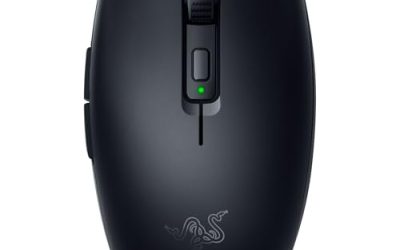
| Razer Naga V2 Pro Wireless MMO Gaming Mouse | Players who want swappable side plates for different games | 19+1 programmable buttons with swappable side plates |
| Razer Naga V2 HyperSpeed Wireless MMO Gaming Mouse | Long sessions without charging or swapping batteries often | Up to 400 hours of battery life |
| SteelSeries Aerox 9 Wireless | Players who want a light mouse for long MMO sessions | 18 buttons with Bluetooth and 2.4 GHz wireless |
| Corsair Scimitar Elite RGB Wireless MMO Gaming Mouse | Players who want a sliding thumb panel that fits their hand | 16 programmable buttons with a 12-button Key Slider side panel |
How to Choose
Count the thumb buttons you will actually use
A 12-button thumb grid suits a full rotation in World of Warcraft or Final Fantasy XIV, because you can map an entire hotbar to one thumb without reaching for number keys. Fewer buttons work when you play a class with a short rotation or you prefer to keep utility spells on the keyboard. Try picturing your most-used abilities in order, then count how many of them deserve a thumb press during a boss fight. If the number is close to twelve, a full grid is the safer choice. If it is closer to six, a smaller layout may feel less crowded and easier to learn, especially during your first week with a new mouse.
Check the wireless connection and polling behaviour
Wireless latency matters most when an interrupt or defensive cooldown must land inside a short window, so look for a dedicated 2.4 GHz receiver rather than Bluetooth alone. Bluetooth is useful for a laptop or a second machine, but a 2.4 GHz link is the connection most MMO players rely on during raids. Also check whether the mouse provides a wired mode through its charging cable, because that gives you a fallback if the battery runs low mid-session. A mouse that supports both 2.4 GHz and Bluetooth covers desk play, travel and a living-room setup without forcing you to carry a second pointing device.
Match the shape and weight to your grip and session length
MMO sessions often run for three or four hours, so a shape that cramps your thumb or palm will show up long before the raid ends. Right-handed ergonomic shells with a thumb rest suit palm and claw grips, while a lighter shell reduces wrist fatigue when you flick between targets and menus. Before choosing, consider whether your thumb rests naturally on the middle row of the side grid and whether the mouse feels stable when you lift it to reposition. A mouse that is comfortable for one hour but awkward after three is the wrong pick for a game built around long evenings.
Compare battery life against how you charge
Battery life decides whether you think about charging once a week or every night, and the difference matters during a progression raid. Some wireless MMO mice list several hundred hours on Bluetooth and a shorter figure on a 2.4 GHz link, while others use a replaceable battery that you can swap in seconds. Decide which routine fits you better: plugging in a cable between sessions, keeping a spare battery nearby, or charging only on weekends. Also note whether the mouse charges over USB-C, because a common cable is easier to keep on a desk than a cradle or a proprietary dock.
The 4 Best Options
Razer Naga V2 Pro Wireless MMO Gaming Mouse
The Naga V2 Pro is the most flexible pick here because its side plates swap between a 12-button grid, a 7-button layout and a 2-button panel, so one mouse can serve a full MMO rotation on raid night and a simpler layout for other games the next day. Its Focus Pro 30K optical sensor tracks cleanly across fast target switches, and the HyperScroll Pro wheel helps when you scroll through long inventories, talent lists or chat logs. It is heavier than the lightest options in this guide, which gives it a planted feel but may tire smaller hands during very long sessions.
Specs
- 19+1 programmable buttons with swappable side plates
- Focus Pro 30K optical sensor
- HyperScroll Pro wheel
- Optical Mouse Switches Gen-3
- Up to 300 hours of battery life
- HyperSpeed Wireless, Bluetooth and wired connections
Best for: Players who want one mouse that adapts to MMO, MOBA and other genres through swappable side plates.
Watch out for: The heavier body and the extra side plates add bulk, so check the grip and the plate you plan to use most before settling in.
ASIN: B0BGJTLFN5
Razer Naga V2 HyperSpeed Wireless MMO Gaming Mouse
The Naga V2 HyperSpeed keeps the same 12-button thumb grid idea in a simpler, lighter package, and it is the pick to consider when battery life is your main worry. Its listed battery life reaches up to 400 hours on Bluetooth and up to 250 hours on HyperSpeed Wireless, which means many players can go weeks between battery changes during normal play. The Focus Pro 30K sensor and HyperScroll wheel carry over from the Pro model, while mechanical Gen-2 switches give the main clicks a firm, tactile feel. It runs on a replaceable AA battery rather than a built-in cell, so keep a spare nearby if you dislike plugging in.
Specs
- 19 programmable buttons, including a 12-button thumb grid
- Focus Pro 30K optical sensor
- HyperScroll technology
- Mechanical Mouse Switches Gen-2
- Up to 400 hours of battery life on Bluetooth
- HyperSpeed Wireless and Bluetooth connections
Best for: Players who want very long battery life and a straightforward 12-button MMO layout without swappable plates.
Watch out for: It uses a replaceable AA battery, so the weight and the charging routine differ from mice with a built-in rechargeable battery.
ASIN: B0BGJT87N2
SteelSeries Aerox 9 Wireless
The Aerox 9 Wireless stands out by being unusually light for a mouse with 18 buttons, and that lightness is easy to notice when you move between targets, loot windows and map screens for hours. Its honeycomb shell keeps the weight down to 89 grams, while the 12-button side panel still covers a full hotbar for most classes. The TrueMove Air sensor reaches 18,000 CPI, and the mouse connects over 2.4 GHz wireless or Bluetooth, with a listed battery life of up to 180 hours. Water resistance adds some protection against spills on a busy desk, though it does not make the mouse suitable for wet conditions.
Specs
- 18 programmable buttons, including a 12-button side panel
- TrueMove Air optical sensor up to 18,000 CPI
- Bluetooth and 2.4 GHz wireless connections
- Up to 180 hours of battery life
- 89-gram ultra-lightweight honeycomb design
- Water-resistant AquaBarrier design
Best for: Players who want a light wireless MMO mouse that stays comfortable through long evenings of play.
Watch out for: The honeycomb shell and light body feel different from a solid-shell mouse, so confirm the texture and grip suit your hand.
ASIN: B09VNPB6Q1
Corsair Scimitar Elite RGB Wireless MMO Gaming Mouse

The Scimitar Elite Wireless is built around a sliding 12-button side panel, and that adjustment is its main advantage for players whose thumbs do not line up neatly with a fixed grid. You can slide the Key Slider panel forward or back until the rows sit under the part of your thumb that presses most naturally, which helps during long rotations. Its MARKSMAN sensor reaches 26,000 DPI, the SLIPSTREAM wireless link supports up to 2,000 Hz hyper-polling, and the listed battery life reaches up to 150 hours. Bluetooth and a wired USB connection give you extra ways to connect when you move between machines.
Specs
- 16 programmable buttons with a 12-button Key Slider side panel
- Optical sensor up to 26,000 DPI
- SLIPSTREAM wireless with up to 2,000 Hz hyper-polling
- Up to 150 hours of battery life
- Bluetooth, SLIPSTREAM wireless and USB wired connections
- iCUE software compatibility
Best for: Players who want to adjust the thumb panel position to match their hand instead of adapting to a fixed grid.
Watch out for: The sliding panel and the software setup take time to tune, so allow a few sessions to settle on a layout that feels natural.
ASIN: B0CCVYHZ9N
Which One Fits Your Situation
You play several genres and want one mouse for all of them
Choose the Razer Naga V2 Pro because its swappable side plates let you switch from a 12-button MMO grid to a simpler panel for other games without buying a second mouse. The Focus Pro 30K sensor and long battery life carry across those layouts, so your aim and your charging routine stay consistent. Keep the plate you use least in the box, and change plates only when you change games for a while, rather than between every match.
You raid for hours and hate thinking about batteries
Choose the Razer Naga V2 HyperSpeed because its listed battery life reaches up to 400 hours on Bluetooth, which is far longer than most players need in a week of raiding. The familiar 12-button grid covers a full rotation, and the replaceable battery means a swap takes seconds when it finally runs low. This is the simplest pick for a player who wants to set up a rotation once and then forget about charging.
Your wrist tires before the raid ends
Choose the SteelSeries Aerox 9 Wireless because its 89-gram honeycomb body is the lightest option in this guide, and that difference adds up over a long evening. The 18-button layout still gives you a full thumb grid, while Bluetooth and 2.4 GHz wireless let you move between a desk and a laptop without a cable. Try the grip first if you prefer a heavier, solid-shell mouse, since this one feels deliberately airy.
Your thumb never quite lines up with a fixed button grid
Choose the Corsair Scimitar Elite Wireless because its Key Slider panel moves forward and back to meet your thumb, instead of asking your thumb to stretch to a fixed row. The 26,000 DPI sensor and 2,000 Hz hyper-polling suit fast target switching, and the 150-hour battery life covers a full week of regular play. Spend a little time sliding the panel and rebinding keys before your next raid, so the layout feels settled.
Common Mistakes
- Buying a 12-button mouse before counting how many abilities you actually press with your thumb, which leaves half the grid unused or confusing.
- Choosing Bluetooth as the only wireless link for raids, when a dedicated 2.4 GHz receiver is the steadier choice for timed abilities.
- Ignoring weight and grip shape, then discovering that a heavy or awkward shell causes fatigue halfway through a long session.
- Mapping every ability at once instead of learning the thumb grid in small groups, which slows down your rotation during the first weeks.
- Forgetting to check the charging routine, so a mouse with a short battery life runs flat in the middle of a progression night.
Frequently Asked Questions
How many side buttons does a wireless MMO mouse need?
Most MMO players do well with a 12-button thumb grid, because it maps neatly to one full hotbar in World of Warcraft or Final Fantasy XIV. Fewer buttons suit short rotations or players who keep utility spells on the keyboard. More than twelve can help in games with very large ability sets, but a crowded grid takes longer to learn and can cause misclicks during fast fights.
Is wireless reliable enough for MMO raids?
Yes, when the mouse uses a dedicated 2.4 GHz receiver with a stable link, because that connection is designed for low-latency gaming rather than general Bluetooth use. Bluetooth works for casual play and for a second machine, but most raiders keep the 2.4 GHz receiver plugged in for boss fights. A wired fallback through the charging cable also helps if the battery runs low mid-session.
Does a lighter MMO mouse make a real difference?
A lighter mouse reduces wrist and forearm fatigue during long sessions, especially when you move between targets, menus and maps for several hours. The SteelSeries Aerox 9 Wireless, at 89 grams, is noticeably easier to lift and reposition than heavier MMO mice. Weight is still a personal preference, so some players prefer a heavier shell that feels more planted during slow, deliberate play.
Can one wireless MMO mouse work for other games too?
Yes, and the Razer Naga V2 Pro shows this well, because its swappable side plates let you change from a 12-button grid to a simpler layout for other genres. Even without swappable plates, you can rebind the thumb buttons to shortcuts, macros or menu commands in other games. Keep a separate profile for each game, so your MMO bindings do not clash with other controls.
Related guides
More from Amazon
Programs that pair well with the guide above. Offers and eligibility are set by Amazon and may change.
A free business account with business pricing and bulk-buying tools for work, shop or home office.
Create a business accountFree shipping on eligible items, Prime Video and more. Eligible new members can start with a free trial.
Start a Prime free trialAudiobooks and podcasts to listen to on the go. Eligible new members can start with a free trial.
Try Audible freeAd-free music streaming. Eligible new subscribers can start with a free trial.
Try Music Unlimited freeAs an Amazon Associate we earn from qualifying purchases.