Choosing a gaming mouse pad size is really a decision about how far your hand travels in a match. A pad that ends halfway through a flick forces a lift and a reset at the worst moment, while a pad that swallows the whole desk leaves no room for a keyboard, a drink, or a notebook. The right size depends on your sensitivity, your grip, and the flat space you actually have, not on the label printed on the box.
This guide is for competitive shooter players who flick at low sensitivity, for high-sensitivity players on compact desks, and for anyone building a tidy setup where the keyboard and mouse share one surface. Each pad below is chosen from the name and specifications shown on its Amazon product page, with its exact size stated so you can measure your desk before you buy.
Top 3 picks at a glance


Quick Picks
As an Amazon Associate we earn from qualifying purchases
| Product | Best for | Key spec from title |
|---|---|---|
| Razer Gigantus V2 Medium | High-sensitivity play on a compact desk | 360 x 275 mm medium pad |
| SteelSeries QcK Large | Low-sensitivity flicks on a standard desk | 450 x 400 mm large pad |
| Logitech G840 XL | Keyboard and mouse on one wide surface | 900 x 400 mm XL pad |
| Glorious 3XL Extended | A full desk mat under a wide setup | 1219 x 610 mm 3XL pad |
How to Choose
Match the pad to your sensitivity and swipe length
Sensitivity decides how much surface your mouse actually needs. At 400 DPI with a low in-game sensitivity, a single 180-degree turn can move the mouse across most of a medium pad, so a large or XL surface gives the hand room to finish the motion without lifting. At 1600 DPI and above, the same turn needs only a short wrist movement, and a medium pad often covers every swipe a player makes in a round. Before choosing, play a few rounds and notice where your hand stops: if you lift the mouse twice during a spray, the pad is too small, and if the hand never leaves the centre third, a bigger pad adds desk coverage without improving aim.
Measure the flat space on your desk first
A pad size only works if the desk underneath it is flat, clear, and wide enough. Measure the width from the left edge of the desk to the monitor stand, the keyboard, or any drawer unit, then measure the depth from the front edge to the monitor base or wall. A 900 mm XL pad needs a desk at least that wide, with a small margin so the edge does not hang over the side. A monitor arm, a speaker, or a headphone stand can steal 100 mm or more, so measure with everything in place rather than trusting the desk dimensions printed on the box.
Think about depth, not only width
Most buyers compare width and forget depth, yet depth decides whether the wrist stays supported through a long session. A pad that is 275 mm deep gives a high-sensitivity player enough room for the mouse and the heel of the hand, but a low-sensitivity player who pulls the mouse toward the body during a flick can run out of space at the front edge. Pads around 400 mm deep suit arm aimers because the forearm can rest and slide without dropping onto the bare desk. For a desk mat, depth matters even more, so check that the monitor base and any cable tray still sit flat on top of a deep mat.
Decide how much of the desk the pad should cover
A mouse-only pad keeps the rest of the desk free for a notebook, a controller, or a drink, and it is easy to roll up and carry to a LAN event. An extended pad that holds the keyboard as well creates one continuous surface, so the keyboard does not slide on bare wood and the mouse never crosses a hard edge mid-swipe. A full desk mat goes further and unifies the whole setup, which suits players who want a clean look and a consistent feel under both hands. Once a desk mat is down, moving the keyboard or adding a second monitor means lifting a large cloth sheet, so choose full coverage only when the layout is settled.
The 4 Best Options
Razer Gigantus V2 Medium

The Razer Gigantus V2 Medium suits a player who uses high sensitivity and wants a pad that fits a compact desk without dominating it. At 360 x 275 mm it leaves room for a keyboard beside it, yet it still gives the mouse a defined area with a textured micro-weave cloth surface that balances glide and stopping power. The 3 mm high-density rubber foam base keeps the pad flat on an uneven desktop and cushions the wrist during long sessions, while the non-slip underside holds its position through fast flicks. It is a sensible first choice when desk space is tight and the hand moves mainly from the wrist.
Specs
- Size: 360 x 275 mm (14.18 x 10.84 inches)
- Thickness: 3 mm
- Surface: Textured micro-weave cloth
- Base: Thick, high-density rubber foam with a non-slip underside
- Model number: RZ02-03330200-R3M1
- Size class: Medium
Best for: High-sensitivity players with a compact desk who move the mouse mainly from the wrist.
Watch out for: Measure your widest swipe first, because a 360 mm pad can run out during a low-sensitivity turn.
SteelSeries QcK Large
The SteelSeries QcK Large is the classic single-mouse size, and its 450 x 400 mm surface gives arm aimers room for wide flicks without taking over the desk. The micro-woven cloth is tuned for optical and laser sensors at both low and high sensitivity, so tracking stays consistent from a slow hold to a fast snap. A non-slip silicone rubber base keeps the pad planted during intense rounds, and the thin profile sits close to the desk, which suits players who rest the wrist on the pad edge. It works well as a first serious pad because the size fits most standard desks and most sensitivity settings.
Specs
- Size: 450 x 400 mm (17.72 x 15.75 inches)
- Surface: Micro-woven cloth
- Base: Non-slip silicone rubber base
- Tracking: Optimised for gaming sensors at low and high sensitivity
- Model number: 63003
- Colour: Black
Best for: Players who want a proven large pad for low-sensitivity flicks on a standard desk.
Watch out for: Check the exact dimensions in the listing before ordering, because the QcK family is sold in several sizes under one name.
Logitech G840 XL
The Logitech G840 XL turns the pad into a shared surface for the keyboard and the mouse, with a 900 x 400 mm footprint that covers most of a standard desk. Its performance-tuned cloth surface gives moderate friction, so the mouse glides smoothly but still stops cleanly when the hand does, which suits players who switch between aiming and precise menu work. The stable rubber base holds the mat flat, and the slim 3 mm profile keeps the wrist close to the desk during long sessions. It is a strong choice when the goal is one tidy surface rather than a separate pad beside the keyboard.
Specs
- Size: 900 x 400 mm (35.43 x 15.75 inches)
- Thickness: 3 mm
- Surface: Performance-tuned cloth with moderate friction
- Base: Stable rubber base
- Model number: 943-000776
- Colour: Black
Best for: Players who want the keyboard and mouse on one wide, low-profile surface.
Watch out for: Confirm the desk is at least 900 mm wide with clear space, because the pad needs its full width to lie flat.
Glorious 3XL Extended
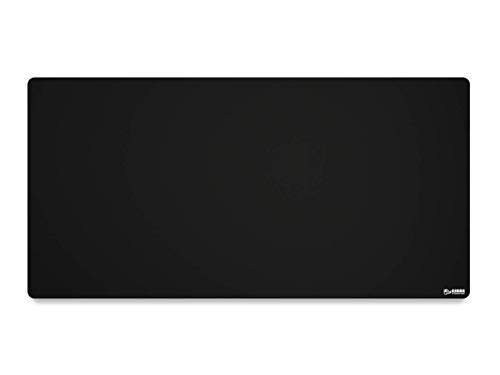
The Glorious 3XL Extended is a full desk mat, measuring 1219 x 610 mm, so it covers the keyboard, the mouse, and the space around them in one sheet. That depth matters: at 610 mm it reaches further back than most extended pads, giving low-sensitivity players a long runway for arm movements and room for a monitor stand or a headset stand on top. The cloth surface and 3 mm thickness keep the feel consistent across the whole desk, and stitched edges protect the border from fraying where the wrist rests. It suits a settled wide setup where the layout rarely changes and the player wants the entire workspace unified.
Specs
- Size: 1219 x 610 mm (48 x 24 inches)
- Thickness: 3 mm
- Surface: Black cloth
- Edges: Stitched edges
- Model number: G-3XL
- Size class: 3XL Extended
Best for: Wide desks where the player wants a full desk mat under the keyboard, mouse, and monitor stand.
Watch out for: Measure both width and depth carefully, because a 1219 x 610 mm mat needs a large, clear desk and is awkward to move.
Which One Fits Your Situation
You play at high sensitivity on a small desk
Pick the Razer Gigantus V2 Medium. Its 360 x 275 mm surface covers the short wrist movements that high sensitivity needs, and it leaves the rest of a compact desk free for a keyboard. The 3 mm foam base also cushions the wrist without raising the hand far above the desk.
You play at low sensitivity and flick across the pad
Pick the SteelSeries QcK Large. Its 450 x 400 mm surface gives the arm room to finish a wide flick without lifting, and the micro-woven cloth tracks consistently at low sensitivity. It fits a standard desk, so it suits players who want more room without moving to a desk mat.
You want the keyboard and mouse on one surface
Pick the Logitech G840 XL. At 900 x 400 mm it holds a full-size keyboard beside the mouse, so the hand never crosses a hard edge during a swipe. The moderate-friction cloth and slim 3 mm profile keep aiming controlled through long sessions on a shared surface, with the keyboard staying put beside the mouse.
You want a full desk mat for a wide setup
Pick the Glorious 3XL Extended. Its 1219 x 610 mm size covers the keyboard, the mouse, and the area under a monitor stand, which suits a wide desk with a settled layout. The stitched edges and 3 mm cloth give a consistent feel across the whole workspace, from the keyboard to the far edge.
Common Mistakes
- Buying by the size label alone, such as XL or XXL, without checking the dimensions in millimetres, because those labels are not standardised between brands.
- Measuring the desk instead of the clear, flat area left after the monitor stand, speakers, and keyboard are in place.
- Choosing a pad that is wide enough but too shallow, so the hand runs off the front edge during a low-sensitivity flick.
- Placing a desk mat under a monitor stand or cable tray that lifts one corner and creates a bump under the mouse.
- Picking a full desk mat for a desk that is rearranged often, when a separate mouse pad would be easier to move.
Frequently Asked Questions
What size mouse pad is best for low sensitivity gaming?
A large or XL pad usually suits low sensitivity gaming, because the hand travels further for each turn. A 450 x 400 mm pad covers most flicks on a standard desk, while a 900 x 400 mm pad adds room for very wide arm movements. Measure your longest swipe in a match, then choose a pad at least that wide with some margin left over.
Is a bigger mouse pad always better for gaming?
No, a bigger pad is better only when the hand and the desk need the extra space. High-sensitivity players often aim well on a medium pad, and an oversized mat can crowd a small desk or cover ports and drawers. Match the size to your sensitivity, your grip, and the flat area available, rather than buying the largest pad by default.
How do I measure my desk for a gaming mouse pad?
Measure the clear width and depth with the monitor, keyboard, and speakers in place, not the bare desk dimensions. Leave a small margin at each edge so the pad lies flat without hanging over the side. Then compare those numbers with the pad dimensions in millimetres and check that the depth covers the wrist through a full swipe.
Can I use a desk mat instead of a regular mouse pad?
Yes, a desk mat works as a mouse pad when its surface tracks well and it lies flat under the mouse. Extended and 3XL mats give the keyboard and mouse one continuous surface, which many players prefer. The trade-off is size and flexibility, so confirm the desk is wide and deep enough before choosing a full mat.
Related guides
More from Amazon
Programs that pair well with the guide above. Offers and eligibility are set by Amazon and may change.
A free business account with business pricing and bulk-buying tools for work, shop or home office.
Create a business accountFree shipping on eligible items, Prime Video and more. Eligible new members can start with a free trial.
Start a Prime free trialAudiobooks and podcasts to listen to on the go. Eligible new members can start with a free trial.
Try Audible freeAd-free music streaming. Eligible new subscribers can start with a free trial.
Try Music Unlimited freeAs an Amazon Associate we earn from qualifying purchases.