Choosing an ASUS ROG wireless gaming mouse means choosing a shape first and a sensor second. Every mouse in this guide uses a high-resolution ROG sensor and low-latency wireless, so the real difference is how the shell fits your hand, how heavy it feels after an hour, and how often you need to charge it or change its battery. A mouse that suits a claw grip in fast shooters can feel cramped for a palm grip in longer sessions, and a heavier ergonomic model can feel slow when you need quick flicks.
This guide is for competitive FPS players wanting a light, precise mouse, for palm-grip players wanting a larger and steadier shape, for travellers carrying a mouse between a desktop and a laptop, and for buyers wanting one wireless mouse for work and play. The four picks below were chosen from the product names and specifications shown on their Amazon listings, with attention to weight, sensor, connectivity, battery life and button layout.
Top 3 picks at a glance


Quick Picks
As an Amazon Associate we earn from qualifying purchases
| Product | Best for | Key spec from title |
|---|---|---|
| ASUS ROG Harpe Ace Aim Lab Edition | Competitive FPS play with a light symmetrical shape | 54g lightweight, 36K DPI, 90-hour battery |
| ASUS ROG Keris II Ace | Ergonomic FPS play with a higher-resolution sensor | 54g lightweight, 42K DPI, 107-hour battery |
| ASUS ROG Gladius III Wireless AimPoint | Palm-grip sessions with a larger ergonomic shape | 79g, 36K DPI, 119-hour battery |
| ASUS ROG Strix Impact III Wireless | Travel and everyday use with very long battery life | 57g lightweight, 36K DPI, 618-hour battery |
How to Choose
Shape and Grip Before Sensor Numbers
Begin with the shape, because it decides whether the mouse stays comfortable after the first week. A symmetrical shell such as the Harpe Ace suits claw and fingertip grips and works well for players who lift the mouse often. A right-handed ergonomic shell such as the Keris II Ace or the Gladius III supports the thumb and the palm, which helps when your hand rests on the mouse for long stretches. A compact ambidextrous shell such as the Strix Impact III suits smaller hands and bags, but it gives large hands less to hold. Compare length, width and hump position on the listing, then match the shape to the grip you already use.
Weight and How It Changes Long Sessions
Weight changes how quickly you can stop the mouse as much as how quickly you can move it. The Harpe Ace and the Keris II Ace both list 54 grams, which keeps flicks and corrections light during fast rounds. The Strix Impact III lists 57 grams without its battery and receiver, so its carried weight depends on the cell you fit. The Gladius III lists 79 grams, and that extra mass can feel steadier for tracking and for slower, deliberate aim. If your wrist tires during evening sessions, favour the lighter models; if your aim feels jittery with very light mice, a heavier shell may suit you better.
Battery Design and Charging Habits
ROG wireless mice do not all manage power in the same way, so check the battery design before you buy. The Harpe Ace, Keris II Ace and Gladius III use built-in rechargeable batteries and a cable for charging and wired play, with listed wireless times from 90 hours to 119 hours in 2.4 GHz mode. The Strix Impact III instead runs on a single AA or AAA battery, which means you can swap a fresh cell in seconds instead of waiting for a charge. Long Bluetooth times matter for laptop use, while 2.4 GHz times matter for gaming, so read both figures on the listing rather than the larger one alone.
Connectivity, Polling and Software Setup
All four mice in this guide provide tri-mode or dual-mode wireless, but the details still matter for a shared desk. A 2.4 GHz receiver gives the lowest-latency link for gaming, Bluetooth lets you pair with a laptop or a second machine without a dongle, and a wired USB connection covers charging and play at the same time. The Gladius III and the Strix Impact III also use an Omni Receiver or a standard receiver arrangement that can simplify a desk with several ROG devices. Before buying, check that the listing mentions the operating systems you use, the number of programmable buttons, and whether the software you need runs on your machine.
The 4 Best Options
ASUS ROG Harpe Ace Aim Lab Edition Wireless Gaming Mouse
The Harpe Ace Aim Lab Edition is the most direct choice for FPS players who want a light, symmetrical mouse without a large ergonomic hump. Its 54-gram shell and compact form suit claw and fingertip grips, and the Aim Lab Settings Optimizer link gives players a clear baseline for sensitivity and button settings. Tri-mode connectivity covers a gaming desktop, a laptop and wired play, while the long wireless battery time means charging does not interrupt a regular week of evening games. It is a focused esports shape, so players who want many side buttons or a deep palm rest should look at the larger ROG models in this guide.
Specs
- 54g lightweight design
- 36,000 DPI ROG AimPoint optical sensor
- Tri-mode connectivity: 2.4 GHz RF, Bluetooth and wired USB
- Up to 90 hours of battery life without lighting
- Five programmable buttons
- ROG SpeedNova wireless technology
- Aim Lab Settings Optimizer support
- PC and Mac support
Best for: Competitive FPS players who want a light, symmetrical wireless mouse for claw or fingertip grip.
Watch out for: The compact symmetrical shell can feel small for large hands, so check the listed dimensions against your current mouse before ordering.
ASUS ROG Keris II Ace Wireless Gaming Mouse
The Keris II Ace is the ergonomic counterpart to the Harpe Ace, with the same 54-gram weight in a right-handed shape that supports the thumb and the palm. Its ROG AimPoint Pro sensor lists a higher maximum resolution than the other mice here, and the listing notes track-on-glass capability for desks where a mousepad is not always available. Tri-mode connectivity and a long battery time make it easy to move between a desktop and a laptop, and the included grip tape helps when your hands get warm during longer matches. Players who already like a sculpted right-handed mouse will settle into this shape faster than into a symmetrical shell.
Specs
- 54g lightweight, right-handed ergonomic design
- 42,000 DPI ROG AimPoint Pro optical sensor
- Tri-mode connectivity: 2.4 GHz RF, Bluetooth and wired USB
- Up to 107 hours of battery life
- ROG SpeedNova wireless technology
- ROG Optical Micro Switches
- Track-on-glass capability
- PC and Mac support
Best for: FPS players who want an ergonomic right-handed shape with a higher-resolution sensor and a light shell.
Watch out for: The ergonomic shape is right-handed only, so left-handed players should choose a symmetrical or ambidextrous model instead.
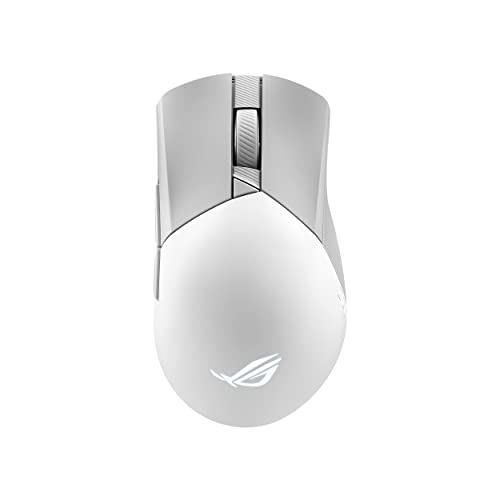
ASUS ROG Gladius III Wireless AimPoint Gaming Mouse
The Gladius III Wireless AimPoint is the choice for players who want a palm-grip mouse with room to rest the whole hand. At 79 grams it is the heaviest mouse here, and that weight pairs with an ergonomic shape, six programmable buttons and a pivoted button mechanism for consistent clicks. Its Push-Fit Switch Socket II lets you change the switches without soldering, which is useful if a click begins to feel different after months. Battery life reaches up to 119 hours in 2.4 GHz mode and up to 143 hours in Bluetooth mode with lighting off, so it suits a desk where the mouse stays out all week.
Specs
- 79g lightweight, right-handed ergonomic design
- 36,000 DPI ROG AimPoint optical sensor
- Tri-mode connectivity: 2.4 GHz RF, Bluetooth and wired USB
- Up to 119 hours of battery life in 2.4 GHz RF mode
- Up to 143 hours of battery life in Bluetooth mode
- Six programmable buttons
- Push-Fit Switch Socket II for hot-swappable switches
- ROG Micro Switches
- ROG Paracord cable and PTFE mouse feet
- PC and Mac support
Best for: Palm-grip players who want a larger, steadier wireless mouse with swappable switches and long battery life.
Watch out for: The larger shell and higher weight can slow quick flicks for small hands, so compare its size with a mouse you already find comfortable.
ASUS ROG Strix Impact III Wireless Gaming Mouse
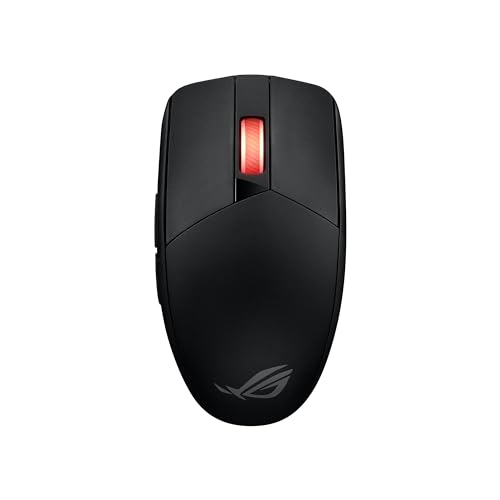
The Strix Impact III Wireless is the most portable mouse in this guide, with a compact ambidextrous shell and a battery design for travel. It lists 57 grams without its battery and receiver, and it runs on a single AA or AAA battery, so a flat battery is fixed by a swap rather than a charging session. Its ROG AimPoint sensor lists the same 36,000 DPI maximum as the Harpe Ace and the Gladius III, with Bluetooth time up to 618 hours with lighting off. The ROG Omni Receiver can link the mouse with a compatible ROG keyboard, keeping a small desk or laptop bag free of extra dongles.
Specs
- 57g lightweight, compact ambidextrous design
- 36,000 DPI ROG AimPoint optical sensor
- Dual wireless connectivity: ROG SpeedNova 2.4 GHz RF and Bluetooth
- Up to 618 hours of battery life in Bluetooth mode
- Up to 450 hours of battery life in 2.4 GHz RF mode
- Replaceable switches with Push-Fit switch sockets
- ROG Omni Receiver for multi-device connectivity
- Powered by a single AA or AAA battery
Best for: Travellers and laptop users who want a compact wireless mouse with very long battery life and a swappable battery.
Watch out for: The listed weight excludes the battery and receiver, so the mouse in your hand will weigh more than 57 grams once a cell is fitted.
Which One Fits Your Situation
You mainly play fast FPS games and want the lightest mouse
Choose the ASUS ROG Harpe Ace Aim Lab Edition. Its symmetrical 54-gram shell suits claw and fingertip grips, its 36,000 DPI sensor covers fast flicks and precise corrections, and its tri-mode link keeps a desktop and a laptop covered. The Aim Lab Settings Optimizer link also gives a practical baseline for sensitivity, so you can settle into a consistent setup rather than guessing at settings each week.
You want an ergonomic shape without giving up a light shell
Choose the ASUS ROG Keris II Ace. It keeps the 54-gram weight of the Harpe Ace but adds a right-handed ergonomic shape, a higher-resolution AimPoint Pro sensor and grip tape for longer sessions. That combination suits players whose hand rests on the mouse for hours, and it works well when you want the control of an ergonomic shell without the heavier feel of a full-size palm-grip model.
You use a palm grip and want a larger, steadier mouse
Choose the ASUS ROG Gladius III Wireless AimPoint. Its 79-gram ergonomic shell gives your whole hand a place to rest, its six programmable buttons cover more in-game actions, and its swappable switches let you change the click feel later. Long battery life in both wireless modes also means the mouse can stay on your main desk all week without a charging routine getting in the way.
You travel often or share one mouse between machines
Choose the ASUS ROG Strix Impact III Wireless. Its compact ambidextrous shell fits a laptop bag, its AA or AAA battery can be swapped in seconds, and its Bluetooth time reaches up to 618 hours with lighting off. The ROG Omni Receiver also reduces dongle clutter when you pair it with a compatible ROG keyboard, which is a practical gain for a small desk or a shared workspace.
Common Mistakes
- Buying on DPI alone and ignoring shape, grip and weight, which decide comfort far more than a maximum sensitivity figure.
- Choosing a right-handed ergonomic mouse for a left hand, or a compact shell for a large palm, without checking the listed dimensions first.
- Comparing battery figures from different modes, such as Bluetooth time against 2.4 GHz time, instead of reading both figures on the same listing.
- Assuming the listed weight is the weight in your hand, when some listings exclude the battery, cable or receiver.
- Forgetting to check operating-system support, programmable-button count and charging or battery type before ordering for a shared or travel setup.
Frequently Asked Questions
Do all four mice work wirelessly and wired?
Yes, with a small difference in how they connect. The Harpe Ace, Keris II Ace and Gladius III provide tri-mode links through 2.4 GHz RF, Bluetooth and a wired USB cable. The Strix Impact III has dual wireless links through 2.4 GHz RF and Bluetooth, and it uses a single AA or AAA battery instead of a built-in rechargeable cell.
Is a higher DPI number always better for gaming?
No. A higher maximum DPI gives you more sensitivity range, but most players use a far lower setting in actual games. Shape, weight, sensor tracking quality and a stable wireless link affect aim more than the top DPI figure. Choose a comfortable mouse first, then set a sensitivity that lets you turn and aim without lifting the mouse too often.
Can I use an ASUS ROG wireless mouse with a Mac?
The listings for the Harpe Ace, Keris II Ace and Gladius III state PC and Mac support, and Bluetooth pairing makes them easy to use with a laptop. The Strix Impact III pairs over Bluetooth and 2.4 GHz, but check the listing for your macOS version and for software features that are only available on Windows.
How do I choose between the Harpe Ace and the Keris II Ace?
Choose by shape, not by sensor. Pick the Harpe Ace if you use a claw or fingertip grip and want a symmetrical shell, or if you want the Aim Lab Settings Optimizer link for FPS. Pick the Keris II Ace if you want a right-handed ergonomic shape, a higher-resolution sensor and grip tape for longer sessions.
Related guides
More from Amazon
Programs that pair well with the guide above. Offers and eligibility are set by Amazon and may change.
A free business account with business pricing and bulk-buying tools for work, shop or home office.
Create a business accountFree shipping on eligible items, Prime Video and more. Eligible new members can start with a free trial.
Start a Prime free trialAudiobooks and podcasts to listen to on the go. Eligible new members can start with a free trial.
Try Audible freeAd-free music streaming. Eligible new subscribers can start with a free trial.
Try Music Unlimited freeAs an Amazon Associate we earn from qualifying purchases.