An RGB mouse pad does more than light up a desk. It sets the size of your play area, the feel under your mouse, and the glow that ties a whole setup together, so the real decision is not which pad looks good in a photo. It is which size, surface, and lighting style fit the way you play, the desk you own, and the keyboard that will sit beside the pad every day.
This guide is for gamers building a first lit setup, players who want a wide mat for a keyboard and mouse, and anyone replacing a plain pad with one that adds light without giving up smooth tracking. Each pad below was picked from the names and details shown on its Amazon page, with the lighting, size, surface, and base checked against that listing before it earned a place here.
Top 3 picks at a glance

Quick Picks
As an Amazon Associate we earn from qualifying purchases
| Product | Best for | Key spec from title |
|---|---|---|
| Razer Goliathus Extended Chroma Gaming Mousepad: Customizable Chroma RGB Lighting – Soft, Cloth Material – Balanced Control & Speed – Non-Slip Rubber Base – Classic Black | A wide cloth mat under keyboard and mouse | Soft cloth material with Chroma RGB lighting |
| Razer Firefly Hard V2 RGB Gaming Mouse Pad: Customizable Chroma Lighting, Built-in Cable Management, Balanced Control & Speed, Non-Slip Rubber Base | A firm pad with a tidy cable route | Built-in cable management |
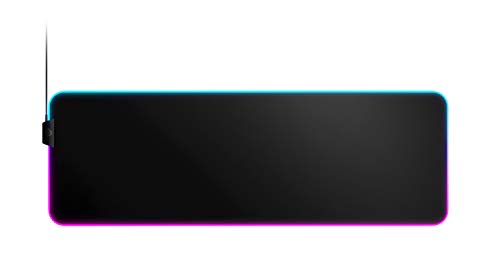
| SteelSeries QcK Gaming Mouse Pad – XL RGB Prism Cloth – Sized to Cover Desks | A big desk covering with edge glow | XL RGB Prism cloth sized to cover desks |
| Corsair MM700 RGB Extended Cloth Gaming Mouse Pad – Black | A large lit desk mat with extra USB ports | Dynamic 360° three-zone RGB lighting |
| Razer Firefly V2 Pro Fully Illuminated RGB Gaming Mouse Mat: Backlit Design – 15 Zone Chroma Lighting – USB 2.0 Port – Detachable USB Type C Cable – Micro Textured Surface – Anti Slip Base | A pad whose whole surface lights up | 15 zone Chroma lighting with backlit design |
How to Choose
Match the size to your desk and aim style
Measure your desk before you buy, because an RGB pad that hangs over the edge will curl, and one that is too small will leave your mouse running off the side in the middle of a match. A wide extended pad suits players who use low sensitivity and sweep their arm across the desk, while a standard pad suits a compact desk or a high sensitivity style with short wrist flicks. Leave room for your keyboard on the same mat if you want one clean surface, and check the depth too, since a deep pad can push your keyboard too close to the edge.
Pick a surface for glide or control
Cloth pads give a soft, even glide with a little grip that helps you stop the mouse exactly where you want it, which suits players who value steady aim over raw speed. Hard pads feel slicker and let the mouse fly with less friction, which suits fast flicks and quick turns, though they can feel cold and loud under a hard mouse shell. A micro-textured finish sits between the two and keeps tracking steady on most sensors, so think about whether you want the mouse to slide freely or to hold its line when you lift and reset.
Choose lighting you can live with every day
Edge lighting draws a thin glowing line around the pad and stays out of your way, while a fully lit surface turns the whole mat into a light panel that fills the desk with color. More zones mean finer control over patterns and gradients, and software control lets you match the pad to a keyboard, headset, and case. If you play in a dark room, a dim solid color keeps the glow calm, while a bright rainbow wave can distract your eyes during long sessions, so pick lighting that fits the room as well as the desk.
Look at edges, base, and cleaning
Stitched edges stop a cloth pad from fraying after months of wrist contact, and a thick rubber base keeps the mat flat instead of sliding when you push hard into a turn. A hard pad with a firm frame will not curl at the corners, but it needs a flat desk underneath to sit level. For cleaning, a hard surface wipes down with a damp cloth in seconds, while a cloth pad needs a gentle wash and a full air dry before the lights go back on, so match the upkeep to how often snacks and drinks reach your desk.
The 5 Best Options
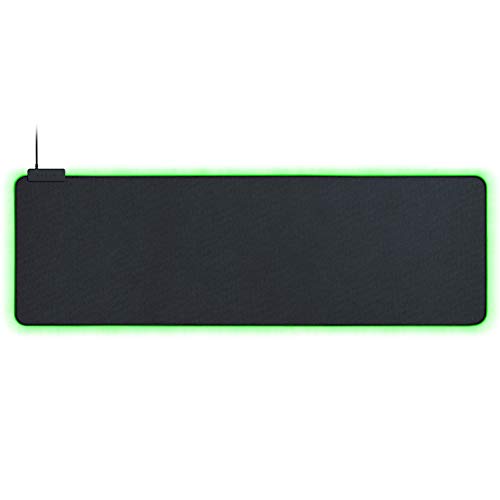
Razer Goliathus Extended Chroma Gaming Mousepad: Customizable Chroma RGB Lighting – Soft, Cloth Material – Balanced Control & Speed – Non-Slip Rubber Base – Classic Black
This wide cloth pad suits a gamer who wants the keyboard and mouse on one soft surface with a glowing edge that ties the desk together. The micro-textured cloth gives a balanced glide that works for both steady aiming and quick turns, and the long shape leaves room for a full-size keyboard beside the mouse. It fits a first RGB setup well, since the lighting syncs with other Chroma gear and the soft surface feels familiar to anyone moving up from a plain cloth pad.
Specs
- Customizable Chroma RGB lighting with 16.8 million colors
- Soft, micro-textured cloth surface for balanced control and speed
- Non-slip natural rubber base
- Size 920 x 294 x 3 mm
- Syncs with games, Razer hardware, Philips Hue, and gear from 30 plus partners
Best for: A wide soft mat that holds a keyboard and mouse under one glow.
Watch out for: The cloth surface needs a gentle wash and a full air dry, and it must stay dry around the cable and light strip.
ASIN: B07DG64YL9
Razer Firefly Hard V2 RGB Gaming Mouse Pad: Customizable Chroma Lighting, Built-in Cable Management, Balanced Control & Speed, Non-Slip Rubber Base
This firm pad suits a player who likes a slick, fast glide and a desk with no loose cables in the way. The hard surface lets the mouse move with very little drag, which helps quick flicks and sharp turns, and the built-in cable groove keeps a wired mouse lead from dragging across the pad. It fits a compact setup well, since the standard size leaves room for other gear, and the edge lighting adds color without covering the whole desk in light.
Specs
- Customizable Chroma RGB lighting
- Hard surface for balanced control and speed
- Built-in cable management
- Non-slip rubber base
Best for: Fast aim on a firm surface with a tidy cable route.
Watch out for: A hard surface can feel loud under a mouse and shows dust and smudges sooner than cloth.
ASIN: B07ZDWHL4M
SteelSeries QcK Gaming Mouse Pad – XL RGB Prism Cloth – Sized to Cover Desks
This XL cloth pad suits a gamer with a large desk who wants a soft surface big enough for a keyboard, mouse, and a little extra room to spare. The micro-woven cloth gives smooth, steady tracking, and the two-zone edge lighting adds color along the rim without turning the whole mat into a light panel. It fits a calm, clean setup well, since the wide shape covers the desk and the simple lighting pairs with most other gear without a fuss.
Specs
- XL RGB Prism cloth, sized to cover desks
- Size 900 x 300 x 4 mm
- Micro-woven cloth surface
- Two-zone RGB lighting
- Non-slip base
Best for: A big soft desk covering with a gentle edge glow.
Watch out for: The XL size needs a desk at least as wide as the pad, and the cloth needs time to air dry after a wash.
ASIN: B07HYXKWS9
Corsair MM700 RGB Extended Cloth Gaming Mouse Pad – Black
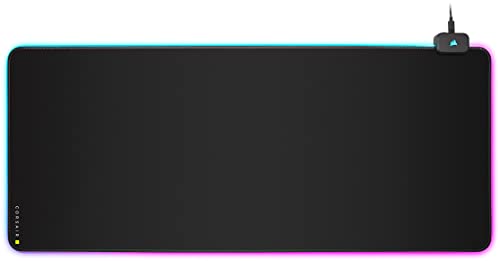
This extended cloth pad suits a gamer who wants a huge lit surface plus handy ports for a mouse dongle or headset. The wide shape holds a keyboard and mouse with room to spare, the three-zone lighting wraps the whole edge in color, and the two-port USB hub keeps small devices close at hand. It fits a busy desk well, since the thick rubber base smooths out small bumps in the desktop and the onboard lighting controls work even before any software opens.
Specs
- Expansive 930 mm x 400 mm cloth surface
- Dynamic 360° three-zone RGB lighting
- Two-port USB hub
- 4 mm-thick rubber construction
- Twelve onboard RGB lighting profiles
- Detachable USB Type C cable
Best for: A large lit desk mat with extra USB ports close at hand.
Watch out for: The pad needs a USB connection to light up, and its large size leaves little room on a small desk.
ASIN: B08QSNNV5H
Razer Firefly V2 Pro Fully Illuminated RGB Gaming Mouse Mat: Backlit Design – 15 Zone Chroma Lighting – USB 2.0 Port – Detachable USB Type C Cable – Micro Textured Surface – Anti Slip Base

This fully lit pad suits a gamer who wants the mouse mat itself to be the light show, not just a glowing rim around it. The whole surface shines through fifteen Chroma zones, so gradients and waves flow across the pad under the mouse, and the micro-textured finish keeps tracking smooth while the light stays even. It fits a showpiece setup well, since the bright panel anchors the desk, and the built-in USB port gives a wired mouse or dongle a close home.
Specs
- Fully illuminated backlit design with 15 zone Chroma lighting
- Micro textured surface
- Anti slip base
- USB 2.0 port
- Detachable USB Type C cable
Best for: A whole-surface glow that anchors a showpiece desk.
Watch out for: The bright panel can distract in a dark room, and the pad needs USB power for the lighting to work.
ASIN: B0D72FSVDS
Which One Fits Your Situation
You want one wide mat for keyboard and mouse
Pick an extended cloth pad that covers the desk under both devices, so the keyboard and mouse share one even surface with no seam between them. A soft cloth finish keeps the feel familiar, the stitched edge stops fraying where your wrists rest, and the edge lighting frames the whole setup. Measure the desk first, since a wide mat that overhangs the edge will curl and lift under your palms during play.
You play fast aim games and want a firm surface
Pick a hard pad with a slick micro-textured finish, so the mouse glides with little drag and flicks land quickly. A firm frame keeps the pad flat, the rubber base stops it sliding mid-fight, and the edge lighting adds color without covering the play area in light. Keep a cloth nearby for wiping, since a hard surface shows dust and smudges sooner than cloth.
You want the whole pad to glow
Pick a fully illuminated pad with many lighting zones, so color flows across the surface instead of sitting only at the rim. A backlit design turns the mat into a light panel that sets the mood of the whole desk, and software control lets you match it to a keyboard and case. Use a dim solid color for late sessions, since a bright moving pattern can pull your eyes away from the screen.
You want a pad that stays put and wipes clean
Pick a pad with a thick rubber base and a surface you can wipe down in seconds, so it stays flat and tidy through long sessions. A hard or coated finish shrugs off crumbs and drink splashes, and a firm edge keeps the corners from curling after months of use. This kind of pad suits a shared desk or a setup where food and drinks often sit beside the keyboard.
Common Mistakes
- Buying a pad wider than the desk, so the edge hangs off and curls up under your wrist.
- Picking a hard surface for slow, steady aim, or a soft cloth pad when you want the mouse to fly with almost no drag.
- Plugging the lighting into a port that stays live overnight, so the glow runs while you sleep.
- Washing a cloth RGB pad while the cable is still attached, or plugging it back in before it has fully air dried.
- Setting a bright rainbow wave for a dark room, then finding the moving light pulls your eyes away from the screen.
Frequently Asked Questions
Do RGB mouse pads need software to light up?
Most RGB pads light up as soon as they get USB power, using onboard controls or a button on the pad to cycle through built-in patterns. Software adds finer control over colors, zones, and sync with other gear, but it is not needed for basic lighting. If you want a simple setup, a pad with onboard profiles is enough.
Can I use any mouse on an RGB mouse pad?
Yes, most modern mice track well on both cloth and hard RGB pads, since the lighting sits at the edge or under a clear layer that does not block the sensor. A micro-textured surface suits optical and laser sensors alike, and a smooth hard finish can even help a mouse glide better. If a mouse skips, clean the surface and check the sensor lens first.
How do I clean an RGB mouse pad?
Unplug the pad first and keep the cable and light strip dry. A hard surface wipes down with a damp cloth in seconds, while a cloth pad needs a gentle wash with mild soap and a full air dry before you plug it back in. Never soak the lighting edge, and never use a harsh cleaner that could dull the surface or loosen the stitching.
Does the lighting affect mouse tracking?
No, the lighting does not affect tracking on a well-made pad, because the light sits at the edge or under a smooth layer that the sensor reads through cleanly. Tracking trouble usually comes from dust, crumbs, or a worn surface, not from the glow. Keep the pad clean and flat, and the sensor will track the same with the lights on or off.
Related guides
More from Amazon
Programs that pair well with the guide above. Offers and eligibility are set by Amazon and may change.
A free business account with business pricing and bulk-buying tools for work, shop or home office.
Create a business accountFree shipping on eligible items, Prime Video and more. Eligible new members can start with a free trial.
Start a Prime free trialAudiobooks and podcasts to listen to on the go. Eligible new members can start with a free trial.
Try Audible freeAd-free music streaming. Eligible new subscribers can start with a free trial.
Try Music Unlimited freeAs an Amazon Associate we earn from qualifying purchases.