Choosing a gaming mouse brand is really choosing an ecosystem: the software, the sensor philosophy and the shape language you will live with for years. Logitech, Razer, SteelSeries and Corsair all make excellent mice, but they differ in how their software works, how their mice feel in the hand and how much they cost for the same performance. The decision is less about which brand is best in general and more about which one fits your grip, your games and your desk.
This guide is for players buying their first serious gaming mouse, anyone replacing a worn-out mouse and wondering whether to switch brands, and builders who want their mouse to match the rest of their setup. Each brand below is represented by one mouse chosen from its name and listed specifications on its Amazon product page, so the sensor figures, weights and button counts come from the listing itself rather than from guesswork.
Top 3 picks at a glance


Quick Picks
As an Amazon Associate we earn from qualifying purchases.
| Product | Best for | Key spec from title |
|---|---|---|
| Logitech G502 HERO | A button-rich all-rounder | 11 programmable buttons, HERO 25K |
| Razer DeathAdder V2 | A proven ergonomic shape | Focus+ 20K sensor, 82 g |
| SteelSeries Rival 5 | A light mouse with strong software | 9 programmable buttons, TrueMove Air |
| Corsair M65 RGB Ultra | A sturdy aluminium-frame mouse | 18,000 DPI, 8 programmable buttons |
How to Choose
Start with the software, not the logo
Every major brand has its own software, and you will spend more time in it than you expect. Logitech G HUB, Razer Synapse, SteelSeries GG and Corsair iCUE all handle rebinding, macros, lighting and profiles, but they differ in size, account requirements and how much runs in the background. Some players prefer a lightweight tool, while others want deep macro support. Check whether profiles are stored on the mouse, because onboard memory means your setup survives a move to another computer without reinstalling anything.
Compare the sensor philosophy
All four brands now use excellent optical sensors, so the differences are in tuning rather than raw accuracy. Logitech HERO sensors are known for efficiency and long battery life, Razer Focus sensors push the highest DPI and polling rates, SteelSeries TrueMove sensors are tuned for one-to-one tracking, and Corsair Marksman sensors focus on consistent performance at a fair cost. In practice, any of them tracks cleanly at the sensitivities most players use. Pick the sensor story that matches your games rather than chasing the biggest DPI number on the box.
Think about shape language
Each brand has a house shape that repeats across its range, so choosing a brand often means choosing a shape family. Logitech mixes ergonomic and symmetrical designs, Razer is known for the tall DeathAdder shell and the light Viper line, SteelSeries favours compact symmetrical shapes, and Corsair builds sturdy, angular mice with aluminium frames. If you already know your grip style, look at which brand has the most shapes in that family. A brand with three mice that fit your hand is a better bet than one with a single model.
Weigh support and the wider ecosystem
A mouse rarely lives alone on a desk, so think about the rest of your setup. Razer and Corsair have the widest ecosystems, with keyboards, headsets and pads that sync lighting through one app. Logitech and SteelSeries are strong on software polish and long-term driver support. Also check warranty length and how easy it is to get a replacement, since a mouse is a high-wear item. A brand that stands behind its switches and sensors is worth more than a slightly cheaper rival.
The 4 Best Options
Logitech G502 HERO

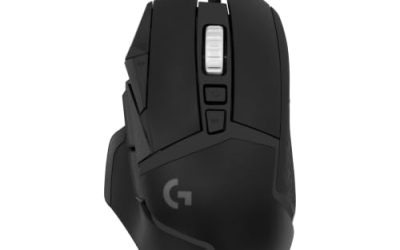
Logitech is the safe default for many players, and the G502 HERO shows why. Eleven programmable buttons, a dual-mode scroll wheel and an adjustable weight system cover more use cases than any other mouse in this guide, and the HERO 25K sensor tracks up to 25,600 DPI. G HUB software is polished and widely used, and Logitech mice are known for long-lasting switches and solid build quality. The G502 shape is wide and heavy, which suits palm and claw grips, and the brand has plenty of lighter options if the weight does not suit you.
Specs
- 11 programmable buttons
- HERO 25K optical sensor, up to 25,600 DPI
- Dual-mode hyper-fast scroll wheel
- Adjustable weight system with 5 removable weights
- LIGHTSYNC RGB lighting
- 121 g weight
Best for: Players who want one button-rich mouse that covers many genres and a brand with wide support.
Watch out for: The G502 is heavier than most esports mice, so players who prefer a light shell should look at Logitech’s lighter models instead.
Razer DeathAdder V2
Razer is the brand most players think of first for gaming mice, and the DeathAdder V2 is its most famous shape. The tall, ergonomic right-handed shell has suited palm grippers for years, while the Focus+ 20K sensor and optical switches give crisp, consistent performance. Chroma RGB is the most widely supported lighting system in gaming, syncing with keyboards, headsets and even games. Razer also has the widest range of shapes, from the light Viper line to the button-heavy Naga series, so there is a Razer mouse for almost every grip and genre.
Specs
- 8 programmable buttons
- Focus+ 20K optical sensor, up to 20,000 DPI
- Optical mouse switches
- Ergonomic right-handed shape
- Chroma RGB lighting on logo and scroll wheel
- 82 g weight
Best for: Palm-grip players who want the most famous ergonomic shape and the widest lighting ecosystem.
Watch out for: Razer Synapse software needs an account for some features, so players who prefer a lightweight tool should check the software requirements first.
SteelSeries Rival 5
SteelSeries is the brand for players who value clean software and honest specifications. The Rival 5 is light at 85 g, with nine programmable buttons including a five-button side cluster that suits MOBA and battle royale play. The TrueMove Air sensor tracks up to 18,000 CPI with one-to-one movement, and PrismSync RGB syncs with other SteelSeries gear. SteelSeries GG is one of the lightest apps in this guide, and the brand is known for accurate sensor tuning rather than headline numbers. It is a strong choice for players who want performance without fuss.
Specs
- 9 programmable buttons with a 5-button side cluster
- TrueMove Air optical sensor, up to 18,000 CPI
- PrismSync RGB lighting with 10 zones
- 85 g weight
- Onboard memory for profiles
Best for: Players who want a light, accurate mouse with clean software and no bloat.
Watch out for: The Rival 5 shape is compact, so players with large hands should compare its listed dimensions with their current mouse before ordering.
Corsair M65 RGB Ultra

Corsair is the brand for players who like their hardware built like a tank. The M65 RGB Ultra has an aluminium frame, a sturdy feel and a sniper button on the side that drops sensitivity for precise aiming. Its 18,000 DPI Marksman sensor tracks cleanly, eight programmable buttons cover the essentials, and the 97 g shell sits in the middle of the weight range. iCUE software ties the mouse to Corsair keyboards, headsets and fans, making it a natural pick for a Corsair desk setup. It is the most solid-feeling mouse in this guide.
Specs
- 8 programmable buttons including a dedicated sniper button
- 18,000 DPI Marksman optical sensor
- Aluminium frame construction
- 97 g weight
- RGB backlighting configurable in iCUE software
- 8,000 Hz polling rate
Best for: FPS players who want a sturdy mouse with a sniper button and a Corsair desk setup.
Watch out for: The angular shape and aluminium frame feel different from a smooth plastic shell, so it suits players who like a firm, textured grip.
Which One Fits Your Situation
You want one mouse that does everything
Pick Logitech and the G502 HERO. Eleven buttons, an adjustable weight system and a sensor that covers every genre make it the most versatile pick here, and Logitech’s wide range means you can switch to a lighter model later without learning new software. The wide Logitech range also means spare parts and replacements are easy to find, which matters for a mouse you will click thousands of times a day.
You play palm-grip shooters for hours
Pick Razer and the DeathAdder V2. Its ergonomic shell is the most comfortable in this guide for long sessions, and Chroma RGB gives you the widest lighting ecosystem if you build out the rest of the desk. The DeathAdder shape has also stayed largely unchanged for years, so a replacement will feel familiar the moment you pick it up.
You want light, accurate and fuss-free
Pick SteelSeries and the Rival 5. At 85 g with a clean sensor and lightweight software, it is the pick for players who care about performance and hate bloat. The onboard memory keeps your setup when you move computers. SteelSeries GG stays out of the way in daily use, and the clean sensor tuning means there is nothing to fix or fiddle with after setup.
You are building a Corsair setup
Pick Corsair and the M65 RGB Ultra. Its aluminium frame feels built to last, the sniper button is genuinely useful in FPS games, and iCUE syncs the mouse with the rest of your Corsair gear in one app. The aluminium frame also shrugs off the knocks and drops that wear out lighter plastic shells over years of daily play.
Common Mistakes
- Choosing a brand for its logo instead of checking whether its shapes fit your hand.
- Ignoring the software and discovering too late that it needs an account or a heavy background service.
- Buying a mouse that does not sync with your keyboard and ending up with two apps fighting over the lighting.
- Assuming the most expensive brand is the best, when the differences are mostly in shape and software.
- Switching brands without checking whether your profiles and macros can move with you.
Frequently Asked Questions
Which gaming mouse brand is the best overall?
There is no single best brand: Logitech leads on versatility, Razer on shape range and lighting, SteelSeries on clean software and sensor tuning, and Corsair on build quality and ecosystem. The best brand for you is the one whose shapes fit your hand and whose software you enjoy using.
Do I need to stay with one brand for my whole setup?
No, but it helps. One brand means one piece of software and one lighting system across the mouse, keyboard and headset. Mixed brands work fine too, though, as long as you are happy running two apps and setting colours separately.
Are expensive gaming mice worth it over budget ones?
Expensive mice usually bring better sensors, lighter shells, onboard memory and longer-lasting switches. Budget mice cover the basics well, though, and the difference only matters if you play competitively or for long hours. For casual play, a good budget mouse is often enough.
How long does a gaming mouse last?
A well-made gaming mouse typically lasts several years of daily use, with the switches and cable wearing out first. Optical switches and braided cables last longer than mechanical switches and rubber cables. Keep the mouse clean, avoid slamming it down, and the sensor will usually outlast the buttons.
Related guides
More from Amazon
Programs that pair well with the guide above. Offers and eligibility are set by Amazon and may change.
A free business account with business pricing and bulk-buying tools for work, shop or home office.
Create a business accountFree shipping on eligible items, Prime Video and more. Eligible new members can start with a free trial.
Start a Prime free trialAudiobooks and podcasts to listen to on the go. Eligible new members can start with a free trial.
Try Audible freeAd-free music streaming. Eligible new subscribers can start with a free trial.
Try Music Unlimited freeAs an Amazon Associate we earn from qualifying purchases.