Mac storage is a decision you cannot easily undo. Most modern MacBooks and Mac Minis ship with soldered storage, so the capacity you buy is the capacity you keep, and the official upgrade path is either a new machine or an external drive. That makes the external SSD the practical answer for Mac owners who run out of room, and the choice comes down to speed, format, durability and how the drive behaves with macOS.
This guide is for MacBook owners editing photos on the go, iMac users with a growing media library, and Mac Mini owners who want fast external storage without opening the machine. Every drive below was selected from the specifications on its Amazon listing, including the Mac compatibility and formatting details stated on the product page.
Our Top Picks


Top 3 picks at a glance
Quick Picks
As an Amazon Associate we earn from qualifying purchases
| Product | Best for | Key spec from title |
|---|---|---|
| Crucial X9 Pro for Mac 1TB | Mac-first setup out of the box | Up to 1,050 MB/s, USB 3.2 USB-C, Mac optimised |
| SanDisk Extreme Pro 1TB | Fastest Mac transfers on 20 Gbps | Up to 2,000 MB/s, USB-C, USB 3.2 Gen 2×2 |
| Samsung T9 1TB | Heavy video work on a MacBook Pro | Up to 2,000 MB/s, USB 3.2 Gen 2×2, Mac compatible |
| LaCie Rugged SSD4 1TB | Field work with a MacBook | USB 40 Gbps, IP54 rated, Data Rescue Service |
| Samsung T7 1TB | Simple everyday Mac storage | Up to 1,050 MB/s, USB 3.2 Gen 2, password protection |
How to Choose
Start With the Format, Not the Speed
A drive that arrives formatted for Windows will still work on a Mac, but it will need reformatting before Time Machine or a Mac-only workflow can use it properly. APFS is the right format for a Mac-only drive, especially for Time Machine backups, while exFAT is the choice when the same drive must also plug into a Windows PC. One drive in this guide ships optimised for Apple devices, which removes the setup step entirely. Whichever format you choose, back up anything already on the drive before reformatting, because the process erases everything.
USB Speeds on a Mac Are Not What the Box Suggests
Macs with Apple silicon have Thunderbolt ports, yet most portable SSDs connect over USB, so the drive runs at USB speeds rather than Thunderbolt speeds. A drive rated at 2,000 MB/s needs a 20 Gbps USB 3.2 Gen 2×2 connection to reach that figure, and many Macs negotiate USB at 10 Gbps, which caps the same drive near 1,000 MB/s. That does not make the faster drive useless, since it still runs at the port’s ceiling, but it does mean the headline speed is not guaranteed. Match the drive to the port your Mac actually offers.
Time Machine Has Its Own Requirements
If the drive will hold Time Machine backups, it needs to stay connected regularly and have room for the backup history to grow. Apple recommends a backup drive at least twice the size of the data being backed up, so a Mac with 512GB of used storage wants a 1TB drive at minimum. The drive must also be formatted as APFS or Mac OS Extended, and a drive shared between Time Machine and general file storage will fill up faster than expected. A dedicated backup drive is simpler to manage than one drive doing two jobs.
Ruggedness Counts When the Mac Travels
A MacBook travels, and the drive attached to it travels too, so the drive’s build matters as much as its speed. Drop resistance, dust and water ratings and a metal housing all protect against the knocks of a commute or a location shoot. The LaCie drive below carries an IP54 rating and a data rescue service, while the SanDisk and Samsung rugged options carry IP65 ratings. A drive that lives on a desk at home does not need these features, but a drive that rides in a camera bag or a backpack does, and the price difference is small.
The 5 Best Options
Crucial X9 Pro for Mac 1TB

This is the only drive here sold as a Mac-specific model, and that is its whole appeal. The listing describes it as optimised for Apple devices, with read and write speeds up to 1,050 MB/s over USB-C and compatibility with iPad as well as Mac. It arrives ready for a Mac workflow rather than needing a reformat first, which suits buyers who want to plug in and start working. The light gold finish matches Mac hardware nicely, and the listing includes a Mylio Photos+ offer for organising a photo library. At 1TB it holds a large photo collection or a full Time Machine backup for a 512GB Mac.
Specs
- Capacity: 1TB
- Sequential read and write speed: up to 1,050 MB/s
- Interface: USB 3.2 USB-C
- Optimised for: Apple devices, including iPad
- Colour: Light Gold
- Model number: CT1000X9PROMACSSD9B02
Best for: Mac owners who want a drive that works with macOS straight out of the box.
Watch out for: It is the same hardware class as the standard X9 Pro, so the Mac optimisation is about setup convenience rather than extra speed.
ASIN: B0CLYZZP8K
SanDisk Extreme Pro 1TB
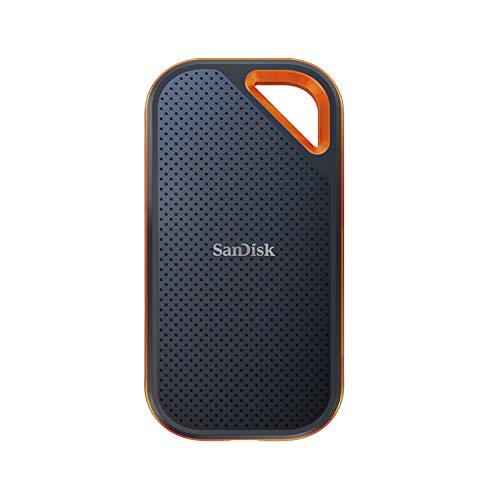
The Extreme Pro is the fastest option here for Mac users with a 20 Gbps port, listing read and write speeds up to 2,000 MB/s over USB-C. That speed suits editing 4K video directly from the drive in Final Cut Pro or DaVinci Resolve, where slow storage shows up as dropped frames. An IP65 rating covers dust and water jets, and the familiar orange loop makes it easy to clip to a bag. It ships with updated firmware and Mac compatibility, fitting a MacBook-based editing setup without extra software. On a 10 Gbps connection it still runs at the port ceiling, so it stays fast even on older Macs.
Specs
- Capacity: 1TB
- Sequential read and write speed: up to 2,000 MB/s
- Interface: USB-C, USB 3.2 Gen 2×2
- Water and dust resistance: IP65 rated
- Model number: SDSSDE81-1T00-G25
Best for: Mac video editors who need the fastest portable storage for 4K work.
Watch out for: The full 2,000 MB/s needs a 20 Gbps connection, so check your Mac’s USB speed before buying for speed alone.
ASIN: B08GV9M64L
Samsung T9 1TB
The T9 pairs the same 2,000 MB/s class of speed with a metal body and a textured grip that keeps it steady on a desk next to a Mac Mini or an iMac. Its listing states compatibility with macOS, Windows and Android, and drop resistance up to 3 metres, which covers the usual desk accidents. The drive works with Samsung’s Magician software for firmware updates and health checks, though that software is optional. For a MacBook Pro user moving large video projects between a laptop and a desktop, the T9’s speed cuts transfer time roughly in half compared with the 1,050 MB/s drives, provided the port supports 20 Gbps.
Specs
- Capacity: 1TB
- Sequential read speed: up to 2,000 MB/s
- Interface: USB 3.2 Gen 2×2 (20 Gbps)
- Drop resistance: up to 3 metres
- Compatibility: macOS, Windows, Android
- Model number: MU-PG1T0B/AM
Best for: MacBook Pro owners who move large projects between machines and want top speed.
Watch out for: Like other 2,000 MB/s drives, it runs at the port’s speed on Macs that negotiate USB at 10 Gbps.
ASIN: B0CHFSWM2P
LaCie Rugged SSD4 1TB

The Rugged SSD4 is the field-work pick, built around a USB 40 Gbps connection and an IP54 rating for dust and water protection. Its orange bumper is the most recognisable design in portable storage, and the listing includes a Data Rescue Service, which is a real benefit for photographers whose livelihood sits on one drive. The model number is STND1000400, and the drive connects over USB-C, so it plugs straight into any modern MacBook or Mac Mini. Its top speed depends on the host port, but the rugged build and the rescue service are the reasons to choose it over a faster but plainer drive.
Specs
- Capacity: 1TB
- Interface: USB 40 Gbps, USB-C
- Water and dust resistance: IP54 rated
- Data Rescue Service: Included
- Model number: STND1000400
Best for: Photographers and field creators who need the toughest drive and a recovery safety net.
Watch out for: The rugged bumper adds size, so it takes up more room in a slim laptop sleeve than the compact drives here.
ASIN: B0F38HLNLC
Samsung T7 1TB
The regular T7 is the straightforward choice for everyday Mac storage: fast enough, small, and simple. Its listing states read speeds up to 1,050 MB/s over USB 3.2 Gen 2, password protection for locking the contents, and compatibility with Mac, Windows and Android. The grey model carries the number MU-PC1T0T/AM, and the listing notes a 3-year limited warranty and drop resistance up to 2 metres. It suits documents, a photo library or a Time Machine backup when the faster drives offer more speed than the job needs. It also costs less than the 2,000 MB/s class, which matters when the drive will mostly sit on a desk.
Specs
- Capacity: 1TB
- Sequential read speed: up to 1,050 MB/s
- Interface: USB 3.2 Gen 2
- Security: Password protection
- Drop resistance: up to 2 metres
- Warranty: 3-year limited warranty
- Model number: MU-PC1T0T/AM
Best for: Everyday Mac storage, Time Machine backups and photo libraries on a budget.
Watch out for: It has no IP dust or water rating, so keep it away from rain and dust on location shoots.
ASIN: B0874XN4D8
Which One Fits Your Situation
You Just Want a Drive That Works With Your Mac
Pick the Crucial X9 Pro for Mac 1TB. It is sold as optimised for Apple devices, so there is no reformatting step before first use, and the 1,050 MB/s speed covers photo libraries, documents and backups comfortably. The iPad compatibility is a bonus for owners who also move files to a tablet.
You Edit Video on a MacBook Pro
Pick the SanDisk Extreme Pro 1TB or the Samsung T9 1TB. Both list 2,000 MB/s speeds for fast 4K editing, and the SanDisk adds an IP65 rating while the T9 adds a grippy metal body. Either one needs a 20 Gbps port to reach full speed, so confirm your MacBook’s USB speed first and take the cheaper of the two if your ports cap at 10 Gbps.
You Shoot Photos on Location
Pick the LaCie Rugged SSD4 1TB. The rugged bumper and IP54 rating handle dust and splashes, and the included Data Rescue Service is worth having when a card or drive fails on a job. The Crucial X9 Pro for Mac is the lighter alternative if the shoot is indoors and the drive never leaves a bag.
You Need a Time Machine Drive
Pick the Samsung T7 1TB. Its 1,050 MB/s speed is more than enough for backups, the password protection keeps the backup private, and the 1TB capacity suits a Mac with up to 512GB of data. Format it as APFS, plug it in, and let Time Machine run on its own schedule.
Common Mistakes
- Reformatting a Mac drive to exFAT for Time Machine, which then refuses to use it, since Time Machine needs APFS or Mac OS Extended.
- Buying a 2,000 MB/s drive for a Mac that negotiates USB at 10 Gbps, then blaming the drive for the slower speed.
- Sizing a Time Machine drive at the same capacity as the Mac’s used storage, leaving no room for backup history to grow.
- Using one drive for both Time Machine and daily file storage, then running out of room for both jobs at once.
- Skipping the password setup on a drive that holds a full backup, leaving personal files readable if the drive is lost.
Frequently Asked Questions
Do I need a Mac-specific SSD, or will any portable SSD work?
Any portable SSD works with a Mac over USB-C, but a Mac-specific model such as the Crucial X9 Pro for Mac arrives ready for macOS without reformatting. A standard drive may need to be erased and reformatted as APFS before Time Machine accepts it. The hardware is the same class either way, so the Mac label mainly saves setup time and removes guesswork for first-time buyers.
What format should I use for a Mac SSD?
Use APFS for a drive that only serves a Mac, especially for Time Machine backups, since Apple designed APFS for its own storage features. Use exFAT if the drive must also work on a Windows PC, because both systems can read and write exFAT natively. Remember that reformatting erases the drive, so move any files off it first.
Can I edit video directly from a portable SSD on a Mac?
Yes, provided the drive is fast enough for the footage. A 1,050 MB/s drive handles 4K editing in most cases, while a 2,000 MB/s drive gives more headroom for multi-stream or high-bitrate work. Keep the drive connected over USB-C rather than a hub with slower ports, and leave some free space on the drive, since a nearly full SSD slows down.
Will a portable SSD work with a Mac Mini?
Yes. A Mac Mini has Thunderbolt and USB ports that accept any USB-C portable SSD, and an external drive is the standard way to expand a Mac Mini whose internal storage is soldered. A fast drive can hold a photo library, a media collection or even a bootable backup. Place the drive where it gets airflow during long transfers, since sustained writes warm any compact SSD.
Related guides
More from Amazon
Programs that pair well with the guide above. Offers and eligibility are set by Amazon and may change.
A free business account with business pricing and bulk-buying tools for work, shop or home office.
Create a business accountFree shipping on eligible items, Prime Video and more. Eligible new members can start with a free trial.
Start a Prime free trialAudiobooks and podcasts to listen to on the go. Eligible new members can start with a free trial.
Try Audible freeAd-free music streaming. Eligible new subscribers can start with a free trial.
Try Music Unlimited freeAs an Amazon Associate we earn from qualifying purchases.