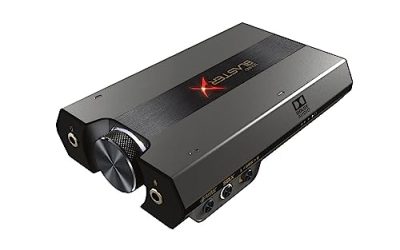
Onboard audio has improved, yet it still shares a motherboard with power circuits, graphics cards, and fans. That shared space adds noise to the signal, and the built-in headphone output often runs out of power before demanding headphones reach their best. An internal PCIe sound card moves conversion onto its own board with a cleaner DAC and a stronger amp, and the choice comes down to resolution, headphone power, surround output, and the software that shapes the sound.
This guide is for PC owners who listen to music through wired headphones or a speaker set, and who want more than the motherboard gives. Listeners with high-impedance headphones, collectors of high-resolution files, and owners of 5.1 or 7.1 speaker sets will each find a different pick below. Every product here was chosen from its name and specifications on the Amazon product page, and every one fits a standard PCIe slot inside a desktop.
Top 3 picks at a glance
Quick Picks
As an Amazon Associate we earn from qualifying purchases
| Product | Best for | Key spec from title |
|---|---|---|
| Creative Sound Blaster Z SE | Demanding headphones on a desktop | 24-bit/192kHz, 116dB SNR, 600 ohm amp |
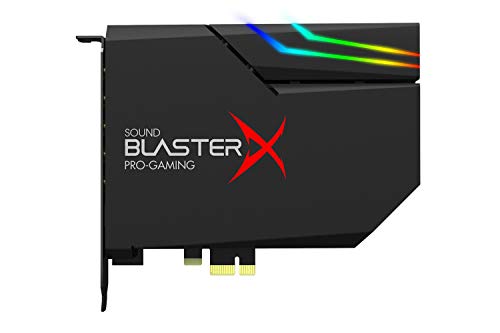
| Creative Sound BlasterX AE-5 Plus | The highest-resolution DAC here | 32-bit/384kHz, up to 122dB SNR |
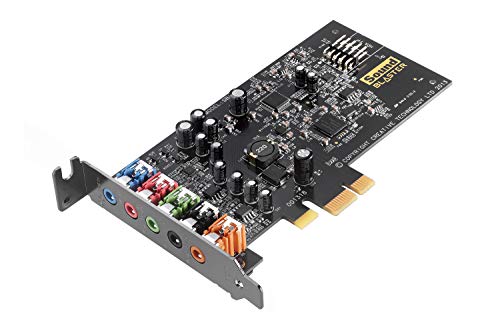
| Creative Sound Blaster Audigy FX | A simple 5.1 upgrade | 24-bit/192kHz, 106dB SNR, 5.1 |
| Creative Sound Blaster Audigy PCIe Rx | 7.1 surround and two mic inputs | 24-bit/192kHz, 106dB SNR, 7.1 |
How to Choose
Read the DAC numbers in order
Two numbers do most of the talking on a sound card listing. Bit depth and sample rate set the ceiling for playback, so 24-bit/192kHz already covers the vast majority of music files, while 32-bit/384kHz suits collectors of high-resolution recordings. The signal-to-noise ratio says how far the music sits above the background hiss, so a 116dB or 122dB figure beats a 106dB one on paper. Treat the numbers as a shortlist tool, then match the winner to your headphones or speakers, because a strong DAC cannot rescue weak output gear.
Match the amp to your headphones
Headphone impedance decides whether the amp matters more than the DAC. Efficient headphones play loudly from almost any output, so a basic amp is enough and the DAC becomes the difference. High-impedance models stay quiet and flat without real power, which is why the Z SE and the Audigy Rx list a 600 ohm amp. Check the impedance printed on your headphones before ordering, and treat the amp figure as a limit: a card that tops out below your headphones will always sound held back, no matter how good its DAC is.
Plan the surround output before you buy
Surround sound only works when the outputs match the speakers. A 5.1 card gives you front, rear, center, and subwoofer channels through analog jacks, while a 7.1 card adds side channels for a fuller room. If the speakers connect to a receiver instead, look for optical output with Dolby Digital Live or DTS encoding, which carries the surround mix down one cable. Count the jacks on the card against the inputs on your speaker set before ordering, because a missing center channel turns a surround purchase into a stereo one.
Weigh the software and recording extras
The card is only half the purchase; the software shapes what you hear. ASIO support matters when you record or play high-resolution files without the operating system resampling them, and a mic EQ helps when you record voice or stream. Dual microphone inputs suit podcasters and streamers who run two mics at once, while surround suites such as SBX Pro Studio let you tune the soundstage for films and games. Decide which of these you will actually open each week, and let the unused features stay out of the decision.
The 4 Best Options
Creative Sound Blaster Z SE

The Z SE is the strongest all-round card in this group, and it suits listeners whose headphones need real power. Its 600 ohm headphone amp drives demanding models that stay quiet on onboard audio, and the 116dB signal-to-noise ratio keeps music clean at higher volumes. ASIO support lets high-resolution files play without resampling, while Mic EQ shapes voice for calls and recording. Discrete 5.1 output covers a speaker set, Dolby Digital Live and DTS feed a receiver, and the card fits a standard PCIe slot in most desktops.
Specs
- 24-bit/192kHz playback with 116dB SNR
- 600 ohm headphone amplifier
- ASIO support and Mic EQ
- Discrete 5.1 and virtual 7.1 output
- Dolby Digital Live and DTS support
Best for: Listeners with demanding headphones who want a strong amp and clean playback.
Watch out for: It needs a free PCIe slot, so check the space under your graphics card before ordering.
Creative Sound BlasterX AE-5 Plus
The AE-5 Plus is the highest-resolution card in this group, and it suits listeners who collect high-resolution files. Its SABRE32-class DAC plays at 32-bit/384kHz with up to 122dB of signal-to-noise ratio, which puts it ahead of every other card here on paper. The Xamp discrete headphone bi-amp drives each channel on its own, so demanding headphones get clean power on both sides. Dolby Digital and DTS encoding feed a receiver over optical, and the RGB lighting strip lets the card match a lit build.
Specs
- SABRE32-class DAC with 32-bit/384kHz playback
- Up to 122dB signal-to-noise ratio
- Xamp discrete headphone bi-amp
- Dolby Digital and DTS encoding
- RGB lighting system
Best for: Listeners who collect high-resolution files and want the strongest DAC numbers here.
Watch out for: It needs a free PCIe slot with clearance under the graphics card, and the RGB header is optional.
Creative Sound Blaster Audigy FX
The Audigy FX is the simplest upgrade in this group, and it suits anyone who wants 5.1 sound without a large outlay. It adds a true 5.1 analog output to a desktop, so a satellite speaker set finally gets separate front, rear, center, and subwoofer channels. The 24-bit/192kHz playback and 106dB signal-to-noise ratio lift music above onboard audio, while SBX Pro Studio adds surround tuning for films and games. Both full-height and half-height brackets come in the box, so it fits slim desktops as well as full towers.
Specs
- 24-bit/192kHz playback with 106dB SNR
- Discrete 5.1 analog output
- PCI Express x1 interface
- SBX Pro Studio surround processing
- Full-height and half-height brackets included
Best for: Anyone who wants a simple 5.1 upgrade for a speaker set.
Watch out for: The listing targets Windows, so confirm your operating system version before ordering.
Creative Sound Blaster Audigy PCIe Rx

The Audigy Rx is the surround specialist in this group, and it suits listeners who run a 7.1 speaker set. Its discrete 7.1 output adds side channels that the 5.1 cards here cannot give, and the 24-bit/192kHz playback with a 106dB signal-to-noise ratio keeps music clean across all of them. Dual microphone inputs suit podcasters and streamers who run two mics at once, and the 600 ohm headphone amp covers demanding headphones. EAX Advanced HD support rounds out a card that is built for rooms with many speakers.
Specs
- 24-bit/192kHz playback with 106dB SNR
- Discrete 7.1 surround output
- Dual microphone inputs
- 600 ohm headphone amplifier
- EAX Advanced HD support
Best for: Listeners with a 7.1 speaker set or two microphones to run at once.
Watch out for: It is an older design, so confirm your Windows version and front-panel header fit before ordering.
Which One Fits Your Situation
You listen through demanding headphones
Pick the Sound Blaster Z SE. Its 600 ohm amp drives headphones that stay quiet on onboard audio, and the 116dB signal-to-noise ratio keeps music clean at higher volumes. ASIO support lets high-resolution files play without resampling, and Mic EQ shapes your voice for calls. Choose it when your headphones are the demanding kind.
You want the highest-resolution DAC
Pick the Sound BlasterX AE-5 Plus. Its SABRE32-class DAC plays at 32-bit/384kHz with up to 122dB of signal-to-noise ratio, the strongest numbers in this group. The Xamp bi-amp drives each headphone channel on its own, and Dolby Digital and DTS feed a receiver. Choose it when your music library is full of high-resolution files.
You want the simplest 5.1 upgrade
Pick the Sound Blaster Audigy FX. It adds a true 5.1 analog output to a desktop, so a satellite speaker set gets separate front, rear, center, and subwoofer channels. Both bracket sizes come in the box, so it fits slim desktops as well as full towers. Choose it when you want surround sound without a large outlay.
You want 7.1 surround and two mic inputs
Pick the Sound Blaster Audigy Rx. Its discrete 7.1 output adds side channels for a fuller room, and dual microphone inputs suit podcasters and streamers who run two mics at once. The 600 ohm amp also covers demanding headphones. Choose it when your speaker set has seven channels plus a subwoofer.
Common Mistakes
- Buying a PCIe card without checking for a free x1 slot under the graphics card.
- Plugging headphones into the front-panel jack instead of the card’s rear output.
- Expecting a sound card to fix weak speakers or worn-out headphones.
- Skipping the maker’s software and missing ASIO, EQ, and surround controls.
- Paying for 7.1 output when the speaker set only has two channels.
Frequently Asked Questions
Do I still need a sound card with modern onboard audio?
Onboard audio has improved, yet it still shares a board with power circuits and fans, so noise can leak into the signal. A dedicated card adds a cleaner DAC, a stronger headphone amp, and analog surround outputs that onboard audio cannot give. If you listen through basic earbuds, the difference is small, but demanding headphones and speaker sets show it clearly.
Can a PCIe sound card work in any desktop?
Almost any desktop with a free PCIe x1 slot can take one, but check two things first. The slot must be free and reachable, since a large graphics card can block the slot below it, and the case needs room for the card’s bracket. Slim desktops need the half-height bracket, so confirm it comes in the box before ordering.
Does a sound card help Bluetooth headphones?
No. A sound card only changes wired audio that leaves through its own jacks, so Bluetooth headphones keep using their own wireless path and built-in DAC. The card helps wired headphones and speakers plugged into it, where the cleaner conversion and stronger amp do the work. For Bluetooth listening, the headphone itself decides the sound.
Do I need special software for hi-res playback?
The card handles the conversion, but the player and the driver path decide whether the file reaches it untouched. ASIO support lets a compatible player send high-resolution audio straight to the card without the operating system resampling it. Install the maker’s software, pick the ASIO output in your player, and check that the file itself is high-resolution, since a standard file gains nothing from the setting.
Related guides
More from Amazon
Programs that pair well with the guide above. Offers and eligibility are set by Amazon and may change.
A free business account with business pricing and bulk-buying tools for work, shop or home office.
Create a business accountFree shipping on eligible items, Prime Video and more. Eligible new members can start with a free trial.
Start a Prime free trialAudiobooks and podcasts to listen to on the go. Eligible new members can start with a free trial.
Try Audible freeAd-free music streaming. Eligible new subscribers can start with a free trial.
Try Music Unlimited freeAs an Amazon Associate we earn from qualifying purchases.