PUBG rewards a different kind of aim than a fast arena shooter: long sightlines, careful peeking and sudden close-range fights in the final circle. The right mouse makes those moments feel natural, with a sensor that tracks cleanly at medium sensitivity and a shape that stays comfortable through a 30-minute match. The wrong one shows up as a missed spray at 100 metres or a cramped hand when the zone closes in.
This guide is for PUBG players who drop into ranked matches, squad players who need reliable recoil control, and newcomers choosing their first serious mouse for the game. Each mouse below was chosen from its name and listed specifications on its Amazon product page, so the sensor figures, weights and button counts come from the listing itself rather than from guesswork.
Top 3 picks at a glance


Quick Picks
As an Amazon Associate we earn from qualifying purchases.
| Product | Best for | Key spec from title |
|---|---|---|
| Logitech G502 HERO | Versatile play with plenty of buttons | 11 programmable buttons, HERO 25K |
| Razer DeathAdder V2 | Comfortable ergonomic aim for long matches | Focus+ 20K sensor, 82 g |
| HyperX Pulsefire Haste | Fast flicks with a very light shell | 59 g honeycomb shell, 16,000 DPI |
| Corsair Harpoon RGB Wireless | Wireless play with a light, simple shape | 10,000 DPI, 99 g, 60-hour battery |
How to Choose
Pick a sensor that tracks cleanly at medium sensitivity
PUBG players usually run medium sensitivity, so the sensor needs to be flawless in that middle range rather than impressive at its maximum. A modern optical sensor with no acceleration and no angle snapping keeps crosshair movement predictable when you are tracking a moving target across open ground. Check the sensor name on the listing: well-known sensors like the HERO 25K, Focus+ and Pixart 3335 are proven choices. The headline DPI number matters less than clean tracking, since most PUBG players never go above 3,200 DPI in practice.
Choose a shape that survives a 30-minute match
A PUBG match can last half an hour, so the mouse shape matters more than it does in a five-minute round. An ergonomic right-handed shell supports the palm during long looting phases, while a light symmetrical shell suits players who flick between targets in close fights. Grip style decides the fit: palm grippers need a tall, full shell, while claw and fingertip players do better with a shorter, lighter body. If your hand cramps by the final circle, the shape is wrong, no matter how good the sensor is.
Think about weight for flicks and recoil control
Weight changes how a mouse feels when you flick to a target and when you pull down to control recoil. A light mouse under 90 g moves fast and tires the wrist less, which helps in the frantic final circles. A heavier mouse around 120 g feels steadier when you are holding a long sightline and tracking a distant target. Neither is right for everyone: try to match the weight to your sensitivity, since low-sensitivity players move the mouse further and benefit more from a lighter shell.
Make sure the buttons cover your PUBG binds
PUBG uses more binds than many shooters: leaning, free look, map, healing and weapon slots all compete for keys. A mouse with two side buttons covers the basics, while one with more programmable buttons can take leaning and healing off the keyboard. Check that the side buttons are easy to reach without shifting your grip, because a button you cannot find under pressure is useless. DPI switches on the fly also help, letting you drop sensitivity for a long-range scope and raise it for close fights.
The 4 Best Options
Logitech G502 HERO

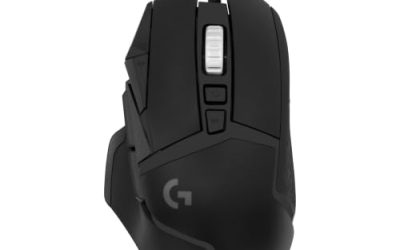
The G502 HERO is the most versatile mouse in this guide, and that matters in a game as varied as PUBG. Eleven programmable buttons cover leaning, free look, healing and weapon swaps without reaching for the keyboard, and the dual-mode scroll wheel helps with looting and inventory scrolling. The HERO 25K sensor tracks up to 25,600 DPI with clean, consistent movement, and the adjustable weight system lets you tune the 121 g shell to your taste. It is the pick for players who want one mouse that handles every phase of a match.
Specs
- 11 programmable buttons
- HERO 25K optical sensor, up to 25,600 DPI
- Dual-mode hyper-fast scroll wheel
- Adjustable weight system with 5 removable weights
- LIGHTSYNC RGB lighting
- 121 g weight
Best for: Squad players who want many binds and a mouse that covers looting, sniping and close fights.
Watch out for: The G502 is heavier than most esports mice, so low-sensitivity players who make big arm movements should check the listed weight first.
Razer DeathAdder V2
The DeathAdder V2 is the comfort pick for long PUBG matches. Its tall, ergonomic right-handed shell supports the palm through looting, driving and long waits in the zone, while the Focus+ 20K sensor tracks cleanly at the medium sensitivities PUBG players use. Optical switches give a crisp, consistent click for semi-automatic fire, and the 82 g weight keeps flicks quick without feeling flimsy. Eight programmable buttons cover the essential binds, and Chroma RGB lighting matches the rest of a Razer setup.
Specs
- 8 programmable buttons
- Focus+ 20K optical sensor, up to 20,000 DPI
- Optical mouse switches
- Ergonomic right-handed shape
- Chroma RGB lighting on logo and scroll wheel
- 82 g weight
Best for: Palm-grip players who want comfort through long matches and clean aim at medium range.
Watch out for: The ergonomic shape is right-handed only, so left-handed players should look at a symmetrical mouse instead.
HyperX Pulsefire Haste
The Pulsefire Haste is the lightest mouse here, and its 59 g honeycomb shell is built for the fast flicks that decide close-range PUBG fights. The Pixart 3335 sensor reaches 16,000 DPI with clean tracking, and the flexible HyperFlex cable barely drags, so the wired connection feels almost wireless. Six programmable buttons cover the main binds, TTC Golden switches give a firm click, and the symmetrical shape suits claw and fingertip grips. For players who fight in compounds and towns, the light shell is a real advantage.
Specs
- 59 g honeycomb shell design
- Pixart 3335 optical sensor, up to 16,000 DPI
- 6 programmable buttons
- TTC Golden micro dustproof switches
- HyperFlex flexible USB cable
- 1,000 Hz polling rate
Best for: Aggressive players who push compounds and need fast flicks in close fights.
Watch out for: The honeycomb shell has open cutouts, so it is not the best pick if you eat at the desk and worry about crumbs getting inside.
Corsair Harpoon RGB Wireless

The Harpoon RGB Wireless is the simplest wireless pick in this guide, and that simplicity suits PUBG well. It connects over Slipstream wireless, Bluetooth or a wired cable, so it works with a desktop, a laptop or a console without fuss. The 10,000 DPI optical sensor is more than enough for the game, six programmable buttons cover the key binds, and the 99 g shell sits between light and steady. Battery life reaches up to 60 hours, which covers a week of evening matches before a recharge is needed.
Specs
- 10,000 DPI optical sensor
- 6 programmable buttons
- Slipstream wireless, Bluetooth and wired USB connections
- Up to 60 hours battery life
- 99 g weight
- RGB backlighting configurable in iCUE software
Best for: Players who want a light wireless mouse without a complicated setup.
Watch out for: The side buttons are small and close together, so players with large hands should check the listed dimensions before ordering.
Which One Fits Your Situation
You play ranked and want every bind on the mouse
Pick the Logitech G502 HERO. Eleven buttons cover leaning, healing and weapon swaps, and the adjustable weight lets you tune the feel for long sightlines. It is the most complete mouse here for serious ranked play. The dual-mode wheel also speeds up looting, so you spend less time in menus and more time watching the circle.
You play long sessions and your hand gets tired
Pick the Razer DeathAdder V2. Its ergonomic shell supports the palm through 30-minute matches, and the 82 g weight keeps aim quick without strain. It is the comfort pick for players who play several matches in a row. The optical switches also stay consistent through thousands of clicks, which matters when every semi-automatic shot needs to land.
You push compounds and fight up close
Pick the HyperX Pulsefire Haste. At 59 g it flicks faster than anything else here, and the flexible cable keeps the wired connection out of the way. It is built for the fast, close fights in towns and final circles. The flexible cable keeps drag to a minimum, so the wired connection never pulls the mouse off target during a flick.
You want wireless without the hassle
Pick the Corsair Harpoon RGB Wireless. Three connection modes, a simple shape and 60-hour battery life make it the easiest wireless pick, and it is light enough for quick fights. The three connection modes also mean it works with a laptop or console when you play away from your main desk.
Common Mistakes
- Running very high DPI and wondering why long-range sprays feel uncontrollable.
- Buying a heavy mouse for low sensitivity and tiring your arm out by the final circle.
- Ignoring the shape and ending up with a cramped hand halfway through a match.
- Leaving key binds like leaning and free look on the keyboard when the mouse has spare buttons.
- Choosing a mouse for its looks instead of checking whether the sensor tracks cleanly at your sensitivity.
Frequently Asked Questions
What DPI should I use for PUBG?
Most PUBG players run between 400 and 1,600 DPI with a medium in-game sensitivity, because that range gives steady aim at long range and enough speed for close fights. The exact number depends on your mouse pad space and grip style. Start at 800 DPI and adjust in small steps until tracking a moving target feels natural.
Is a lightweight mouse better for PUBG?
A lighter mouse helps with fast flicks and reduces wrist fatigue, which matters in close fights and long sessions. Heavier mice can feel steadier when holding a sightline, though. The best weight depends on your sensitivity: low-sensitivity players who move the mouse further usually benefit more from a lighter shell.
Do I need many buttons on a PUBG mouse?
Not necessarily, but extra buttons help. Two side buttons cover the basics, while more programmable buttons can take leaning, free look and healing off the keyboard. The right count depends on how many binds you want under your thumb during a fight.
Is wireless fine for competitive PUBG?
Yes, modern 2.4 GHz wireless connections are fast enough that input delay is not a practical concern in PUBG. The bigger question is battery life: pick a mouse rated for 60 hours or more so it does not run flat mid-match, and keep the charging cable nearby during long sessions.
Related guides
More from Amazon
Programs that pair well with the guide above. Offers and eligibility are set by Amazon and may change.
A free business account with business pricing and bulk-buying tools for work, shop or home office.
Create a business accountFree shipping on eligible items, Prime Video and more. Eligible new members can start with a free trial.
Start a Prime free trialAudiobooks and podcasts to listen to on the go. Eligible new members can start with a free trial.
Try Audible freeAd-free music streaming. Eligible new subscribers can start with a free trial.
Try Music Unlimited freeAs an Amazon Associate we earn from qualifying purchases.