Most laptops treat audio as an afterthought. The built-in headphone jack shares space with power circuits and Wi-Fi antennas, so music can pick up hiss, calls can sound thin, and a worn jack can cut out on one side entirely. An external USB sound card moves the conversion outside that noisy chassis, and the choice is not about brand loyalty. It is about which connections you need, how much power your headphones demand, and whether you want surround processing or a simple stereo fix.
This guide is for laptop owners who listen through wired headphones, take calls from a laptop, or play music through desktop speakers. Students in shared rooms, remote workers on long calls, and listeners with a good pair of headphones will each find a different pick below. Every product here was chosen from its name and specifications on the Amazon product page, and every one connects over USB, so no laptop needs to be opened.
Top 3 picks at a glance

Quick Picks
As an Amazon Associate we earn from qualifying purchases
| Product | Best for | Key spec from title |
|---|---|---|
| Creative Sound BlasterX G6 | Demanding headphones on a laptop | 130dB DAC, 32-bit/384kHz playback |
| Creative Sound Blaster Play! 3 | A small plug-and-play upgrade | 24-bit/96kHz playback, USB stereo |
| Creative Sound Blaster X4 | Surround sound and optical output | 24-bit/192kHz, 7.1 discrete surround |
| SABRENT USB External Stereo Sound Adapter | A basic headphone and mic fix | Plug and play USB adapter, no drivers |
How to Choose
Match the connection to your laptop
Start with the port you actually have free. Most USB sound cards use USB-A, so a laptop with only USB-C ports needs an adapter or a hub, and that adapter belongs in the budget of ports, not as an afterthought. Check whether the card draws all its power from USB or needs a separate supply, and look at the cable: a short fixed cable suits a laptop that moves between rooms, while a longer cable suits a desk setup where the card sits beside a monitor. If you already run a hub for a mouse and keyboard, confirm the sound card works through it, because some hubs share bandwidth and can cause dropouts during calls.
Check how much power your headphones need
Headphone impedance decides whether a small adapter is enough. Efficient earbuds and most portable headphones play loudly from any USB output, but larger over-ear models with high impedance stay quiet and flat without an amplifier. Look for a dedicated headphone amp in the listing, such as the Xamp amp in the G6 or the amp in the X4, and match it to the impedance printed on your headphones. When the listing states a maximum impedance, treat it as a real limit rather than a suggestion. If your headphones are the demanding kind, a card with a proper amp matters more than a higher sample rate.
Read the resolution numbers in context
Sample rates and bit depths look impressive on a listing, yet they only matter when the rest of the chain keeps up. A 24-bit/96kHz adapter already covers the audio in most music libraries and video calls, while 32-bit/384kHz playback suits listeners with high-resolution files and headphones that can show the difference. The DAC quality and the signal-to-noise figure say more about clarity than the biggest sample rate on the box. Before paying for the highest numbers, confirm your music files and your headphones can use them, and remember that a noisy room or a worn cable erases the advantage first.
Decide what the microphone side must do
A sound card is only half the purchase when you take calls. Some adapters give you a separate microphone jack with its own recording path, while others leave the mic on the laptop, where keyboard noise and fan hum leak in. Sidetone, which plays a little of your own voice back into your headphones, helps you stop shouting on long calls. Check whether the mic input records in stereo or mono and whether the listing gives a recording sample rate, because a card built for music playback can still record calls poorly. If calls fill your day, put the mic input ahead of surround features.
The 4 Best Options
Creative Sound BlasterX G6

The G6 is the strongest headphone option in this group, and it suits laptop owners whose headphones need real power. Its Xamp headphone amplifier drives demanding models that stay quiet on a basic adapter, and the 130dB DAC keeps music clean at higher volumes. Dolby Digital and 7.1 virtual surround add width to games and films, while sidetone keeps your voice at a natural level during calls. A large volume knob and a speaker-headphone switch make it easy to use at a desk, and the USB connection means any laptop can use it without opening the case.
Specs
- 130dB DAC with 32-bit/384kHz playback
- Discrete Xamp headphone amplifier
- Dolby Digital with 7.1 virtual surround sound
- Sidetone and speaker-headphone control
- USB connection for PC and Mac
Best for: Laptop owners with demanding headphones who want a strong amp and surround sound.
Watch out for: It is a desktop-sized unit, so check you have desk space and a free USB port before ordering.
Creative Sound Blaster Play! 3
The Play! 3 is the smallest fix in this group, and it suits anyone whose laptop jack has failed or sounds thin. It plugs straight into a USB port with no drivers to install, and the 24-bit/96kHz playback already lifts music above the level of most built-in audio. Separate headphone and microphone jacks give you a clean path for calls, and the Control Panel software adds tuning when you want it. It draws all its power from USB, so it travels in a laptop bag without a charger, and it works on both Windows and Mac machines.
Specs
- 24-bit/96kHz high-resolution playback
- USB connection with plug-and-play setup, no drivers required
- Separate headphone and microphone jacks
- Microphone recording at 24-bit/48kHz
- Control Panel software for PC and Mac
Best for: Anyone who wants the smallest plug-and-play fix for a weak or broken laptop jack.
Watch out for: Headsets with a single combined plug need a splitter, since the Play! 3 has separate headphone and mic jacks.
Creative Sound Blaster X4
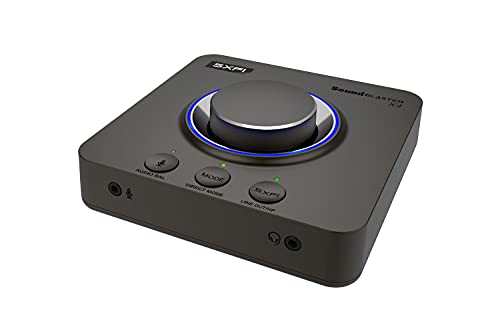
The X4 is the most complete desktop DAC in this group, and it suits laptop owners who also run speakers and want surround sound. Its Super X-Fi processing builds a wide soundstage for films and games, while the 7.1 discrete output drives a full speaker set from one box. Optical input and output let it sit between a laptop and a receiver, and the 114dB DAC keeps stereo music clean. A large volume knob and front-panel jacks keep everyday controls within reach, and the USB-C connection fits modern laptops without an adapter hunt.
Specs
- 24-bit/192kHz high-resolution playback with 114dB DAC
- Super X-Fi headphone holography
- 7.1 discrete surround output
- Optical-in, optical-out, line-in, mic-in, and headset-in
- USB-C connection for PC and Mac
Best for: Laptop owners who run speakers and want surround sound plus optical connections.
Watch out for: It is a desktop unit, not a pocket adapter, so it suits a fixed desk rather than a travel bag.
SABRENT USB External Stereo Sound Adapter

The Sabrent adapter is the simplest pick in this group, and it suits anyone who only needs a working headphone and microphone jack. It is a small USB stick with no drivers to install, and it restores audio on a laptop whose built-in jack has stopped working. The 48kHz stereo output covers music, video, and calls without fuss, and separate 3.5mm jacks for headphones and a microphone keep the setup obvious. It works on Windows and Mac machines, draws power from USB, and costs little in desk space, which makes it a good spare to keep in a laptop bag.
Specs
- USB connection with plug-and-play setup, no drivers needed
- 3.5mm stereo headphone output and separate microphone input
- 48kHz stereo audio output
- Works with Windows and Mac
Best for: Anyone who only needs a working headphone and mic jack on a laptop.
Watch out for: It is stereo only, so it cannot add surround sound or drive demanding headphones.
Which One Fits Your Situation
You want the strongest headphone amp for a laptop
Pick the Sound BlasterX G6. Its Xamp amplifier drives headphones that stay quiet on a basic adapter, and the 130dB DAC keeps music clean when you turn the volume up. The volume knob and speaker-headphone switch make it the most comfortable pick for long desk sessions. Choose it when your headphones are the demanding kind and your laptop stays mostly on one desk.
You want the smallest plug-and-play fix
Pick the Sound Blaster Play! 3. It plugs into any USB port with no drivers, and the 24-bit/96kHz playback already beats most built-in audio. Separate headphone and mic jacks cover calls, and it is small enough to live in a laptop bag. Choose it when your laptop jack has failed or sounds thin and you want the fix to take seconds.
You want surround sound and optical output
Pick the Sound Blaster X4. Its 7.1 discrete output drives a full speaker set, and optical in and out let it sit between a laptop and a receiver. Super X-Fi widens the soundstage for films and games, and the big volume knob keeps control simple. Choose it when your laptop is the hub of a desk setup with speakers.
You only need a working headphone and mic jack
Pick the Sabrent adapter. It is a small USB stick with no drivers, and it restores headphone and mic jacks on a laptop whose built-in audio has stopped working. The stereo output covers music, video, and calls without any setup. Keep one in your bag as a spare, since it takes almost no space and works on Windows and Mac.
Common Mistakes
- Buying an internal PCIe sound card for a laptop that has no slot for it.
- Using a charge-only USB-C port and wondering why the card never appears.
- Choosing a card with no microphone input when calls fill the day.
- Ignoring headphone impedance and blaming the card for quiet sound.
- Expecting hi-res numbers to rescue worn earbuds or a noisy room.
Frequently Asked Questions
Do laptop sound cards improve the built-in speakers?
No. A USB sound card only changes the audio that leaves through its own jacks, so the laptop speakers keep using the built-in path. The improvement shows up in wired headphones and in speakers plugged into the card, where the cleaner DAC and stronger amp do the work. If the built-in speakers are the problem, an external speaker is the fix, not a sound card.
Do USB sound cards need drivers?
Most of the cards here work without drivers, because the operating system already knows how to talk to a standard USB audio device. Plug the card in, pick it as the output in sound settings, and it plays. The maker’s software is optional and adds tuning such as surround modes and EQ, so install it only when you want those extras.
Can I use a USB sound card with a hub?
Yes, in most cases, as long as the hub supplies enough power and bandwidth for audio. A powered hub is the safer choice when the card also drives demanding headphones, because a bus-powered hub can starve the amp. If you hear dropouts during calls, plug the card straight into the laptop to see whether the hub is the cause.
Will a sound card fix a broken headphone jack?
Yes, if the failure is only in the jack itself. A USB sound card bypasses the built-in jack entirely, so a loose or dead socket stops mattering. The rest of the laptop audio can stay broken while the USB card handles headphones and the microphone. It cannot fix a deeper fault, such as no audio device appearing at all, so check that the laptop still lists its audio hardware first.
Related guides
More from Amazon
Programs that pair well with the guide above. Offers and eligibility are set by Amazon and may change.
A free business account with business pricing and bulk-buying tools for work, shop or home office.
Create a business accountFree shipping on eligible items, Prime Video and more. Eligible new members can start with a free trial.
Start a Prime free trialAudiobooks and podcasts to listen to on the go. Eligible new members can start with a free trial.
Try Audible freeAd-free music streaming. Eligible new subscribers can start with a free trial.
Try Music Unlimited freeAs an Amazon Associate we earn from qualifying purchases.