A keyboard and mouse combo is the fastest way to finish a gaming setup on a budget, because one box covers both hands at once. The real decision is what the low cost leaves out: some combos keep the RGB lighting and anti-ghosting keys that matter for games, while others are office sets with a gaming label. Checking the keyboard layout, the mouse sensor and whether the pair is wired or wireless tells you more than the headline features ever will.
This guide is for first-time PC gamers, players building a second setup for a spare room, and parents buying a starter kit that needs to work on day one. Each combo below was chosen from its name and listed specifications on its Amazon product page, so the key counts, DPI figures and connection types come from the listing itself rather than from guesswork.
Top 3 picks at a glance

Quick Picks
As an Amazon Associate we earn from qualifying purchases.
| Product | Best for | Key spec from title |
|---|---|---|
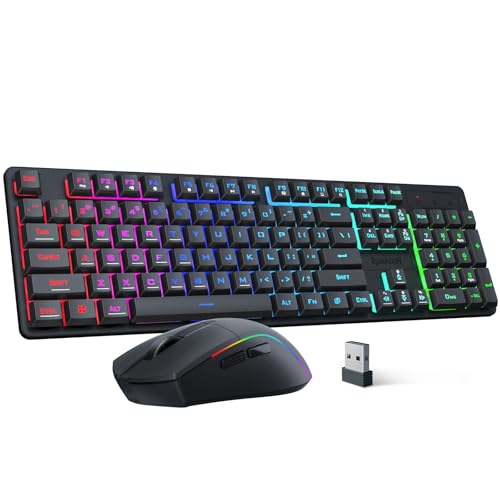
| Redragon S101 | A wired starter set with a wrist rest | RGB keyboard, 3,200 DPI mouse |
| Redragon Updated S107 | A wired set with a sharper mouse sensor | RGB keyboard, 10,000 DPI mouse |
| Redragon S107KS Wireless | A wireless set for a clean desk | 3-mode connection, 10,000 DPI mouse |
| Logitech MK270 | A quiet wireless set for mixed use | 2.4 GHz wireless, 8 multimedia keys |
How to Choose
Check the keyboard layout before the lighting
A combo keyboard lives or dies by its layout, so check the key count and spacing before admiring the backlight. A full-size layout with a number pad suits players who use it for work as well as games, while a compact layout saves desk space for big mouse movements. Anti-ghosting matters more than the lighting: 25-key anti-ghosting means your movement keys and ability keys register together during busy fights. Also check the key feel, because membrane keys with a soft, quiet press suit shared rooms better than loud clicky switches.
Match the mouse sensor to your games
The mouse in a budget combo is often the weaker half, so its sensor deserves a close look. A 3,200 DPI mouse handles casual play and everyday use fine, while a 10,000 DPI sensor with adjustable steps gives more room to tune sensitivity in shooters. Polling rate matters too: a 1,000 Hz rate keeps the cursor responsive, while a low rate can feel laggy even if the DPI number looks big. Check the mouse weight and shape as well, since a heavy or awkward mouse will annoy you long after the keyboard fades into the background.
Decide wired or wireless up front
Wired combos never need charging and usually cost less, which makes them the safe default for a fixed desk. Wireless combos keep the desk tidy and suit a living-room or laptop setup, but they add batteries or charging to the routine. A three-mode set that runs wired, over 2.4 GHz and over Bluetooth covers every situation, though it costs more than a simple wireless pair. Think about where the setup will live: a desk that never moves favours wired, while a shared table or a couch setup rewards wireless.
Look for what is actually in the box
Budget combos sometimes hide the extras that make them usable, so read the listing for what is included. A large mouse pad in the box saves a separate purchase, a detachable wrist rest helps long sessions, and a single receiver for both devices keeps USB ports free. Check whether batteries are included for wireless sets, because a combo that arrives without them cannot be used on day one. Also confirm the connection type: some sets need two USB ports, while others share one receiver for the keyboard and the mouse.
The 4 Best Options
Redragon S101

The S101 is the classic budget starter set, and it earns its place by including the things beginners actually need. The keyboard has RGB backlighting with several lighting modes, multimedia keys and a wrist rest, while the mouse runs up to 3,200 DPI with a red backlight to match. The 25-key anti-ghosting keeps movement and ability keys registering together, and the wired USB connection means the set works the moment it is plugged in. It is a straightforward, no-fuss way to get a gaming desk running.
Specs
- RGB backlit gaming keyboard with multimedia keys and wrist rest
- Gaming mouse up to 3,200 DPI with red backlight
- 25-key anti-ghosting on the keyboard
- Wired USB connection for keyboard and mouse
- 7 RGB lighting modes on the keyboard
Best for: First-time gamers who want a complete wired set that works straight out of the box.
Watch out for: The mouse sensor tops out at 3,200 DPI, so players who use very high sensitivity in shooters should check the listed DPI steps first.
Redragon Updated S107
The Updated S107 takes the same budget formula and upgrades the mouse, which is the part players notice most. Its mouse reaches 10,000 DPI with a 1,000 Hz polling rate and software for rebinding buttons, so sensitivity and macros can be tuned properly. The keyboard keeps the RGB backlighting and 25-key anti-ghosting, and the whole set stays wired and plug-and-play. For players who want a sharper sensor without stepping up to a separate mouse, this is the sensible middle ground.
Specs
- RGB gaming keyboard with 25-key anti-ghosting
- Gaming mouse up to 10,000 DPI with 1,000 Hz polling rate
- Programmable mouse buttons with included software
- Wired USB connection for keyboard and mouse
- RGB backlighting on keyboard and mouse
Best for: Budget players who want a better mouse sensor in the same affordable wired set.
Watch out for: The software for the mouse is Windows-only, so check your operating system before relying on custom button mapping.
Redragon S107KS Wireless
The S107KS is the wireless version of the S107 idea, and it suits desks where cables are the enemy. It connects over a wired cable, a 2.4 GHz receiver or Bluetooth, so it works with a desktop, a laptop or a tablet without swapping hardware. The mouse is light at 65 g and reaches 10,000 DPI, while the keyboard keeps RGB backlighting and 25-key anti-ghosting. That combination makes it the most flexible set here for players who move their gear between rooms or machines.
Specs
- 3-mode connection: wired, 2.4 GHz wireless and Bluetooth
- RGB backlit keyboard with 25-key anti-ghosting
- Gaming mouse up to 10,000 DPI, 65 g weight
- Programmable mouse buttons with included software
- Rechargeable battery in keyboard and mouse
Best for: Players who want a wireless set that still works wired when the battery runs low.
Watch out for: Both devices need charging, so keep the cable handy and check the listed battery life before a long gaming weekend.
Logitech MK270

The MK270 is not a flashy gaming set, and that is exactly why it belongs here. Its full-size keyboard has a spill-resistant design and eight multimedia keys, while the compact mouse is ambidextrous and comfortable for either hand. A single nano receiver connects both devices over 2.4 GHz, and the keyboard battery is rated for up to two years, so the set is almost maintenance-free. It suits players who game casually and also need a reliable keyboard for school or work.
Specs
- Full-size wireless keyboard with spill-resistant design
- 8 multimedia and shortcut keys
- Compact ambidextrous wireless mouse
- Single USB nano receiver for keyboard and mouse
- Keyboard battery life up to 2 years
Best for: Mixed-use desks where the same set handles games, homework and office work.
Watch out for: The MK270 has no backlighting and no gaming software, so players who want RGB effects or macro keys should pick one of the Redragon sets instead.
Which One Fits Your Situation
You are building your first gaming PC
Pick the Redragon S101. It is the cheapest complete set here, it includes a wrist rest, and the wired connection means there is nothing to charge or pair. It gets a new desk playing on day one with no extra purchases. The RGB keyboard and matching mouse also give the setup a proper gaming look from the start, which matters when the desk is the centrepiece of the room.
You play shooters on a budget
Pick the Redragon Updated S107. Its 10,000 DPI mouse and 1,000 Hz polling rate give you proper sensitivity control, while the keyboard keeps the anti-ghosting and RGB lighting. It is the best balance of sensor quality and cost in this guide. The wired connection also means there is no battery to worry about during ranked matches, so the set stays ready whenever you sit down to play.
Your desk is shared or you move your gear
Pick the Redragon S107KS Wireless. The three connection modes cover a desktop, a laptop and a tablet, and the light mouse suits long sessions. Just remember to charge both devices between uses. The rechargeable batteries keep running costs down over time, and the wired mode covers you on the rare evening you forget to plug in.
You need one set for games and work
Pick the Logitech MK270. Its quiet keys, spill-resistant design and two-year keyboard battery life make it the most practical set here, and the compact mouse works for either hand. The long battery life also means the set is almost maintenance-free, which suits a desk that is used for school, work and games in turn.
Common Mistakes
- Buying a combo for its RGB photos and discovering the mouse sensor is too weak for shooters.
- Picking a wireless set without checking whether batteries or a charging cable are included.
- Ignoring anti-ghosting and finding that movement keys stop registering during busy fights.
- Choosing a compact keyboard and then missing the number pad for everyday work.
- Assuming a “gaming” label means the set has macro software, when many budget combos have none.
Frequently Asked Questions
Are keyboard and mouse combos good for gaming?
Yes, a good combo covers the basics well: an anti-ghosting keyboard and a mouse with adjustable DPI handle most games. The trade-off is that neither half is as specialised as a standalone purchase, so competitive players often upgrade the mouse first. For casual and first-time gamers, a combo is a sensible starting point.
Is a wired or wireless combo better for gaming?
Wired combos are better for a fixed desk because they never need charging and usually respond faster. Wireless combos are better for shared desks and laptops because they keep the area tidy. A three-mode set that runs both ways gives you the choice without buying twice.
What does anti-ghosting mean on a combo keyboard?
Anti-ghosting means the keyboard registers several keys pressed at the same time, so movement keys and ability keys all work together. A 25-key anti-ghosting rating covers the keys gamers actually hold down at once. Without it, some key combinations can fail to register during busy moments.
Do budget combos work with consoles?
Some do, but it depends on the game and the console. Wired USB combos often work on PlayStation and Xbox for games that support keyboard and mouse, while wireless sets need a compatible receiver. Check the game you want to play first, since many console titles do not support keyboard and mouse at all.
Related guides
More from Amazon
Programs that pair well with the guide above. Offers and eligibility are set by Amazon and may change.
A free business account with business pricing and bulk-buying tools for work, shop or home office.
Create a business accountFree shipping on eligible items, Prime Video and more. Eligible new members can start with a free trial.
Start a Prime free trialAudiobooks and podcasts to listen to on the go. Eligible new members can start with a free trial.
Try Audible freeAd-free music streaming. Eligible new subscribers can start with a free trial.
Try Music Unlimited freeAs an Amazon Associate we earn from qualifying purchases.