A wired gaming mouse in the entry-level budget tier can still deliver a reliable optical sensor, programmable buttons, and a shape that holds up through long sessions, without the charging routine or connection worries that come with wireless models. This guide compares five wired picks from Logitech, Razer, SteelSeries, and Corsair, covering sensor range, weight, button layout, and grip fit, so players can match a mouse to their hand size, preferred games, and desk setup instead of buying on headline sensitivity numbers alone.


As an Amazon Associate, we earn from qualifying purchases.
Top 3 picks at a glance

Quick answer
For most players, the Logitech G502 HERO offers the most buttons and tuning in this budget tier, while the SteelSeries Rival 3 suits lighter, faster play. The Logitech G203 LIGHTSYNC fits smaller hands, the Razer DeathAdder Essential favors a larger ergonomic grip, and the Corsair Harpoon RGB Pro balances light weight with simple controls for everyday ranked and casual sessions alike.
How to choose
Start with shape and grip, because a mouse that fights your hand will feel wrong no matter how strong its sensor is. Palm grip players who rest their whole hand on the shell usually prefer a taller, sculpted ergonomic shape with room for every finger. Claw and fingertip players, who steer with more wrist and finger movement, often prefer a shorter, lighter, more symmetrical shell that is easier to lift and reposition. Hand size matters just as much: a long mouse can force smaller hands into an overextended grip, while a compact mouse can cramp larger hands during long sessions.
Next, look at sensor range in practical terms. Every pick in this guide uses an optical sensor with a sensitivity range that comfortably covers the low and medium settings most players actually use in shooters and strategy games. A higher maximum figure does not make aim better by itself. Consistent tracking, a stable polling connection over the cable, and a sensitivity setting you can repeat from match to match matter far more than chasing the largest number on a box.
Weight shapes how a mouse feels during fast swipes and slow, precise corrections. Lighter mice, roughly in the range covered by the Rival 3, G203 LIGHTSYNC, and Harpoon RGB Pro here, are easier to flick and stop quickly, which suits fast-paced shooters. A heavier, weight-adjustable mouse like the G502 HERO feels more planted and can suit players who make smaller, controlled movements or who play games where many abilities sit on mouse buttons.
Count buttons against the games you play. Six buttons cover the standard layout of left and right click, a clickable wheel, a sensitivity switch, and two side buttons, which is enough for most shooters and everyday use. Players in MOBA, MMO, and strategy titles may use the extra programmable buttons on the G502 HERO for abilities, items, or communication commands. Check the software as well: Logitech G HUB, Razer Synapse, SteelSeries software, and Corsair iCUE each handle button assignments, sensitivity stages, and lighting, and onboard memory on several of these models stores settings on the mouse itself.
Finally, consider the cable and your desk. A wired mouse needs enough cable slack to move freely without dragging against a monitor stand or desk edge, and a mouse bungee or simple cable routing can help. Rubber and braided cables behave differently, so think about how much drag you tolerate. Also confirm the connection is a standard USB plug that matches your PC or laptop, and think about whether you want lighting that can sync with the rest of your setup or a plainer look for a shared or work desk.
Who should skip
Skip this entire category if you strongly prefer the freedom of a wireless mouse and are willing to manage charging or batteries, because every pick here keeps a cable attached at all times. Skip it as well if you need a very large number of side buttons for complex MMO rotations beyond what the G502 HERO offers, if you want an ultralight esports shell well below the weights covered here, or if you need a left-handed ergonomic shape, since most of these designs are right-handed or symmetrical shells that will not suit every left-handed player. Players who want adjustable shape modules, swappable switches, or premium materials should also look at a higher tier instead, because the savings in this band come from simpler shells, fixed cables, and focused feature sets rather than modular extras.
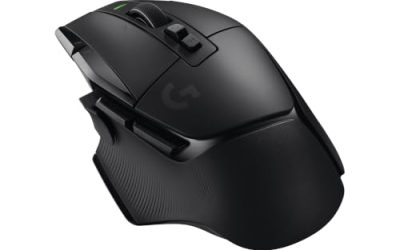
Logitech G502 HERO
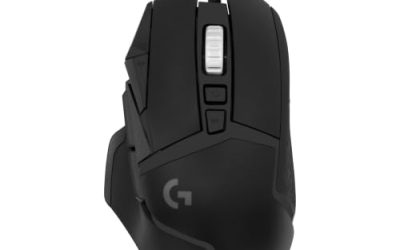
The Logitech G502 HERO is the most feature-dense option in this guide and the natural pick for players who want many controls within reach. Its HERO 25K optical sensor adjusts from low settings up to 25,600 DPI, giving a wide sensitivity range for everything from slow, careful aim in tactical shooters to fast cursor movement across a large monitor in strategy and everyday desktop work.
Eleven programmable buttons set it apart from the rest of this list. Alongside the main clicks and two side buttons, there are additional controls near the wheel and thumb area that can carry ability, item, or communication assignments in MOBA and MMO titles, or editing and productivity shortcuts outside games. The dual-mode scroll wheel can switch between a stepped, notched feel and a faster free-spinning mode, which is useful both for weapon switching and for moving through long documents or inventory screens.
An adjustable weight system adds further tuning. Five removable weights of 3.6 grams each can be placed inside the mouse to shift balance and bring the total feel closer to what a player prefers, starting from a base weight of about 121 grams. That makes the G502 HERO the heaviest pick here by a clear margin, which planted-feel fans may like and fast-flick players may not. LIGHTSYNC RGB lighting and onboard memory round out the package, storing profiles on the mouse through Logitech G HUB. Players with smaller hands or a fingertip grip should think carefully about its size and weight, but for palm grip players who want buttons and tuning above all else, it is the standout in this tier.
SteelSeries Rival 3
The SteelSeries Rival 3 takes the opposite approach to the G502 HERO: fewer extras, a much lighter body, and a focus on durability and straightforward tracking. It weighs 77 grams without its cable, making it the lightest pick in this guide, and its right-handed ergonomic shape is sized to suit claw and fingertip grips as well as a relaxed palm grip for small to medium hands.
Its TrueMove Core optical sensor, developed with PixArt, covers 100 to 8,500 CPI with tracking rated at 300 IPS and 35G acceleration. In practical terms, that range covers the sensitivity settings most shooter and MOBA players use, with headroom for higher settings on large or high-resolution displays. Six programmable buttons handle the standard layout, including two side buttons for push-to-talk, melee, or ability commands.
Durability is a headline feature here. The main switches are rated for 60 million clicks, and the shell uses a high-grade polymer intended to hold up to heavy daily use. Onboard memory saves polling rate, keybinds, and up to five CPI settings directly on the mouse, so preferences travel between computers without reinstalling software. Three independently controlled RGB zones add more lighting flexibility than a single-zone design. The rubber cable measures 1.8 metres, long enough for most desk layouts. For players who want a light, tough, no-fuss wired mouse for fast games, and who do not need a large button cluster, the Rival 3 makes a strong case as the value-focused pick of this group.
Logitech G203 LIGHTSYNC
The Logitech G203 LIGHTSYNC is the compact, symmetrical option in this guide, aimed at smaller hands and at players who prefer a simple shape they can move with fingertip or claw control. Its classic six-button layout keeps things familiar: main clicks, a clickable wheel, a sensitivity button behind the wheel, and two side buttons, all programmable through Logitech G HUB.
The gaming-grade optical sensor adjusts from 200 to 8,000 DPI, a range that covers the settings most players settle on for shooters, MOBA titles, and general use, with the top-mounted button making it easy to step between saved stages mid-match. A 1,000 Hz report rate over the wired connection keeps input timing consistent, which is exactly what a wired mouse should deliver at this level.
LIGHTSYNC RGB is the visual highlight. A lighting strip and logo can show a rainbow wave effect or be set through G HUB to match other Logitech gear, and onboard memory can store a profile on the mouse itself. The symmetrical shell will not give palm grip players the sculpted thumb and finger support of an ergonomic design, and larger hands may find it small for long sessions. Within its intended role, though, it is a tidy package: a light, simple, ambidextrous-style shape with dependable tracking and easy software. Players building a first gaming setup, or replacing an ageing office mouse with something game-ready in the same budget tier, should put the G203 LIGHTSYNC high on their shortlist.
Razer DeathAdder Essential
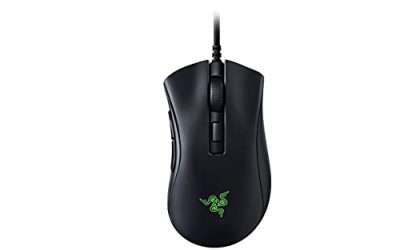
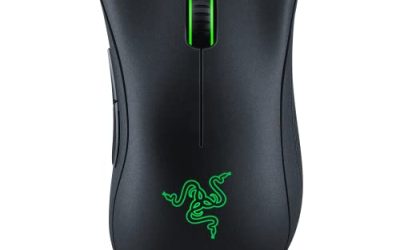
The Razer DeathAdder Essential builds everything around one of the most established ergonomic shapes in gaming. The right-handed shell is larger and more sculpted than the other picks here, with a curved back that fills the palm and rubber side grips that help keep hold during longer sessions. Palm grip players, and claw grip players with medium to large hands, are the natural audience.
Its optical sensor reaches 6,400 DPI, the lowest maximum figure in this guide, but that number deserves context: most players use settings well inside that range, so the practical difference in everyday play is small. What matters more is that tracking is optical and consistent, and that sensitivity can be adjusted to suit the game and display in use. Five programmable buttons cover the essentials, with two side buttons positioned for thumb use in shooters and action games.
Razer rates the mechanical switches for durability across extended use, and assignments are handled through Razer Synapse, which also manages sensitivity stages. There is no onboard weight tuning and no elaborate lighting system here; the design keeps a single logo light and a clean, classic look in black. That simplicity is the point. The DeathAdder Essential suits players who know they like a big, comfortable ergonomic shape and who would rather spend their budget on fit and a proven form than on extra buttons or lighting zones. Left-handed players and fingertip players with small hands should look at the symmetrical picks instead.
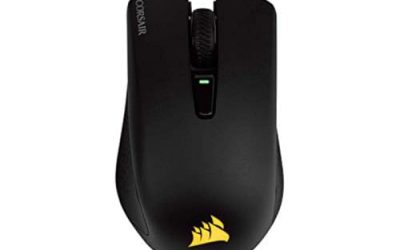
Corsair Harpoon RGB Pro
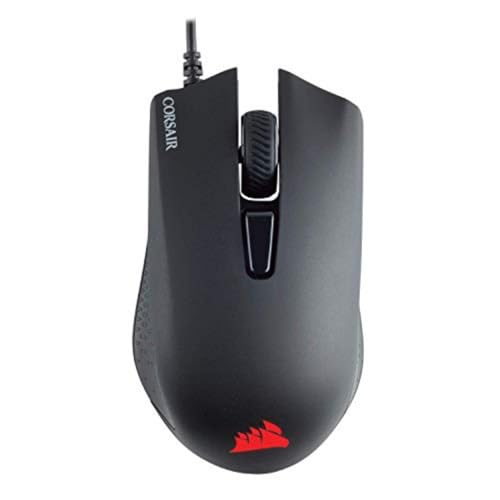
The Corsair Harpoon RGB Pro sits between the compact G203 LIGHTSYNC and the larger DeathAdder Essential in spirit: a small to medium contoured shape with rubber side grips, built for FPS and MOBA play, and light enough at 85 grams to move quickly without feeling flimsy. Its size makes it a sensible option for small to medium hands and for claw or fingertip grips, while the contoured sides still give palm grip players something to hold onto.
The optical sensor reaches 12,000 DPI, placing it in the middle of this group on headline range and comfortably beyond the settings most players use day to day. Six fully programmable buttons, including two side buttons, can carry remaps or macros through Corsair iCUE, which also controls the RGB backlighting and can sync lighting with other compatible Corsair gear in a setup. High-performance Omron switches are rated for more than 20 million clicks, giving the main buttons a clear durability target.
Setup is deliberately simple: plug the USB cable in and play, with iCUE adding deeper control only if wanted. The model number for this version is CH-9301111-NA, and the shell measures about 4.54 by 2.29 by 1.59 inches, confirming its compact footprint on crowded desks and in laptop bags. Players who want a light wired mouse with a grippy, contoured shell, mainstream software support, and no unnecessary extras will find the Harpoon RGB Pro easy to live with. Those who need many buttons or a large ergonomic shape should choose the G502 HERO or DeathAdder Essential instead.
FAQ
Is a wired mouse better than a wireless mouse for gaming?
A wired mouse offers a direct, consistent connection with no charging, no battery weight, and no wireless interference to manage, which is why every pick in this guide uses a cable. Modern wireless models can perform very well, but they sit outside this budget-focused wired category and add battery care to the routine.
What DPI setting should most players use?
Most players settle somewhere in the low to medium part of a sensor range and then adjust in small steps until tracking feels natural for their game and display size. Very high settings make the cursor hard to control precisely. Consistency matters more than the maximum figure, so pick one setting, keep it, and build familiarity around it.
Which grip style suits these mice best?
Palm grip players usually prefer the larger ergonomic shapes of the DeathAdder Essential and G502 HERO, while claw and fingertip players often prefer lighter, more compact shells like the Rival 3, G203 LIGHTSYNC, and Harpoon RGB Pro. Hand size decides the final fit, so compare shell length and weight against your current mouse before choosing.
Do these mice work without their software installed?
Yes, each mouse works as a standard USB mouse when plugged in, with its default sensitivity and button layout available right away. The companion software from Logitech, Razer, SteelSeries, or Corsair adds button remapping, sensitivity stages, and lighting control, and models with onboard memory can carry saved settings to another computer without the software running.
Final verdict
There is no single winner here, only a best match for each kind of player. Choose the Logitech G502 HERO for the most buttons, weight tuning, and profile control, especially for MOBA, MMO, and mixed gaming and work use. Choose the SteelSeries Rival 3 for the lightest body and strongest durability rating in fast-paced games. Choose the Logitech G203 LIGHTSYNC for a compact symmetrical shape and easy lighting for smaller hands. Choose the Razer DeathAdder Essential for a large, proven ergonomic fit, and the Corsair Harpoon RGB Pro for a light, grippy, compact all-rounder with simple setup. All five stay inside the same entry-level wired tier, so shape, weight, and button count should make the final decision.
Product and ASIN Reference
| Product | ASIN |
|---|---|
| Logitech G502 HERO | B07GBZ4Q68 |
| SteelSeries Rival 3 | B08176SM7C |
| Logitech G203 LIGHTSYNC | B07YN82X3B |
| Razer DeathAdder Essential | B094PS5RZQ |
| Corsair Harpoon RGB Pro | B07QVB51L9 |
Related guides
More from Amazon
Programs that pair well with the guide above. Offers and eligibility are set by Amazon and may change.
A free business account with business pricing and bulk-buying tools for work, shop or home office.
Create a business accountFree shipping on eligible items, Prime Video and more. Eligible new members can start with a free trial.
Start a Prime free trialAudiobooks and podcasts to listen to on the go. Eligible new members can start with a free trial.
Try Audible freeAd-free music streaming. Eligible new subscribers can start with a free trial.
Try Music Unlimited freeAs an Amazon Associate we earn from qualifying purchases.