Click noise is the part of a gaming setup nobody specs until it becomes a problem: a standard mouse switch carries through a bedroom door, across a dorm room and straight into a voice-chat microphone. Most silent mice, though, are office models with a fixed low sensitivity and no gaming features. The real decision is narrower than it first looks — finding a mouse that is sold as a gaming mouse and whose own listing commits to quiet clicks, instead of hoping a regular gaming mouse turns out to be hushed.

This roundup is for late-night players in shared houses, students in dorm rooms, parents who game after children are asleep, and anyone whose desk sits a wall away from somebody else’s bed. Every pick is presented as a gaming mouse on its Amazon product page, and that same page publishes silent or quiet click switches. The specs quoted are the ones printed on each listing, so the DPI steps, button counts and battery figures can be checked before ordering.
Top 3 picks at a glance

Quick Picks
As an Amazon Associate we earn from qualifying purchases.
| Product | Best for | Key spec from title |
|---|---|---|
| INPHIC Upgraded Silent Wireless Gaming Mouse | Late-night play across a PC, laptop and tablet | 12,800 DPI with tri-mode connection |
| T-DAGGER Wireless Gaming Mouse | Plug-and-play gaming in dorms and libraries | 7 silent buttons, 5 DPI levels |
| VersionTECH. Wireless Gaming Mouse | A first quiet mouse for a shared family PC | Silent click with 3-level DPI |
| VEGCOO C30 Wireless Gaming Mouse | Casual shooters with a one-press double click | Silent click with double-click key |
How to Choose
Check That the Quiet Claim Is in the Listing
Plenty of mice feel quieter than average without ever promising it, and plenty of office mice promise silence without offering a single gaming specification. For this keyword, only one document counts: the product’s own Amazon page. Look for the words silent click, quiet click or soundless in the title, the bullet points or the feature table, and check which buttons the claim covers. On almost every model here, only the left and right buttons are silenced. Side buttons, the scroll wheel click and the DPI key usually keep their normal mechanical sound, which matters if your game binds abilities to the thumb keys.
Match the DPI Steps to the Games You Play
A quiet switch does not slow a mouse down, but the sensor ladder behind it decides how the mouse behaves in game. Simple models offer three fixed steps, and the gaps can be wide: one pick here jumps from 1,200 to 3,600 DPI with nothing in between, which is fine for strategy and sandbox titles yet clumsy for low-sensitivity aiming. Finer ladders with five or six stops suit players who drop sensitivity for scoped shots and raise it for menus. Compare the actual steps printed on the listing, not just the headline maximum, because a big top number with coarse steps is hard to live with.
Decide How It Connects and How It Charges
Every pick in this roundup is wireless, yet the details differ in ways that shape daily use. A 2.4GHz receiver gives a simple, stable link for one computer and stores inside the mouse on some models. Bluetooth frees a USB port and suits laptops, while a tri-mode mouse can hold a desktop, a laptop and a tablet at once. Charging matters just as much: most of these mice recharge over USB, but one ships without the cable its wired mode needs, and quoted battery figures range from a 400mAh cell to standby claims of a month. Check what is in the box before the first flat battery.
Count the Buttons and Check the Shape
Quiet mice aimed at gamers still vary a lot in hardware. Button counts here run from six to seven, and the extras are not interchangeable: one model adds a dedicated double-click key for rapid repeated actions, another splits sensitivity into separate DPI-plus and DPI-minus keys, and a third hides its power and light controls underneath. Shape deserves the same attention. All four picks are right-handed shells, so left-handed players are excluded entirely, and published sizes differ enough that a mouse suiting a large palm grip can crowd a small hand. Match the listing’s dimensions and grip description to your own hand before ordering.
The 4 Best Options
INPHIC Upgraded Silent Wireless Gaming Mouse
The INPHIC is the pick for players who refuse to trade performance for quiet. Its listing pairs silent left and right switches with the strongest spec sheet in this roundup: six DPI presets topping out at 12,800, a driver-adjustable polling rate reaching 1,000Hz, and tri-mode connection across two Bluetooth channels, a 2.4GHz receiver and USB-C wired play. That makes it as useful for a multi-device desk as for a late-night session, and the sculpted right-handed shell with a matte anti-slip finish is shaped for the medium and large hands that palm and claw grips usually come with.
Specs
- Silent left and right click switches (listed feature: Soundless)
- 6 DPI presets: 800 / 1,600 / 2,400 / 3,200 / 4,800 / 12,800
- Tri-mode connection: Bluetooth 5.0 dual channel, 2.4GHz wireless, USB-C wired
- Polling rate adjustable from 125 to 1,000Hz in the Windows driver, with full button remapping
- 500mAh rechargeable battery with 3-level charge indicator; standby rated up to 1 month
- 6 buttons; right-handed ergonomic shell, matte finish, RGB light
Best for: Late-night players who also switch one mouse between a gaming PC, a laptop and a tablet.
Watch out for: No USB-C cable is included, so wired mode and charging need a USB-C data cable you already own; the configuration driver is Windows-only.
ASIN: B0FQCFSHPQ
T-DAGGER Wireless Gaming Mouse
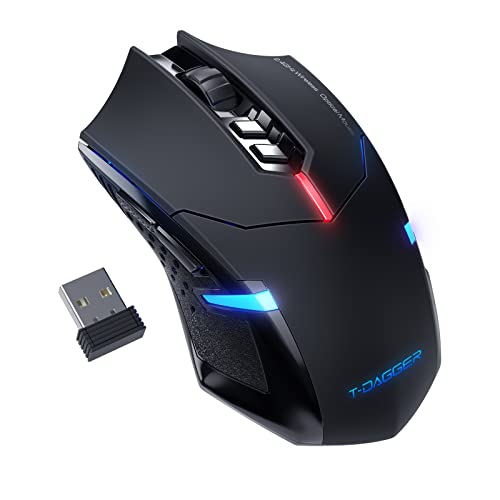
T-DAGGER builds its whole pitch around quiet: the listing title promises seven silent buttons, and the bullet points narrow that to the left and right clicks, which are built to make no noise and rated for up to five million presses. Around that quiet core sits a straightforward wireless gaming mouse — five DPI steps reaching 4,000, a 2.4GHz receiver that plugs in and works without drivers, and a blue LED that can be switched off from the bottom button. It suits students and shared-room players who want zero setup and a mouse that will not announce every click.
Specs
- Silent left and right click buttons, rated for up to 5 million clicks
- 5 DPI levels: 1,000 / 1,500 / 2,000 / 2,400 / 4,000
- 7 buttons, including separate DPI+ and DPI- keys
- 2.4GHz wireless via USB receiver, 33 ft range, plug and play
- Blue LED backlight; bottom button controls light and power
- Sleep mode after 8 minutes idle; press any button to wake
- Right-handed ergonomic shell; Windows and macOS 10.X support
Best for: Dorm and shared-room players who want plug-and-play quiet clicks for gaming and study.
Watch out for: The side buttons do not work on macOS, and only the left and right buttons are specified as silent.
ASIN: B09QS2GS2H
VersionTECH. Wireless Gaming Mouse
VersionTECH’s mouse is the simplest route to a quieter desk. Its Amazon feature list includes Soundless among the headline traits, the title promises silent click outright, and the hardware keeps everything basic: a 2.4GHz nano receiver, three sensitivity levels topping out at 1,600 DPI and six buttons under a right-handed shell with colorful LED lighting. A rechargeable lithium polymer battery and the charging cable are in the box, and the two-year warranty is longer than budget gaming mice usually carry. Treat it as a casual-play and family-PC mouse rather than a competitive tool, and its limits make sense.
Specs
- Soundless main buttons (listed under the mouse’s additional features)
- 2.4GHz wireless with USB nano receiver, 33 ft range
- 3 DPI levels, up to 1,600 DPI maximum sensitivity
- 6 buttons
- Rechargeable lithium polymer battery included; charging cable in the box
- Colorful LED lights; right-handed shell; 0.15 kg
- 2-year warranty
Best for: A first quiet gaming mouse for a younger player or a shared family computer.
Watch out for: The 1,600 DPI ceiling and three fixed steps suit casual games; fast competitive shooters will feel the limit quickly.
ASIN: B092QXSVSB
VEGCOO C30 Wireless Gaming Mouse
The C30 earns its place with one feature none of the other picks publish: a dedicated double-click key beside the main buttons, handy for rapid repeated actions in shooters and sandbox games. Silent click is printed in the listing title itself, and the spec block backs it with three DPI steps that climb higher than the other simple mice here, reaching 4,800. The 400mAh battery recharges over the included cable, the USB receiver keeps the connection wire-free up to the listed 10 metres, and colorful LED lighting covers the gaming look. It is a casual mouse, but a thoughtfully equipped one.
Specs
- Silent click main buttons (listing type: Silent Wireless Mouse)
- 3 DPI levels: 1,200 / 3,600 / 4,800
- 7 buttons, including a dedicated double-click key
- 2.4GHz wireless via USB receiver, 10 m range
- 400mAh rechargeable lithium battery; charging cable included
- Colorful LED lights
- In the box: mouse, charging cable, USB receiver, manual
Best for: Casual shooter and sandbox players who want one-press double clicks during late, quiet sessions.
Watch out for: The three DPI steps jump widely (1,200 straight to 3,600), and the listing prints two different dimension sets, so confirm the size on the page if your hands are small.
ASIN: B09PFM7Z4Z
Which One Fits Your Situation
You Play After the Rest of the House Falls Asleep
Start with the INPHIC. It is the only pick that pairs silent main switches with a spec sheet built for serious play — 12,800 DPI at the top step and a 1,000Hz polling option — so going quiet does not mean giving up responsiveness. Its battery indicator also warns you before a charge is due, which matters when fumbling for a cable at 1 a.m. would wake the very people you are trying not to disturb.
Your Desk Is a Dorm Room or Shared Study Space
The T-DAGGER fits rooms where other people work and sleep within earshot. It needs no software and no pairing routine — the receiver goes into a USB port and the mouse is ready — and its listed use cases read like a map of shared spaces: offices, libraries, dormitories and cafes. The five DPI steps cover coursework and gaming without menus, and the backlight can be switched off when the room wants darkness rather than a blue glow.
One Mouse Covers Gaming and Homework for a Younger Player
Choose the VersionTECH. Its three sensitivity levels and six buttons are easy for a newer player to understand, the rechargeable battery ends the hunt for spare cells, and the charging cable is actually in the box. The two-year warranty adds a safety net that budget mice rarely include. Because the clicks are listed as soundless, homework at the kitchen table and gaming in the evening can share one mouse without the soundtrack annoying everyone nearby.
You Split Time Between a Gaming PC and a Laptop
The INPHIC is the natural choice again, this time for its connection list rather than its sensor. Two Bluetooth channels plus the 2.4GHz receiver let one mouse live on a desktop, a work laptop and a tablet, switching with a mode change instead of a fresh pairing each time. Only the wired mode needs planning, because the USB-C data cable it requires is not in the box.
Common Mistakes
- Assuming every button is silent: on these listings the quiet promise covers the left and right clicks, while side buttons, wheel clicks and DPI keys may still sound.
- Buying a silent office mouse and expecting gaming hardware: office models publish low fixed DPI and no polling figures, which is why this roundup only used mice listed as gaming mice.
- Judging sensitivity by the headline maximum: three coarse steps can be harder to use than six finer ones, even when the top number is higher.
- Forgetting the box contents: one pick needs a USB-C data cable it does not include, so check what ships before the battery runs flat.
- Leaving the LED lighting on all night: the lights drain rechargeable cells faster and can glow in a dark shared room, and most of these mice let you switch them off.
Frequently Asked Questions
Are quiet gaming mice completely silent?
No. The silent or soundless wording on these pages covers only the left and right click switches. Scroll wheel clicks, side buttons and DPI keys are separate mechanisms and are not promised quiet. Expect a reduction in noise rather than silence, and check which buttons a listing names before relying on it in a library or a sleeping household.
Do silent switches make a mouse worse for gaming?
The switch changes the sound of the click; tracking quality comes from the sensor figures a listing publishes. The picks differ widely: the INPHIC lists six DPI presets to 12,800 and polling up to 1,000Hz in its driver, while the simplest models stop at three steps and 1,600 DPI. Judge the published ladder against your games instead of assuming quiet means slow.
Can one of these mice double as a work mouse?
Yes — that dual role is the point of the category. All four picks are plug and play, their listings cover Windows and macOS to varying degrees, and the quiet clicks that suit a sleeping household suit an office or a video call just as well. The INPHIC goes furthest, holding three devices across Bluetooth and its receiver, so a work laptop and a gaming PC can share one mouse.
Why are there so few quiet gaming mice to choose from?
Because the two requirements rarely meet on one page. Gaming brands compete on sensors, weight and polling rates and seldom publish anything about click noise, while mice advertising silent switches are usually office models with fixed low sensitivity. This roundup kept only products clearing both bars on their Amazon listings — sold as gaming mice, with silent or quiet click wording in print.
Related guides
More from Amazon
Programs that pair well with the guide above. Offers and eligibility are set by Amazon and may change.
A free business account with business pricing and bulk-buying tools for work, shop or home office.
Create a business accountFree shipping on eligible items, Prime Video and more. Eligible new members can start with a free trial.
Start a Prime free trialAudiobooks and podcasts to listen to on the go. Eligible new members can start with a free trial.
Try Audible freeAd-free music streaming. Eligible new subscribers can start with a free trial.
Try Music Unlimited freeAs an Amazon Associate we earn from qualifying purchases.