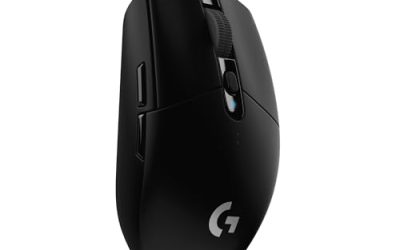
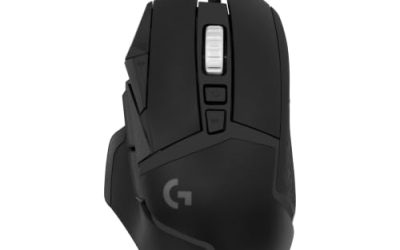
A quiet wireless gaming mouse solves a real clash: you want fast, accurate play, but loud clicks carry through a shared room and break focus late at night. The switch design decides how much sound each click makes, so a mouse built around optical or hybrid optical-mechanical switches keeps the desk calm without giving up sensor accuracy or a steady wireless link. Weight, battery life, and grip shape still matter, because a hushed mouse in the wrong shape tires a hand fast.


This guide is for gamers who play after others go to sleep, for people in shared rooms, dorms, and apartments, and for anyone who wants a calm desk without a cord in the way. Each mouse below was picked from the name and listed specs on its Amazon page, with attention to switch type, weight, battery life, and grip shape. Read the switch type first, then match the weight and shape to how you play.
Our Top Picks
- Razer DeathAdder V3 Pro Wireless Gaming Mouse1000 Hz5.01 x 2.65 x 1.69 inches0.1 poundsCheck on Amazon
 Logitech G Pro X Superlight 2 Lightspeed WirelessClassic1.57 x 2.5 x 4.92 inches0.1 poundsCheck on Amazon
 Razer Basilisk V3 Pro Customizable RGB Wireless GamingMouse5.12 x 2.96 x 1.67 inches0.24 poundsCheck on Amazon
Top 3 picks at a glance
Quick Picks
As an Amazon Associate we earn from qualifying purchases
| Product | Best for | Key spec from title |
|---|---|---|
| Logitech G502 X Lightspeed Wireless Gaming Mouse – LIGHTFORCE Hybrid Optical-Mechanical switches, Hero 25K Gaming Sensor, Compatible with PC – macOS/Windows – Black | Button-rich ergonomic play with hushed clicks | HERO 25K gaming sensor |
| Razer DeathAdder V3 Pro Gaming Mouse: 63g Ultra Lightweight – Focus Pro 30K Optical Sensor – Fast Optical Switches Gen-3 – HyperSpeed Wireless – 5 Programmable Buttons – 90 Hr Battery – Black | Light palm-grip play in fast shooters | Focus Pro 30K optical sensor |
| Logitech G PRO X Superlight 2 Wireless Gaming Mouse, 60g Pro-Grade with 5 Programmable Buttons, 44k DPI Sensor, 8kHz Report Rate, USB-C Charging for PC/Mac – Black | Competitive play at 60 grams | 44k DPI sensor with 8kHz report rate |
| Razer Viper V3 Pro Wireless Esports Gaming Mouse: Symmetrical – 54g Lightweight – 8K Polling – 35K DPI Optical Sensor – Gen3 Optical Switches – 8 Programmable Buttons – 95 Hr Battery – Black | Claw and fingertip aim at 54 grams | 35K DPI optical sensor with 8K polling |
| Razer Basilisk V3 Pro Wireless Gaming Mouse: HyperScroll Tilt Wheel – 30K DPI Optical Sensor – Gen-3 Optical Switches – 13-Zone Chroma RGB – 13 Programmable Controls – 3 Connection Modes – Black | Control-rich play with a tilt wheel | Focus Pro 30K optical sensor |
How to Choose
Switch type and click feel
Optical switches use a light beam instead of a metal contact, so each click feels crisp with a short, clean actuation and no snapping contact. Hybrid optical-mechanical switches pair an optical signal with a mechanical feel, which is the design behind Logitech LIGHTFORCE switches. Look for the switch name in the listing title: Gen-3 optical switches on Razer mice and LIGHTFORCE hybrid switches on Logitech mice. A mouse that only lists plain mechanical switches gives no reason to expect hushed clicks. A light actuation with short travel suits fast repeated clicks, while a firmer click suits deliberate single shots.
Wireless link and polling rate
A 2.4 GHz receiver link keeps the connection steady when the room holds many wireless devices, while Bluetooth works for casual play but adds delay that fast games punish. Polling rate shapes how often the mouse reports its position: 1000 Hz feels smooth for most play, while 8000 Hz polling sharpens motion and drains the battery sooner. Check whether the listing includes a dongle or adapter in the box, and whether the mouse charges over USB-C while you keep playing. A receiver kept close to the mouse, away from metal objects, holds the steadiest link.
Weight and shape
Weight changes how the mouse moves across a pad: a 54 to 63 gram mouse flicks fast and lifts with little effort, while a heavier body near 100 grams feels planted and calm for slow, careful aim. Shape matters as much as weight: a symmetrical shell suits either hand and claw or fingertip grips, while a curved ergonomic shell fills a palm grip. Match the shell to your grip first, then check the listed weight, because a light mouse in the wrong shape still tires a hand over a long evening.
Battery life and charging
Battery life decides how often the mouse needs a cable: the mice in this guide list 90 to 140 hours of play, so a long-life mouse can run for weeks of evening sessions before a recharge. USB-C charging is the modern standard, and a mouse that keeps working while plugged in never forces a break mid-match. Check whether the listed battery figure assumes the standard polling rate, since an 8000 Hz mode drains the cell far sooner than the headline figure suggests. A quick top-up between sessions keeps a short-life mouse ready too.
The 5 Best Options
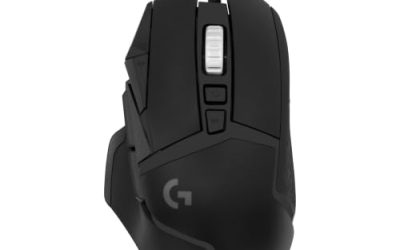
Logitech G502 X Lightspeed Wireless Gaming Mouse – LIGHTFORCE Hybrid Optical-Mechanical switches, Hero 25K Gaming Sensor, Compatible with PC – macOS/Windows – Black
The G502 X Lightspeed suits gamers who want many buttons and a familiar ergonomic shell with hushed LIGHTFORCE hybrid optical-mechanical switches. Its HERO 25K sensor tracks fine aim with no smoothing, and the reversible DPI-shift button sits where a thumb can reach it mid-match. Thirteen programmable controls cover ability keys, weapon swaps, and macros, while the dual-mode scroll wheel flips between ratchet steps and free spin. At 102 grams it feels planted rather than floaty, and PowerPlay support keeps it charged on a compatible pad.
Specs
- LIGHTFORCE hybrid optical-mechanical switches
- HERO 25K gaming sensor, 100 to 25,600 DPI
- Up to 140 hours of battery life
- 13 programmable controls
- USB-C charging port
- Weight: 102 g
- PowerPlay wireless charging compatible
- 5 onboard memory profiles
- PTFE feet
Best for: Gamers who want a button-rich ergonomic mouse with hushed clicks for long evening sessions.
Watch out for: The 102 gram body feels heavy next to light mice, and the wide shell suits medium to large hands more than small ones.
ASIN: B092CRH1RX
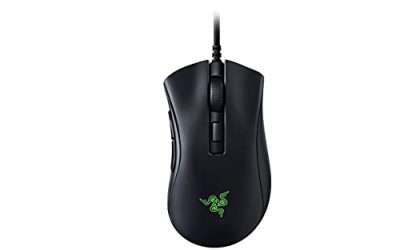
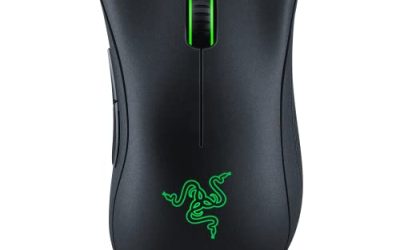
Razer DeathAdder V3 Pro Gaming Mouse: 63g Ultra Lightweight – Focus Pro 30K Optical Sensor – Fast Optical Switches Gen-3 – HyperSpeed Wireless – 5 Programmable Buttons – 90 Hr Battery – Black
The DeathAdder V3 Pro is the pick for palm-grip players who want a light ergonomic shell with Gen-3 optical switches. At 63 grams it moves with little effort, and the Focus Pro 30K optical sensor holds steady aim across fast flicks and slow tracking. HyperSpeed wireless keeps the link firm in a crowded room, and five programmable buttons cover the essentials without clutter. A 90-hour battery runs through many evenings before a USB-C recharge, and the smooth shell wipes clean with little fuss.
Specs
- Gen-3 optical switches
- Focus Pro 30K optical sensor
- 63 g lightweight design
- HyperSpeed wireless
- 5 programmable buttons
- Up to 90 hours of battery life
- USB-C charging
- Black
Best for: Palm-grip players who want a light ergonomic mouse with optical switches for fast shooters.
Watch out for: The tall ergonomic shell suits medium to large hands, and small hands may find the reach to the side buttons long.
ASIN: B0B6XZLNHQ
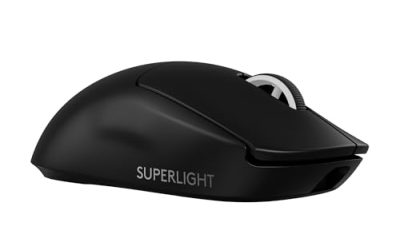
Logitech G PRO X Superlight 2 Wireless Gaming Mouse, 60g Pro-Grade with 5 Programmable Buttons, 44k DPI Sensor, 8kHz Report Rate, USB-C Charging for PC/Mac – Black
The PRO X Superlight 2 fits competitive players who want a light mouse with no extra bulk. At 60 grams it lifts and flicks with almost no drag, and LIGHTFORCE hybrid switches give a crisp click with a short actuation. The HERO 2 sensor reaches 44,000 DPI with an 8kHz report rate, so motion stays smooth at high sensitivity. Five programmable buttons keep the layout clean, and USB-C charging tops the cell between sessions. Grip tape in the box adds hold for damp palms.
Specs
- LIGHTFORCE hybrid switches
- HERO 2 gaming sensor, up to 44,000 DPI
- 8kHz report rate
- 60 g pro-grade design
- 5 programmable buttons
- USB-C charging
- LIGHTSPEED wireless
- PC and Mac compatible
Best for: Competitive players who want a 60 gram mouse with crisp hybrid switches and a clean button layout.
Watch out for: The plain symmetrical shell gives little palm support, and the 8kHz mode drains the battery sooner than the standard mode.
ASIN: B09NBWL8J5
Razer Viper V3 Pro Wireless Esports Gaming Mouse: Symmetrical – 54g Lightweight – 8K Polling – 35K DPI Optical Sensor – Gen3 Optical Switches – 8 Programmable Buttons – 95 Hr Battery – Black
The Viper V3 Pro suits players who want a very light body in this guide with a symmetrical shell that fits claw and fingertip grips. At 54 grams it changes direction with almost no effort, and Gen-3 optical switches give a short, clean click with no debounce delay. The Focus Pro 35K optical sensor pairs with 8K polling through the included HyperPolling wireless dongle, so tracking stays smooth at high sensitivity. Eight programmable buttons and a 95-hour battery cover long ranked nights without a recharge.
Specs
- Gen-3 optical switches
- Focus Pro 35K optical sensor
- 54 g lightweight design
- 8K polling with HyperPolling wireless dongle
- 8 programmable buttons
- Up to 95 hours of battery life
- Symmetrical shape
- USB Type A to USB Type C cable included
Best for: Claw and fingertip players who want a 54 gram symmetrical mouse with optical switches for fast aim.
Watch out for: The low, flat shell gives little palm support, and the small body may feel cramped for very large hands.
ASIN: B0CW25XR5R
Razer Basilisk V3 Pro Wireless Gaming Mouse: HyperScroll Tilt Wheel – 30K DPI Optical Sensor – Gen-3 Optical Switches – 13-Zone Chroma RGB – 13 Programmable Controls – 3 Connection Modes – Black
The Basilisk V3 Pro fits players who want many controls and a full ergonomic shell with Gen-3 optical switches. Thirteen programmable controls cover abilities, items, and macros, while the HyperScroll tilt wheel flips between tactile steps and free spin for long pages and fast weapon swaps. The Focus Pro 30K optical sensor holds steady aim, and three connection modes — HyperSpeed wireless, Bluetooth, and wired USB-C — cover a desk with several devices. A 90-hour battery and 13-zone Chroma RGB lighting round out a mouse built for long sessions.
Specs
- Gen-3 optical switches
- Focus Pro 30K optical sensor
- HyperScroll tilt wheel
- 13-zone Chroma RGB lighting
- 13 programmable controls
- 3 connection modes: HyperSpeed wireless, Bluetooth, wired USB-C
- Up to 90 hours of battery life
- Black
Best for: Players who want a control-rich ergonomic mouse with a tilt wheel and optical switches.
Watch out for: The full shell and many controls add bulk next to the lighter picks here, and the wide body suits medium to large hands more than small ones.
ASIN: B0B6Y3XYFG
Which One Fits Your Situation
You play late while others sleep
Pick a mouse with optical or hybrid optical-mechanical switches and a long battery, so clicks stay hushed and the mouse never needs a cable mid-match. The DeathAdder V3 Pro and Viper V3 Pro keep the body light and the clicks short, while the G502 X adds buttons for games with many abilities. Keep the polling at the standard rate to stretch battery life through the night.
You share a desk with work and play
Pick a mouse that moves between games and daily tasks without a cord swap: the Basilisk V3 Pro covers three connection modes and a tilt wheel for long pages, while the G502 X covers many buttons and a dual-mode scroll wheel. A firm ergonomic shell helps during long days, and USB-C charging keeps the setup simple with one cable.
You want a light mouse for fast aim
Pick the Viper V3 Pro at 54 grams or the PRO X Superlight 2 at 60 grams, both with optical or hybrid switches and high polling for smooth tracking. A symmetrical shell suits claw and fingertip grips, so check your grip before you settle on a shape. Skip the heavier ergonomic shells here if every gram matters to your flick shots.
Common Mistakes
- Buying a mouse for its sensor alone and ignoring the switch type, then finding the clicks loud in a shared room.
- Picking a heavy ergonomic shell for fast flick shots when a light symmetrical shell would move with less effort.
- Running 8000 Hz polling all day and wondering why the battery drains long before the listed figure.
- Choosing a shape that fights your grip, then blaming the sensor for aim that feels off.
- Forgetting to check the connection modes and dongle in the box, then finding no receiver for a desk with several devices.
Frequently Asked Questions
Are optical switches quieter than standard mechanical switches?
Optical switches replace the metal contact with a light beam, so the click comes from a short, clean actuation rather than a snapping contact. Makers such as Razer and Logitech build their quiet wireless gaming mice around Gen-3 optical switches and LIGHTFORCE hybrid switches. The feel stays crisp, while the sharp snap of an older mechanical switch is gone.
Does wireless play add delay compared with a cord?
A 2.4 GHz receiver link from Razer HyperSpeed or Logitech LIGHTSPEED is built for gaming, with polling up to 8000 Hz on the top mice here. Bluetooth adds more delay and suits casual play rather than ranked matches. Keep the receiver close to the mouse and away from metal objects for the steadiest link.
How long should the battery last on a quiet wireless gaming mouse?
The mice in this guide list 90 to 140 hours of play on a charge, which covers many evenings before a USB-C recharge. High polling modes drain the cell sooner, so the listed figure assumes standard settings. A mouse that works while plugged in never forces a break, and a quick top-up between sessions keeps it ready.
What grip works with a light symmetrical mouse?
A light symmetrical shell suits claw and fingertip grips, where the fingers steer and the palm floats above the shell. Palm-grip players often prefer a taller ergonomic shell such as the DeathAdder V3 Pro or Basilisk V3 Pro, which fills the hand. If your palm rests flat, measure your hand against the listed length before you settle.
Related guides
More from Amazon
Programs that pair well with the guide above. Offers and eligibility are set by Amazon and may change.
A free business account with business pricing and bulk-buying tools for work, shop or home office.
Create a business accountFree shipping on eligible items, Prime Video and more. Eligible new members can start with a free trial.
Start a Prime free trialAudiobooks and podcasts to listen to on the go. Eligible new members can start with a free trial.
Try Audible freeAd-free music streaming. Eligible new subscribers can start with a free trial.
Try Music Unlimited freeAs an Amazon Associate we earn from qualifying purchases.