Redragon sells a lot of mice that look alike at first glance, and the model numbers do little to explain the differences. The real decision is not which one carries the biggest DPI number, but which shape, button layout, and connection type match the games you actually play. A mouse built for MMO ability bars can feel clumsy in a fast shooter, while a light wired mouse can frustrate a player who needs a dozen thumb keys within reach. Getting that match right matters more than any single specification, because your hand touches the mouse for every minute of every session.
This guide is for MMO and MOBA players who want extra buttons, for shooter players who want a straightforward wired mouse, and for anyone building a first gaming setup around a Redragon mouse. The three mice below were chosen from their names and specifications on their Amazon listings, covering a wireless MMO specialist, a higher-DPI wireless mouse, and a wired all-rounder.
Top 3 picks at a glance

Quick Picks
As an Amazon Associate we earn from qualifying purchases.
| Product | Best for | Key spec from title |
|---|---|---|
| Redragon M913 Impact Elite Wireless Gaming Mouse | MMO players who want a wireless mouse with a full thumb grid | Up to 16,000 DPI |
| Redragon M811 PRO Wireless MMO Gaming Mouse | Wireless MMO play with the widest sensitivity range | Up to 26,000 DPI |
| Redragon M910-K Ranger Gaming Mouse | First gaming mouse buyers who want a simple wired mouse | Up to 8,000 DPI |
How to Choose
Sensor and DPI Range
The sensor sets how faithfully the mouse turns hand movement into cursor movement, and the DPI ceiling is only part of the story. A sensor that tracks cleanly at the sensitivity you use matters far more than a headline number you will never select, so look for a stated DPI range with steps you can switch mid-game. Redragon lists the M910-K up to 8,000 DPI, the M913 up to 16,000 DPI, and the M811 PRO up to 26,000 DPI, which gives you a clear ladder. Most players settle somewhere between 800 and 3,200 DPI and change it with a button, so check for on-the-fly DPI switching and steps that feel useful rather than decorative.
Button Count and Layout
Extra buttons only help if your thumb can find them without looking down, so layout matters as much as count. MMO players usually want a grid of side buttons they can learn by touch, with each key mapped to an ability, a potion, or a push-to-talk channel. The M913 puts 12 side buttons under the thumb inside a 16-button total, while the M811 PRO uses 10 side macro keys within 15 programmable buttons, and the M910-K keeps things simpler with 9 programmable buttons and a dedicated fire button. Before you buy, picture your most-used abilities and count them; if the number is higher than the side panel holds, you will still be reaching for the keyboard.
Wired or Wireless, and Battery Life
A wired mouse never needs charging and never drops its connection mid-match, which is why many competitive players prefer a cable. Wireless removes the cable from the desk, but it adds a battery to manage, so the battery claim deserves a close read. Redragon lists the M913 at 45 hours and the M811 PRO at up to 80 hours with RGB lighting off, and both figures assume lighting off or an economy mode, so real use with lighting on runs shorter. Check whether the mouse keeps working while it charges over USB-C, and whether a wireless receiver is in the box, because a wireless mouse that dies mid-match is worse than a wired one.
Shape, Weight, and Software
Shape decides comfort over a long session more than any specification. Redragon MMO mice tend toward large, right-handed ergonomic bodies with a thumb rest, which suits palm and claw grips but can overwhelm smaller hands, while the lighter wired models feel quicker to move across the pad. Weight matters here too: the M811 PRO is a substantial mouse, so players who flick aim in shooters should check the listed weight and the grip shape before ordering. Finally, confirm the software situation, because macros, lighting, and DPI steps are set in Redragon software that is built mainly for Windows, and a mouse bought for a Mac or Linux setup may run with basic functions only.
The 3 Best Options
Redragon M913 Impact Elite Wireless Gaming Mouse
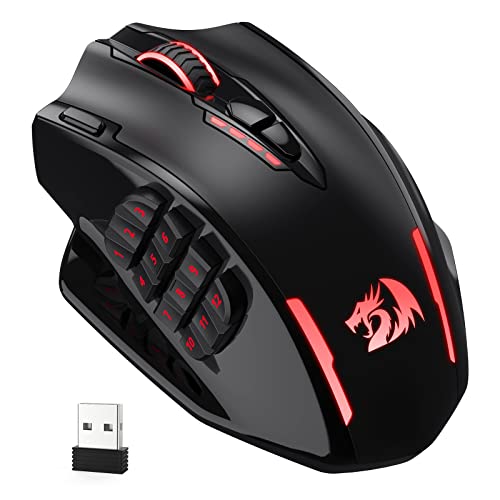
The M913 Impact Elite is the wireless MMO mouse to start with if your games live on the side buttons. Its 12-button thumb grid covers a full action bar, and the extra programmable buttons give you room for push-to-talk, mounts, or consumables without touching the keyboard. Because it runs wired or wireless, you can play cable-free most of the time and plug in over USB-C when the battery runs low, which removes the usual worry about a wireless mouse dying mid-raid. The ergonomic right-handed shape and RGB lighting round out a mouse built for long sessions in World of Warcraft, Final Fantasy XIV, and similar games.
Specs
- Up to 16,000 DPI optical sensor
- 16 programmable buttons, including 12 side buttons
- Wired and wireless modes with 2.4GHz wireless and USB-C wired connection
- 45-hour battery life
- RGB backlighting
- Pro optical sensor
Best for: MMO players who want a wireless mouse with a full 12-button thumb grid.
Watch out for: Check the listing title and images before ordering, because Redragon sells several similar Impact models, and confirm the 2.4GHz receiver is included in the box.
Redragon M811 PRO Wireless MMO Gaming Mouse
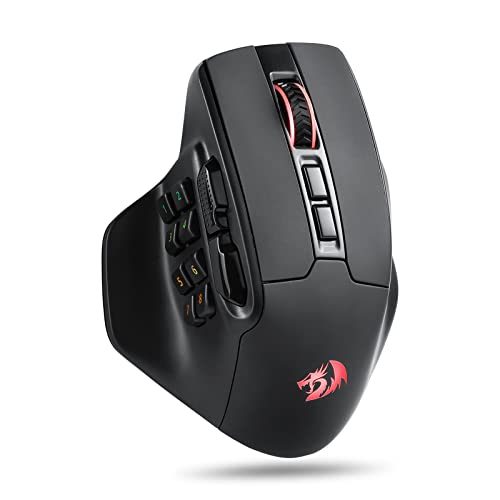
The M811 PRO takes the same MMO idea and pushes the sensor further, with a ceiling of 26,000 DPI and five switchable levels running from 1,000 to the maximum. Its 10 side macro keys sit in a two-plus-eight arrangement rather than a straight grid, which some players find easier to learn by touch, and the 15 programmable buttons cover macros, media controls, and DPI switching. Tri-mode connectivity covers 2.4GHz wireless, Bluetooth, and wired USB-C, and the 1,000 mAh battery is listed at up to 80 hours with RGB lighting off. It suits players who want wireless freedom and a very wide sensitivity range in one mouse.
Specs
- Up to 26,000 DPI, with 5 redefinable DPI levels (1,000 / 2,000 / 4,000 / 8,000 / 26,000)
- PAW3395 optical sensor
- 15 programmable buttons, including 10 side macro keys
- 2.4GHz wireless, Bluetooth, and USB-C wired connectivity
- 1,000 mAh battery, up to 80 hours with RGB lighting off
- RGB backlighting with 5 backlit modes
- Ergonomic natural grip build
- Software supports DIY keybinds
Best for: Players who want wireless MMO play with the widest DPI range and tri-mode connectivity.
Watch out for: Check the listed size and grip shape against your hand before ordering, since this is a large, substantial MMO mouse, and confirm the software supports your operating system.
Redragon M910-K Ranger Gaming Mouse
The M910-K Ranger is the straightforward pick of the three, and that is its strength. It is a wired mouse, so there is no battery to charge and no wireless receiver to lose, and its 9 programmable buttons plus a dedicated fire button cover macros and rapid clicking without the learning curve of a full thumb grid. The adjustable sensor tops out at 8,000 DPI, which is more than enough for most players, and the RGB backlighting and DIY keybind software give you room to personalise it. It fits first-time gaming mouse buyers, shooter players, and anyone who wants a dependable wired mouse.
Specs
- Up to 8,000 DPI adjustable sensor
- 9 programmable macro buttons
- Dedicated fire button
- RGB backlit design
- Wired USB connection
- Software supports DIY keybinds
Best for: First-time gaming mouse buyers who want a simple, dependable wired mouse.
Watch out for: Confirm you are ordering the wired M910-K and not the wireless M910-KS, since the two models share a name and look alike, and check the cable length suits your desk layout.
Which One Fits Your Situation
You Play MMOs Most Nights
If your evenings are spent raiding or running dungeons, the Redragon M913 Impact Elite Wireless Gaming Mouse fits best. Its 12-button thumb grid maps neatly onto a full action bar, so abilities, potions, and interrupts sit under one thumb instead of spread across the keyboard. The wireless mode keeps the desk clear during long sessions, and the wired USB-C fallback means a low battery never ends a raid early.
You Want Wireless Play and the Widest DPI Range
If you want to cut the cable and still keep the highest sensitivity ceiling in this guide, pick the Redragon M811 PRO Wireless MMO Gaming Mouse. Its 26,000 DPI maximum and five switchable levels cover everything from precise low-sensitivity aiming to fast sweeps across a wide monitor. Tri-mode connectivity adds Bluetooth for a laptop or second machine, and the 10 side macro keys keep your most-used commands close at hand.
You Want a First Gaming Mouse That Just Works
If this is your first gaming mouse, or you mainly play shooters and want nothing to manage, the Redragon M910-K Ranger Gaming Mouse is the right choice. There is no battery to charge and no receiver to pair, so it works the moment you plug it in. Nine programmable buttons and a fire button add useful control without the learning curve of a full MMO thumb grid, and the 8,000 DPI sensor covers everyday play.
You Play a Mix of Genres on One Mouse
If your library jumps between MMOs, shooters, strategy games, and everyday work, the Redragon M811 PRO Wireless MMO Gaming Mouse covers the most ground. Its five DPI levels let you drop sensitivity for careful aiming and raise it for fast camera work, while the programmable buttons can hold game macros one day and productivity shortcuts the next. Tri-mode connectivity means the same mouse can move between a desktop and a laptop without a second peripheral.
Common Mistakes
- Choosing by the biggest DPI number alone, instead of checking whether the sensor tracks cleanly at the sensitivity you actually use.
- Picking a 12-button thumb grid without checking whether your thumb can reach every key comfortably, since a grid you cannot learn by touch slows you down.
- Assuming every Redragon mouse is wireless: the M910-K is wired only, while the M910-KS is the wireless model with a near-identical name.
- Buying before checking software and operating system support, because macros, lighting, and DPI steps are set in Redragon software built mainly for Windows.
- Ignoring size and weight for your hand, since Redragon MMO mice are large, right-handed, and substantial, and a mouse that strains your grip will show up within the first week.
Frequently Asked Questions
Are Redragon gaming mice good for FPS games?
Redragon mice can work well for shooters, but the right model depends on the game. The wired M910-K is the simplest fit, with a direct connection, a fire button, and no battery to manage during a match. The larger MMO models carry extra buttons and weight that suit ability-heavy games better than fast flick aiming, so shooter players should weigh the shape and size first.
Do Redragon gaming mice work on Mac?
The mice work as basic pointing devices on Mac, so movement and clicks function when you plug one in or pair it. Full control over macros, lighting, and DPI steps depends on Redragon software, which is built mainly for Windows and may not support every feature on Mac. Check the software download page for your exact model before buying for a Mac setup.
Should I buy a wired or wireless Redragon mouse?
Buy wired if you want the simplest setup with nothing to charge, which makes the M910-K a strong default. Buy wireless if a clear desk matters to you and you are willing to charge the mouse, and pick a model that keeps working over USB-C while it charges, like the M913 or the M811 PRO. Either way, confirm the connection type on the listing before ordering.
How many buttons do I need on a gaming mouse?
Most players need between 7 and 9 buttons, which covers the standard clicks, side buttons for forward and back, and a DPI switch. MMO and MOBA players benefit from more, with 12 side buttons covering a full action bar on the M913. Count the abilities you press constantly, then choose a layout whose side panel matches that number rather than buying the highest button count available.
Related guides
More from Amazon
Programs that pair well with the guide above. Offers and eligibility are set by Amazon and may change.
A free business account with business pricing and bulk-buying tools for work, shop or home office.
Create a business accountFree shipping on eligible items, Prime Video and more. Eligible new members can start with a free trial.
Start a Prime free trialAudiobooks and podcasts to listen to on the go. Eligible new members can start with a free trial.
Try Audible freeAd-free music streaming. Eligible new subscribers can start with a free trial.
Try Music Unlimited freeAs an Amazon Associate we earn from qualifying purchases.