Our Short List of 3

- Capacity: 4TB
- Recording technology: CMR
- Interface: SATA 6 Gb/s, 3.5-inch form factor
- Rotational speed: 5400 RPM class

- Capacity: 4TB
- Recording technology: CMR
- Interface: SATA 6 Gb/s, 3.5-inch form factor
- Rotational speed: 5400 RPM
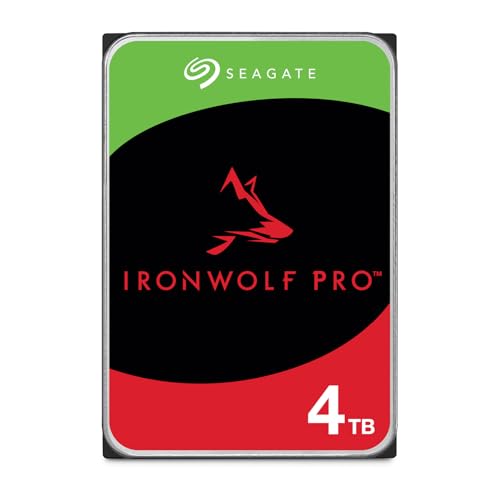
- Capacity: 4TB
- Recording technology: CMR
- Interface: SATA 6 Gb/s, 3.5-inch form factor
- Rotational speed: 7200 RPM
All 5 Picks at a Glance
| Product | Specs | Action |
|---|---|---|
| 1. WD Red Plus 4TB (WD40EFPX) — Best for Most NAS Builds |
| Check price on Amazon |
| 2. Seagate IronWolf 4TB (ST4000VN006) — Best With Health Monitoring |
| Check price on Amazon |
| 3. Seagate IronWolf Pro 4TB (ST4000NT001) — Best for Busy Multi-User NAS |
| Check price on Amazon |
 4. WD Red Pro 8TB (WD8005FFBX) — Best for Large Arrays |
| Check price on Amazon |
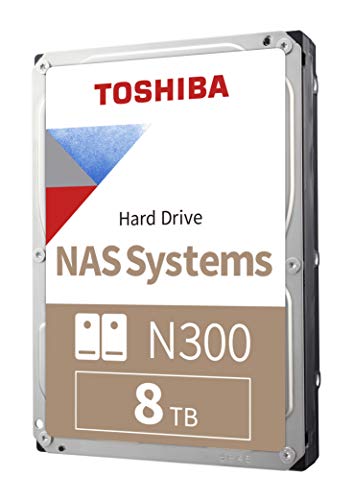 5. Toshiba N300 8TB (HDWG780XZSTA) — Best 8TB Alternative |
| Check price on Amazon |
A network attached storage box works its drives very differently from a desktop PC. A NAS runs around the clock, serves several users at once, and usually groups its drives into a RAID array where every disk has to behave predictably during rebuilds. That is why the best hard drives for nas storage are not ordinary desktop drives. They are NAS-rated models with firmware tuned for RAID, rotational vibration sensors for multi-bay enclosures, higher workload ratings, and, most importantly, conventional magnetic recording (CMR) instead of shingled magnetic recording (SMR), which can slow RAID rebuilds dramatically.
As an Amazon Associate we earn from qualifying purchases.
This guide compares five CMR hard drives built specifically for NAS duty, covering home media servers, small office file sharing, and larger multi-bay systems. Each pick below is a 3.5-inch SATA drive from a dedicated NAS product line: WD Red Plus, WD Red Pro, Seagate IronWolf, Seagate IronWolf Pro, and Toshiba N300. The sections after the product summaries explain how to match capacity, workload rating, and spindle speed to your enclosure, and answer the questions buyers ask most often before filling a NAS with drives.
Our Top Picks
Top 3 picks at a glance
Quick Picks
- Best for most home and small office NAS systems: WD Red Plus 4TB (WD40EFPX). A quiet 5400 RPM CMR drive rated for systems with up to 8 bays, with NASware firmware and a workload rating of up to 180 TB per year.
- Best alternative for up to 8 bays: Seagate IronWolf 4TB (ST4000VN006). Another 5400 RPM CMR option, adding IronWolf Health Management support and included Rescue data recovery services.
- Best for busy multi-user systems at 4TB: Seagate IronWolf Pro 4TB (ST4000NT001). A faster 7200 RPM CMR drive with a much higher workload ceiling and a longer warranty for commercial and enterprise RAID storage.
- Best for large arrays and heavy workloads: WD Red Pro 8TB (WD8005FFBX). A 7200 RPM CMR drive designed for systems with up to 24 bays and a workload rating of up to 550 TB per year.
- Best 8TB value alternative: Toshiba N300 8TB (HDWG780XZSTA). A 7200 RPM CMR drive with a large 512 MB cache, rotational vibration sensors, and a 24/7 design for systems with up to 8 bays.
The Best Hard Drives for NAS Storage
1. WD Red Plus 4TB (WD40EFPX) — Best for Most NAS Builds
- Capacity: 4TB
- Recording technology: CMR
- Interface: SATA 6 Gb/s, 3.5-inch form factor
- Rotational speed: 5400 RPM class
The WD Red Plus line is Western Digital’s mainstream NAS range, and the 4TB WD40EFPX is the natural starting point for a two-bay to eight-bay home or small office system. It uses CMR recording, which keeps write performance consistent during long RAID rebuilds and heavy copy jobs, and it spins at a 5400 RPM performance class that favors quieter operation and lower power draw over raw transfer speed. For a NAS that mostly stores media, backups, and shared documents, that trade-off usually makes sense, because network speed, not the drive, is the bottleneck for most single-user transfers.
WD’s NASware firmware is the other half of the package. It is designed to improve compatibility with NAS enclosures, reduce the chance of a drive dropping out of an array during error recovery, and support the always-on duty cycle a NAS expects. The drive is rated for workloads up to 180 TB per year, several times the rating of a typical desktop drive, and carries a three-year limited warranty.
Key specifications:
Pros:
Cons:
Check the WD Red Plus 4TB on Amazon
2. Seagate IronWolf 4TB (ST4000VN006) — Best With Health Monitoring
- Capacity: 4TB
- Recording technology: CMR
- Interface: SATA 6 Gb/s, 3.5-inch form factor
- Rotational speed: 5400 RPM
Seagate’s IronWolf range is the direct rival to WD Red Plus, and the 4TB ST4000VN006 matches it closely on the basics: CMR recording, a 5400 RPM spindle, SATA 6 Gb/s interface, support for systems with up to 8 bays, a workload rating of up to 180 TB per year, and a mean time between failures rating of 1 million hours. Seagate lists transfer speeds of up to 180 MB/s for this model, which is typical for this class and enough to saturate a gigabit network connection many times over in sequential work.
Where IronWolf stands apart is monitoring and recovery. IronWolf Health Management integrates with the operating systems of major NAS brands to report drive health in more detail than standard SMART data, with prevention and recovery recommendations. The drive also includes three years of Seagate Rescue data recovery services alongside its three-year limited warranty, which adds a safety net if a drive fails with data that was not fully backed up. AgileArray firmware, dual-plane balancing, time-limited error recovery, and built-in rotational vibration sensors round out a feature set aimed squarely at multi-bay RAID arrays.
Key specifications:
Pros:
Cons:
Check the Seagate IronWolf 4TB on Amazon
3. Seagate IronWolf Pro 4TB (ST4000NT001) — Best for Busy Multi-User NAS
- Capacity: 4TB
- Recording technology: CMR
- Interface: SATA 6 Gb/s, 3.5-inch form factor
- Rotational speed: 7200 RPM
Step up to IronWolf Pro when the NAS serves a whole team, runs virtual machines or surveillance alongside file sharing, or lives in a rack that never sleeps. The 4TB ST4000NT001 keeps the CMR recording and AgileArray firmware of the standard IronWolf but moves to a 7200 RPM spindle and a 256 MB cache, which helps with random access and multiple simultaneous users. Seagate builds the Pro line for commercial and enterprise RAID storage, with support for much larger multi-bay systems than the standard line.
The reliability ratings climb accordingly. IronWolf Pro drives are built for 24/7 performance in multi-user environments, carry a five-year limited warranty according to Seagate’s product description, and include three years of Rescue data recovery services plus IronWolf Health Management. The trade-offs are the usual ones for a faster, enterprise-leaning drive: it draws more power and produces more noise than a 5400 RPM model, which matters in a small enclosure sitting on a desk.
Key specifications:
Pros:
Cons:
Check the Seagate IronWolf Pro 4TB on Amazon
4. WD Red Pro 8TB (WD8005FFBX) — Best for Large Arrays
- Capacity: 8TB
- Recording technology: CMR
- Interface: SATA 6 Gb/s, 3.5-inch form factor
- Rotational speed: 7200 RPM class
WD Red Pro is Western Digital’s answer for bigger systems: creative studios, small businesses with many users, and home lab builders running enclosures with up to 24 bays. The 8TB WD8005FFBX uses CMR recording and a 7200 RPM performance class, pairs them with a 256 MB cache, and is rated for workloads up to 550 TB per year, roughly three times the rating of the Red Plus line. That headroom matters when an array is constantly ingesting camera footage, syncing cloud backups, or serving as shared storage for a team.
Like the rest of the family it runs NASware firmware optimized for RAID environments and always-on operation, and it carries a five-year limited warranty. At 8TB per drive, a four-bay array can hold a large media library or years of workstation backups while still keeping one or two drives’ worth of capacity aside for redundancy, depending on the RAID level you choose.
Key specifications:
Pros:
Cons:
Check the WD Red Pro 8TB on Amazon
5. Toshiba N300 8TB (HDWG780XZSTA) — Best 8TB Alternative
- Capacity: 8TB
- Recording technology: CMR
- Interface: SATA 6 Gb/s, 3.5-inch form factor
- Rotational speed: 7200 RPM
Toshiba’s N300 is the third dedicated NAS line worth considering, and the 8TB HDWG780XZSTA is a strong alternative if you want 7200 RPM performance at this capacity. It records with CMR technology, connects over SATA 6 Gb/s, and carries a large 512 MB cache. Toshiba rates the N300 series for 24/7 operation in systems with up to 8 bays, with a workload rating of up to 180 TB per year and a three-year warranty.
Rotational vibration sensors help the drive stay stable when several disks share one enclosure, and Toshiba builds in error recovery controls intended to keep a drive from being dropped from a RAID array during a long rebuild. For a home or small business NAS that stores large media files and backups, the N300’s combination of spindle speed and cache size makes it a capable bulk-storage pick, and it is often worth comparing against the IronWolf and Red Plus models at the same capacity before you buy.
Key specifications:
Pros:
Cons:
Check the Toshiba N300 8TB on Amazon
How to Choose the Best Hard Drive for NAS Storage
Start with CMR. For RAID arrays, recording technology is the single most important specification. CMR drives write data in a straightforward way that keeps performance consistent during rebuilds. SMR drives overlap tracks to raise capacity, and their write performance can collapse during exactly the long, sustained writes a rebuild demands. Every drive in this guide is CMR; if you shop beyond this list, confirm the recording technology on the manufacturer’s specification sheet for the exact model number, because some product families mix technologies across capacities.
Match the bay rating to your enclosure. NAS drives are validated for a maximum number of bays, which reflects how much vibration the design tolerates. Entry NAS lines such as Red Plus, IronWolf, and N300 are built for up to 8 bays, while Pro lines extend to 24 bays or more. A drive rated for fewer bays is not a bargain in a large enclosure; it is a reliability risk.
Compare workload ratings, not just capacity. The workload rating, stated in terabytes per year, describes how much data the drive is designed to transfer annually. Ratings of up to 180 TB per year suit home and small office use, while 550 TB per year Pro drives fit surveillance, creative production, and heavily shared storage. Also check the warranty length, since it tracks closely with the drive’s intended duty level.
Choose spindle speed for your workload. A 5400 RPM drive runs quieter and cooler, which suits a NAS in a living space, and it is fast enough when the network is the bottleneck. A 7200 RPM drive helps when many users hit the array at once, when the NAS runs applications or virtual machines, or when you want rebuilds to finish sooner. On a multi-gigabit network, faster drives also make better use of the available bandwidth for large sequential transfers.
Buy drives with a plan for redundancy. RAID protects against a drive failure, not against deletion, theft, or a dead enclosure, so keep a separate backup of anything irreplaceable. Buy all the drives for an array at the same capacity so no space is wasted, and consider ordering from different production batches when possible so a single bad batch cannot take out multiple drives at once. Finally, check your NAS maker’s compatibility list for the exact model number before ordering, since enclosure firmware support varies.
FAQs
Can I use a regular desktop hard drive in a NAS?
It will usually work at first, but desktop drives are not designed for 24/7 operation, multi-bay vibration, or RAID error recovery behavior. Many also use SMR recording, which can make RAID rebuilds extremely slow. A NAS-rated drive costs a little more and is built for the environment, so it is the safer default for data you care about.
How many drives should I buy for a NAS?
That depends on the redundancy you want. Two drives can mirror each other so one can fail without data loss. Arrays of three or more drives can use parity RAID levels that give more usable capacity while still tolerating a failed drive. Buy identical capacities for the array, and remember that usable space is always less than the sum of the drives once redundancy is applied.
Is 5400 RPM fast enough for a home NAS?
For streaming media, backups, and file sharing over a standard gigabit network, yes. The network connection limits transfers before a 5400 RPM NAS drive does. If your NAS has a faster network port, serves many users, or runs applications directly, a 7200 RPM model is the better fit.
Should all drives in my NAS be the same model?
Matching models and capacities keeps performance predictable and simplifies replacements, and arrays size themselves around the smallest drive. Mixing models of the same capacity can work and may reduce the risk of simultaneous batch failures, but matching a single NAS-rated CMR model is the simplest approach for most home and small office builds.
How long do NAS hard drives last?
NAS drives are rated with MTBF figures of around one million hours or more and carry warranties of three to five years depending on the line. Real service life varies with temperature, vibration, and workload, so monitor drive health through your NAS software, keep the enclosure ventilated, and replace drives that start reporting errors rather than waiting for a complete failure.
Conclusion
The best hard drives for nas storage share a clear recipe: CMR recording, NAS-specific firmware, vibration tolerance for multi-bay enclosures, and a workload rating matched to how hard the array will work. For most home and small office systems, the WD Red Plus 4TB and Seagate IronWolf 4TB cover the essentials, with IronWolf adding health management and recovery services. Busier systems should look at the IronWolf Pro 4TB or the WD Red Pro 8TB for their higher workload ceilings and longer warranties, while the Toshiba N300 8TB gives 8-bay owners a fast third option. Pick the capacity your data growth demands, build in redundancy, and keep a separate backup, and any of these drives will serve a NAS reliably around the clock.
Related guides
More from Amazon
Programs that pair well with the guide above. Offers and eligibility are set by Amazon and may change.
A free business account with business pricing and bulk-buying tools for work, shop or home office.
Create a business accountFree shipping on eligible items, Prime Video and more. Eligible new members can start with a free trial.
Start a Prime free trialAudiobooks and podcasts to listen to on the go. Eligible new members can start with a free trial.
Try Audible freeAd-free music streaming. Eligible new subscribers can start with a free trial.
Try Music Unlimited freeAs an Amazon Associate we earn from qualifying purchases.