Our Short List of 3

- Best for: Mac gamers who want wireless play with long battery life and a clear mic.
- 2.4GHz wireless plus Bluetooth connection
- Battery life up to 38 hours
- AI-powered noise-cancelling microphone
- 40mm Neodymium drivers
- Best for: Mac owners who want a simple wired headset that needs no setup.
- 50mm custom-tuned drivers
- Cooling gel-infused ear cushions
- Retractable cardioid microphone
- 3.5mm connection for Mac, consoles and mobile

- Best for: Mac players who want surround sound through a wired USB connection.
- 53mm drivers
- USB sound card with 7.1 virtual surround sound for PC and Mac
- Detachable noise-cancelling microphone
- Memory foam ear cushions with leatherette
All 4 Picks at a Glance
| Product | Specs | Action |
|---|---|---|
| SteelSeries Arctis Nova 7 |
| Check price on Amazon |
| Razer Kraken Quartz Pink |
| Check price on Amazon |
| HyperX Cloud II |
| Check price on Amazon |
 Logitech G733 Black |
| Check price on Amazon |
Mac owners who game face a compatibility question that Windows players never think about: many gaming headsets only reach their full feature set on Windows. Surround sound, lighting controls and equalizer apps often need software that has no Mac version, so a headset that sounds great on a PC can turn into a plain stereo headset on a Mac. The real decision is finding a headset whose core sound, microphone and comfort work fully through a standard Mac connection, with no extra app required.
This guide is for Mac gamers who play on a MacBook or an iMac, streamers who need a clear microphone for voice chat, and anyone who switches between a Mac and a console. Each headset below was picked from the names and specifications shown on its Amazon product page, with attention to how it connects to a Mac and which features carry over. The aim is a headset that sounds good on a Mac first, not one that needs Windows to shine.
Our Top Picks
- Logitech G733 Lightspeed Wireless Gaming HeadsetOne Size8.5 x 8.3 x 4.1 inches0.6 poundsCheck on Amazon
Top 3 picks at a glance
Quick Picks
As an Amazon Associate we earn from qualifying purchases
| Product | Best for | Key spec from title |
|---|---|---|
| SteelSeries Arctis Nova 7 | Wireless play with long battery life | 2.4GHz wireless plus Bluetooth |
| Razer Kraken Quartz Pink | Simple wired play on any Mac | 50mm custom-tuned drivers |
| HyperX Cloud II | Surround sound that works on Mac | USB sound card with 7.1 virtual surround |
| Logitech G733 Black | Light wireless headset for long sessions | LIGHTSPEED wireless with up to 29-hour battery |
How to Choose
Connection type and Mac ports
The connection decides whether the headset works at all on a modern Mac. A standard 3.5mm jack plugs straight into a MacBook or iMac and needs no software, which makes wired headsets the safest choice. Wireless headsets that use a USB dongle need a free USB port, and newer Macs only have USB-C ports, so a small adapter may be needed. Bluetooth headsets pair directly, but they can add a slight delay that matters in fast games. Check the listing for Mac in the compatibility list before buying, and confirm the port type on the Mac itself.
Sound features that carry over to Mac
Many headline features only work on Windows, so read the fine print before paying for them. Surround sound that needs a companion app will usually fall back to stereo on a Mac, and lighting controls often need the same app. The features that always carry over are the driver size, the earcup design and the microphone quality. A headset with large drivers and a good microphone sounds strong on any system. Treat app-only extras as a bonus for Windows use, not as the reason to buy for a Mac, since the Mac experience is what matters here.
Microphone quality for voice chat
A gaming headset on a Mac often doubles as the microphone for voice chat, streaming and calls, so mic quality matters as much as sound. A retractable or detachable microphone keeps the headset usable as plain headphones when the mic is not needed. Noise cancellation on the microphone helps teammates hear the voice instead of the keyboard or the room. Look for a mic that sits close to the mouth and has a mute control within easy reach. A headset with a poor mic forces a separate purchase later.
Comfort for long sessions
Gaming sessions on a Mac can run for hours, so weight and earcup padding decide whether the headset stays comfortable. Light headsets under 300 grams cause less neck strain, and memory foam earcups spread pressure around the ears instead of pressing on one spot. A suspension headband adjusts itself to the head and avoids the tight clamp of a fixed band. Check the earcup shape too: oval cups fit more ears than round ones. Comfort is personal, so the listed weight and cushion material are the best guide before buying.
The 4 Best Options
SteelSeries Arctis Nova 7
- Best for: Mac gamers who want wireless play with long battery life and a clear mic.
- 2.4GHz wireless plus Bluetooth connection
- Battery life up to 38 hours
- AI-powered noise-cancelling microphone
- 40mm Neodymium drivers
Mac gamers who want wireless play with long battery life and a clear mic.
The companion app for custom sound profiles is Windows only, so equalizer changes need a Windows computer.
The SteelSeries Arctis Nova 7 is the most flexible wireless choice for a Mac, because it connects over 2.4GHz wireless for games and Bluetooth for calls at the same time. The battery lasts up to 38 hours, so it covers a full week of evening sessions before needing a charge over USB-C. Its microphone uses AI noise cancellation to keep the voice clear while cutting keyboard noise, and the 40mm drivers deliver full sound without any app. It suits Mac gamers who want one headset for games, calls and music without swapping devices, and the long battery covers a full week of evening play.
Razer Kraken Quartz Pink
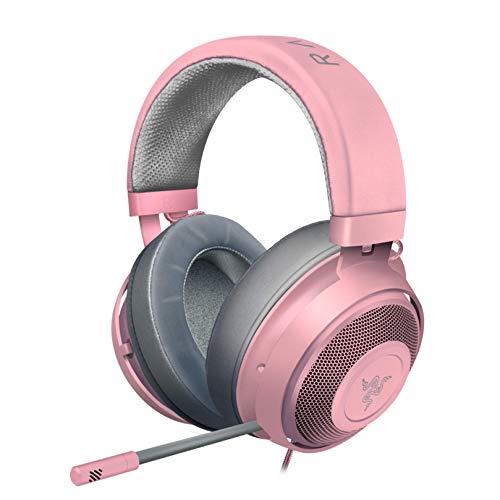
- Best for: Mac owners who want a simple wired headset that needs no setup.
- 50mm custom-tuned drivers
- Cooling gel-infused ear cushions
- Retractable cardioid microphone
- 3.5mm connection for Mac, consoles and mobile
Mac owners who want a simple wired headset that needs no setup.
The 7.1 surround sound needs Razer software on Windows, so it plays in stereo on a Mac.
The Razer Kraken Quartz Pink keeps things simple: it plugs into the Mac headphone jack and works at once, with no dongle, no app and no battery to charge. Its 50mm drivers give the sound plenty of body for games and music, and the cooling gel ear cushions stay comfortable during long sessions. The retractable microphone tucks away when it is not needed, and the in-line controls put volume and mute within reach. It suits Mac owners who want a headset that just works, in a colour that stands out on the desk, and the light frame stays comfortable for hours.
HyperX Cloud II
- Best for: Mac players who want surround sound through a wired USB connection.
- 53mm drivers
- USB sound card with 7.1 virtual surround sound for PC and Mac
- Detachable noise-cancelling microphone
- Memory foam ear cushions with leatherette
Mac players who want surround sound through a wired USB connection.
The USB sound card needs a USB-A port, so newer Macs with only USB-C ports need an adapter.
The HyperX Cloud II is the pick for Mac owners who want surround sound without Windows software, because its USB sound card brings 7.1 virtual surround to PC and Mac alike. The 53mm drivers give games a wide, detailed sound, and the memory foam earcups with a leatherette finish stay comfortable for hours. Its detachable microphone cancels background noise for clear voice chat, and the braided cable with in-line controls feels built to last. It suits players who want the fullest sound a Mac can offer from a wired headset, with a microphone that keeps voice chat clear.
Logitech G733 Black
- Best for: Mac gamers who want a light wireless headset for long sessions.
- LIGHTSPEED wireless with up to 20m range
- Battery life up to 29 hours with lighting off
- Lightweight 278g design with a suspension headband
- Dual-zone LIGHTSYNC RGB lighting
Mac gamers who want a light wireless headset for long sessions.
The DTS surround sound and lighting controls need Logitech software on Windows, so they stay off on a Mac.
The Logitech G733 Black is the lightest wireless headset here at 278 grams, and that low weight shows during long sessions. Its suspension headband spreads the weight evenly, and the dual-layer memory foam earcups keep the fit soft without clamping hard. The battery runs up to 29 hours with the lighting off, and the detachable microphone uses Blue VO!CE filters for clear voice chat. It suits Mac gamers who want to move freely without a cable and like a headset that looks as good as it feels, with a light frame that suits long sessions.
Which One Fits Your Situation
Wireless play across Mac and console
Pick the SteelSeries Arctis Nova 7 when the headset needs to serve a Mac and a console. Its 2.4GHz wireless keeps game audio lag-free, while Bluetooth handles calls at the same time. The long battery life means fewer charging breaks, and the noise-cancelling mic keeps voice chat clear on any platform. Bluetooth handles calls at the same time, so the headset covers games and voice chat together.
Simple wired headset that just works
Pick the Razer Kraken Quartz Pink when setup should take seconds. It plugs into the Mac headphone jack and plays at once, with no dongle or battery to manage. The cooling gel cushions suit long sessions, and the retractable mic hides away when the headset doubles as plain headphones. The wired connection needs no charging, so the headset is always ready to use.
Fullest sound on a Mac
Pick the HyperX Cloud II when surround sound matters. Its USB sound card delivers 7.1 virtual surround on Mac, which most gaming headsets cannot do. The large drivers and memory foam earcups make long sessions comfortable, and the detachable mic keeps voice chat clear. The USB sound card is the key part, since it brings surround sound to a Mac without extra software.
Light wireless headset for long sessions
Pick the Logitech G733 Black when weight is the main concern. At 278 grams with a suspension headband, it stays comfortable far longer than heavier wireless headsets. The long battery life covers several sessions, and the detachable mic handles voice chat without a separate microphone. The suspension headband spreads the light weight evenly, so the headset stays comfortable for hours.
Common Mistakes
- Buying a headset for its Windows-only surround sound, then finding it plays in stereo on a Mac, which wastes the money spent on the feature.
- Forgetting that newer Macs have only USB-C ports, so a USB-A dongle needs an adapter that should be bought with the headset.
- Choosing a heavy headset for long sessions and ending up with neck strain after an hour, when a lighter model would have cost the same.
- Ignoring the microphone and discovering too late that teammates cannot hear clearly during the games that matter most.
- Picking a Bluetooth-only headset for fast games, where the extra delay can be felt in every quick reaction.
Frequently Asked Questions
Do gaming headsets work on a Mac?
Yes, most gaming headsets work on a Mac through a 3.5mm jack, a USB connection or Bluetooth. Wired headsets plug in and play at once. Wireless headsets with a USB dongle may need a USB-C adapter on newer Macs. Check the compatibility list on the product page before buying, and confirm whether the headset needs an adapter for USB-C ports.
Why does surround sound often fail on a Mac?
Surround sound usually needs the maker’s companion app, and many of those apps have no Mac version. Without the app, the headset falls back to stereo sound. A headset with a hardware USB sound card, like the HyperX Cloud II, can bring surround sound to a Mac without extra software, since the processing happens in the hardware itself.
Is Bluetooth good enough for gaming on a Mac?
Bluetooth works for casual games and media, but it adds a small delay that can be felt in fast competitive games. A 2.4GHz wireless dongle or a wired connection keeps audio in sync with the action. Bluetooth is still useful for calls and music alongside a wired game connection, and it suits casual games well.
Should I choose a wired or wireless headset for a Mac?
Wired headsets are simpler: they need no charging, no dongle and no adapter beyond the headphone jack. Wireless headsets give freedom of movement and keep the desk tidy, but they need charging and a USB port for the dongle. Pick wired for simplicity and wireless for comfort and movement, and check battery life first.
Related guides
More from Amazon
Programs that pair well with the guide above. Offers and eligibility are set by Amazon and may change.
A free business account with business pricing and bulk-buying tools for work, shop or home office.
Create a business accountFree shipping on eligible items, Prime Video and more. Eligible new members can start with a free trial.
Start a Prime free trialAudiobooks and podcasts to listen to on the go. Eligible new members can start with a free trial.
Try Audible freeAd-free music streaming. Eligible new subscribers can start with a free trial.
Try Music Unlimited freeAs an Amazon Associate we earn from qualifying purchases.