Our Short List of 3

- Best for: Colour-critical photo editing where accuracy matters more than speed.
- 27-inch 4K UHD (3840 x 2160) IPS panel
- 99% DCI-P3 and 99% Adobe RGB coverage
- Calman Verified, factory calibrated to Delta E under 2
- USB-C with 96W power delivery, DisplayPort daisy chaining

- Best for: 4K gaming with strong colour for photo work on the same screen.
- 27-inch 4K UHD (3840 x 2160) SS IPS panel
- 160Hz refresh rate, 1ms MPRT response time
- 95% DCI-P3 coverage, 10-bit colour
- HDMI 2.1, DisplayPort 1.4, USB-C with KVM switch

- Best for: Fast competitive gaming with photo editing on the same screen.
- 27-inch QHD (2560 x 1440) Nano IPS panel
- 165Hz refresh rate, 1ms response time
- 98% DCI-P3 colour coverage
- NVIDIA G-SYNC Compatible, AMD FreeSync Premium
All 4 Picks at a Glance
| Product | Specs | Action |
|---|---|---|
| ASUS ProArt PA279CRV |
| Check price on Amazon |
| Gigabyte M27U |
| Check price on Amazon |
| LG UltraGear 27GP850-B |
| Check price on Amazon |
 Dell S2722QC |
| Check price on Amazon |
A monitor that serves both gaming and photo editing has to satisfy two masters at once, and the real decision is where to compromise between speed and colour. A fast panel with a narrow gamut makes games feel sharp but leaves edited photos looking different in print, while a colour-perfect panel at 60Hz makes fast games feel sluggish. The sweet spot is an IPS panel that pairs a wide colour gamut with a refresh rate above 120Hz, so one screen can carry both jobs without a second display.
This guide is for photographers who also game, streamers who edit their own thumbnails, and anyone whose desk has room for one good monitor rather than two. Each pick was chosen from the names and specs on its Amazon page, with panel type, resolution, colour coverage, refresh rate and connectivity checked against the listing. The four picks below cover 4K colour-first screens and fast QHD panels, so you can match the monitor to the work you do most.
Our Top Picks
 ASUS ProArt PA279CRV 27 Inch 4K UHD USB-C27 Inch24.1 x 8.46 x 16.07 Inches18.25 poundsCheck on Amazon
- LG 27GP850-B Ultragear Gaming Monitor 27-Inch QHD14.4"x24.2"x2"11.5 x 24.2 x 22.7 inches13.9 poundsCheck on Amazon
Top 3 picks at a glance
Quick Picks
As an Amazon Associate we earn from qualifying purchases
| Product | Best for | Key spec from title |
|---|---|---|
| ASUS ProArt PA279CRV | Colour-critical photo editing | 27-inch 4K IPS with wide DCI-P3 colour |
| Gigabyte M27U | 4K gaming with strong colour | 27-inch 4K 160Hz IPS panel |
| LG UltraGear 27GP850-B | Fast competitive gaming and editing | 27-inch QHD Nano IPS at 165Hz |
| Dell S2722QC | A single-cable laptop desk setup | 27-inch 4K IPS with USB-C |
How to Choose
Resolution and panel type
Resolution decides how much detail you can see in a photo and how sharp a game looks, and panel type decides how colours hold up at an angle. A 27-inch 4K IPS panel gives the fine detail that retouching demands, while a 27-inch QHD IPS panel is easier for a graphics card to drive at high frame rates. IPS is the right panel family for this dual job because its colours stay consistent when you lean back or slide sideways, unlike cheaper TN panels. Avoid a VA panel if colour accuracy matters to you, since its gamma shifts with viewing angle.
Colour accuracy and gamut coverage
Colour accuracy is what separates a photo monitor from a gaming monitor, and the numbers to check are gamut coverage and factory calibration. Look for full sRGB coverage for web work, and a wide DCI-P3 or Adobe RGB gamut if you print or grade video. A factory calibration report with a Delta E under 2 means the colours are close to true straight from the box. Check whether the listing states the calibration, since an uncalibrated wide-gamut panel can oversaturate skin tones and make edits unreliable.
Refresh rate and response time
Refresh rate is what makes a monitor feel fast in games, and it matters less for editing, so your gaming habits set this number. A 60Hz panel is fine for slow strategy games and single-player adventures, but a 144Hz or 165Hz panel makes first-person shooters feel noticeably smoother, with less blur as you turn. Response time matters too: a 1ms figure keeps fast motion clear, while a slow panel smears edges during quick turns. Remember that a 4K panel at high refresh needs a strong graphics card, so a QHD panel is the safer pick for mid-range hardware.
Connectivity, ergonomics and eye comfort
Connectivity decides how cleanly the monitor fits your desk, and ergonomics decides how long you can sit in front of it. A USB-C port with power delivery lets a laptop connect with one cable for video and charging, while a built-in KVM switch lets one keyboard and mouse serve two machines. Look for a stand with height, tilt, swivel and pivot adjustments, since a fixed stand forces you to stack books under the screen. Flicker-free backlighting and a low blue light mode help during long editing sessions that run late into the evening.
The 4 Best Options
ASUS ProArt PA279CRV
- Best for: Colour-critical photo editing where accuracy matters more than speed.
- 27-inch 4K UHD (3840 x 2160) IPS panel
- 99% DCI-P3 and 99% Adobe RGB coverage
- Calman Verified, factory calibrated to Delta E under 2
- USB-C with 96W power delivery, DisplayPort daisy chaining
Colour-critical photo editing where accuracy matters more than speed.
The 60Hz refresh rate feels slow in fast competitive games.
This monitor suits photographers and print designers who need colour they can trust above all else. The 27-inch 4K IPS panel covers the full DCI-P3 and Adobe RGB gamuts, and ASUS factory-calibrates each unit to a Delta E under 2 with Calman verification, so what you see on screen matches what comes out of the printer. A 96W USB-C port charges a laptop through the same cable that carries video, and DisplayPort daisy chaining lets a second screen join the desk later. Its 60Hz refresh rate is the trade-off for colour-first design.
Gigabyte M27U
- Best for: 4K gaming with strong colour for photo work on the same screen.
- 27-inch 4K UHD (3840 x 2160) SS IPS panel
- 160Hz refresh rate, 1ms MPRT response time
- 95% DCI-P3 coverage, 10-bit colour
- HDMI 2.1, DisplayPort 1.4, USB-C with KVM switch
4K gaming with strong colour for photo work on the same screen.
Driving 4K at 160Hz needs a powerful graphics card.
This monitor suits gamers who edit photos on the same screen and refuse to give up either job. The 27-inch 4K IPS panel runs at 160Hz with a 1ms response time, so fast games stay sharp, while wide DCI-P3 coverage and 10-bit colour keep edited images looking rich and true. Two HDMI 2.1 ports and DisplayPort 1.4 cover consoles and PCs, and the built-in KVM switch lets one keyboard and mouse control a second computer. DisplayHDR 400 adds brighter highlights in supported games and video, though it is a modest HDR tier rather than a true HDR experience.
LG UltraGear 27GP850-B
- Best for: Fast competitive gaming with photo editing on the same screen.
- 27-inch QHD (2560 x 1440) Nano IPS panel
- 165Hz refresh rate, 1ms response time
- 98% DCI-P3 colour coverage
- NVIDIA G-SYNC Compatible, AMD FreeSync Premium
Fast competitive gaming with photo editing on the same screen.
QHD resolution shows less fine detail than 4K when retouching.
This monitor suits competitive players who also edit photos and want speed without giving up colour. The 27-inch QHD Nano IPS panel runs at 165Hz with a 1ms response time, and its wide DCI-P3 coverage is unusually broad for a gaming screen, so edited photos hold their colour. QHD resolution is far easier for a mid-range graphics card to drive at high frame rates than 4K, which means smoother play in demanding titles. G-SYNC compatibility and FreeSync Premium keep frames tear-free, and the fully adjustable stand tilts, swivels, pivots and rises to fit any desk.
Dell S2722QC
- Best for: A single-cable laptop desk setup with sharp 4K editing.
- 27-inch 4K UHD (3840 x 2160) IPS panel
- 99% sRGB coverage, 1.07 billion colours
- USB-C with 65W power delivery
- Built-in dual 3W speakers, height-adjustable stand
A single-cable laptop desk setup with sharp 4K editing.
The 60Hz panel and 8ms response time are not built for fast games.
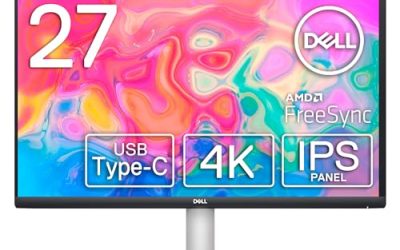
This monitor suits laptop owners who want one clean cable and a sharp 4K image for editing. The 27-inch 4K IPS panel covers the full sRGB gamut with 1.07 billion colours, which is plenty for web publishing and general photo work, and the USB-C port carries video plus 65W of charging to a laptop. Built-in dual speakers save desk space, and the slim bezels and silver finish suit a tidy home office. Its 60Hz refresh rate and 8ms response time are the trade-offs for a screen built around calm desk work rather than fast play.
Which One Fits Your Situation
You edit photos for print and play casually
Pick the ASUS ProArt PA279CRV. Its full Adobe RGB coverage and factory calibration make it the most trustworthy screen here for print work, and its 60Hz refresh rate is fine for slower games and single-player adventures. The 96W USB-C port also keeps a laptop charged while you edit, which suits a desk that serves both work and play.
You game hard and edit on the same screen
Pick the Gigabyte M27U. Its 4K panel at 160Hz keeps fast games sharp, and its wide DCI-P3 coverage keeps edited photos looking right. The KVM switch is a bonus if you run a second machine, and the HDMI 2.1 ports mean a console can share the screen without swapping cables. You get top-tier gaming speed and honest colour from one display, with no need for a second monitor on the desk.
Your graphics card is mid-range and you play competitively
Pick the LG UltraGear 27GP850-B. QHD at 165Hz is far easier to drive than 4K at high refresh, so a mid-range card can hold high frame rates in competitive titles. Its wide DCI-P3 coverage still handles photo editing well, and the fully adjustable stand makes long sessions comfortable.
You work from a laptop and want a tidy desk
Pick the Dell S2722QC. One USB-C cable carries video and charging to your laptop, the 4K panel is sharp for editing, and the built-in speakers clear the desk of extra boxes. It is the calmest pick here, built for a desk where work comes first and gaming is occasional. The slim bezels also suit a second screen later, if you decide one display is not enough.
Common Mistakes
- Buying a fast gaming panel with a narrow gamut and then wondering why prints look wrong.
- Choosing 4K at high refresh without a graphics card strong enough to drive it.
- Ignoring the stand and ending up with a screen at the wrong height for long sessions.
- Assuming every USB-C port charges a laptop, when some carry video only.
- Skipping calibration and trusting a wide-gamut panel straight from the box.
Frequently Asked Questions
Is 4K worth it for photo editing?
Yes, 4K is worth it for photo editing on a 27-inch screen because the extra pixels show fine detail in retouching and let you judge sharpness without zooming in constantly. A 4K panel also gives more room for toolbars and panels around the image. If your graphics card struggles, QHD is a fair compromise, but 4K is the better editing resolution.
Can one monitor really serve gaming and photo editing?
Yes, one monitor can serve both if it is an IPS panel with a wide colour gamut and a refresh rate above 120Hz. The gamut keeps edited photos accurate, while the refresh rate keeps games smooth. The compromise is usually a QHD panel rather than 4K, since high refresh at 4K demands a very strong graphics card.
What colour gamut should I look for?
Look for full sRGB coverage for web publishing and general photo work, since that is the standard most screens and browsers use. If you print photos or grade video, aim for a wide DCI-P3 or Adobe RGB gamut instead. A factory calibration report with a Delta E under 2 adds confidence that the colours are accurate from day one.
Do I need USB-C on my monitor?
You need USB-C if you work from a laptop and want a single cable for video, data and charging, since it clears the desk of adapters and docks. If your computer is a desktop with DisplayPort and HDMI, USB-C is a convenience rather than a necessity. Check the wattage too, since a 65W port may not fully charge a powerful laptop under load.
Related guides
More from Amazon
Programs that pair well with the guide above. Offers and eligibility are set by Amazon and may change.
A free business account with business pricing and bulk-buying tools for work, shop or home office.
Create a business accountFree shipping on eligible items, Prime Video and more. Eligible new members can start with a free trial.
Start a Prime free trialAudiobooks and podcasts to listen to on the go. Eligible new members can start with a free trial.
Try Audible freeAd-free music streaming. Eligible new subscribers can start with a free trial.
Try Music Unlimited freeAs an Amazon Associate we earn from qualifying purchases.