Our Short List of 3
All 3 Picks at a Glance
| Product | Specs | Action |
|---|---|---|
 Fractal Design Define 7 XL | Check price on Amazon | |
 Fractal Design Define 7 | Check price on Amazon | |
 Corsair Obsidian Series 750D Airflow Edition | Check price on Amazon |
Finding the best PC case for hard drives is a different job from picking a case for a gaming rig. Most modern chassis are built around glass panels, radiator mounts and open airflow, and drive cages are treated as an afterthought. That is a problem when your build is really a storage machine: a home server, a media library, a photo archive, a video editing workstation or a backup box that needs room for half a dozen spinning disks and a few solid state drives on top.
The cases in this guide were chosen for one thing above all else: the number of hard drives they can hold without resorting to adapters, brackets wedged into odd corners, or drives sitting loose on the floor of the chassis. Every pick below ships with at least six internal 3.5-inch bays, and most of them can be expanded further with extra trays. They also cover the practical details that matter once you start filling those bays, such as airflow over the drive cages, vibration control, cable routing space, and enough clearance for the long graphics card or large cooler that usually shares the build.
Before you buy, count your drives honestly. A build that starts with four hard drives often grows to eight within a year, once a media collection expands or a second backup set is added. Buying a case with two empty bays left over is far cheaper than moving an entire system into a new chassis later. The picks below are all full towers or large mid towers, so they take up real desk or floor space, but that size is exactly what makes room for the drive cages, the airflow and the cable management a storage-heavy build needs.
Our Top Picks
Top 3 picks at a glance
How to Choose
Drive Bay Count and Layout
The headline number is how many 3.5-inch bays the case offers, but the layout matters just as much. Look for removable drive cages that can be repositioned or taken out entirely, so you can trade a cage for a longer graphics card or a front radiator when needed. Cases that ship with two separate cages give you more flexibility than a single fixed cage. Also check whether the case supports extra trays: several of the picks below accept additional drive trays that raise the total bay count well above the number included in the box.
Dedicated 2.5-Inch Mounts
Solid state drives do not need a 3.5-inch tray, and a good storage case gives them their own mounting points behind the motherboard tray or on the rear of a drive cage. This keeps the main bays free for spinning hard drives and keeps SATA cables short and tidy. Count the dedicated 2.5-inch mounts separately from the 3.5-inch bays, and check whether they are tool-free, since swapping a solid state drive should not require removing the motherboard.
Airflow Over the Drives
Hard drives generate heat, and a stack of six or eight of them in a closed cage can get warm enough to shorten drive life. The best storage cases place intake fans directly in front of the drive cages, so cool air flows across the drives before it reaches the rest of the system. Look for front fan mounts that line up with the cage positions, and for cases that include at least two front fans out of the box. Mesh front panels move more air than solid panels, though solid panels with side vents can still work well when the fan layout is right.
Vibration and Noise Control
Spinning hard drives vibrate, and a stack of them can make a steel chassis hum. Rubber grommets on the drive trays, silicone mounting pins and sound-dampening material on the side panels all help. Cases designed for quiet operation usually include some of these features as standard. If the machine will sit in a living room or a home office, noise control deserves as much attention as the bay count, because a humming drive cage is hard to ignore once you notice it.
Motherboard and Component Clearance
A storage build still needs room for everything else. Check the maximum graphics card length with the drive cages installed, the maximum CPU cooler height, and the power supply length the case accepts. Some cases quote generous clearances that only apply when a drive cage is removed, so read the fine print and plan for your actual configuration. Full towers generally have room to spare, while large mid towers may force a choice between the lowest drive cage and a very long graphics card.
Cable Management and Future Expansion
Eight hard drives mean eight SATA data cables and eight SATA power connectors, plus the usual motherboard, graphics card and fan wiring. A case with deep cable channels behind the motherboard tray, rubber grommets on the routing holes and at least 25 mm of space behind the tray will save hours of frustration. Also think about expansion: spare fan mounts, radiator support and room for an add-in storage controller card all extend the useful life of the case.
Top Picks
Fractal Design Define 7 XL
View the Fractal Design Define 7 XL on Amazon
The Define 7 XL is the largest case in this guide and the natural first choice for a serious storage build. It ships with six 3.5-inch drive trays and two dedicated 2.5-inch mounts, and with additional trays it can hold up to eighteen hard drives, which is more than any other case here. Two separate drive cages can be repositioned along the floor of the case or removed entirely, so the interior adapts to whatever combination of drives, radiators and graphics cards the build needs.
The chassis is a full tower that accepts E-ATX and SSI-EEB motherboards, with three 140 mm fans included and room for radiators up to 480 mm in the front. Sound-dampening material lines the front, top and side panels, and the drive trays use rubber grommets to keep vibration down. Cable routing is generous, with a deep channel behind the motherboard tray and a cable cover that keeps the main chamber tidy. Front I/O includes USB-C alongside USB-A ports.
This case is for the builder who wants the maximum drive count in a single chassis, whether that means a home server, a network storage box or a workstation with a large local media library. The trade-offs are size and weight: at over 18 kg empty, it is not a case you move often, and it needs floor space rather than a desk shelf. Check the current listing before ordering, since stock of this model can vary.
Fractal Design Define 7
View the Fractal Design Define 7 on Amazon
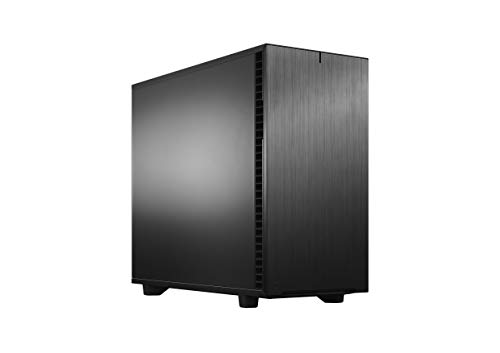
The standard Define 7 is the mid-tower sibling of the XL, and it is the better pick when the XL is simply too large for the space available. It ships with six 3.5-inch trays and two 2.5-inch mounts, and with extra trays it can be expanded to fourteen hard drives. That is still far more storage than most builds will ever need, and it comes in a chassis that fits under a desk without dominating the room.
The Define 7 shares the XL’s modular interior, with two repositionable drive cages, sound-dampening panels and the same clean cable management layout. It accepts E-ATX motherboards despite its mid-tower size, takes graphics cards up to 491 mm long with the front cage removed, and includes two 140 mm fans with room for a front radiator up to 360 mm. The solid side panel version keeps noise down, and the front door can be opened for extra airflow or kept closed for quiet operation.
This case is for builders who want a large drive count in a more manageable footprint, including home servers and editing workstations that live in a home office. Its main caveat is that the largest configurations still need the front cage removed for a very long graphics card, so measure before committing to both a full drive load and a top-end card.
Phanteks Enthoo Pro Tempered Glass
View the Phanteks Enthoo Pro Tempered Glass on Amazon
The Enthoo Pro Tempered Glass is the most affordable full tower in this guide and a long-standing favourite for storage-heavy builds. It offers six internal 3.5-inch bays in two removable cages, plus dedicated mounts for solid state drives behind the motherboard tray. The cages can be removed to make room for radiators up to 420 mm or for graphics cards up to 347 mm long, and the case includes a 200 mm front fan and a 140 mm rear fan out of the box.
What sets the Enthoo Pro apart is its interior flexibility. A PWM fan hub is built in, the power supply shroud hides drive and power cabling, and the tempered glass side panel shows off the build without giving up the drive cages. Ventilation is strong, with a mesh front section and mounts for up to six fans. The case accepts E-ATX motherboards and has room for large air coolers.
This case is for builders who want full-tower drive capacity and water-cooling room without paying a premium for it. The main caveat is that the six-bay count is fixed at six unless you add third-party brackets, so builders planning to grow beyond six hard drives should look at the Define 7 XL instead. Also confirm the exact variant when ordering, since the Enthoo Pro is sold in several panel and colour options.
Corsair Obsidian Series 750D Airflow Edition
View the Corsair Obsidian Series 750D Airflow Edition on Amazon
The Obsidian 750D Airflow Edition is the veteran of this list, a full tower that has been a storage-builder staple for years. It provides six tool-free 3.5-inch drive bays in two cages, four dedicated 2.5-inch mounts behind the motherboard tray, and three 5.25-inch bays at the front for optical drives or hot-swap accessories. The airflow-focused front panel feeds two included 140 mm intake fans directly across the drive cages, which keeps a full stack of spinning drives cooler than a solid-front design.
Build quality is a strong point: brushed aluminium and solid steel throughout, with a clean interior, good cable routing channels and room for E-ATX motherboards. Radiator support extends to 360 mm in the front and 280 mm on top, and the case accepts long graphics cards with the drive cages in place. The 5.25-inch bays are a genuine advantage for builders who still use optical media or want to fit a hot-swap bay or fan controller in the front of the case.
This case is for builders who value airflow and the extra front bays, and who like a proven, no-nonsense full tower. The main caveat is availability: this is an older model and stock can be inconsistent, so confirm that the listing is live and that the airflow edition is the variant in the cart before ordering. The drive count also tops out at six hard drives, so it suits medium storage builds rather than the largest server projects.
Comparison Table
| Case | 3.5-inch Bays | 2.5-inch Mounts | Max Drives With Extra Trays | Motherboard Support | Included Fans | Side Panel |
|---|---|---|---|---|---|---|
| Fractal Design Define 7 XL | 6 | 2 | 18 | E-ATX, SSI-EEB | 3 x 140 mm | Solid or tempered glass |
| Fractal Design Define 7 | 6 | 2 | 14 | E-ATX | 2 x 140 mm | Solid or tempered glass |
| Phanteks Enthoo Pro Tempered Glass | 6 | 2 | 6 | E-ATX | 200 mm front, 140 mm rear | Tempered glass |
| Corsair Obsidian 750D Airflow | 6 | 4 | 6 | E-ATX | 2 x 140 mm front, 1 x 140 mm rear | Windowed |
Which One Is Right for You?
Choose the Fractal Design Define 7 XL if your drive count is going to keep growing. Eighteen possible hard drives, two repositionable cages and full-tower clearance mean you are unlikely to outgrow it, and the sound-dampening panels keep a full drive stack quiet. It is the right call for a home server, a network storage build or a media archive that adds drives every year.
Choose the Fractal Design Define 7 if you want most of the XL’s storage in a smaller chassis. Fourteen possible drives is still a large number, and the mid-tower footprint fits far more rooms. It is the best balance in this guide between drive capacity and everyday practicality.
Choose the Phanteks Enthoo Pro Tempered Glass if you want full-tower room and strong cooling at a lower outlay. Six hard drive bays cover most storage builds, and the generous radiator support makes it a good home for a water-cooled workstation that also carries a large local drive array.
Choose the Corsair Obsidian 750D Airflow Edition if airflow over the drives and the extra front bays matter to you. The mesh-style front panel and the 5.25-inch bays give it options the others lack, and its build quality has held up well over the years. Just confirm availability first, since this older model is not always in stock.
Whatever you choose, buy the extra drive trays at the same time if you plan to expand later. Trays for a specific case can be harder to find a year after the case itself was purchased, and having them on hand removes the main obstacle to growing your storage.
Frequently Asked Questions
How many hard drives can a normal PC case hold?
Most modern cases hold two to four hard drives, often fewer, because manufacturers have removed drive cages to make room for radiators and glass panels. The cases in this guide hold six hard drives as standard, and the two Fractal Design models can be expanded to fourteen or eighteen with additional trays. If you need more than six drives, check the bay count in the specifications rather than assuming a large case has room for them.
Do hard drives need direct airflow?
Yes, a stack of spinning hard drives generates noticeable heat, and drives that run hot tend to fail sooner. The best arrangement is intake fans mounted directly in front of the drive cages, so cool air passes over the drives before warming up elsewhere in the case. All four picks in this guide place intake fans in front of their drive cages, and the Corsair 750D Airflow Edition is the most direct example of this layout.
Can I mix hard drives and solid state drives in the same case?
Yes, and it is the normal arrangement for a storage build. Hard drives go in the 3.5-inch trays, while solid state drives use the dedicated 2.5-inch mounts behind the motherboard tray or on the back of a drive cage. This keeps the main bays free for spinning disks and keeps SATA cables short. All four cases here include dedicated 2.5-inch mounts alongside their 3.5-inch bays.
Is a full tower case necessary for a storage build?
Not always, but it helps. A large mid tower like the Define 7 can hold six hard drives and still fit under a desk, so it suits most home storage builds. A full tower becomes necessary when the drive count grows past eight, when the build also needs a long graphics card and a large radiator, or when the machine will serve as a home server that adds drives over several years. Measure your space first, since full towers are heavy and hard to move once loaded with drives.
Disclosure: As an Amazon Associate, we may earn from qualifying purchases.
Related guides
- Best Monitors for CSGO: High Refresh Picks for Competitive Play
- Best LCD Options for PC Cases: Built-In Screens, Sensor Panels and DIY Displays (2026)
- Best Gaming Headsets for 100: 5 Wired Picks With Clear Mics and Big Sound
- Best 4 Speakers: Four-Speaker In-Ceiling Sets for Surround and Whole-Room Sound
More from Amazon
Programs that pair well with the guide above. Offers and eligibility are set by Amazon and may change.
A free business account with business pricing and bulk-buying tools for work, shop or home office.
Create a business accountFree shipping on eligible items, Prime Video and more. Eligible new members can start with a free trial.
Start a Prime free trialAudiobooks and podcasts to listen to on the go. Eligible new members can start with a free trial.
Try Audible freeAd-free music streaming. Eligible new subscribers can start with a free trial.
Try Music Unlimited freeAs an Amazon Associate we earn from qualifying purchases.