Our Short List of 3

- Best for: Laptop owners who want a single-cable desk setup.
- 27-inch 4K UHD IPS panel, 3840 x 2160 resolution
- USB-C port with up to 65W power delivery
- Two HDMI 2.0 ports and DisplayPort
- 99% sRGB colour coverage

- Best for: Photo and video editors who need trustworthy colour.
- 27-inch 4K UHD IPS panel, 3840 x 2160 resolution
- 99% DCI-P3 and 99% Adobe RGB colour coverage
- Calman Verified factory calibration
- USB-C port with power delivery and hub

- Best for: Long work sessions in a bright room.
- 27-inch 4K UHD IPS panel, 3840 x 2160 resolution
- HDR10 support with 1.07 billion colours
- 350 nits brightness
- Eye Saver Mode and flicker-free panel
All 3 Picks at a Glance
| Product | Specs | Action |
|---|---|---|
| Dell S2722QC |
| Check price on Amazon |
| ASUS ProArt PA279CRV |
| Check price on Amazon |
| Samsung ViewFinity S7 S70D |
| Check price on Amazon |
A monitor in this budget class has to do two jobs at once: keep games smooth enough to enjoy and keep text sharp enough for a full workday. That is a harder balance than it looks, because a panel that chases a high refresh rate often gives up colour accuracy, while a colour-accurate panel may run at a modest refresh rate. The four monitors below were chosen from the names and specs on their Amazon pages, and each one covers a different side of that trade-off.
This guide is for gamers who play on a mid-range graphics card, for people who work from home and want one screen for everything, and for buyers replacing an old 1080p panel with something noticeably sharper. Every pick below is a 27-inch 4K panel, so the comparison stays honest: the differences are in ports, colour coverage, stands and extra features, not in size or resolution.
Our Top Picks
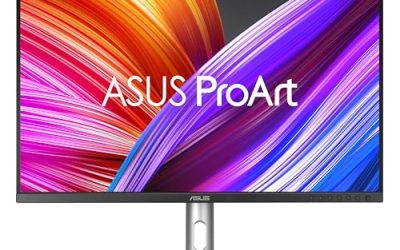
 ASUS ProArt PA279CRV 27 Inch 4K UHD USB-C27 Inch24.1 x 8.46 x 16.07 Inches18.25 poundsCheck on Amazon
Top 3 picks at a glance
Quick Picks
As an Amazon Associate we earn from qualifying purchases
| Product | Best for | Key spec from title |
|---|---|---|
| Dell S2722QC | Single-cable laptop setups | 27-inch 4K USB-C monitor with 65W power delivery |
| LG 27UL500-W | Colour-accurate work on a budget | 27-inch 4K UHD IPS monitor with HDR10 |
| ASUS ProArt PA279CRV | Photo and video editing | 27-inch 4K monitor with wide DCI-P3 colour |
| Samsung ViewFinity S7 S70D | Bright rooms and eye comfort | 27-inch 4K UHD monitor with HDR10 and eye care |
How to Choose
Resolution and panel type
A 27-inch 4K panel shows far more detail than a 1080p screen of the same size, which matters for both games and spreadsheets. All four picks here use IPS panels, which hold their colours steady when you view the screen from an angle, unlike cheaper TN panels that wash out off-axis. Check the listed resolution on the product page before you buy, because some listings bundle a 1440p variant under the same model name. For mixed gaming and work, a 4K IPS panel is the safest starting point in this class, and it keeps small text readable without scaling tricks.
Refresh rate and response time
Every monitor in this guide runs at 60Hz, which suits story-driven games, strategy titles and everyday work, but it is not the right choice for competitive shooters where a 144Hz or faster panel makes a real difference. The listed response times sit between 4ms and 5ms, fast enough that ghosting stays minor in casual play. If your library is mostly fast-paced multiplayer, spend your budget on a lower-resolution high-refresh screen instead of chasing 4K. For everyone else, 60Hz at 4K is a fair trade, and the sharper image pays off every time you open a document.
Colour coverage and HDR
Colour coverage decides how true photos, videos and games look on screen. The Dell and LG panels cover around 98 to 99 percent of sRGB, which is plenty for everyday editing and media. The ASUS ProArt goes further with 99 percent DCI-P3 coverage and factory calibration, which is what you want if colour accuracy is part of your work. HDR10 appears on three of the four listings, but on panels in this class it adds gentle highlight detail rather than the dramatic contrast of a high-end HDR display, so treat it as a bonus rather than a reason to choose.
Ports, stand and extras
Ports decide how the monitor fits your desk. The Dell leads here with a USB-C port that carries video and up to 65W of charging, so a laptop connects with one cable. The ASUS adds a USB-C port with stronger power delivery plus a hub, while the LG and Samsung stick to HDMI and DisplayPort. Check the stand too: height, tilt, swivel and pivot adjustments matter more than they sound after a long day. Built-in speakers appear on the Dell and Samsung, but they are small, so plan on separate speakers or headphones for serious listening.
The 4 Best Options
Dell S2722QC
- Best for: Laptop owners who want a single-cable desk setup.
- 27-inch 4K UHD IPS panel, 3840 x 2160 resolution
- USB-C port with up to 65W power delivery
- Two HDMI 2.0 ports and DisplayPort
- 99% sRGB colour coverage
Laptop owners who want a single-cable desk setup.
The 60Hz refresh rate is not built for competitive shooters.
The Dell S2722QC is the pick for a desk where one monitor serves a laptop and a desktop, because its USB-C port carries the picture and charges the laptop at the same time. The 27-inch 4K IPS panel covers 99 percent of sRGB, so colours stay honest for photo browsing and video, and AMD FreeSync keeps casual games free of tearing at 60Hz. Dual 3W speakers handle video calls and background music without extra hardware on the desk, and the slim bezels keep the focus on the screen itself.
LG 27UL500-W
The LG 27UL500-W is the straightforward value pick in this group, a 27-inch 4K IPS panel with HDR10 and AMD FreeSync at a budget-friendly tier. Its 98 percent sRGB coverage keeps colours consistent across the screen, and the anti-glare coating cuts reflections in a bright room. Two HDMI ports and a DisplayPort cover a console and a PC at once, and the on-screen control software lets you split the wide desktop into zones for multitasking. It does nothing fancy, and that is exactly why it works so well as an everyday screen.
Specs
- 27-inch 4K UHD IPS panel, 3840 x 2160 resolution
- HDR10 support
- AMD FreeSync technology
- 98% sRGB colour coverage
- Two HDMI ports and one DisplayPort
- On-Screen Control software with Screen Split
Best for: Everyday gaming and office work on a tight budget.
Watch out for: There is no USB-C port, so laptop owners need an adapter or a dock.
ASIN: B07PGL2WVS
ASUS ProArt PA279CRV
- Best for: Photo and video editors who need trustworthy colour.
- 27-inch 4K UHD IPS panel, 3840 x 2160 resolution
- 99% DCI-P3 and 99% Adobe RGB colour coverage
- Calman Verified factory calibration
- USB-C port with power delivery and hub
Photo and video editors who need trustworthy colour.
The 60Hz panel and modest response time do not suit fast competitive games.
The ASUS ProArt PA279CRV is the editing pick, built around colour accuracy rather than gaming speed. Its 27-inch 4K IPS panel covers 99 percent of DCI-P3 and 99 percent of Adobe RGB, and the listing states it is Calman Verified with factory calibration, so colours are trustworthy out of the box. A USB-C port with strong power delivery and a built-in hub turn it into a small docking station, and the fully adjustable stand tilts, swivels, pivots and changes height.
Samsung ViewFinity S7 S70D
- Best for: Long work sessions in a bright room.
- 27-inch 4K UHD IPS panel, 3840 x 2160 resolution
- HDR10 support with 1.07 billion colours
- 350 nits brightness
- Eye Saver Mode and flicker-free panel
Long work sessions in a bright room.
The 60Hz refresh rate limits its appeal for fast-paced competitive play.
The Samsung ViewFinity S7 S70D is the comfort pick, a 27-inch 4K IPS panel with HDR10, 1.07 billion colours and eye-care features for long sessions. Its matte finish and Eye Saver Mode cut glare and blue light in bright rooms, and the Easy Setup Stand adjusts height, tilt, swivel and pivot without tools. Multiple ports, including HDMI, DisplayPort and USB-C, cover a PC and a console, and the built-in speakers keep the desk clear of extra boxes.
Which One Fits Your Situation
You work from a laptop most of the day
Pick the Dell S2722QC. Its USB-C port carries video and charging over one cable, so the laptop docks and undocks in seconds, and the 99 percent sRGB panel keeps documents and video looking right. The adjustable stand and built-in speakers mean the desk needs nothing else to get started.
You want the best picture for the least money
Pick the LG 27UL500-W. It is the simplest panel here: 4K, IPS, HDR10 and FreeSync with no extras inflating the cost. The anti-glare coating helps in a bright room, and the two HDMI ports plus DisplayPort cover a PC and a console without a switch.
You edit photos or video for clients
Pick the ASUS ProArt PA279CRV. Its 99 percent DCI-P3 coverage and factory calibration are the reason it costs more than a general-purpose panel, and that accuracy is what client work demands. The USB-C hub also clears cable clutter from the desk, and the fully adjustable stand holds the screen exactly where your eyes need it.
Your eyes tire after long sessions
Pick the Samsung ViewFinity S7 S70D. Its matte finish, Eye Saver Mode and flicker-free panel are designed for hours of reading and spreadsheets, and the fully adjustable stand lets you set the screen exactly at eye level. The built-in speakers mean the desk stays clear, and the wide port selection covers a PC and a console at once.
Common Mistakes
- Buying a 4K monitor for a graphics card that cannot drive games at 4K, then blaming the screen for low frame rates.
- Ignoring the stand: a fixed-tilt stand forces a bad neck angle on a desk that is the wrong height, and the strain builds up over weeks of daily use.
- Assuming every listing under the same model name is the same panel; check the listed resolution and size on the product page.
- Expecting dramatic HDR from a budget panel; HDR10 here adds subtle highlight detail, not true high-end contrast.
- Forgetting that built-in speakers are small; plan on headphones or separate speakers for films and music.
Frequently Asked Questions
Is a 4K monitor worth it for casual gaming?
Yes, if your graphics card can handle it. A 27-inch 4K panel makes open worlds, strategy games and older titles look noticeably sharper than 1080p, and text stays crisp for work between sessions. Competitive shooters are the exception, since a high-refresh 1440p panel serves them better. For mixed use, 4K at 60Hz is a good balance of sharpness and smoothness.
Do I need USB-C on my monitor?
You need it only if you dock a laptop. USB-C carries video and charging over one cable, which the Dell and ASUS picks do well, while the LG and Samsung need a separate charger. Desktop-only setups gain nothing from USB-C, so do not pay extra for it if your PC connects over HDMI or DisplayPort.
What does full sRGB coverage mean in practice?
It means the panel can show nearly the full range of colours used by the web, photos and most games, so images look as their creators intended. Panels with weaker coverage look washed out by comparison. The ASUS goes further with DCI-P3 coverage, which matters for video work but not for everyday browsing and gaming.
Can these monitors handle console gaming?
Yes, with limits. All four accept a console over HDMI and show a sharp 4K picture at 60Hz, which suits story games and casual play. They lack the 120Hz modes newer consoles offer, so competitive console players should look at a high-refresh panel instead. For a living-room console and a work desk sharing one screen, they work well.
Related guides
More from Amazon
Programs that pair well with the guide above. Offers and eligibility are set by Amazon and may change.
A free business account with business pricing and bulk-buying tools for work, shop or home office.
Create a business accountFree shipping on eligible items, Prime Video and more. Eligible new members can start with a free trial.
Start a Prime free trialAudiobooks and podcasts to listen to on the go. Eligible new members can start with a free trial.
Try Audible freeAd-free music streaming. Eligible new subscribers can start with a free trial.
Try Music Unlimited freeAs an Amazon Associate we earn from qualifying purchases.