Our Short List of 3

- Best for: A desktop workstation where active design files need the fastest internal storage available.
- Digital storage capacity: 2 TB
- PCIe Gen4 NVMe M.2 2280 internal solid state drive
- Sequential read speeds up to 7,450 MB/s, write speeds up to 6,900 MB/s
- Available in capacities from 1TB to 4TB

- Best for: Freelance designers carrying active project files between a studio, home, and client sites.
- Digital storage capacity: 2 TB
- Read speeds up to 1050MB/s, write speeds up to 1000MB/s
- USB-C, USB 3.2 Gen 2 interface
- IP65 water and dust resistance
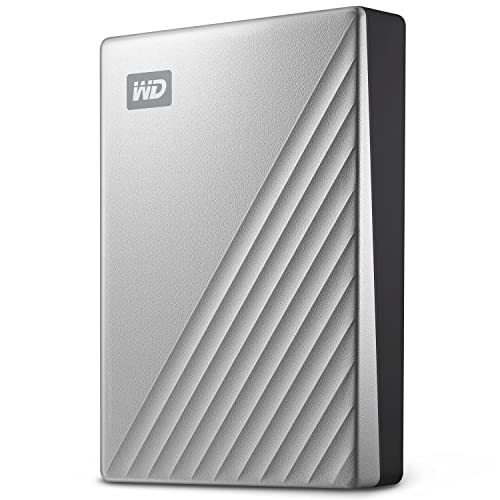
- Best for: Designers who need a portable home for finished projects and a second copy of client archives.
- Digital storage capacity: 4 TB
- Portable external hard drive, USB 3.1 interface
- Backup software included
- Password protection
All 4 Picks at a Glance
| Product | Specs | Action |
|---|---|---|
| Samsung 990 PRO 2TB |
| Check price on Amazon |
| SanDisk Extreme Portable SSD 2TB |
| Check price on Amazon |
| WD My Passport 4TB |
| Check price on Amazon |
 Seagate Expansion Desktop 4TB |
| Check price on Amazon |
Graphic designers do not just store files; they live inside them. A single branding project can hold layered Photoshop documents, linked Illustrator assets, font libraries, and exported versions in several formats, and every one of those files gets opened, saved, and duplicated again and again. When the drive holding that work is slow or nearly full, the whole workflow drags: applications hesitate on save, previews stutter, and the designer waits on hardware instead of drawing.
This guide is for freelance illustrators, in-house brand designers, and print and packaging designers who need storage that keeps up with large working files and still leaves room for an archive. The five drives below were shortlisted from the names and specifications on their Amazon listings, covering fast internal SSDs for active work, a rugged portable SSD for moving between machines, and high-capacity external drives for finished projects.
Our Top Picks
Top 3 picks at a glance
Quick Picks
As an Amazon Associate we earn from qualifying purchases
| Product | Best for | Key spec from title |
|---|---|---|
| Samsung 990 PRO 2TB | Fast internal storage for a design workstation | Up to 7,450 MB/s read speeds |
| WD Black SN850X 2TB | A second fast internal drive for active projects | Up to 7,300 MB/s read speeds |
| SanDisk Extreme Portable SSD 2TB | Carrying project files between studio and home | Up to 1050MB/s read speeds |
| WD My Passport 4TB | A portable archive for finished client work | 4TB portable external hard drive |
| Seagate Expansion Desktop 4TB | A desk-bound archive for large file libraries | 4TB desktop external hard drive, USB 3.0 |
How to Choose
Match Capacity to Real File Sizes
Design files grow faster than most people expect, and a drive that feels roomy on day one can feel cramped within a year. Layered Photoshop documents with smart objects, high-resolution print files, and video assets for motion work can each run into hundreds of megabytes, while a single client folder with exports and revisions can pass several gigabytes. A 2TB drive is a sensible starting point for active work, while a 4TB drive suits designers who keep finished projects on hand. Before choosing, add up the size of your current project folders and font and asset libraries, then double it; that rough total is a better guide than any round number on a box.
Put Speed Where the Work Happens
Not every drive in a design setup needs to be fast, but the one holding active files does. An internal NVMe SSD with sequential read speeds in the multi-thousand megabyte per second range makes opening large documents, scrubbing through linked assets, and saving layered files noticeably quicker. Archive drives, by contrast, mostly sit still and get read occasionally, so a standard external hard drive is fine there even though its transfer speeds are far lower. The mistake is spending the fast-drive budget on the archive while the working drive lags, or the reverse: buying a premium NVMe drive and then filling it with old projects that never get opened.
Check the Connection Before You Buy
A drive is only as fast as the port it plugs into, and designers switch machines more than most users do. An internal NVMe drive needs a free M.2 slot and a motherboard that supports its generation; a laptop with only one slot may need the old drive cloned or replaced rather than added to. Portable drives live or die by their USB connection, so confirm whether your machine offers USB-C with USB 3.2 Gen 2 speeds or only a slower port, and whether the cable in the box matches it. Mac and Windows compatibility is also worth a look on the listing, since some drives ship formatted for one system and need reformatting for the other.
Treat Reliability as Part of the Spec
A hard drive holding client work is not the place to gamble. Look for the warranty length on the listing, check whether the drive is listed for drops or dust and water resistance if it will travel, and remember that no single drive, however well built, counts as a backup. The practical habit is simple: active files on the fast drive, a second copy on an external drive, and a third copy somewhere off the desk, whether that is another drive stored elsewhere or a cloud service. A rugged shell helps a portable drive survive a fall, but it does not replace that second copy.
The 5 Best Options
Samsung 990 PRO 2TB
- Best for: A desktop workstation where active design files need the fastest internal storage available.
- Digital storage capacity: 2 TB
- PCIe Gen4 NVMe M.2 2280 internal solid state drive
- Sequential read speeds up to 7,450 MB/s, write speeds up to 6,900 MB/s
- Available in capacities from 1TB to 4TB
A desktop workstation where active design files need the fastest internal storage available.
Confirm it is still sold before buying, since this pick was verified from listing content rather than a live product page; also confirm a free M.2 slot and PCIe 4.0 support on your machine first.
The 990 PRO is the drive to put inside a desktop workstation where large design files are opened and saved all day. Its PCIe Gen4 interface and read speeds up to 7,450 MB/s keep layered documents, linked assets, and application launches moving without the pauses that creep in on a slower drive. With 2TB on board, there is room for the current client roster plus the font and stock libraries that designers reach for constantly. It fits a standard M.2 2280 slot, so it slots into most modern desktops and many laptops with a spare bay.
Watch out for: Confirm it is still sold before buying, since this pick was verified from listing content rather than a live product page; also confirm a free M.2 slot and PCIe 4.0 support on your machine first.
WD Black SN850X 2TB
The SN850X earns its place as a second internal drive for designers who want active projects on fast flash while the operating system lives elsewhere. Its read speeds up to 7,300 MB/s and write speeds up to 6,300 MB/s handle big saves and asset-heavy documents with ease, and the M.2 2280 form factor fits the spare slot in most gaming and creator desktops. Capacities run up to 8TB across the line, so the 2TB model here is a middle ground: large enough for several concurrent projects without paying for space that sits empty.
Specs
- Digital storage capacity: 2 TB
- M.2 2280 NVMe SSD, PCIe x4 interface
- Read speeds up to 7,300 MB/s, write speeds up to 6,300 MB/s
- Model number WDS200T2X0E
- Capacities up to 8TB across the range
- WD_BLACK Dashboard software included
Best for: Designers adding a dedicated fast drive for active projects alongside an existing system drive.
Watch out for: Confirm it is still sold before buying, since this pick was verified from listing content rather than a live product page; check whether your build needs the heatsink version for sustained writes.
SanDisk Extreme Portable SSD 2TB
- Best for: Freelance designers carrying active project files between a studio, home, and client sites.
- Digital storage capacity: 2 TB
- Read speeds up to 1050MB/s, write speeds up to 1000MB/s
- USB-C, USB 3.2 Gen 2 interface
- IP65 water and dust resistance
Freelance designers carrying active project files between a studio, home, and client sites.
Confirm it is still sold before buying, since this pick was verified from listing content rather than a live product page; double-check the exact model number, since several Extreme variants share similar names.
The Extreme Portable SSD is the drive for designers who work in more than one place and need their files to travel safely. Its pocket-sized shell carries 2TB over a USB-C connection at read speeds up to 1050MB/s, which is fast enough to edit directly from the drive when a studio machine is not available. The IP65 figure for water and dust resistance and drop protection up to 3 meters matter for a drive that rides in a bag every day, and the carabiner loop is a small detail that keeps it attached instead of loose at the bottom of a tote.
Watch out for: Confirm it is still sold before buying, since this pick was verified from listing content rather than a live product page; double-check the exact model number, since several Extreme variants share similar names.
WD My Passport 4TB
- Best for: Designers who need a portable home for finished projects and a second copy of client archives.
- Digital storage capacity: 4 TB
- Portable external hard drive, USB 3.1 interface
- Backup software included
- Password protection
Designers who need a portable home for finished projects and a second copy of client archives.
Confirm it is still sold before buying, since this pick was verified from listing content rather than a live product page; as a spinning hard drive it is slower than an SSD, so keep active files on faster storage.
The My Passport is the portable archive for designers whose finished work keeps piling up. Four terabytes holds years of completed client folders, exported print files, and reference material without forcing constant cleanup, and the drive is small enough to slip into a bag or a desk drawer. It connects over USB, includes backup software and password protection, and works as the second copy in a backup routine: finished projects move here, freeing the fast internal drive for whatever comes next. For a designer who bills by the project, that separation between active and finished work is worth more than raw speed.
Watch out for: Confirm it is still sold before buying, since this pick was verified from listing content rather than a live product page; as a spinning hard drive it is slower than an SSD, so keep active files on faster storage.
Seagate Expansion Desktop 4TB
- Best for: A desk-bound archive for large libraries of finished design work and long-term backups.
- Digital storage capacity: 4 TB
- Desktop external hard drive, USB 3.0 interface
- Model number STEB4000100
- Hard drive size: 4 TB
A desk-bound archive for large libraries of finished design work and long-term backups.
Confirm it is still sold before buying, since this pick was verified from listing content rather than a live product page; it needs mains power and a permanent desk spot, so it is not a travel drive.
The Expansion Desktop is the set-and-forget archive that sits beside a workstation and quietly absorbs finished work. Its 4TB capacity and USB 3.0 connection suit bulk storage of completed projects, old client folders, and asset libraries that are referenced occasionally rather than edited daily. Because it is a desktop drive with its own power supply, it stays put, which makes it a natural partner for a scheduled backup routine: plug it in once, point the backup software at it, and let it collect copies in the background while the fast drives handle the real work.
Watch out for: Confirm it is still sold before buying, since this pick was verified from listing content rather than a live product page; it needs mains power and a permanent desk spot, so it is not a travel drive.
Which One Fits Your Situation
You Edit Large Files on a Desktop Every Day
Start with the Samsung 990 PRO as the working drive, since its read speeds up to 7,450 MB/s keep layered documents and linked assets responsive. Add the WD Black SN850X if a second fast drive would let you separate active projects from applications and the operating system. Pair either one with the Seagate Expansion Desktop for finished work, so the fast drives never fill up with old projects.
You Work From a Laptop in Different Places
Take the SanDisk Extreme Portable SSD, which moves 2TB of active files between machines over USB-C and survives the daily bag. Its rugged shell and IP65 figure suit a drive that travels, and editing directly from it is practical for most design work. Keep the WD My Passport at home as the second copy, so a lost or damaged portable drive never means lost client files.
Your Archive Has Outgrown Your Computer
Choose the Seagate Expansion Desktop 4TB for the desk and the WD My Passport 4TB for a copy that can leave the building. Together they hold finished projects, exports, and reference libraries while the internal drive stays clear for current work. Move completed folders off the fast drive as soon as a project ships, and the whole system stays quick.
You Want One Drive for Everything
The WD My Passport 4TB is the simplest single-drive answer, with room for active and finished files alike and a size that travels. Accept the trade-off: a spinning hard drive opens very large documents more slowly than an SSD, so keep only the current project on it and move the rest to a second drive when the budget allows.
Common Mistakes
- Buying a fast NVMe drive and then filling it with finished projects, leaving no room for active work
- Choosing a portable drive by capacity alone and ignoring whether the laptop port can deliver its full speed
- Keeping the only copy of client work on a single external drive with no second copy anywhere
- Picking a desktop drive for a travel workflow, or a tiny portable drive for a desk-bound archive
- Skipping the warranty and endurance details on the listing and discovering them only after a failure
Frequently Asked Questions
How much storage does a graphic designer need?
Most working designers are comfortable starting at 2TB for active files, with a separate 4TB drive for archives. Layered print files, font libraries, and exported versions accumulate quickly, so count the size of your current project folders and double it before deciding. If the total is already near 2TB, step up to the larger archive drive rather than squeezing everything onto one disk.
Is an SSD or a hard drive better for graphic design?
An SSD is better for the files you open and save every day, because its faster reads and writes make large documents feel responsive. A traditional hard drive is better for archives, where capacity matters more than speed and the files are rarely opened. Most designers end up with both: a fast SSD for active work and a roomy hard drive for finished projects.
Can I edit design files directly from a portable SSD?
Yes, a portable SSD over USB 3.2 Gen 2 is fast enough for most design work, including editing layered documents and browsing large asset libraries. Keep the drive connected directly to the computer rather than through a slow hub, and keep a second copy of anything important, since a portable drive is easier to lose or damage than an internal one.
Do I need a separate backup drive, or is one big drive enough?
One drive is never enough for client work, no matter how large or reliable it is. A drive can fail, get lost, or be overwritten by mistake, and any of those events takes the only copy with it. Use at least two drives, with one holding a copy that lives away from the desk, so a single failure never becomes a lost project.
Related guides
More from Amazon
Programs that pair well with the guide above. Offers and eligibility are set by Amazon and may change.
A free business account with business pricing and bulk-buying tools for work, shop or home office.
Create a business accountFree shipping on eligible items, Prime Video and more. Eligible new members can start with a free trial.
Start a Prime free trialAudiobooks and podcasts to listen to on the go. Eligible new members can start with a free trial.
Try Audible freeAd-free music streaming. Eligible new subscribers can start with a free trial.
Try Music Unlimited freeAs an Amazon Associate we earn from qualifying purchases.