Our Short List of 3
All 5 Picks at a Glance
| Product | Specs | Action |
|---|---|---|
 SteelSeries Arctis Nova 3 | Check price on Amazon | |
 Razer BlackShark V2 X | Check price on Amazon | |
 HyperX Cloud Stinger 2 Core | Check price on Amazon | |
 Logitech G435 LIGHTSPEED Wireless | Check price on Amazon | |
 HyperX Cloud Alpha | Check price on Amazon |
A gaming laptop is only half of the setup. The screen and the keyboard travel with the machine, but the sound does not have to come from small built-in speakers. A headset built for laptop play gives you directional audio for footsteps and callouts, a microphone your squad can actually hear, and isolation from the room around you. The five headsets in this guide all connect to a laptop through USB, a 3.5mm jack, or Bluetooth, and every one of them names PC compatibility on its listing. That matters: a headset made only for a living-room console can leave you with a wireless dongle that has nowhere to plug in, or a mic that never works on a laptop at all. Each pick is judged from its listing specs only; nothing here is presented as practical use.
Our Top Picks
- Razer BlackShark V2 X Wired Gaming Headset with3.5 mm7.6 x 6.76 x 3.86 inches0.5 poundsCheck on Amazon
Top 3 picks at a glance
What to Look for
Connection type comes first, because it decides whether the headset works with your laptop at all. A 3.5mm jack is the simplest path: nearly every gaming laptop has one, and a wired 3.5mm headset needs no battery, no dongle, and no software. Check whether your laptop has a single combined jack or separate mic and headphone jacks — the BlackShark V2 X in this guide ships with a splitter cable for separate jacks, and the guide notes which picks do not include one. A USB-C headset plugs straight into a modern laptop, while a USB-A receiver needs a free USB-A port. Bluetooth is the most convenient for moving between a laptop and a phone, but it can add a small delay that matters in fast games. The wireless pick in this guide uses a dedicated USB receiver for game audio and keeps Bluetooth as a second connection, which is the right way to use both.
Driver size is the next thing to read, but read it with care. A 50mm driver is the common size in this guide, and it suits game audio because a larger driver can move more air for low sounds like explosions and footsteps. A 40mm driver is not automatically worse: the lightest pick here uses 40mm drivers and still covers the full game-audio range. What matters more is the driver design. The HyperX Cloud Alpha uses two chambers inside each 50mm driver, one for bass and one for mids and highs, so the low end does not smear the dialogue and footsteps. The Razer BlackShark V2 X splits its 50mm driver into three parts for the same reason. Read the driver description on the listing, not just the diameter.
The microphone decides whether your team hears you. A boom mic that sits close to your mouth picks up more voice and less room noise than a mic built into an earcup. Four of the five picks here use a boom mic; the wireless pick uses two beamforming mics built into the earcup instead, which is a deliberate trade for a lighter, cable-free design. Look for a mic that mutes easily. A swivel-to-mute boom, where you lift the mic to silence it, is faster than a button on a cable, and a detachable mic lets you remove it entirely when you only want to listen to music or watch a film. A cardioid mic picks up mainly from one direction and rejects sound from the sides, which helps when a laptop fan is spinning nearby.
Weight and comfort decide whether a headset stays on your head for a long session. The picks here run from 165 grams to 298 grams, and that spread is easy to feel. A lighter headset puts less load on your neck, which matters on a laptop because you sit upright and close to the screen. Memory foam cushions help, and so does a headband that spreads the weight across the top of your head.
Surround sound needs a plain reading. Several listings in this guide name 7.1 surround or spatial audio, and all of them deliver it through software on Windows, not through extra drivers in the earcups. On a Mac, or on a laptop running another system, the same headset plays in stereo. The HyperX Cloud Stinger 2 Core includes a two-year activation for its spatial audio software, after which it plays in stereo unless you renew it. Battery matters for the one wireless pick: a dead battery ends the session unless the headset also works wired — the G435 does not have a wired mode. The four wired picks never need charging.
Finally, check the exact model before you buy. Headset names cover wide families.
SteelSeries Arctis Nova 3
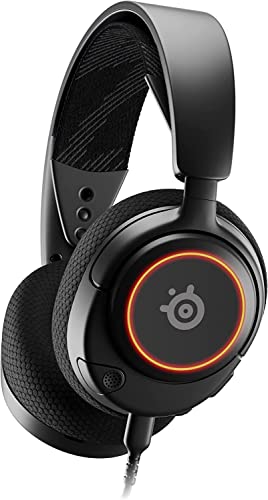
The Arctis Nova 3 is the most complete laptop headset in this guide. It connects over USB-C, which plugs straight into a modern laptop with no adapter, and it also ships with a 3.5mm cable for laptops that lack a free USB-C port. The listing names PC, PlayStation, Switch, and mobile use, and the USB-C connection is the one that matters for a laptop: it carries both game audio and chat audio over a single cable, and it powers the headset, so there is no battery to charge.
The headset uses high-fidelity drivers with 360-degree spatial audio, and the listing names a 10-band parametric equalizer that you can adjust in SteelSeries software on Windows. A tunable equalizer lets you lift footsteps and dialogue without turning the whole game up. The ClearCast Gen 2 microphone is a retractable boom mic that slides into the earcup when you do not need it, and it mutes when you retract it.
At 253 grams, the Arctis Nova 3 sits in the middle of this guide on weight. The earcups use AirWeave memory foam, which the listing describes as breathable, and the headband is the suspension type that SteelSeries uses across the Arctis line. Two things to check on the live listing: confirm model 61631 before you buy, since the same name appears on bundles with different cables, and note that the spatial audio and equalizer need SteelSeries software on Windows — on a Mac, the headset still works over USB-C and 3.5mm, but the tuning features are not available.
Razer BlackShark V2 X
The BlackShark V2 X is the classic wired choice in this guide, and it is the one to pick if you want the simplest possible laptop headset. It connects over a 3.5mm jack, which every gaming laptop has, and it ships with an audio and mic splitter extension cable for laptops with separate mic and headphone jacks. The listing names PC, Mac, PlayStation, Xbox, and Switch use, and the item type on the listing reads “PC Gaming Headset.” At 240 grams it is the second-lightest wired pick here, and its closed earcups with memory foam cushions give it the strongest passive noise isolation in the guide — useful when a laptop fan is spinning up during a long match.
The sound comes from custom-tuned 50mm TriForce drivers, which Razer divides into three parts for highs, mids, and lows. The listing names 7.1 surround sound, and the fine print matters: the surround effect is software-enabled and works on Windows 10 64-bit only. On any other system the headset plays in stereo.
The HyperClear cardioid microphone is a fixed boom with a pickup pattern that favors your voice and rejects sound from the back and sides. It is not detachable, so it stays on the headset even when you only want to listen, and it mutes from an inline control on the cable rather than by swivelling. The cable itself is fixed to the headset, not detachable, which is the main durability trade here: a cable that cannot be replaced is a cable that ends the headset if it frays. Confirm model RZ04-03240100-R3U1 on the live listing. The BlackShark name covers wireless versions and console-tuned versions that look alike, and the wired V2 X is the one with the 3.5mm jack and the splitter cable in the box.
HyperX Cloud Stinger 2 Core
The Cloud Stinger 2 Core is the entry pick in this guide, and it is the one to pick if you want a light wired headset that does the basics well. It connects over a 3.5mm jack, names PC use on its listing, and weighs 275 grams — heavier than the two lightest picks here, but light enough for long sessions. The listing names 40mm directional drivers tuned for enhanced bass, and a swivel-to-mute microphone that silences when you lift it up. That mute gesture is the fastest in this guide: one movement, no button to find, and the mic is visibly up when it is muted, so you always know its state.
The headline feature is DTS Headphone:X spatial audio, and the listing is clear about the limit: the activation runs for two years from activation, after which the headset plays in stereo. Without the software, it is a straightforward stereo headset with good bass and a clear mic.
The cable is fixed, and the listing does not name a splitter in the box, so check your laptop before you buy. If your laptop has a single combined audio jack, the headset plugs straight in. If your laptop has separate mic and headphone jacks, you will need a splitter, which the listing does not include. Confirm model 683L9AA on the live listing. The Cloud Stinger name covers several versions, including a PlayStation-tuned model with a different model number, and the Core is the general PC version in this guide.
Logitech G435 LIGHTSPEED Wireless
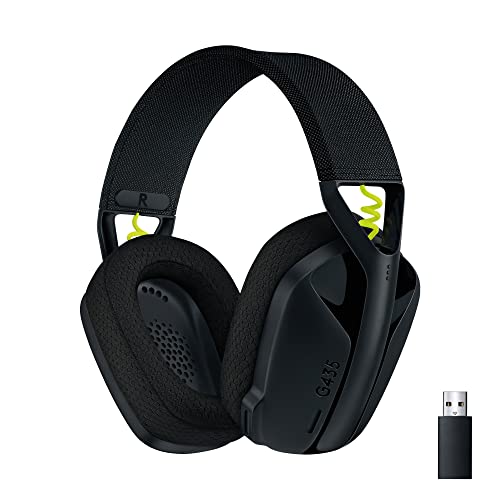
The G435 is the only wireless headset in this guide, and it is the lightest pick here at 165 grams. It connects two ways: a LIGHTSPEED wireless USB receiver for low-latency game audio on a laptop, and Bluetooth for a phone or a second device. The listing names PC, Mac, PlayStation, Switch, and mobile use. On a laptop, the LIGHTSPEED receiver is the connection to use for games, because Bluetooth can add a delay that you can feel in fast play, and the receiver plugs into a USB-A port. If your laptop has only USB-C ports, you will need an adapter for the receiver, and the listing does not include one.
The headset uses 40mm drivers and lists an 18-hour battery, charged over USB-C in about two hours. There is no wired mode, so a dead battery ends the session — keep the charging cable in your laptop bag. The microphones are two beamforming mics built into the earcup, not a boom mic. That keeps the headset clean and light, but it is a real trade: a beamforming mic picks up more room sound than a boom mic held close to your mouth, and in a noisy room your squad will hear more of the room.
Confirm model 981-001049 on the live listing. The G435 name covers several colors, and each color can carry a different code. Also note the older Amazon crawl for this listing shows a note saying no buying option is shown in one section while the same crawl shows a live buying option in another — the two sections disagree, so confirm a new-unit buying option on the live page before you buy, and check the seller named on the listing.
HyperX Cloud Alpha
The Cloud Alpha is the sturdiest headset in this guide. Its frame is aluminum, not plastic, and the listing names a two-year warranty, which is the longest warranty named on any listing here. It connects over a 3.5mm jack, names PC, PlayStation, Xbox, Switch, and mobile use, and the listing states that it is designed to work on PC and other platforms with a 3.5mm port.
The sound comes from 50mm dual-chamber drivers, one chamber for bass and a separate one for mids and highs. When bass and dialogue share one chamber, the bass can smear the dialogue. Keeping them apart keeps footsteps and callouts distinct from explosions, which is exactly what you want in a game where hearing a footstep a moment sooner matters. The listing names a frequency range of 50 Hz to 18,000 Hz and an impedance of 65 ohms. The higher impedance means this headset wants a little more power than the others here, but any gaming laptop headphone jack drives it without trouble.
The microphone is detachable, with noise cancellation, and it unplugs for music-only listening. The cable is detachable too, with inline volume and mic mute controls, and the box includes a protective carrying case — the only pick in this guide that ships with a case, which matters if the headset travels in a laptop bag. At 298 grams it is the heaviest pick here, and the weight is the trade for the aluminum frame and the large drivers.
Confirm model HX-HSCA-RD/AM on the live listing. The Cloud Alpha name covers the wired Alpha, the wireless Alpha, and the newer Cloud III models, and the red wired version in this guide is the HX-HSCA-RD/AM. The listing also names TeamSpeak and Discord certification for the mic.
Comparison Table
| Headset | Connection | Drivers | Mic | Weight |
|---|---|---|---|---|
| SteelSeries Arctis Nova 3 | USB-C and 3.5mm | High-fidelity, 360-degree spatial audio | Retractable ClearCast Gen 2 boom | 253 g |
| Razer BlackShark V2 X | 3.5mm | 50mm TriForce, 7.1 surround on Windows 10 | Fixed HyperClear cardioid boom | 240 g |
| HyperX Cloud Stinger 2 Core | 3.5mm | 40mm, DTS Headphone:X for two years | Swivel-to-mute boom | 275 g |
| Logitech G435 LIGHTSPEED Wireless | LIGHTSPEED USB receiver and Bluetooth | 40mm, Dolby Atmos through software | Dual beamforming mics, no boom | 165 g |
| HyperX Cloud Alpha | 3.5mm | 50mm dual-chamber | Detachable noise-cancelling boom | 298 g |
Frequently Asked Questions
Do I need a USB headset for a gaming laptop?
No. A 3.5mm headset works with any gaming laptop that has a headphone jack, which is nearly all of them. USB headsets add features — the Arctis Nova 3 in this guide uses USB-C for its equalizer and spatial audio — but those features need software on Windows, and the headset still works over 3.5mm without them.
Why does my laptop headset mic pick up fan noise?
A laptop fan sits close to the keyboard, and a mic that picks up sound from all directions will hear it. A cardioid boom mic, like the ones on the BlackShark V2 X and the Cloud Alpha, picks up mainly from one direction and rejects sound from the back and sides, which helps. Sitting the mic close to your mouth helps more: the closer the mic, the louder your voice is relative to the fan. The wireless pick in this guide uses beamforming mics in the earcup instead of a boom, so it picks up more room sound by design.
Can one headset work on a laptop and a console?
Yes, and four of the five picks in this guide name console use on their listings alongside PC use. A 3.5mm headset is the most flexible here, because the same jack exists on a laptop, a console controller, and a phone. A USB headset is less flexible: the Arctis Nova 3 works over USB-C on a laptop and over 3.5mm elsewhere, but its software features stay on Windows. Check the listing for the exact platforms it names, and confirm the model number, because headset names often cover console-tuned versions with different codes.
How to Choose
Match the connection to your laptop first. If your laptop has a free USB-C port and you play on Windows, the Arctis Nova 3 gives you the most tuning, with a retractable mic and a 10-band equalizer. If you want the simplest headset that just works, the BlackShark V2 X plugs into any 3.5mm jack, weighs 240 grams, and its closed earcups block more fan noise than any other pick here. If you want the lightest headset and you are willing to charge it, the G435 at 165 grams is in a class of its own — just remember it has no wired mode and no boom mic, so it suits quiet rooms more than noisy ones.
If sturdiness matters most, the Cloud Alpha is the pick. Its aluminum frame, detachable cable and mic, carrying case, and two-year warranty make it the headset most likely to survive years in a laptop bag. And if you want the lowest fuss at the entry end of the guide, the Cloud Stinger 2 Core gives you a swivel-to-mute mic and spatial audio for two years, with the plain warning that you should check whether your laptop needs a splitter, since the box does not include one.
Whatever you pick, confirm the exact model number on the live listing before you buy. Headset names cover wide families, and the model number is the only thing that ties the listing to the specs in this guide. The weakest evidence in the guide belongs to the Cloud Alpha, whose direct Amazon crawl is the oldest — confirm it live first.
Disclosure: As an Amazon Associate, we may earn a commission from qualifying purchases made through links in this article, at no additional cost to you.
Related guides
More from Amazon
Programs that pair well with the guide above. Offers and eligibility are set by Amazon and may change.
A free business account with business pricing and bulk-buying tools for work, shop or home office.
Create a business accountFree shipping on eligible items, Prime Video and more. Eligible new members can start with a free trial.
Start a Prime free trialAudiobooks and podcasts to listen to on the go. Eligible new members can start with a free trial.
Try Audible freeAd-free music streaming. Eligible new subscribers can start with a free trial.
Try Music Unlimited freeAs an Amazon Associate we earn from qualifying purchases.