Our Short List of 3
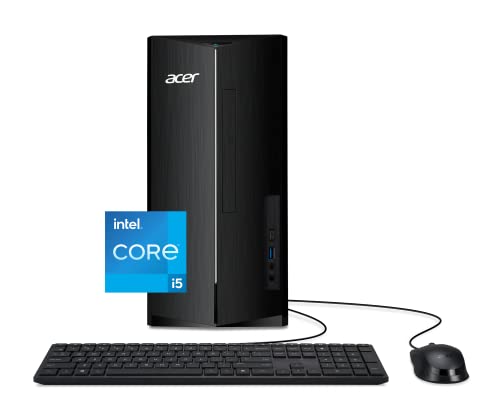
- Best for: A family room tower that doubles as a homework and office machine.
- Processor: Intel Core i5-12400, 6 cores, up to 4.4GHz
- Memory: 12GB DDR4 3200MHz, expandable to 32GB
- Storage: 512GB NVMe M.2 SSD
- Graphics: Intel UHD Graphics 730

- Best for: A tiny, quiet desktop for a small desk, dorm room, or reception counter.
- Processor: AMD Ryzen 5 PRO 5650G, 6 cores, 12 threads, 3.9GHz
- Memory: 16GB DDR4, expandable to 64GB
- Storage: 512GB PCIe SSD
- Display support: Dual 4K via DisplayPort++

- Best for: A living-room all-in-one for a household that runs video calls, schoolwork, and browsing all at once.
- Processor: Intel Core i3-N305, 8 cores, 8 threads, up to 3.8GHz
- Memory: 16GB DDR4
- Storage: 512GB PCIe NVMe M.2 SSD
- Display: 23.8-inch Full HD, 1920 x 1080
All 3 Picks at a Glance
| Product | Specs | Action |
|---|---|---|
| 1. Acer Aspire TC-1760-UA92 |
| Check price on Amazon |
| 2. HP Elite 805 Mini |
| Check price on Amazon |
| 4. Lenovo IdeaCentre 24 All-in-One, Intel Core i3-N305 |
| Check price on Amazon |
Buying a cheap desktop PC is really a decision about which corners you can live with. A machine with a modest processor and integrated graphics handles documents, browsing, video calls, and schoolwork without complaint, but it will struggle with heavy photo editing or modern games. Storage matters just as much: a solid-state drive makes the whole system feel responsive, while a spinning hard drive slows down every launch and file search. The trick is to match the hardware to the work you actually do, not the work you imagine you might do one day.
This guide is for families who need one shared computer, students setting up a study desk, and home workers who want a dependable machine for email, spreadsheets, and video meetings. It also suits anyone replacing an aging tower with something smaller and quieter. Every desktop below was chosen from its Amazon listing, using the processor, memory, storage, and connectivity stated there, so you can compare the four on facts rather than marketing claims.
Our Top Picks
Top 3 picks at a glance
Quick Picks
As an Amazon Associate we earn from qualifying purchases
| Product | Best for | Key spec from title |
|---|---|---|
| Acer Aspire TC-1760-UA92 | A traditional tower for a family room | Intel Core i5-12400, 12GB RAM |
| HP Elite 805 Mini | A tiny desktop for a crowded desk | AMD Ryzen 5 PRO 5650G, 16GB RAM |
| Lenovo IdeaCentre 24, N100 | An all-in-one with a big SSD | Intel N100, 16GB RAM, 1TB SSD |
| Lenovo IdeaCentre 24, i3-N305 | An all-in-one with a stronger CPU | Intel Core i3-N305, 16GB RAM |
How to Choose
Processor First, Then Everything Else
The processor sets the ceiling for everything else in a cheap desktop, so it deserves the first look. A current six-core chip like the Core i5-12400 handles multitasking, large spreadsheets, and dozens of browser tabs without stalling. A quad-core N100 is fine for one task at a time but slows down when several heavy apps run together. An eight-core i3-N305 sits between the two, giving you extra headroom for video calls while documents stay open. Count the cores, check the boost clock, and remember that a newer efficient chip often beats an older chip with a bigger name.
Memory and Storage Shape Daily Speed
Memory decides how many things you can keep open at once, and storage decides how fast they open. Sixteen gigabytes of RAM is the sweet spot for a cheap desktop in 2026: it keeps a browser with many tabs, a word processor, and a video call running side by side without constant reloading. Eight gigabytes works for light use but forces the system to shuffle data sooner. For storage, insist on a solid-state drive of at least 512GB, and take 1TB if you keep photos and videos locally. A fast SSD makes booting, launching apps, and searching files feel instant, which matters more day to day than a slightly faster processor.
Tower, Mini, or All-in-One
The shape of the desktop changes where it fits and what you can change later. A tower like the Acer Aspire sits under a desk, holds a DVD drive, and leaves room inside for extra storage or a memory upgrade. A mini PC like the HP Elite 805 hides behind a monitor or tucks onto a shelf, which suits small rooms and tidy desks, though its compact case limits internal upgrades. An all-in-one like the Lenovo IdeaCentre bundles the screen and computer into one unit, so setup means one power cable and a keyboard. Pick the tower for flexibility, the mini for space, and the all-in-one for simplicity.
Ports, Wi-Fi, and Room to Grow
A cheap desktop should connect to everything you already own and leave a path for upgrades. Look for at least two HDMI or DisplayPort outputs if you ever want a second monitor, plus a USB-C port for modern accessories and a handful of USB-A ports for a keyboard, mouse, printer, and external drive. Wi-Fi 6 keeps wireless connections steady when the router sits in another room, and Bluetooth pairs headphones and speakers without cables. Check the memory ceiling too: a machine that accepts 32GB or 64GB of RAM can grow with your needs, while a sealed unit with soldered memory cannot. A DVD drive or an SD card reader is a bonus if you still use discs or camera cards.
The 4 Best Options
1. Acer Aspire TC-1760-UA92
- Best for: A family room tower that doubles as a homework and office machine.
- Processor: Intel Core i5-12400, 6 cores, up to 4.4GHz
- Memory: 12GB DDR4 3200MHz, expandable to 32GB
- Storage: 512GB NVMe M.2 SSD
- Graphics: Intel UHD Graphics 730
A family room tower that doubles as a homework and office machine.
12GB of RAM is enough for everyday work but leaves less headroom than 16GB, so confirm the exact configuration on the listing before ordering.
The Aspire TC-1760-UA92 is the most conventional desktop in this guide, and that is its strength. Its six-core Core i5-12400 processor handles office work, homework, and dozens of browser tabs with room to spare, while 12GB of DDR4 memory keeps multitasking smooth. The 512GB NVMe SSD makes the system boot quickly and apps launch without waiting, and the built-in DVD drive is handy for older discs and software. Two HDMI ports support a dual-monitor setup, Wi-Fi 6 keeps the connection steady, and the tower case leaves space inside for a memory upgrade later.
Watch out for: 12GB of RAM is enough for everyday work but leaves less headroom than 16GB, so confirm the exact configuration on the listing before ordering.
2. HP Elite 805 Mini
- Best for: A tiny, quiet desktop for a small desk, dorm room, or reception counter.
- Processor: AMD Ryzen 5 PRO 5650G, 6 cores, 12 threads, 3.9GHz
- Memory: 16GB DDR4, expandable to 64GB
- Storage: 512GB PCIe SSD
- Display support: Dual 4K via DisplayPort++
A tiny, quiet desktop for a small desk, dorm room, or reception counter.
The compact case limits internal upgrades, so choose the memory and storage configuration you will need long term.
The Elite 805 Mini squeezes a full desktop into a box smaller than a hardback book, which makes it the pick for desks with no space to spare. Its six-core Ryzen 5 PRO 5650G processor and 16GB of DDR4 memory handle office apps, browsing, and video calls with ease, and the 512GB PCIe SSD keeps everything responsive. Dual 4K display support lets you run two monitors from a machine that hides behind one of them, and the included keyboard and mouse mean it works straight out of the box. The ultra-quiet design suits bedrooms, libraries, and shared workspaces where fan noise would distract.
Watch out for: The compact case limits internal upgrades, so choose the memory and storage configuration you will need long term.
3. Lenovo IdeaCentre 24 All-in-One, Intel N100
The IdeaCentre 24 with the Intel N100 is the simplest way to put a computer on a desk: the screen and the system are one unit, so there is no tower to find room for and only a few cables to manage. Its 23.8-inch Full HD display is large enough for documents and video calls side by side, while 16GB of memory and a roomy 1TB SSD cover years of files, photos, and apps. The N100 processor sips power and stays quiet, which fits a bedroom or a study corner. Wi-Fi 6 and Bluetooth cover wireless accessories, and Windows 11 Home is ready from the first boot.
Specs
- Processor: Intel N100, 4 cores, 4 threads, up to 3.4GHz
- Memory: 16GB DDR4, expandable to 32GB
- Storage: 1TB PCIe NVMe M.2 SSD
- Display: 23.8-inch Full HD, 1920 x 1080
- Graphics: Integrated Intel UHD Graphics
- Connectivity: Wi-Fi 6, Bluetooth, Ethernet, HDMI
- Operating system: Windows 11 Home
- Dimensions: 21.23 x 7.3 x 16.65 inches; 9.47 lb
Best for: A first family computer or a study desk where one tidy unit replaces a tower, monitor, and cables.
Watch out for: The N100 is an efficiency chip, so keep multitasking moderate and avoid heavy creative apps.
4. Lenovo IdeaCentre 24 All-in-One, Intel Core i3-N305
- Best for: A living-room all-in-one for a household that runs video calls, schoolwork, and browsing all at once.
- Processor: Intel Core i3-N305, 8 cores, 8 threads, up to 3.8GHz
- Memory: 16GB DDR4
- Storage: 512GB PCIe NVMe M.2 SSD
- Display: 23.8-inch Full HD, 1920 x 1080
A living-room all-in-one for a household that runs video calls, schoolwork, and browsing all at once.
Storage is 512GB rather than 1TB, so plan for cloud storage or an external drive if your photo library is large.
The second IdeaCentre 24 looks identical to its N100 sibling, but the eight-core i3-N305 processor inside gives it noticeably more muscle for busy days. It juggles video calls, a browser full of tabs, and office apps at the same time without the slowdowns a four-core chip can show. The 512GB SSD is smaller than the N100 model’s 1TB drive, so it suits buyers who store photos and documents in the cloud or on an external drive. Everything else carries over: the same bright 23.8-inch Full HD screen, 16GB of memory, Wi-Fi 6, and a clean white finish that blends into a living room.
Watch out for: Storage is 512GB rather than 1TB, so plan for cloud storage or an external drive if your photo library is large.
Which One Fits Your Situation
A Shared Family Computer
Pick the Acer Aspire TC-1760-UA92. Its six-core i5 processor and 12GB of memory cope with several family members taking turns through the day, from homework to bills to streaming. The tower sits out of the way under a desk, the DVD drive plays older discs, and two HDMI ports leave room for a second screen later. It is the most flexible machine in this guide, and the easiest to upgrade when needs change.
A Desk With Almost No Space
Pick the HP Elite 805 Mini. It hides behind a monitor or perches on a shelf, leaving the whole desk free for books and notebooks. The Ryzen 5 processor and 16GB of memory are stronger than the size suggests, and dual 4K support means two monitors are still possible. It is the right choice for dorm rooms, small bedrooms, and reception counters where a tower would dominate the room.
A Home Office That Runs All Day
Pick the Lenovo IdeaCentre 24 with the i3-N305. Its eight cores keep video meetings, email, and spreadsheets running together without stuttering, and the built-in screen means one less device to buy and cable up. The white finish looks tidy in a living room, and the 16GB of memory covers a full working day of multitasking. Add an external drive for archives and it will carry a home office for years.
Homework, Browsing, and Video Calls
Pick the Lenovo IdeaCentre 24 with the Intel N100. Its 1TB SSD holds years of school files and photos, and the all-in-one design keeps a study corner neat with a single unit to switch on. The N100 handles documents, browsing, and video lessons comfortably, and its quiet, low-power running suits a bedroom. It is the simplest option in this guide, and the one with the most storage for the least fuss.
Common Mistakes
- Buying a spinning hard drive instead of an SSD: the whole system feels slow from the first boot, even with a decent processor.
- Choosing 8GB of memory to save a little, then running a browser, a video call, and office apps together and wondering why tabs keep reloading.
- Ignoring the monitor: a tower or mini PC needs a screen, keyboard, and mouse, so check what is in the box before ordering.
- Picking a processor by its brand name alone: a modern efficient chip often outperforms an older chip with a fancier badge.
- Forgetting to check ports: count the HDMI, USB, and Ethernet connections you need, including a second monitor and a printer.
Frequently Asked Questions
Is 16GB of RAM enough for a cheap desktop?
Yes, for the everyday work these desktops are built for. Sixteen gigabytes keeps a browser with many tabs, a word processor, and a video call running together without constant reloading. It also leaves headroom for the occasional heavier task, like editing a large document with photos. Only heavy photo or video editing and demanding games call for more.
Do I need a separate graphics card?
No, not for office work, schoolwork, browsing, streaming, or video calls. The integrated graphics in every desktop in this guide handle those tasks and drive one or two Full HD monitors. A separate graphics card only matters for modern games, 3D work, or heavy video editing. If those are your plans, look at a gaming desktop instead of a cheap general-purpose machine.
Tower, mini PC, or all-in-one: which is best?
It depends on your room and your habits. A tower gives you the most room to upgrade and the most ports, so it suits a fixed desk that will not move. A mini PC is best when desk space is scarce. An all-in-one is best when you want the simplest setup, with the screen and computer in one unit and the fewest cables to manage.
How much storage do I need?
For most buyers, 512GB is the minimum worth accepting, and it covers Windows, apps, documents, and a modest photo collection. Take 1TB if you keep years of photos and videos on the machine itself, or if several people share one computer. Whatever the size, insist on a solid-state drive: it makes booting and launching apps far quicker than a spinning hard drive.
Related guides
More from Amazon
Programs that pair well with the guide above. Offers and eligibility are set by Amazon and may change.
A free business account with business pricing and bulk-buying tools for work, shop or home office.
Create a business accountFree shipping on eligible items, Prime Video and more. Eligible new members can start with a free trial.
Start a Prime free trialAudiobooks and podcasts to listen to on the go. Eligible new members can start with a free trial.
Try Audible freeAd-free music streaming. Eligible new subscribers can start with a free trial.
Try Music Unlimited freeAs an Amazon Associate we earn from qualifying purchases.