Our Short List of 3
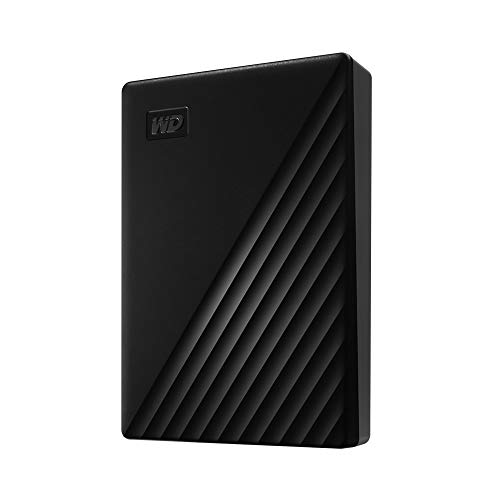
- Best for: Carrying a growing archive of photos, videos, and documents between home and office.
- 4TB digital storage capacity
- Mechanical hard disk, 2.5-inch form factor
- USB 2.0, USB 3.0, and USB 3.2 Gen 2 connectivity
- Dimensions of 4.22 by 2.95 by 0.75 inches

- Best for: Large scheduled backups and carrying a multi-year media library in a single metal drive.
- 6TB digital storage capacity
- Mechanical hard disk, 2.5-inch portable form factor
- USB-C connectivity with USB 3.2 Gen 1 and USB Type C support
- Anodized metal enclosure
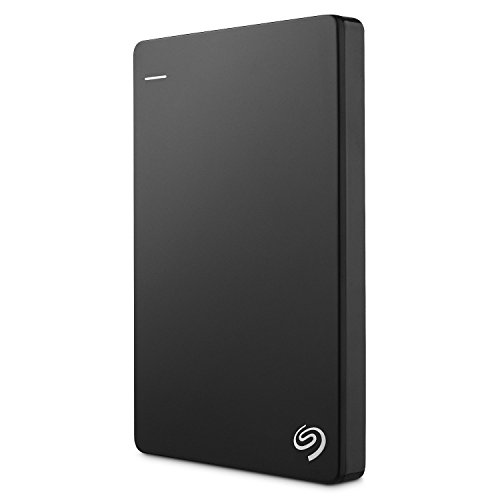
- Best for: Slim everyday carry in a laptop bag where thinness and light weight matter most.
- 2TB digital storage capacity
- USB 3.0 hard disk interface
- Read speed of 120 megabytes per second
- 2.5-inch form factor
All 5 Picks at a Glance
| Product | Specs | Action |
|---|---|---|
| WD My Passport 4TB |
| Check price on Amazon |
| WD My Passport Ultra 6TB |
| Check price on Amazon |
| Seagate Backup Plus Slim 2TB |
| Check price on Amazon |
 Toshiba Canvio Basics 2TB |
| Check price on Amazon |
 LaCie Rugged Mini 2TB |
| Check price on Amazon |
A portable USB hard drive earns its place in a bag when it moves a whole library between machines without a wall adapter or a setup ritual. The real decision is not capacity alone; it is how the drive behaves on a laptop USB port, how much room it leaves for the next year of files, and whether its enclosure survives being tossed into a backpack pocket next to keys and cables. A drive that needs a second cable or a reformatting session every time it changes computers quietly stops being portable.
This guide is for students, photographers, office workers, and anyone who carries work between a desktop, a laptop, and a borrowed machine. The five drives below were shortlisted from the names and specifications on their Amazon listings, covering compact two-terabyte options for everyday carry, a roomy four-terabyte pick for growing archives, a six-terabyte metal drive for heavy backups, and a rugged model for rough handling.
Our Top Picks
- Toshiba Canvio Basics 2TB Portable External Hard Drive2TB4.3 x 3.1 x 0.55 inches0.3 poundsCheck on Amazon
- LACIE Z230636-240FLaCie Rugged Mini USB 3.0 2TB External2TB5.3 x 3.4 x 0.79 inches240 GramsCheck on Amazon
Top 3 picks at a glance
Quick Picks
As an Amazon Associate we earn from qualifying purchases
| Product | Best for | Key spec from title |
|---|---|---|
| WD My Passport 4TB | Growing photo and document archives | 4TB portable external hard drive, USB 3.1 |
| WD My Passport Ultra 6TB | Large backups in a metal enclosure | 6TB portable external hard drive, USB-C |
| Seagate Backup Plus Slim 2TB | Slim everyday carry between laptop and desktop | 2TB portable hard drive, USB 3.0 |
| Toshiba Canvio Basics 2TB | Simple plug-and-play storage with no software setup | 2TB portable external hard drive, USB 3.0 |
| LaCie Rugged Mini 2TB | Field work and rough travel | 2TB portable external hard drive, USB 3.0 |
How to Choose
Capacity against the files you actually carry
Capacity decides how long a portable drive stays useful, so start from the folders you already have rather than from a round number. A two-terabyte drive comfortably holds a document library, a music collection, and several years of phone photos, while a four-terabyte drive suits someone whose video folder grows every month. Count the size of the largest folder you move regularly, then leave headroom for the next year of shooting, downloading, and project files. A drive that fills up in six months forces an awkward second purchase, and moving an archive between drives takes far longer than buying the right size once.
USB connection and bus power
Every drive in this guide draws its power from the USB port, which is what makes it genuinely portable, but the connector on the drive end still matters. Older drives use a Micro-B port with a USB-A cable, while newer ones use USB-C, and the cable in the box decides what you can plug into on arrival. Check the ports on the machines you use most: a laptop with only USB-C ports needs either a USB-C drive or an adapter in the bag. Also confirm the port can deliver enough power during spin-up, since a weak hub or a front-panel port sometimes drops a spinning drive mid-transfer.
Enclosure, size, and weight
A portable drive lives in pockets, pouches, and backpack compartments, so its shell is a working part of the product rather than decoration. Slim metal enclosures shrug off scratches and slide easily beside a laptop, while thicker rugged models trade pocket space for drop and crush resistance. Compare the listed dimensions and weight against the bag you carry daily, and think about the cable too: a short cable tangles less, but a longer one reaches a desktop tower tucked under a desk. If the drive will ride in a jacket pocket, a flat two-terabyte model beats a tall high-capacity one.
Backup software and encryption
Hardware alone does not protect files; the software bundled with the drive decides whether backups actually happen. Some drives ship with scheduling tools that copy new files automatically, while others rely on plain drag and drop, which works fine until a busy week breaks the habit. Password protection and hardware encryption matter most for drives that leave the house, since a lost drive without a password hands its contents to whoever finds it. Read what the listing says about the included software and whether it needs an account or a download before the first backup can run.
The 5 Best Options
WD My Passport 4TB
- Best for: Carrying a growing archive of photos, videos, and documents between home and office.
- 4TB digital storage capacity
- Mechanical hard disk, 2.5-inch form factor
- USB 2.0, USB 3.0, and USB 3.2 Gen 2 connectivity
- Dimensions of 4.22 by 2.95 by 0.75 inches
Carrying a growing archive of photos, videos, and documents between home and office.
The listing is a 2026 crawl with no buy box visible, so confirm it is still sold before buying, and check whether your laptop has a USB-A port or needs an adapter.
The four-terabyte My Passport suits someone whose archive has outgrown a two-terabyte drive but who still wants a pocketable unit rather than a desktop box. Its two-and-a-half-inch enclosure fits in the palm of a hand, and the included backup software handles scheduled copies alongside password protection for files that travel. Four terabytes leaves generous room for raw photos, project folders, and a full system backup on the same drive, so the drive works as both a working library and a safety net. It is the straightforward pick when capacity is the bottleneck.
Watch out for: The listing is a 2026 crawl with no buy box visible, so confirm it is still sold before buying, and check whether your laptop has a USB-A port or needs an adapter.
WD My Passport Ultra 6TB
- Best for: Large scheduled backups and carrying a multi-year media library in a single metal drive.
- 6TB digital storage capacity
- Mechanical hard disk, 2.5-inch portable form factor
- USB-C connectivity with USB 3.2 Gen 1 and USB Type C support
- Anodized metal enclosure
Large scheduled backups and carrying a multi-year media library in a single metal drive.
The listing is a 2026 crawl with no buy box visible, so confirm it is still sold before buying, and note that its weight and thickness make it a bag drive rather than a pocket drive.
The six-terabyte My Passport Ultra is the heavy lifter of this group, built for people who back up whole machines and keep years of media in one place. Its anodized metal enclosure adds a layer of durability that plastic shells cannot match, and the USB-C connection fits modern laptops without an adapter in the middle. Six terabytes means a photographer or video editor can carry an entire working archive plus backups, rather than choosing which folders deserve a place in the bag. It weighs more than the slim two-terabyte models, and that trade is the honest cost of carrying this much storage.
Watch out for: The listing is a 2026 crawl with no buy box visible, so confirm it is still sold before buying, and note that its weight and thickness make it a bag drive rather than a pocket drive.
Seagate Backup Plus Slim 2TB
- Best for: Slim everyday carry in a laptop bag where thinness and light weight matter most.
- 2TB digital storage capacity
- USB 3.0 hard disk interface
- Read speed of 120 megabytes per second
- 2.5-inch form factor
Slim everyday carry in a laptop bag where thinness and light weight matter most.
The listing is a 2026 crawl with no buy box visible, so confirm it is still sold before buying, and remember that two terabytes fills quickly if video projects join the library.
The Backup Plus Slim is the thinnest drive here, and that slimness is its whole argument: it slips into a laptop sleeve and disappears until it is needed. Two terabytes covers everyday documents, music, and a solid photo library, and the metal enclosure keeps the package feeling substantial despite its half-inch thickness. Setup is plain plug and play with the included USB 3.0 cable, and the bundled backup tools cover one-click and scheduled copies. A complimentary two-month Adobe Creative Cloud Photography Plan comes with the drive for photo editing.
Watch out for: The listing is a 2026 crawl with no buy box visible, so confirm it is still sold before buying, and remember that two terabytes fills quickly if video projects join the library.
Toshiba Canvio Basics 2TB
- Best for: Straightforward drag-and-drop storage on a Windows PC with no software setup.
- 2TB mechanical hard disk
- USB 3.0 hard disk interface
- Rotational speed of 5400 RPM
- Dimensions of 4.3 by 3.1 by 0.55 inches
Straightforward drag-and-drop storage on a Windows PC with no software setup.
The listing is a 2026 crawl with no buy box visible, so confirm it is still sold before buying, and Mac users must reformat the drive before use.
The Canvio Basics is the simplest drive in this lineup, and that simplicity is deliberate. There is no software to install and no account to create: plug it in, drag files across, and unplug when done. That makes it a good fit for a shared household computer, a library machine, or anyone who wants storage without a setup project. Its matte black casing resists smudges, and the compact body fits a pocket at five and a half ounces. The drive ships formatted for Windows, so Mac users should plan on reformatting before first use.
Watch out for: The listing is a 2026 crawl with no buy box visible, so confirm it is still sold before buying, and Mac users must reformat the drive before use.
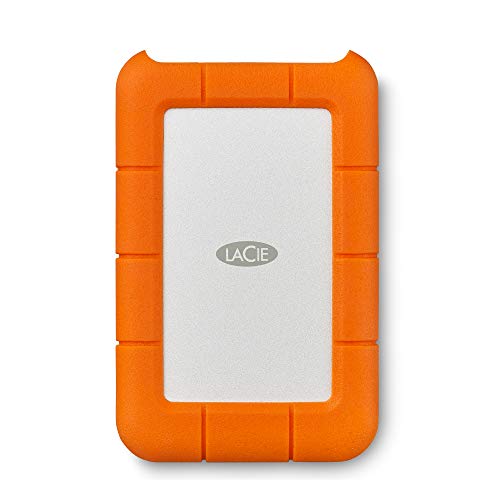
LaCie Rugged Mini 2TB
- Best for: Photographers and field workers who carry irreplaceable files through rough travel and outdoor conditions.
- 2TB digital storage capacity
- USB 3.0 hard disk interface
- Transfer speed of up to 130 megabytes per second
- Rotational speed of 5400 RPM
Photographers and field workers who carry irreplaceable files through rough travel and outdoor conditions.
The listing is a 2026 crawl with no buy box visible, so confirm it is still sold before buying, and its thicker body takes more bag space than the slim models here.
The Rugged Mini is the drive for bags that get dropped, rained on, and squeezed into overhead bins. Its orange rubber bumper and metal core protect against drops, crushing, and rain, which matters when the drive carries irreplaceable field photos rather than replaceable downloads. Two terabytes is enough for a long shoot or a project archive, and the USB 3.0 connection moves files at up to 130 megabytes per second. A two-year limited warranty and included data rescue service round out a package built around the idea that accidents happen away from a desk.
Watch out for: The listing is a 2026 crawl with no buy box visible, so confirm it is still sold before buying, and its thicker body takes more bag space than the slim models here.
Which One Fits Your Situation
Everyday carry between laptop and desktop
Choose the Seagate Backup Plus Slim 2TB when the drive rides in a laptop sleeve every day. Its half-inch profile and light weight disappear into a bag, and plug-and-play setup means it works the moment it is connected. Two terabytes covers documents, music, and photos for most daily routines, and the metal enclosure handles the scuffs of constant travel without complaint.
A large archive that keeps growing
Choose the WD My Passport 4TB when two terabytes no longer holds the library. Four terabytes gives a photo collection or a video folder room to grow for another year or two, while the pocketable enclosure keeps the archive portable. The bundled backup software also turns the drive into a scheduled safety net rather than a manual chore.
Rough travel and outdoor shoots
Choose the LaCie Rugged Mini 2TB when the drive will be dropped, rained on, or crushed in a crowded bag. Its rubber bumper and metal core are built for exactly that treatment, and the included data rescue service adds a fallback if the worst happens. It is thicker than the slim picks, but that bulk is the protection itself.
Backing up a whole household
Choose the WD My Passport Ultra 6TB when one drive must hold backups from several machines plus a media library. Six terabytes absorbs full system backups without constant pruning, and the metal enclosure plus hardware encryption suits a drive that stores family records. The Toshiba Canvio Basics 2TB works as a simpler second drive for drag-and-drop copies on a shared Windows computer.
Common Mistakes
- Buying a desktop drive that needs a wall adapter and calling it portable, then discovering it cannot run from a laptop USB port.
- Picking a solid-state drive when the budget and capacity point to a spinning drive, or the reverse, without checking which technology the listing actually describes.
- Ignoring the connector on the drive end and arriving with a cable that fits nothing on the laptop.
- Skipping the backup habit and treating the portable drive as the only copy, so a lost bag means lost files.
- Filling the drive to the last gigabyte, which slows transfers and leaves no room for the next project.
Frequently Asked Questions
Do portable USB hard drives need a power adapter?
No. Every drive in this guide draws power from the USB port it is plugged into, which is why no wall adapter appears in the box. That bus power works on most laptop and desktop ports, but a weak unpowered hub can struggle during spin-up. If a drive disconnects mid-transfer, connect it directly to the computer instead of through a hub.
Can I use the same drive on Windows and Mac?
Often, but not always without a step in between. Several drives here ship formatted for Windows, and a Mac can read that format but needs reformatting to write freely. Reformatting erases everything on the drive, so do it before copying files across. Check the listing for the shipped format and for whether the maker supplies a Mac driver.
Is a portable hard drive fast enough for editing video directly?
It depends on the footage and the connection. A USB 3.0 spinning drive handles documents, photos, and light video work comfortably, but scrubbing through large video timelines benefits from faster storage. Many editors keep active projects on the computer and use the portable drive for storage, backup, and transport between machines instead of live editing.
How should I carry a portable hard drive safely?
Keep the drive in a padded sleeve or a dedicated pocket rather than loose with keys and chargers. Eject it through the operating system before unplugging, since pulling the cable mid-write can corrupt files. Avoid leaving it in a hot car, and keep a second copy of irreplaceable files elsewhere, because a portable drive is easy to lose.
Related guides
More from Amazon
Programs that pair well with the guide above. Offers and eligibility are set by Amazon and may change.
A free business account with business pricing and bulk-buying tools for work, shop or home office.
Create a business accountFree shipping on eligible items, Prime Video and more. Eligible new members can start with a free trial.
Start a Prime free trialAudiobooks and podcasts to listen to on the go. Eligible new members can start with a free trial.
Try Audible freeAd-free music streaming. Eligible new subscribers can start with a free trial.
Try Music Unlimited freeAs an Amazon Associate we earn from qualifying purchases.