The best GTX 1080 Ti to buy in 2026 is a well-cooled, triple-fan partner model such as the EVGA GTX 1080 Ti FTW3 or ASUS ROG Strix GTX 1080 Ti, bought used at roughly $120–$220 with a return window. Every 1080 Ti uses the same GP102 chip with 11GB of GDDR5X, so cooler quality, condition and seller terms matter more than the badge. The card is still a capable 1080p and entry-level 1440p option for older games, but it lacks ray tracing hardware and DLSS and has reached the end of NVIDIA’s feature updates.
As an Amazon Associate we earn from qualifying purchases at no extra cost to you.
Our Top Picks
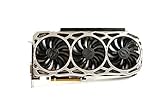
 EVGA GeForce GTX 1080 Ti SC Black EditionReal Boost Clock: 1670 MHz12.81 x 2.81 x 9.5 inchesCheck on Amazon
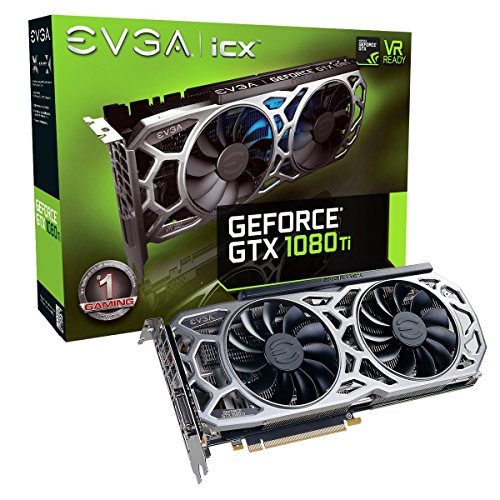 EVGA GeForce GTX 1080 Ti SC2 GamingReal Boost Clock: 1670 MHz12.81 x 2.81 x 9.5 inches0.75 poundsCheck on Amazon
 EVGA GeForce GTX 1080 Ti FTW3 GamingReal Boost Clock: 1683 MHz12.81 x 2.81 x 9.5 inches0.75 poundsCheck on Amazon
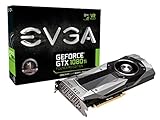
 EVGA GeForce GTX 1080 Ti Founders Edition GamingReal Boost Clock: 1582 MHz10.5 x 1.5 x 4.4 inches3 poundsCheck on Amazon
Top 3 picks at a glance
Quick comparison of the best GTX 1080 Ti cards
All cards below are used-market only, since the GTX 1080 Ti launched in 2017 and is no longer sold new by manufacturers. Prices are general used-market ranges and swing with local supply.
| Pick | Best for | Key specs | Typical used price |
|---|---|---|---|
| EVGA GTX 1080 Ti FTW3 Gaming | Best overall | 11GB GDDR5X, 352-bit, triple-fan iCX cooler, 8+8-pin power | $150–$220 |
| ASUS ROG Strix GTX 1080 Ti (OC) | Best for quiet, cool running | 11GB, 352-bit, large triple-fan cooler, 8+8-pin power | $150–$220 |
| MSI GTX 1080 Ti Gaming X / Gaming X Trio | Best value partner card | 11GB, 352-bit, TWIN FROZR cooler, 8+8-pin power | $130–$200 |
| Nvidia GTX 1080 Ti Founders Edition | Best for compact or tight airflow builds | 11GB, 352-bit, blower cooler, 8+6-pin power | $120–$180 |
| EVGA GTX 1080 Ti SC2 Hybrid | Best for sustained load and low noise | 11GB, 352-bit, 120mm AIO radiator, 8+6-pin power | $170–$250 |
Best overall: EVGA GTX 1080 Ti FTW3 Gaming
The FTW3 pairs a factory overclock with a heavy triple-fan cooler and extra temperature sensors. That makes it a good default when you want a 1080 Ti that holds boost clocks without screaming. EVGA stopped making graphics cards, so expect little or no warranty support. The trade-off is size: it is a thick card that needs a roomy case and a PSU with two 8-pin PCIe connectors.
Best for quiet running: ASUS ROG Strix GTX 1080 Ti
The Strix has a large heatsink and fans that stop at idle, which suits a desk-side PC. The trade-off is length and thickness, and used prices are often a little higher because of the brand. Check that the fans spin up smoothly, since a worn bearing is the most common fault on an older triple-fan card.
Best value partner card: MSI GTX 1080 Ti Gaming X
MSI’s Gaming X models are common on the used market and often priced below EVGA and ASUS equivalents. The cooling is competent rather than class-leading. If you find one for $130–$180 with clean thermals, it delivers the same GP102 performance as a pricier card. The trade-off is that listings are less consistent, so confirm the exact variant (Gaming X or Gaming X Trio) before you pay.
Best for small cases: Founders Edition
The reference blower pushes hot air out the back of the case, which helps in a cramped small-form-factor build with poor airflow. It runs louder and warmer than the big partner coolers under full load. It is a sensible choice only if case size or exhaust direction is your main constraint.
Best for sustained load: EVGA GTX 1080 Ti SC2 Hybrid
The hybrid design moves GPU heat to a 120mm radiator, so the card stays cool in long sessions and can run quietly. You need a free radiator mount, and the pump is one more part that can fail on a used unit. Ask the seller whether the pump has ever been noisy or intermittent.
Is a 1080 Ti still worth buying in 2026?
It is worth it as a cheap upgrade for older systems or a 1080p esports machine, and a poor choice if you want modern AAA games at high settings. Per NVIDIA’s published driver roadmap, the Pascal generation has moved to a security-update-only phase, so new game-specific optimizations are no longer a given. Check the current NVIDIA driver release notes before you buy.
- No hardware ray tracing and no DLSS. A few recent games now require ray-tracing-capable GPUs and will not launch at all on this card.
- FSR upscaling still works. AMD’s FidelityFX Super Resolution is not tied to specific hardware, which helps when a game supports it.
- No Resizable BAR support on this generation.
- Roughly RTX 2070 Super to RTX 3060 territory in many traditional raster games, per published reviews.
Typical results, which vary a lot with settings, resolution, CPU and game patch: about 100–200+ fps in esports titles at 1080p, roughly 50–90 fps in many AAA games at 1080p high, and about 35–60 fps at 1440p high in demanding games.
Worked example: will your PSU handle it?
NVIDIA lists the reference board power at 250W, and factory-overclocked partner cards can pull more under load. Here is a power budget for a typical older system.
| Component | Estimated peak draw |
|---|---|
| GTX 1080 Ti (partner card, overclocked) | 260–300W |
| Mid-range CPU under gaming load | 65–125W |
| Motherboard, RAM, SSD, fans, USB | 50–75W |
| Total | 375–500W |
Aim for the PSU’s rated wattage to be about 1.3–1.5 times your peak draw, so 500W × 1.3 = 650W at the high end. A quality 550W unit is the minimum for a lower-power CPU, and 650W is safer for a hot CPU or an overclocked card. Confirm the PSU has two PCIe 8-pin cables (8+6 or 8+8, depending on the model). Do not use Molex-to-PCIe adapters on a card this power-hungry.
Decision matrix: which card fits your situation?
| Your situation | Best choice | Reason |
|---|---|---|
| Standard mid-tower, quiet PC | ASUS ROG Strix or EVGA FTW3 | Large coolers keep fan speed low |
| Tight budget under about $150 | MSI Gaming X or a Founders Edition | Lowest used prices for the same GPU |
| Small case with weak airflow | Founders Edition | Blower exhausts heat out of the case |
| Long sessions, noise-sensitive | EVGA SC2 Hybrid | Radiator cooling, but it needs a mount |
| Want ray tracing, DLSS or newest AAA games | Skip the 1080 Ti | Look at a current-generation entry-level card instead |
| PSU under 500W with one 8-pin cable | Skip or upgrade the PSU first | Insufficient power connectors and headroom |
How to check a used 1080 Ti before you pay
- Verify the specs in GPU-Z. A genuine card reports 3,584 shaders, 11,264MB of memory and a 352-bit bus. Fake cards with flashed BIOS data are a known scam on older GPUs.
- Run a stress test for 15–20 minutes. Watch for artifacts, black screens or crashes. A healthy card usually stays below about 83°C with a stock fan curve, depending on the cooler.
- Ask about mining history. Mining is not automatically bad, but fans, thermal paste and pads may be worn. Budget about $15–$30 for fresh paste and pads if temperatures are high.
- Inspect the PCIe connectors and backplate. Look for bent pins, burn marks, corrosion or missing screws.
- Insist on a return window. Buy from a seller with a clear return policy, and pay with a method that offers buyer protection.
How to choose: the numbers that matter
- Price versus new cards: if the used card costs more than about 50–60% of an entry-level new card with a warranty, DLSS and current drivers, the new card is usually the better buy.
- VRAM: 11GB is more than most 1080p and 1440p games need, which is the card’s main advantage over many 8GB cards from the same era.
- Display outputs: partner cards typically include several DisplayPort 1.4 outputs and HDMI 2.0b. HDMI 2.0b tops out at 4K 60Hz, so a 4K 120Hz TV will not run at full refresh.
- Case clearance: measure card length and slot thickness. Many partner models run 11–12 inches and occupy 2.5 slots or more.
Frequently Asked Questions
Which GTX 1080 Ti brand is best?
EVGA and ASUS are the usual favorites because of strong coolers and solid build quality. MSI and Gigabyte models are also fine when the price is lower. The GPU is identical across brands, so choose on cooler design, condition and the seller’s return policy.
Is the GTX 1080 Ti good for 1440p in 2026?
It can handle 1440p in older and esports titles, and with reduced settings in many newer ones. Demanding AAA games often need medium settings or FSR to stay near 60 fps. Results vary with settings, CPU and the specific game patch.
Does the GTX 1080 Ti support ray tracing or DLSS?
No. Pascal GPUs lack the RT and Tensor cores required for DLSS, and while some ray tracing runs in software, performance is poor. A small number of recent games require ray-tracing hardware and will not run on this card.
How much power does a GTX 1080 Ti need?
NVIDIA lists 250W as the reference board power. A good 550W PSU is the minimum for a modest system, and 650W gives comfortable headroom. The PSU also needs two PCIe power cables for the 8-pin and 6-pin or 8-pin connectors.
Is the 1080 Ti better than a new entry-level GPU?
In raw raster performance it can be competitive with some entry-level cards, and it has more VRAM than many of them. A new card brings a warranty, lower power draw, DLSS, ray tracing and ongoing driver optimizations. If those matter to you, and the price gap is small, buy new.
Should I replace the thermal paste on a used 1080 Ti?
If GPU temperatures climb above about 85°C under load, or the card is from a mining or long-term heavy-use environment, yes. Fresh paste and new thermal pads on the memory and VRM can lower temperatures noticeably. Check whether the seller allows disassembly before you buy if a warranty sticker is present.
Related guides
More from Amazon
Programs that pair well with the guide above. Offers and eligibility are set by Amazon and may change.
A free business account with business pricing and bulk-buying tools for work, shop or home office.
Create a business accountFree shipping on eligible items, Prime Video and more. Eligible new members can start with a free trial.
Start a Prime free trialAudiobooks and podcasts to listen to on the go. Eligible new members can start with a free trial.
Try Audible freeAd-free music streaming. Eligible new subscribers can start with a free trial.
Try Music Unlimited freeAs an Amazon Associate we earn from qualifying purchases.