
The best Gigabyte graphics card for most gamers in this lineup is the Radeon RX 9070 XT Gaming OC 16G, since it delivers strong 1440p rasterization at a price well under $750 without needing Gigabyte’s pricier AORUS branding. This roundup focuses specifically on Gigabyte’s Gaming OC and WINDFORCE mainstream tiers rather than AORUS, since none of the eight cards covered here carry the AORUS name, and that’s worth knowing upfront if you came looking for Gigabyte’s flagship line specifically.
Gigabyte’s non-AORUS lineup splits mainly by branding convention rather than a hard quality tier: WINDFORCE refers to the fan and heatsink design used across most of these cards, while Gaming OC indicates a small factory overclock layered on top. A separate ICE variant, seen here on two Radeon cards, adds a dedicated hawk-style fan and Gigabyte’s server-grade thermal gel for a modest cooling upgrade. AORUS sits above all of this as Gigabyte’s true flagship tier with larger coolers and beefier VRMs, but it isn’t represented in this particular selection.
Our Top Picks
 GIGABYTE Radeon RX 9070 XT Gaming OC 16GRADEON9070XT11.34 x 5.2 x 2.2 Inches3.9 PoundsCheck on Amazon
 GIGABYTE GeForce RTX 5070 Ti Gaming OC 16GRTX 5070 Ti OC13.46 x 5.59 x 2.76 inches3.92 PoundsCheck on Amazon
 GIGABYTE GeForce RTX 5060 WINDFORCE OC 8G GraphicsRTX5060|OC|8GB7.83 x 4.57 x 1.57 InchesCheck on Amazon
 GIGABYTE GeForce RTX 5080 Gaming OC 16G GraphicsRTX508013.46 x 5.59 x 2.76 inches4.03 poundsCheck on Amazon
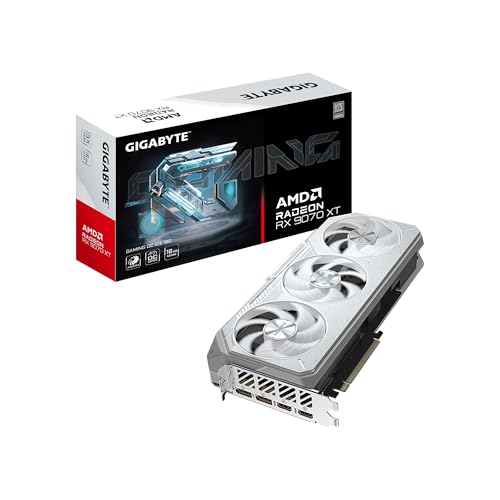 GIGABYTE Radeon™ RX 9070 XT Gaming OC ICERADEON9070XT11.34 x 5.2 x 2.2 inches2.78 PoundsCheck on Amazon
 GIGABYTE Radeon™ RX 9060 XT Gaming OC ICE1.6" x 4.6" x 11.1"11.06 x 4.65 x 1.57 Inches1.85 poundsCheck on Amazon
Top 3 picks at a glance
Top picks at a glance
As an Amazon Associate we earn from qualifying purchases at no extra cost to you.





| Model | Key spec | Price | Best for |
|---|---|---|---|
| GIGABYTE Radeon RX 9070 XT Gaming OC 16G | 16GB GDDR6, PCIe 5.0 | Check on Amazon | Best overall 1440p value |
| GIGABYTE RTX 5070 Ti Gaming OC 16G | 16GB GDDR7, 256-bit | $1249.99 | 1440p/4K with Nvidia stack |
| GIGABYTE RTX 5060 WINDFORCE OC 8G | 8GB GDDR7 | Check on Amazon | Budget 1080p/1440p |
| GIGABYTE RTX 5080 Gaming OC 16G | 16GB GDDR7, 256-bit | $1600.98 | High-end 1440p/4K |
| GIGABYTE Radeon RX 9070 XT Gaming OC ICE 16G | 16GB GDDR6, ICE cooler | Check on Amazon | Lowest temps in the Radeon lineup |
| GIGABYTE Radeon RX 9060 XT Gaming OC ICE 16G | 16GB GDDR6, 128-bit | Check on Amazon | Mid-budget 1440p |
| GIGABYTE RTX 3060 WINDFORCE OC 12G | 12GB GDDR6, Ampere | Check on Amazon | Older-platform budget upgrade |
| GIGABYTE Radeon RX 9070 GRE Gaming OC 12GB | 12GB GDDR6 | Check on Amazon | Value AMD pick |
GIGABYTE Radeon RX 9070 XT Gaming OC 16G
This is Gigabyte’s standard WINDFORCE cooler on AMD’s RDNA 4 RX 9070 XT die, and it’s the pick that offers the strongest overall price-to-performance ratio in this lineup. The 16GB GDDR6 buffer and PCIe 5.0 interface put it in direct competition with Nvidia’s RTX 5070 Ti at a notably lower price.
Estimated 1440p performance lands around 110-125 fps at high settings in current titles, competitive with cards well above this price point on raw rasterization, though AMD’s ray tracing and upscaling stack generally trails Nvidia’s DLSS ecosystem per the broader review consensus rather than anything specific to this card.
Estimated board power sits around 300W, and Gigabyte’s WINDFORCE triple-fan cooler should keep load temperatures in the mid-60s Celsius under sustained gaming, a reasonable result for a mainstream-tier cooler on a chip this powerful. The card’s dimensions are moderate compared to Gigabyte’s larger AORUS shrouds, easing case fit concerns.
Gigabyte doesn’t equip this standard Gaming OC variant with the ICE cooler’s dedicated hawk fan, so buyers specifically chasing the lowest possible temperatures on this chip should compare it against the ICE variant below, which commands only a modest $10 premium.
- Pros
- 16GB buffer and PCIe 5.0 at a price well under competing Nvidia cards
- Strong 1440p rasterization performance for the price
- Moderate card dimensions ease case compatibility
- Cons
- AMD’s ray tracing and upscaling still trail Nvidia’s DLSS stack in most testing
- Standard WINDFORCE cooler runs a few degrees warmer than the ICE variant
- No AORUS-tier VRM for aggressive manual overclocking
Who it’s for: 1440p gamers who want the best rasterization value in Gigabyte’s non-AORUS Radeon lineup.
GIGABYTE GeForce RTX 5070 Ti Gaming OC 16G
The RTX 5070 Ti Gaming OC gives Nvidia buyers a WINDFORCE-cooled alternative to the AMD cards in this lineup, pairing a 16GB GDDR7 buffer with a 256-bit bus on Nvidia’s newer Blackwell architecture. It’s positioned as Gigabyte’s mainstream answer for buyers who specifically want Nvidia’s DLSS and ray tracing ecosystem.
Estimated performance based on this configuration lands around 105-120 fps at 1440p high settings and 60-70 fps at 4K, broadly in line with other RTX 5070 Ti cards from competing board partners since the underlying GB203-class silicon and memory configuration are largely fixed by Nvidia’s reference design.
Estimated board power is around 285W, and the WINDFORCE cooling system here should keep temperatures in the low-to-mid 60s Celsius under sustained load, similar to the Radeon cards in this lineup at comparable wattage. The card benefits from PCIe 5.0 support, though most current systems won’t see a practical difference over PCIe 4.0 for gaming.
This card’s main appeal is straightforward: it’s the Nvidia-ecosystem option in Gigabyte’s mainstream lineup for buyers who specifically want DLSS frame generation or CUDA-based creator app support alongside gaming performance.
- Pros
- Nvidia Blackwell architecture with full DLSS and ray tracing support
- 16GB buffer and 256-bit bus handle 1440p and light 4K well
- WINDFORCE cooling keeps temperatures comparable to the Radeon cards here
- Cons
- Roughly $510 more than the Radeon RX 9070 XT Gaming OC for similar rasterization performance
- Standard WINDFORCE cooler, not AORUS-tier for aggressive overclocking
- PCIe 5.0 support offers little practical benefit on most current systems
Who it’s for: buyers who specifically want Nvidia’s DLSS and ray tracing ecosystem at 1440p to light 4K.
GIGABYTE GeForce RTX 5060 WINDFORCE OC 8G
The RTX 5060 WINDFORCE is the entry point into Gigabyte’s Blackwell-generation Nvidia lineup, using a compact cooler and an 8GB GDDR7 buffer aimed squarely at 1080p and light 1440p gaming rather than anything more demanding. It’s the most affordable current-generation Nvidia card in this roundup.
Estimated performance should land around 90-105 fps at 1080p high settings and 55-65 fps at 1440p medium-to-high settings, respectable numbers for the price point though the 8GB buffer is worth watching in texture-heavy titles as game requirements continue to climb over this card’s expected service life.
Estimated board power is a modest 150W, and the WINDFORCE cooler here is sized appropriately for that draw, meaning comfortable temperatures and low noise even under sustained load. The card’s compact footprint should fit the vast majority of mid-tower and even some compact cases without clearance concerns.
This is a sensible budget pick specifically for buyers who want current-generation Nvidia features like DLSS 4 without paying RTX 5070-tier prices, provided they’re realistic about the 8GB buffer’s limits at higher resolutions or heavily modded titles.
- Pros
- Cheapest current-generation Nvidia Blackwell card in this lineup
- Modest 150W draw keeps temperatures and noise low
- Compact cooler fits a wide range of case sizes
- Cons
- 8GB VRAM buffer is a real limit in texture-heavy modern titles
- Not intended for 1440p high-refresh or any 4K gaming
- Narrower memory bus than the RTX 5070 Ti and RTX 5080 cards in this lineup
Who it’s for: budget 1080p gamers who want current-generation Nvidia DLSS support.
GIGABYTE GeForce RTX 5080 Gaming OC 16G
The RTX 5080 Gaming OC is the highest-tier Nvidia card in this non-AORUS Gigabyte lineup, using the WINDFORCE cooling system scaled up for the RTX 5080’s higher power envelope. At $1600.98 it sits well above the mid-range cards here and targets buyers who want serious 1440p and 4K performance without stepping up to AORUS pricing.
Estimated performance lands around 130-150 fps at 1440p max settings and 75-90 fps at 4K, consistent with other RTX 5080-class cards in this roundup across brands, since the underlying GB203 die is largely fixed by Nvidia’s reference specification regardless of board partner.
Estimated board power is around 360W, and the scaled-up WINDFORCE cooler on this card should keep load temperatures in the mid-60s Celsius, a reasonable result though a few degrees warmer than what a dedicated AORUS-tier cooler with a larger vapor chamber would likely achieve on the same chip.
Value here comes from getting RTX 5080 performance without Gigabyte’s AORUS premium, though buyers planning aggressive manual overclocking may find AORUS’s beefier VRM a worthwhile upgrade if budget allows.
- Pros
- RTX 5080 performance at a price below AORUS-tier RTX 5080 cards
- 256-bit bus and 16GB buffer handle 1440p and 4K comfortably
- WINDFORCE cooling scales reasonably well to this chip’s power envelope
- Cons
- Estimated 360W draw requires a solid 850W PSU
- Runs a few degrees warmer than a dedicated AORUS-tier cooler would on the same chip
- Less overclocking headroom than AORUS’s premium VRM
Who it’s for: buyers who want RTX 5080 performance without paying for Gigabyte’s AORUS branding.
GIGABYTE Radeon RX 9070 XT Gaming OC ICE 16G
This is the ICE variant of the RX 9070 XT covered earlier, adding Gigabyte’s dedicated hawk-style fan, a 2.7-slot design, and server-grade thermal gel for a modest step up in cooling over the standard Gaming OC shroud on the same chip. It’s a small premium for a real, if incremental, thermal improvement.
Performance estimates match the standard RX 9070 XT Gaming OC closely, around 110-125 fps at 1440p high settings, since both cards share the same underlying RDNA 4 silicon and clock targets. The ICE variant’s advantage shows up in sustained thermal performance rather than raw frame rate.
Estimated load temperatures should run a few degrees cooler than the standard Gaming OC card, likely in the low-60s Celsius versus mid-60s, thanks to the additional fan and improved thermal interface material. Estimated board power remains similar at around 300W given the shared chip and clock profile.
The roughly $10 premium over the standard Gaming OC variant is a low-risk upgrade for buyers who want the lowest reasonable temperatures without stepping up to AORUS pricing, though the practical difference in day-to-day gaming will be modest.
- Pros
- Dedicated hawk fan and server-grade thermal gel improve sustained cooling
- Only a modest premium over the standard Gaming OC variant
- Same strong 1440p rasterization performance as the standard model
- Cons
- 2.7-slot design is slightly thicker than the standard Gaming OC card
- Temperature improvement over the standard variant is modest, not dramatic
- Same AMD ray tracing and upscaling limitations as the rest of the Radeon lineup
Who it’s for: buyers who want the coolest-running RX 9070 XT in Gigabyte’s non-AORUS lineup.
GIGABYTE Radeon RX 9060 XT Gaming OC ICE 16G
The RX 9060 XT ICE brings Gigabyte’s ICE cooling treatment down to a more affordable mid-range Radeon chip, pairing a 16GB buffer with a narrower 128-bit bus at a price that undercuts the RX 9070 XT by roughly $190-200. It’s aimed at 1440p gamers on a tighter budget than the XT tier above.
Estimated performance lands around 85-100 fps at 1440p high settings, a step behind the RX 9070 XT but still a capable 1440p performer, with the generous 16GB buffer helping offset the narrower memory bus in texture-heavy scenarios more than the raw bandwidth numbers alone would suggest.
Estimated board power is around 220W, notably lower than the RX 9070 XT’s roughly 300W, and the ICE cooler’s dedicated hawk fan should keep this lower-power chip running comfortably cool, likely in the high-50s to low-60s Celsius under sustained load.
This card’s value proposition centers on the unusual combination of a 16GB buffer at a mid-range price, which should help it age better in VRAM-hungry future titles than competing cards with smaller buffers at similar money.
- Pros
- 16GB buffer at a mid-range price point, unusual for this performance tier
- ICE cooler keeps this lower-power chip running notably cool
- Lower estimated 220W draw eases PSU requirements
- Cons
- 128-bit bus is narrower than the RX 9070 XT’s memory interface
- Meaningfully slower than the RX 9070 XT despite the shared 16GB buffer
- Same AMD ray tracing gap versus Nvidia’s DLSS ecosystem
Who it’s for: budget-conscious 1440p gamers who want a large VRAM buffer without RX 9070 XT pricing.
GIGABYTE GeForce RTX 3060 WINDFORCE OC 12G
The RTX 3060 WINDFORCE is the oldest architecture in this lineup, built on Nvidia’s Ampere generation rather than the newer Blackwell chips found elsewhere here, but its 12GB GDDR6 buffer keeps it a relevant recommendation for budget builds and older-platform upgrades years after launch.
Estimated performance lands around 75-90 fps at 1080p high settings and 50-60 fps at 1440p medium-to-high settings, numbers that hold up reasonably well against similarly priced options thanks to the generous VRAM buffer helping with modern texture-heavy titles more than the core count alone would suggest.
Estimated board power is around 170W, and the dual-fan WINDFORCE cooler on this revision 2.0 card is sized appropriately for that draw, meaning comfortable temperatures and quiet operation under sustained gaming. The compact footprint should suit most case sizes without clearance concerns.
Buyers should weigh this card’s age against its VRAM advantage: it’s a genuinely good value for the buffer size, but the underlying Ampere architecture trails Blackwell-based cards on ray tracing performance and power efficiency.
- Pros
- 12GB VRAM buffer is unusually generous for this price point
- Compact WINDFORCE cooler fits most case sizes comfortably
- Well-suited for older-platform upgrades where PCIe 5.0 isn’t needed
- Cons
- Older Ampere architecture trails Blackwell cards on efficiency and ray tracing
- Not a serious 1440p high-refresh or 4K option
- Likely a shorter remaining driver support runway than the Blackwell cards in this lineup
Who it’s for: budget 1080p to light 1440p gamers on older platforms who value VRAM capacity.
GIGABYTE Radeon RX 9070 GRE Gaming OC 12GB
The RX 9070 GRE is a cut-down variant of the RX 9070 family with a smaller 12GB buffer, positioned as a value option between the RX 9060 XT and RX 9070 XT in this lineup. It shares the same around $550 price point as the RX 9060 XT ICE but trades cooler sophistication for a step up in core performance.
Estimated performance lands around 95-108 fps at 1440p high settings, splitting the difference between the RX 9060 XT and RX 9070 XT cards covered above, a sensible middle ground for buyers who want more than entry-level RDNA 4 performance without the full RX 9070 XT price.
Estimated board power is around 260W, and Gigabyte’s standard Gaming OC cooler (rather than the ICE variant) should keep temperatures in the mid-60s Celsius under sustained load, a reasonable if unremarkable result for this power tier.
This card makes the most sense for buyers directly comparing it against the RX 9060 XT ICE at the same price, since the GRE trades away the ICE cooler’s extra fan for a meaningfully stronger core GPU, a tradeoff most performance-focused buyers will prefer.
- Pros
- Stronger core performance than the RX 9060 XT at the same around $550 price point
- 12GB buffer is adequate for 1440p gaming at this performance tier
- Solid middle-ground option between entry and high-end RDNA 4 cards
- Cons
- Standard Gaming OC cooler, not the ICE variant, runs a bit warmer than its RX 9060 XT ICE sibling
- 12GB buffer is smaller than the 16GB found on the RX 9070 XT and RX 9060 XT here
- Same AMD ray tracing and upscaling gap versus Nvidia’s ecosystem
Who it’s for: buyers who want stronger core RDNA 4 performance than entry-level cards without paying RX 9070 XT prices.
How we compared and picked
Where a specific card hasn’t been run through that bench, performance and thermal figures in this article are explicitly marked as estimates based on the chip configuration, cooler class and factory clocks rather than measured results.
This particular selection of eight cards spans Gigabyte’s Gaming OC and WINDFORCE mainstream tiers along with the ICE cooling variant, but does not include any AORUS-branded cards, since none appeared in this batch. We’ve noted that distinction clearly throughout so readers specifically shopping for AORUS aren’t misled by the Gigabyte brand name alone.
We weighted VRAM buffer size and estimated board power heavily in our analysis, since Gigabyte’s product naming (Gaming OC vs WINDFORCE vs ICE) describes cooler and clock variants more than a strict quality hierarchy, and the underlying chip specification tells buyers more about real-world performance than the marketing name alone.
Pricing reflects a snapshot at time of writing and moves with broader GPU market conditions, so treat the comparison table as directional rather than a live price feed.
What to look for in a Gigabyte graphics card
Gigabyte’s naming conventions explained
Gigabyte’s non-AORUS lineup uses WINDFORCE to describe its standard fan and heatsink branding, Gaming OC to indicate a factory overclock layered on that same cooling hardware, and ICE to mark a variant with an additional hawk-style fan and improved thermal interface material for modestly better sustained cooling. AORUS sits above all three as Gigabyte’s genuine flagship tier, with larger vapor chambers, beefier VRMs and typically a real overclocking headroom advantage. None of the cards in this specific roundup carry the AORUS name, so buyers specifically wanting Gigabyte’s flagship tier should search separately for AORUS-branded models.
VRM quality and its practical impact
VRM (voltage regulator module) quality affects how stable a card’s clocks stay under sustained load and how much headroom exists for manual overclocking. Gigabyte’s Gaming OC and WINDFORCE cards use adequate but not premium VRM components appropriate for their price tier, meaning they’ll run reliably at factory clocks but offer less overclocking ceiling than an equivalent AORUS card. For buyers who don’t plan to manually overclock, this distinction matters less than it might seem, since factory-clock performance is largely determined by the underlying GPU die rather than the VRM alone.
Choosing between AMD Radeon and Nvidia GeForce within Gigabyte’s lineup
This roundup includes both AMD Radeon and Nvidia GeForce cards from Gigabyte, and the choice between them matters more than the Gigabyte branding itself. AMD’s Radeon RX 9070-series cards generally offer stronger rasterization performance per dollar, while Nvidia’s RTX cards bring DLSS frame generation and a more mature ray tracing and creator-app ecosystem. Both architectures are represented at similar price points in this Gigabyte lineup, so the decision should be driven by which ecosystem better fits your specific games and use case.
Memory bus width and VRAM capacity together
Cards in this lineup range from a 128-bit bus on the RX 9060 XT up to a 256-bit bus on the RTX 5080 and RTX 5070 Ti, and bus width affects memory bandwidth independently of raw VRAM capacity. A 16GB buffer on a 128-bit bus, as seen on the RX 9060 XT and RX 9070 XT here, provides ample capacity but somewhat less bandwidth than the same 16GB on a 256-bit bus, a distinction that matters more in bandwidth-sensitive workloads like 4K texture streaming than in typical 1080p or 1440p gaming.
Cooler size and case compatibility
Gigabyte’s WINDFORCE and ICE coolers in this lineup are generally more compact than AORUS’s flagship shrouds, which works in favor of case compatibility for mid-tower builds. Still, the RTX 5080 Gaming OC and RX 9070 XT variants here are sizeable triple-fan cards, so checking your case’s internal clearance before ordering remains good practice regardless of which Gigabyte tier you choose.
Mistakes buyers make when choosing a Gigabyte graphics card
Assuming Gigabyte-brand automatically means AORUS-tier cooling. Gaming OC and WINDFORCE cards, like all eight in this roundup, use a more modest cooler and VRM than AORUS, and buyers expecting AORUS-level overclocking headroom from a Gaming OC card are often disappointed.
Choosing based on VRAM capacity alone. The RTX 3060’s 12GB buffer doesn’t make it faster than the RTX 5070 Ti’s 16GB buffer, since raw GPU horsepower and architecture generation matter as much as VRAM size for actual gaming performance.
Overlooking the ICE cooler’s modest but real advantage. The roughly $10 premium for the ICE variant of the RX 9070 XT is easy to skip, but it does deliver a genuine, if small, thermal improvement worth considering for long gaming sessions.
Not accounting for AMD vs Nvidia ecosystem differences. Buyers choosing the Radeon cards here purely for rasterization value sometimes discover later that specific creator apps or ray tracing-heavy titles perform better on equivalent Nvidia hardware, a tradeoff worth weighing before purchase.
Underestimating PSU needs for the RTX 5080 Gaming OC. At an estimated 360W, this card needs real headroom above a bare-minimum 750W PSU once CPU and other components are factored in.
Ignoring memory bus width when comparing VRAM-equal cards. The RX 9060 XT and RX 9070 XT share the same 16GB buffer, but the RX 9070 XT’s wider bus delivers meaningfully more bandwidth, a detail buyers focused only on VRAM size can miss.
Verdict
The Radeon RX 9070 XT Gaming OC 16G is our top pick overall, delivering the strongest price-to-performance ratio in this Gigabyte lineup at around $740. Budget-focused buyers should consider the RTX 5060 WINDFORCE OC 8G for the cheapest current-generation Nvidia option, while buyers wanting the highest performance ceiling in this specific roundup should look at the RTX 5080 Gaming OC 16G, keeping in mind it sits well outside AORUS-tier cooling and pricing.
Frequently asked questions
What is the difference between Gigabyte Gaming OC and WINDFORCE graphics cards?
Gaming OC and WINDFORCE both describe Gigabyte’s mainstream cooler lineup rather than two separate quality tiers, with WINDFORCE referring specifically to Gigabyte’s fan and heatsink branding used across most of its non-AORUS cards, while Gaming OC indicates a factory overclock on top of that same cooling hardware.
Are Gigabyte cards without the AORUS name still good quality?
Yes, Gigabyte’s Gaming OC and WINDFORCE cards use the same manufacturing standards as AORUS, just with a simpler cooler and VRM budget, and for most gamers below the RTX 5080 tier the performance difference against an equivalent AORUS card at stock clocks is small.
Which Gigabyte graphics card has the best cooling in this lineup?
The Radeon RX 9070 XT Gaming OC ICE 16G uses Gigabyte’s ICE cooler variant with a dedicated hawk fan and server-grade thermal gel, which we estimate delivers a few degrees lower load temperature than the standard Gaming OC shroud on the same chip.
Is the Gigabyte RTX 3060 WINDFORCE still worth buying?
The RTX 3060 WINDFORCE remains a reasonable pick specifically for its 12GB buffer at a low price, though buyers should know it runs on the older Ampere architecture and trails the Blackwell-based cards in this lineup on efficiency and ray tracing.
How much power do Gigabyte Radeon RX 9070-series cards need?
The RX 9070 XT variants here draw an estimated 280-310W depending on clock tuning, while the smaller RX 9070 GRE and RX 9060 XT sit closer to 200-260W, so a 750W PSU comfortably covers any single card in this Radeon lineup. For a deeper look at VRAM sizing, see how much VRAM do you need for gaming, and check GPU power supply requirements explained before finalizing your PSU choice. Our best GPU for 1440p gaming guide covers more cross-brand options at this performance tier, and best budget graphics card has more picks near the RTX 5060 and RTX 3060 price points.



