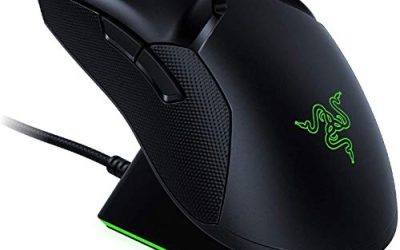
Battery life is the easiest gaming-mouse spec to inflate and the hardest to compare. One maker quotes a Bluetooth figure, another quotes its low-latency gaming mode, and a third leaves the lights running in its test. The real decision is simpler: how many hours does the listing state in the connection mode you will actually play in, and do you want a rechargeable pack or a replaceable AA cell when those hours run out?
This guide serves players who are tired of a mouse dying mid-session: laptop gamers who travel, desk players who hate cables on the desk, and anyone weighing a light shell against a longer charge. Every pick below was chosen from the name and specifications on its Amazon product page, with the stated battery hours for each mode, sensor, weight and power source compared side by side so the trade-offs stay visible.
Our Top Picks
 Razer Orochi V2 Wireless Gaming Mouse4.26 x 1.52 inch (Pack of 1)4.26 x 1.52 x 2.47 inches0.13 poundsCheck on Amazon
 Logitech G Pro X Superlight 2 Lightspeed WirelessClassic1.57 x 2.5 x 4.92 inches0.1 poundsCheck on Amazon

Top 3 picks at a glance

Quick Picks
As an Amazon Associate we earn from qualifying purchases
| Product | Best for | Key spec from title |
|---|---|---|
| Razer Orochi V2 Wireless Gaming Mouse — Black | Months between battery swaps on the go | Up to 950 hours in Bluetooth mode |
| Logitech G305 LIGHTSPEED Wireless Gaming Mouse — Black | A simple AA-powered mouse for everyday play | Up to 250 hours on a single AA battery |
| SteelSeries Aerox 5 Wireless Gaming Mouse | Light shell with nine buttons for mixed play | Up to 180 hours in low-power mode |
| Razer Basilisk V3 Pro 35K Wireless Gaming Mouse — White | Palm grip with the strongest rechargeable gaming-mode figure | Up to 140 hours on HyperSpeed wireless |
| Logitech G Pro X Superlight 2 Wireless Gaming Mouse — Black | Competitive play where shell weight comes first | Up to 95 hours with a 60 g shell |
How to Choose
Read the Battery Figure by Connection Mode
A single mouse can carry two very different numbers. Bluetooth and low-power modes sip energy, while the low-latency gaming mode that most players actually use draws far more. The Orochi V2 in this guide states 950 hours over Bluetooth but 425 hours in HyperSpeed mode, and the Aerox 5 Wireless states 180 hours in low-power mode against a lower default-mode figure. Before comparing two mice, match the mode you will play in: if you game over the 2.4 GHz receiver every night, the gaming-mode figure is the only honest one to rank by.
Decide Between a Rechargeable Pack and AA Cells
Two of these mice run on a single AA battery, and three carry an internal rechargeable pack. AA power suits players who hate downtime: a flat cell is swapped in seconds, and the stated figures are generous, at 250 hours for the G305 and up to 950 hours for the Orochi V2 in Bluetooth mode. A rechargeable pack removes the cost and waste of disposables and keeps the shell sealed, but it ties you to a cable whenever the charge runs low. Neither design is better in the abstract; the right one matches how you already handle the rest of your gear.
Balance Endurance Against Weight and Size
Long battery life usually comes from a bigger cell, and a bigger cell adds grams. The spread here runs from the Orochi V2 at under 60 g to shells built for full palm support, so decide which side of the trade you live on. Fast, low-sensitivity flicks feel easier on a light mouse, while a larger ergonomic shell spreads contact across the hand during long sessions. Check the stated weight on the listing against the mouse you use now; a jump of 20 g or more is easy to feel in the first hour of play.
Factor In Polling Rate, Lighting and Charging Habits
Headline battery figures assume the maker’s test setup, and two settings pull hard against them. High polling rates such as the 8 kHz report rate on the Superlight 2 ask the sensor and radio to work far more often, and bright RGB lighting draws a steady extra current. If you plan to run either, treat the stated hours as a ceiling rather than a promise. Also think about the routine: a USB-C port, as on the Superlight 2, makes a quick top-up painless, while a mouse charged through an older connector needs its own cable kept nearby.
The 5 Best Options
Razer Orochi V2 Wireless Gaming Mouse — Black
The Orochi V2 is the endurance outlier of this group. Razer built it around a single AA or AAA cell, and the listing states up to 950 hours over Bluetooth and up to 425 hours in HyperSpeed wireless mode, so even the gaming-mode figure dwarfs most rechargeable rivals. The shell stays under 60 g, which suits fingertip and claw grips and a laptop bag, while the 18,000 DPI Razer 5G optical sensor and mechanical switches cover fast-paced play. Pick it if battery swaps measured in months matter more to you than a sealed rechargeable design.
Specs
- Battery life: up to 950 hours in Bluetooth mode; up to 425 hours in HyperSpeed wireless mode (listing figures)
- Sensor: Razer 5G optical sensor, 18,000 DPI
- Switches: mechanical mouse switches
- Weight: under 60 g
- Power source: single AA or AAA battery
- Model: RZ01-03730100-R3U1
Best for: Players who want the longest stated endurance in this lineup and a sub-60 g shell, with months between battery swaps.
Watch out for: The headline 950 hours is the Bluetooth figure; gaming-mode endurance is the 425-hour figure, and AA/AAA power means there is no rechargeable pack.
Logitech G305 LIGHTSPEED Wireless Gaming Mouse — Black
The G305 LIGHTSPEED is the straightforward option: a compact wireless mouse that runs on one AA battery for a stated 250 hours and then takes seconds to revive with a fresh cell. Logitech’s HERO sensor tracks at up to 12,000 DPI, six programmable buttons cover the binds most players actually use, and on-board memory keeps your settings with the mouse rather than the PC. The shape is small and safe rather than sculpted, so it fits a wide range of hand sizes and grips. Choose it when you want long stated endurance, simple controls and no charging routine at all.
Specs
- Battery life: up to 250 hours on a single AA battery (listing figure)
- Sensor: HERO sensor, 12,000 DPI
- Buttons: 6 programmable buttons
- Memory: on-board memory
- Connection: LIGHTSPEED wireless
- Model: 910-005280 (Black)
Best for: Players who want a simple, compact wireless mouse that runs a stated 250 hours per AA battery, with no charging cable routine.
Watch out for: Power is a replaceable AA only — there is no internal rechargeable battery, and the white colourway is a separate listing.
SteelSeries Aerox 5 Wireless Gaming Mouse
The Aerox 5 Wireless splits its identity between game nights and travel days. In its default 2.4 GHz mode the maker’s FAQ states 80 hours, while Bluetooth and low-power use stretches the listing figure to 180 hours, so the same mouse can live on a desk all week and then ride in a bag. It weighs 74 g, carries nine buttons for MMO and MOBA binds, and its TrueMove Air sensor reaches 18,000 DPI. The AquaBarrier IP54 rating adds spill resistance that few gaming mice bother with. Pick it if one mouse has to cover both a battlestation and a laptop.
Specs
- Battery life: up to 180 hours in Bluetooth / low-power mode (listing figure); the maker’s FAQ states 80 hours in the default 2.4 GHz mode
- Sensor: TrueMove Air sensor, 18,000 DPI
- Buttons: 9 buttons
- Weight: 74 g
- Water resistance: AquaBarrier IP54
- Model: 62406
Best for: Players who want a light 74 g shell with nine buttons and a stated 180-hour low-power mode for laptop and travel days.
Watch out for: Quote the right mode — the 180-hour figure is the low-power mode and default gaming-mode endurance is lower, so confirm both figures on the live listing.
Razer Basilisk V3 Pro 35K Wireless Gaming Mouse — White

The Basilisk V3 Pro 35K is the pick for players who rest their whole palm on the mouse and still want flagship controls. Its stated endurance is the strongest rechargeable gaming-mode figure in this guide: up to 140 hours on HyperSpeed wireless, rising to 210 hours over Bluetooth. The Focus Pro 35K Optical Sensor Gen-2 and 13 programmable controls give it the deepest feature set here, aimed at players who bind abilities, macros and media keys to the mouse hand. In white, it also suits lighter desk setups. Choose it when comfort and controls outrank a feather-light shell.
Specs
- Battery life: up to 140 hours on HyperSpeed wireless; up to 210 hours on Bluetooth (listing figures)
- Sensor: Razer Focus Pro 35K Optical Sensor Gen-2
- Controls: 13 programmable controls
- Weight: not stated
- Model: RZ01-05240200-R3U1 (White)
Best for: Palm grippers who want a full-featured ergonomic flagship whose stated gaming-mode endurance of 140 hours is the strongest rechargeable figure here.
Watch out for: Several look-alike colourway listings circulate for this mouse, so confirm the live page shows the 35K model in white before you order.
Logitech G Pro X Superlight 2 Wireless Gaming Mouse — Black
The Superlight 2 states the shortest battery life in this guide, up to 95 hours, and that is the honest cost of its design brief. Logitech built it for competitive players: a 60 g shell, the HERO 2 sensor and an 8 kHz report rate in the current listing title, all carried over LIGHTSPEED wireless. Ninety-five hours still covers a week or two of heavy evening play between charges, and USB-C charging makes top-ups quick with the cable most desks already have. Pick it when polling rate and shell weight matter more than marathon endurance.
Specs
- Battery life: up to 95 hours (listing figure)
- Sensor: HERO 2 sensor
- Report rate: 8 kHz (current listing title)
- Weight: 60 g
- Charging: USB-C
- Connection: LIGHTSPEED wireless
- Model: 910-006628 (Black)
Best for: Competitive FPS players who accept the shortest stated endurance here in exchange for the 60 g shell and 8 kHz polling.
Watch out for: 95 hours is a week or two of heavy play, so a regular charging routine is part of owning this pick; the white colourway is a separate listing.
Which One Fits Your Situation
You Play on a Laptop and Travel Often
Take the Orochi V2 or the Aerox 5 Wireless. Both state their longest figures over Bluetooth, which pairs directly with a laptop and skips the receiver. The Orochi V2 is lighter and runs on a swappable AA cell, while the Aerox 5 Wireless adds nine buttons and spill resistance for desks you do not control.
You Want to Forget Charging for Weeks at a Time
The AA-powered picks win this one. The G305 states 250 hours per cell and the Orochi V2 states 425 hours in its gaming mode, so a spare AA in the desk drawer turns a dead mouse into a ten-second fix. No dock, no cable and no battery anxiety before a match.
You Play Competitive Shooters Every Night
Choose the Superlight 2 and build a small charging habit around it. Its 8 kHz report rate and 60 g shell are made for fast, repeated flicks, and the stated 95 hours still stretches across many evenings. Plug it in over lunch once a week, or whenever the low-battery light appears, and the shorter endurance never interrupts a session.
Your Hand Is Large and You Use a Palm Grip
The Basilisk V3 Pro 35K is the natural fit here, with a sculpted ergonomic shell, 13 programmable controls and the strongest rechargeable gaming-mode figure in this guide at 140 stated hours. Its Bluetooth figure of 210 hours also covers workdays, so one mouse can handle both the office desk and the evening queue without a midweek charge.
Common Mistakes
- Comparing one mouse’s Bluetooth figure with another mouse’s gaming-mode figure and calling the first one the winner.
- Leaving RGB lighting at full brightness and then expecting the headline battery figure from the listing.
- Running an 8 kHz polling rate full time without accounting for the extra drain on the battery.
- Letting a rechargeable mouse sit flat before a tournament or raid night instead of topping it up the day before.
- Keeping no spare AA in the house for an AA-powered mouse, turning a ten-second swap into a shopping trip.
Frequently Asked Questions
Why does one mouse list two different battery figures?
Because the connection mode changes the power draw. Bluetooth and low-power modes sip energy, so listings state figures such as 950 hours for the Orochi V2, while the low-latency gaming mode on the same mouse states 425 hours. Always compare the figure for the mode you will actually play in, not the largest number on the page.
Is a replaceable AA battery better than a rechargeable pack?
Neither is better for everyone. An AA cell, as in the G305 and Orochi V2, swaps in seconds and suits players who hate downtime, but it is a recurring consumable. A rechargeable pack, as in the Basilisk V3 Pro 35K and Superlight 2, removes disposables and keeps the shell sealed, at the cost of planned charging breaks.
Does RGB lighting shorten battery life?
Yes. Lighting draws a steady extra current, and the stated hours on a listing come from the maker’s own test conditions, which may not match a mouse running bright effects all evening. If endurance matters, treat the headline figure as a ceiling, lower or switch off the lighting, and judge the mouse by its gaming-mode figure instead.
How often will I actually charge a 95-hour mouse?
It depends on your daily hours. At four hours of play a day, a stated 95 hours covers roughly three weeks of evenings; at eight hours a day it is closer to twelve days. Polling rate and lighting shorten that in practice, so most owners of a mouse like the Superlight 2 settle into a weekly top-up habit.
Related guides
More from Amazon
Programs that pair well with the guide above. Offers and eligibility are set by Amazon and may change.
A free business account with business pricing and bulk-buying tools for work, shop or home office.
Create a business accountFree shipping on eligible items, Prime Video and more. Eligible new members can start with a free trial.
Start a Prime free trialAudiobooks and podcasts to listen to on the go. Eligible new members can start with a free trial.
Try Audible freeAd-free music streaming. Eligible new subscribers can start with a free trial.
Try Music Unlimited freeAs an Amazon Associate we earn from qualifying purchases.