The best desktop graphics card for most gamers in 2026 is the GeForce RTX 5070 Ti, because it combines 16GB of VRAM, a 256-bit memory bus and DLSS 4 support at a moderate 300W. If you want the most performance per dollar and don’t care about NVIDIA’s feature set, the Radeon RX 9070 XT is the strongest alternative. Below 1440p, the Radeon RX 9060 XT 16GB and Intel Arc B580 are the sensible choices.
Prices have been unusually volatile because of memory costs and tariffs, so the ranges below are general market ranges that shift week to week. Judge a card by its price relative to the next tier up, not by the figure printed here.
As an Amazon Associate we earn from qualifying purchases at no extra cost to you.


Our Top Picks


Top 3 picks at a glance
Quick comparison of the best desktop graphics cards
| Pick | Best for | Key specs (per manufacturer spec sheets) | Typical price range |
|---|---|---|---|
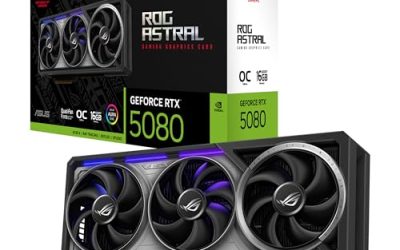
| GeForce RTX 5070 Ti | Best overall, 1440p high refresh and entry 4K | 16GB GDDR7, 256-bit, 300W board power | $750–$1,000 |
| Radeon RX 9070 XT | Best value high-end | 16GB GDDR6, 256-bit, about 304W | $600–$800 |
| GeForce RTX 5070 | Best 1440p mid-range | 12GB GDDR7, 192-bit, 250W | $550–$700 |
| Radeon RX 9060 XT 16GB | Best budget 1440p/1080p | 16GB GDDR6, 128-bit, roughly 160W reference | $350–$450 |
| Intel Arc B580 | Best entry-level 1080p/1440p | 12GB GDDR6, 192-bit, 190W | $250–$320 |
| GeForce RTX 5090 | Best no-compromise 4K | 32GB GDDR7, 512-bit, 575W | $2,000–$3,000+ |
Best overall: GeForce RTX 5070 Ti
The RTX 5070 Ti is the card that rarely forces a compromise. Its 16GB of VRAM covers current 1440p ultra textures and most 4K games with upscaling, and DLSS 4 with multi-frame generation is the broadest upscaling and frame-generation ecosystem today. At 300W it runs on a quality 750W power supply in a typical build.
Who it suits: players on 1440p 144Hz+ monitors, or 4K 60Hz screens with upscaling enabled.
Trade-off: street prices often sit well above launch MSRP, and the step up to an RTX 5080 costs a lot for a modest gain.
Best value high-end: Radeon RX 9070 XT
The RX 9070 XT also has 16GB and a 256-bit bus, and it typically costs noticeably less than the 5070 Ti. Published reviews generally place it close to the 5070 Ti in rasterized games, with FSR 4 upscaling a big improvement over older FSR versions. Most custom models use standard 8-pin PCIe power connectors, which suits users who don’t want to deal with the 12V-2×6 plug.
Who it suits: raster-focused gamers who want the most frames per dollar.
Trade-off: ray tracing and path tracing performance usually trails NVIDIA’s equivalent tier, and FSR 4 support, while growing, is narrower than DLSS.
Best 1440p mid-range: GeForce RTX 5070
The RTX 5070 offers 12GB on a 192-bit bus at 250W. That is enough for 1440p at high settings in nearly all current games, and it is easy to power and cool. The Radeon RX 9070 (16GB, about 220W) is the main rival and gives you more VRAM, so compare street prices before deciding.
Who it suits: 1440p gamers on a mid-size case and a 650W power supply.
Trade-off: 12GB leaves less headroom than 16GB for high-resolution texture packs and ray tracing at 4K.
Best budget: Radeon RX 9060 XT 16GB
The 16GB version of the RX 9060 XT is the budget card to pick if you plan to keep it for several years. Its 128-bit bus keeps bandwidth modest (see the math below), but the large VRAM pool avoids the texture stutter that 8GB cards hit at 1440p. Avoid the 8GB variant unless you only play esports titles at 1080p.
Who it suits: 1080p high-refresh and light 1440p gaming on a budget.
Trade-off: it is not a 4K card, and it costs more than the cheapest Arc option.
Best entry-level: Intel Arc B580
The Arc B580 gives you 12GB on a 192-bit bus for a very low price, which is unusual at this tier. It handles 1080p comfortably and many 1440p games at medium to high settings with XeSS upscaling.
Who it suits: first builds and upgrades from a GTX 10-series or RX 500-series card.
Trade-off: it needs Resizable BAR enabled for best results, and CPU overhead in some games can hurt it on older processors. Driver maturity on older titles has improved but is still less predictable than NVIDIA or AMD.
Best no-compromise 4K: GeForce RTX 5090
The RTX 5090 is the only consumer card with 32GB of VRAM and a 512-bit bus, and it is in a performance class of its own for native 4K and path-traced games. It is also a 575W card that demands a large case, serious cooling and a high-quality 1000W+ power supply.
Who it suits: 4K 120Hz+ displays, content creators and AI hobbyists who value the 32GB.
Trade-off: the price, the power draw, and the fact that the RTX 5080 (16GB, 256-bit, 360W) is a more reasonable step for most 4K players.
How to choose: match the card to your resolution and refresh rate
Resolution and VRAM are the two numbers that decide most purchases. The table below uses rule-of-thumb guidance from typical game requirements and published reviews. Exact results vary with settings, CPU and game patch.
| Your monitor | Minimum VRAM | Comfortable VRAM | Card class that fits |
|---|---|---|---|
| 1080p, 144–240Hz | 8GB | 12GB | Arc B580, RX 9060 XT |
| 1440p, 144Hz | 12GB | 16GB | RTX 5070, RX 9070, RX 9070 XT |
| 1440p, 240Hz or ray tracing | 16GB | 16GB | RTX 5070 Ti, RX 9070 XT, RTX 5080 |
| 4K, 60Hz with upscaling | 16GB | 16GB | RTX 5070 Ti, RX 9070 XT |
| 4K, 120Hz+ native | 16GB | 24–32GB | RTX 5080, RTX 5090 |
Worked example: memory bandwidth from bus width
Memory bandwidth in GB/s equals bus width divided by 8, multiplied by the memory data rate in Gbps. Higher resolutions need more bandwidth, so this explains why two cards with the same VRAM can behave differently at 4K. Using manufacturer spec figures:
| Card | Bus | Data rate | Bandwidth |
|---|---|---|---|
| RX 9060 XT 16GB | 128-bit | 20 Gbps | 128 ÷ 8 × 20 = 320 GB/s |
| Arc B580 | 192-bit | 19 Gbps | 24 × 19 = 456 GB/s |
| RTX 5070 | 192-bit | 28 Gbps | 24 × 28 = 672 GB/s |
| RX 9070 XT | 256-bit | 20 Gbps | 32 × 20 = 640 GB/s |
| RTX 5070 Ti | 256-bit | 28 Gbps | 32 × 28 = 896 GB/s |
| RTX 5090 | 512-bit | 28 Gbps | 64 × 28 = 1,792 GB/s |
Bandwidth is not the only factor. AMD cards use a large on-die cache to offset narrower bandwidth, so don’t compare numbers across brands as a ranking. Within one brand, though, a 128-bit card is a 1080p/1440p card, not a 4K one.
Worked example: power supply sizing
Add the GPU board power, the CPU’s peak draw and about 75W for the motherboard, RAM, drives and fans. Then multiply by 1.3–1.4 to leave room for transient spikes.
- RTX 5070 Ti build: 300W GPU + 120W CPU (a high-end gaming chip) + 75W = 495W. At ×1.4 that is about 693W, so buy a 750W unit.
- RTX 5070 build: 250W + 90W + 75W = 415W. At ×1.4 that is about 581W, so a 650W unit is enough.
- RTX 5090 build: 575W + 160W + 75W = 810W. At ×1.25 that is about 1,010W, so buy a 1000W unit at minimum, with 1200W giving more margin.
Check the connector too: many RTX 50 cards use the 12V-2×6 plug, so use a native cable or a power supply that includes one, and seat it fully.
Compatibility checks before you buy
- Card length and thickness: many 5070 Ti and 9070 XT models are 300–340mm long and occupy 2.5–3 slots. Measure your case’s GPU clearance in millimeters.
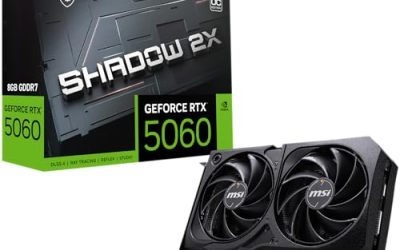
- PCIe lanes: RTX 5060-class cards use a x8 interface. On an older PCIe 3.0 board they can lose noticeable performance when VRAM overflows, so favor 16GB models on older platforms.
- CPU pairing: a very old quad-core or six-core chip will bottleneck any card above the mid-range, particularly at 1080p. Intel Arc is the most sensitive to this.
- Resizable BAR: turn it on in BIOS for Arc and recommended for Radeon.
- Monitor ports: check for DisplayPort 2.1 if you plan to use a 4K 240Hz or high-end 1440p display, and confirm the card supports it.
NVIDIA vs AMD vs Intel: a quick decision guide
- Choose NVIDIA if you use ray tracing, DLSS, streaming encoders or CUDA-based creative and AI software.
- Choose AMD if you play mostly rasterized games and want more VRAM per dollar.
- Choose Intel if the budget is very tight and your CPU is reasonably recent.
Frequently Asked Questions
How much VRAM do I need for gaming in 2026?
For 1080p, 8GB is the bare minimum and 12GB is safer. For 1440p, aim for 12–16GB, and for 4K, 16GB or more. Newer games with high-resolution textures and ray tracing can exceed 8GB even at 1080p.
Is the RTX 5070 Ti or the RX 9070 XT better?
Published reviews generally show them close in rasterized games, with the 5070 Ti ahead in ray tracing and software features. The RX 9070 XT is usually cheaper. Pick the 9070 XT for value, and the 5070 Ti if you want DLSS and stronger ray tracing.
Is an 8GB graphics card still worth buying?
Only for esports titles at 1080p, or if the price is very low. Several recent games hit memory limits on 8GB at high settings, causing stutter or lower texture quality. A 12GB or 16GB card will last longer.
Do I need a new power supply for a new graphics card?
Not always. Add the card’s board power to your CPU’s peak draw and about 75W for other parts, then multiply by roughly 1.3. If your current unit covers that figure and has the right connectors, you can keep it. Very old or low-quality units are worth replacing.
Is it better to buy a card now or wait for the next generation?
If your current card struggles with the games you play today, buy now, since waiting costs you months of use. The RTX 50 and Radeon RX 9000 series are the current generations, and prices can move quickly in either direction. If you can wait and your card is adequate, watch street prices rather than release rumors.
Will my CPU bottleneck a new graphics card?
It can, especially with a high-end card at 1080p or with a CPU older than about five years. At 1440p and 4K the GPU does more of the work, so the CPU matters less. If your CPU hits 100% in games before the GPU does, upgrade the processor or raise the resolution.
Related guides
More from Amazon
Programs that pair well with the guide above. Offers and eligibility are set by Amazon and may change.
A free business account with business pricing and bulk-buying tools for work, shop or home office.
Create a business accountFree shipping on eligible items, Prime Video and more. Eligible new members can start with a free trial.
Start a Prime free trialAudiobooks and podcasts to listen to on the go. Eligible new members can start with a free trial.
Try Audible freeAd-free music streaming. Eligible new subscribers can start with a free trial.
Try Music Unlimited freeAs an Amazon Associate we earn from qualifying purchases.