Our Top Picks
Top 3 picks at a glance

Introduction
The best enterprise SSDs are built for a different job than the drive in a gaming PC. A consumer NVMe drive is tuned to deliver a short burst of very high speed, then throttle back once its cache fills. An enterprise drive holds steady latency hour after hour, under many simultaneous threads, while protecting data in flight when power drops without warning. That matters in a server, a virtualization host, a NAS with all-flash storage, or a workstation that writes large files all day.
Three features separate enterprise SSDs from consumer models: power-loss protection, which lets the drive finish writing cached data when power fails; endurance, expressed in drive writes per day, or DWPD, over a five-year warranty period; and consistent performance under sustained load when the drive is nearly full and many virtual machines are active at once.
Interface choice comes first. Enterprise NVMe drives in U.2 and U.3 connect over PCIe Gen4 and reach sequential read speeds far beyond SATA, with random access performance suited to databases and virtualization. Enterprise SATA drives top out near the SATA ceiling, yet they fit any standard 2.5-inch bay and remain the practical choice for boot mirrors, capacity tiers and legacy servers. A sensible plan often mixes them: NVMe for active data and SATA for capacity and boot volumes.
The five drives below are all enterprise SSDs from established data-center lines.
At a Glance
| Drive | Interface | Form factor | Capacities | Endurance class | Best for |
|---|---|---|---|---|---|
| Samsung PM9A3 | NVMe PCIe Gen4 x4 | U.2 2.5-inch | 960GB to 7.68TB | 1 DWPD | All-round NVMe server storage |
| Micron 7450 Pro | NVMe PCIe Gen4 x4 | U.3 2.5-inch | 480GB to 15.36TB | 1 DWPD | Very large NVMe capacity |
| Solidigm D7-P5520 | NVMe PCIe Gen4 x4 | U.2 2.5-inch | 1.92TB to 15.36TB | 1 DWPD | High-throughput NVMe arrays |
| Samsung PM893 | SATA 6Gb/s | 2.5-inch 7mm | 240GB to 7.68TB | 1 DWPD | SATA servers and home labs |
| Kingston DC600M | SATA 6Gb/s | 2.5-inch 7mm | 480GB to 7.68TB | 1 DWPD | Mixed-use SATA workloads |
Best All-Round NVMe: Samsung PM9A3
View on Amazon: https://www.amazon.com/dp/B0D1C63RSS
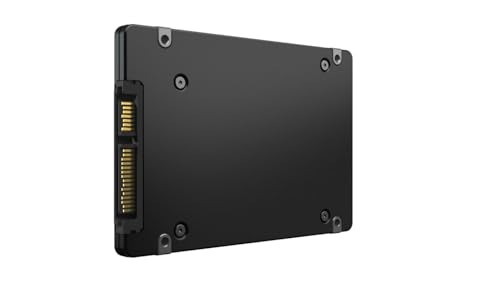
The Samsung PM9A3 is the most versatile enterprise NVMe drive in this guide. It uses a U.2 2.5-inch form factor with a PCIe Gen4 x4 NVMe interface, so it slots into standard enterprise front bays and hot-swap trays without the adapter puzzle that M.2 enterprise drives can create. Sequential read performance reaches up to 6,800 MB/s in manufacturer figures, with strong random read behavior that suits virtualization hosts, database servers and file servers handling many simultaneous requests.
Endurance is classed at 1 DWPD over a five-year warranty period, placing the PM9A3 in the read-intensive class. That is ample for web serving, content libraries, virtual machine storage, game-server asset storage and read-heavy database work. At 7.68TB, 1 DWPD works out to roughly 7.68TB of writes per day for five years, a budget most home labs and small business servers never approach. The family spans 960GB to 7.68TB, so one model line can cover a boot volume, a virtual machine datastore and a large capacity tier.
Key features:
- U.2 2.5-inch NVMe with PCIe Gen4 x4, up to 6,800 MB/s sequential read in manufacturer figures
- Capacities from 960GB to 7.68TB in the same model family
- 1 DWPD endurance class with a five-year warranty period
- Power-loss protection for data in flight during an unexpected shutdown
- TLC NAND tuned for steady latency under mixed server workloads
Considerations:
- Needs a backplane or adapter wired for NVMe; a SAS-only backplane will not carry PCIe lanes to the bay
- The 15mm height of larger capacities may not fit slim 7mm-only trays, so check tray depth before ordering
- Read-intensive endurance is a mismatch for constant heavy logging or write-saturated databases
- Confirm the part number, since the PM9A3 also ships in M.2 and E1.S form factors that do not fit a U.2 bay
Best for Very Large NVMe Capacity: Micron 7450 Pro
View on Amazon: https://www.amazon.com/dp/B0BHGSXB4T
The Micron 7450 Pro stands out for capacity range, from 480GB up to 15.36TB, and it ships in U.3, M.2 and E1.S form factors, giving it the broadest deployment range of any drive in this guide. The U.3 version covered here is a 2.5-inch drive with a PCIe Gen4 x4 NVMe interface, sequential read performance up to 6,800 MB/s in manufacturer figures, and a 1 DWPD endurance class over five years.
U.3 is the detail that makes this drive flexible. A U.3 drive is backward compatible with U.2 bays, while also supporting dual-port connectivity for high-availability setups with two controllers. A single 15.36TB drive can hold a virtual machine library, a media archive and several datasets, using fewer bays and simpler cabling than many small drives.
Key features:
- U.3 2.5-inch NVMe with PCIe Gen4 x4, up to 6,800 MB/s sequential read in manufacturer figures
- Capacities from 480GB to 15.36TB, the widest range in this guide
- U.3 dual-port support with backward compatibility for U.2 bays
- 1 DWPD endurance class with a five-year warranty period
- Power-loss protection and enterprise SMART wear reporting
Considerations:
- The 15mm height of high-capacity versions needs a tray and bay that accept 15mm drives
- Very large capacities concentrate a lot of data on one device, so plan redundancy with mirroring or parity
- Check whether your backplane negotiates U.3 dual-port mode or falls back to single-port U.2 behavior
- The M.2 versions come in 2280 and 22110 lengths, so do not confuse them with this U.3 model
Best for High-Throughput NVMe Arrays: Solidigm D7-P5520
View on Amazon: https://www.amazon.com/dp/B0DW4JZP7Z
The Solidigm D7-P5520 is the throughput pick in this guide. It is a U.2 2.5-inch NVMe drive on PCIe Gen4 x4, with sequential read performance up to 7,100 MB/s and sequential write performance up to 4,200 MB/s in manufacturer figures. Random read performance reaches up to 1.1 million IOPS, which is the figure that matters most for databases, virtualization and analytics workloads that issue many small requests at once.
Capacities run from 1.92TB to 15.36TB in U.2, with E1.S versions for dense sled-based servers. For write-heavy work, Solidigm makes the D7-P5620 as the mixed-use sibling in the same family, classed at 3 DWPD.
Key features:
- U.2 2.5-inch NVMe with PCIe Gen4 x4, up to 7,100 MB/s sequential read in manufacturer figures
- Random read performance up to 1.1 million IOPS in manufacturer figures
- Capacities from 1.92TB to 15.36TB in U.2
- 1 DWPD endurance class with a five-year warranty period
- Power-loss protection and a 2,000,000-hour MTBF figure
Considerations:
- Needs an NVMe-wired backplane or a PCIe to U.2 adapter; it will not work in a SATA or SAS-only bay
- High random performance depends on the host having enough PCIe lanes and CPU headroom
- Read-intensive endurance is not the right match for write-saturated logging or continuous ingest workloads
- Confirm the exact model, since D7-P5520 and D7-P5620 share a family name but carry different endurance classes
Best SATA Enterprise SSD: Samsung PM893
View on Amazon: https://www.amazon.com/dp/B0DH3DFFND
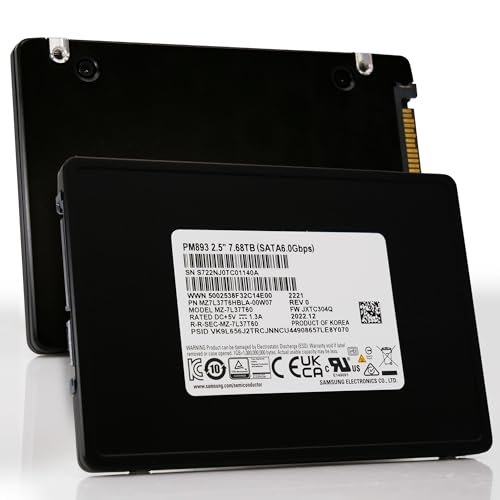
The Samsung PM893 is the SATA anchor of this guide and the safest default when a server has only 2.5-inch SATA bays. It is a 2.5-inch 7mm drive on SATA 6Gb/s, with sequential performance near the interface ceiling at about 550 MB/s read and 520 MB/s write. That ceiling is shared by every SATA drive, consumer or enterprise. What the PM893 adds is power-loss protection, endurance, steady latency under load and a 2.5-inch 7mm body that fits any standard SATA bay or hot-swap tray.
Capacities span 240GB to 7.68TB, covering mirrored boot pairs at the small end and large capacity tiers at the top. Endurance is classed at 1 DWPD over five years, and the drive is a read-intensive model suited to NAS pools, content libraries, game-server storage, backup targets and virtual machine hosts with modest write volume. Self-encrypting drive variants exist for environments that need hardware encryption. SATA remains the right call for older servers with no NVMe bays, chassis with many bays, and ZFS or RAID pools where capacity per bay matters more than single-drive speed.
Key features:
- 2.5-inch 7mm SATA 6Gb/s, about 550 MB/s read and 520 MB/s write
- Capacities from 240GB to 7.68TB in the same model family
- 1 DWPD endurance class with a five-year warranty period
- Power-loss protection for data in flight during an unexpected shutdown
- Self-encrypting drive variants available in the same family
Considerations:
- SATA speed is capped by the interface, so it cannot match NVMe for latency-sensitive databases or dense virtualization
- Read-intensive endurance is a mismatch for constant database writes or heavy logging
- Smaller capacities can be scarce through mainstream channels, so confirm the exact capacity before ordering
- Check the sector format, since most units ship as 512e and some storage stacks expect a different format
Best Mixed-Use SATA: Kingston DC600M
View on Amazon: https://www.amazon.com/dp/B0C4BJP2H8
The Kingston DC600M is the mixed-use SATA drive in this guide, and it is the easiest SATA enterprise drive to buy through mainstream retail channels. It is a fourth-generation data-center SATA 3.0 drive with 3D TLC NAND, a 2.5-inch form factor, and hardware-based power-loss protection. Endurance is classed at 1 DWPD over five years, with a total bytes written figure that scales with capacity, from 876 TBW at 480GB to 14,016 TBW at 7.68TB.
Mixed-use means the DC600M is tuned for workloads that both read and write steadily, rather than mostly reading. That makes it a strong fit for hypervisor boot pairs, small virtual machine hosts, caching tiers, surveillance recording and small business servers where write volume is real but not extreme. The 480GB size suits mirrored operating system volumes, while the 1.92TB and 3.84TB sizes suit data pools and NAS builds. Kingston backs the drive with a five-year warranty, and the DC600ME variant adds AES 256-bit encryption.
Key features:
- 2.5-inch SATA 6Gb/s enterprise drive with 3D TLC NAND
- Capacities from 480GB to 7.68TB
- 1 DWPD endurance class with a five-year warranty period
- Hardware-based power-loss protection
- AES 256-bit encryption available in the DC600ME variant
Considerations:
- SATA performance is typical for the interface, so it will not match NVMe on latency or random throughput
- At the top of its capacity range, a Samsung or Micron SATA drive may hold an edge on availability
- Confirm whether you need the standard DC600M or the encrypted DC600ME variant before ordering
- The 480GB model suits boot mirrors, but it is small for a data pool, so size the capacity to the workload
How to Choose
Begin with the workload, not the headline speed. Measure or estimate daily host writes for a week, then divide by the drive capacity to get DWPD. A drive classed at 1 DWPD can absorb its full capacity in writes every day for the warranty period. Most home labs and NAS builds stay far below 1 DWPD, so a read-intensive drive is enough. If the result is above about 0.5 DWPD, allow a safety factor of two to three times for write amplification in ZFS, databases and virtual machine storage, and consider a mixed-use model classed at 3 DWPD.
The endurance formula is simple: total bytes written equals capacity in terabytes, multiplied by DWPD, multiplied by 365 days, multiplied by the warranty years. A 960GB drive at 1 DWPD over five years works out to about 1,752 TB of lifetime writes, and a 3.84TB drive at the same class works out to about 7,008 TB. Larger capacity is therefore a direct way to buy more lifetime writes, even before moving to a higher DWPD class.
Next, match the interface to the host. NVMe U.2 and U.3 drives need a backplane wired for NVMe or a PCIe adapter that carries lanes to the bay. A SAS backplane will not do it, and a SATA port cannot accept a U.2 drive at all. SATA drives fit any standard 2.5-inch bay and work with ordinary motherboard ports and host bus adapters, which is why they remain the practical choice for older servers and large bay-count chassis.
Form factor and capacity planning come after that. U.2 drives are 2.5-inch but come in 7mm and 15mm heights, and a 15mm drive will not fit a 7mm-only tray. M.2 enterprise drives come in 2280 and 22110 lengths, and a 22110 drive needs a slot and standoff that support the longer size. Plan capacity with growth in mind: a pool that is more than about 80 percent full loses performance headroom and leaves little room for rebuilds.
Fit and Installation
Installation is straightforward once the bay, backplane and lanes are confirmed, but a few checks prevent wasted time. For U.2 and U.3 drives, verify that the backplane is wired for NVMe and that the cable or adapter carries four PCIe lanes to each bay. Some servers wire only two lanes to certain bays, or share lanes between bays, which limits throughput. For SATA drives, any standard motherboard SATA port works, and for arrays with many drives a host bus adapter in IT mode is the usual choice for ZFS.
Cooling deserves attention. Enterprise NVMe drives draw more power under load than consumer M.2 drives, and a U.2 drive in a bay with no airflow can throttle during sustained writes. Check that front-bay airflow reaches the drives. In a desktop or workstation with a PCIe to U.2 adapter, place the adapter where case airflow passes over it, and avoid stacking hot components against the drive.
After physical installation, update firmware before putting data on the drive, and verify the wear indicator reads zero or near zero on a new unit. Set the sector format if your stack needs it, since changing it later usually requires a secure erase. Build redundancy before loading data: mirror boot volumes, use parity or mirroring for data pools, and confirm that a rebuild completes cleanly.
Frequently Asked Questions
Can I use an enterprise SSD in a gaming PC?
Yes. Enterprise SATA drives work in any standard SATA port with no special drivers, and enterprise NVMe U.2 drives work with a PCIe to U.2 adapter or an NVMe-wired bay. They are usually slower to load games than a modern consumer NVMe drive and often cost more per gigabyte than consumer SATA, so they make sense mainly for durability, a secondary data drive, or a machine that doubles as a home server.
Do I need power-loss protection for a home server?
It is strongly recommended if the server holds data you care about, especially with ZFS, databases or virtual machines. Power-loss protection lets the drive finish writing data in its volatile cache if power drops. A UPS helps, but it does not cover a drive-level failure or a sudden shutdown, so the drive-level feature remains valuable on its own.
Should I choose NVMe or SATA for a home lab?
Choose NVMe when the host has U.2 or U.3 bays, or a free PCIe slot for an adapter, and the workload involves many virtual machines, databases or random access. Choose SATA when the server has only 2.5-inch SATA bays, when capacity per bay matters more than single-drive speed, or when building a large pool where many bays beat a few fast ones. Many home labs use both: NVMe for active virtual machines and SATA for capacity and boot mirrors.
How much endurance do I really need?
Most home labs and NAS builds stay far below 1 DWPD, so a read-intensive drive is enough. Measure daily host writes for a week, divide by the drive capacity, then multiply by two to three as a safety margin for write amplification. If the result is above about 0.5 DWPD, consider a mixed-use model. Larger capacity also raises the lifetime write budget, since total bytes written scales directly with capacity at the same DWPD class.
Conclusion
The best enterprise SSDs share the same core strengths: power-loss protection, endurance, steady latency under load and firmware built for servers rather than short bursts. The Samsung PM9A3 is the most versatile NVMe choice for general server storage, the Micron 7450 Pro covers the largest capacities and the most form factors, and the Solidigm D7-P5520 leads on throughput for demanding arrays. On SATA, the Samsung PM893 is the reliable default for legacy bays and capacity tiers, while the Kingston DC600M suits mixed-use SATA workloads and mirrored boot volumes.
Match the drive to the workload first, then to the bay and backplane, and size endurance with a safety margin rather than guessing. Confirm the exact capacity and part number on the listing, check tray height and lane wiring before ordering, and build redundancy into any pool that holds data you cannot afford to lose.
As an Amazon Associate, we earn from qualifying purchases.
Related guides
More from Amazon
Programs that pair well with the guide above. Offers and eligibility are set by Amazon and may change.
A free business account with business pricing and bulk-buying tools for work, shop or home office.
Create a business accountFree shipping on eligible items, Prime Video and more. Eligible new members can start with a free trial.
Start a Prime free trialAudiobooks and podcasts to listen to on the go. Eligible new members can start with a free trial.
Try Audible freeAd-free music streaming. Eligible new subscribers can start with a free trial.
Try Music Unlimited freeAs an Amazon Associate we earn from qualifying purchases.