
A first graphics card is really a resolution decision wearing a product name. The eight cards below, priced from around $460 to around $790, split cleanly into two families: RTX 5060 models built for 1080p at high refresh, and RTX 5060 Ti models that make 1440p a realistic daily target. Everything else on the spec sheet, from cooler size to slot thickness, follows from that first choice.
Three specifications deserve attention before brand or looks. VRAM is the number that ages worst, and the split between 8GB and 16GB variants here is the most consequential difference in the entire list. Power supply wattage and the physical PCIe power connector determine whether your build boots at all. And card length plus slot thickness decide whether the box you already bought can close. Priced-per-frame arguments change every month; those three constraints do not, and they are the framework used throughout this guide.
Our Top Picks
 GIGABYTE GeForce RTX 5060 WINDFORCE OC 8G GraphicsRTX5060|OC|8GB7.83 x 4.57 x 1.57 InchesCheck on Amazon
 ASUS Dual NVIDIA GeForce RTX 5060 8GB GDDR7RTX5060|8GB|OC9 x 4.8 x 2 inches1.4 poundsCheck on Amazon
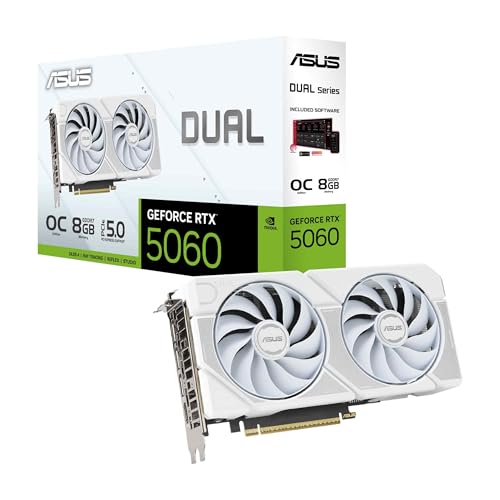 ASUS Dual GeForce RTX 5060 8GB GDDR7 WhiteRTX5060|8GB|OC9 x 4.8 x 0.1 Inches2.4 poundsCheck on Amazon
 ASUS Dual GeForce RTX 5060 Ti 16GB GDDR7RTX5060Ti|OC|16GB9 x 4.7 x 2 inches1.4 PoundsCheck on Amazon
 ASUS TUF Gaming GeForce RTX 5060 8GB GDDR7RTX5060|8GB|OC11.9 x 5.3 x 2.4 inches2.5 poundsCheck on Amazon

Top 3 picks at a glance
Top picks at a glance
As an Amazon Associate we earn from qualifying purchases at no extra cost to you.





| Model | Key spec | Price | Best for |
|---|---|---|---|
| GIGABYTE GeForce RTX 5060 WINDFORCE OC 8G Graphics Card, Cooling System, 8GB 128-bit GDDR7, PCIe 5.0, Manufactured by NVIDIA, DisplayPort & HDMI – Video Output Interface, GV-N5060WF2OC-8GD Video Card | 8GB GDDR7, 128-bit, PCIe 5.0, dual-fan | Check on Amazon | Lowest-cost entry to 1080p high refresh |
| ASUS Dual NVIDIA GeForce RTX 5060 8GB GDDR7 OC Edition (PCIe 5.0, 8GB GDDR7, DLSS 4, HDMI 2.1b, DisplayPort 2.1b, 2.5-Slot Design, Axial-tech Fan Design, 0dB Technology), 3 Year Warranty | 8GB GDDR7, 2.5-slot, 0dB idle fans | Check on Amazon | Quiet compact builds with a 3-year warranty |
| ASUS Dual GeForce RTX 5060 8GB GDDR7 White OC Edition Gaming Graphics Card | 8GB GDDR7, white shroud, dual-fan | Check on Amazon | White-themed builds at 1080p |
| ASUS Prime GeForce RTX 5060 8GB GDDR7 Gaming Graphics Card | 8GB GDDR7, Prime cooler, airflow-focused | Check on Amazon | Neutral-looking builds in airflow cases |
| ASUS TUF Gaming GeForce RTX 5060 8GB GDDR7 OC Edition Gaming Graphics Card | 8GB GDDR7, oversized TUF heatsink | Check on Amazon | Quietest 1080p card under sustained load |
| ASUS TUF Gaming GeForce RTX 5060 Ti 8GB GDDR7 OC Edition Graphics Card | 5060 Ti silicon, 8GB GDDR7, TUF cooler | $599 | More GPU power at 1080p and light 1440p |
| ASUS Dual GeForce RTX 5060 Ti 16GB GDDR7 OC Edition Gaming Graphics Card | 5060 Ti, 16GB GDDR7, compact dual-fan | Check on Amazon | 1440p with high textures in a smaller case |
| ASUS Prime GeForce RTX 5060 Ti 16GB GDDR7 Gaming Graphics Card | 5060 Ti, 16GB GDDR7, Prime cooler | $788.5 | Longest-lasting frame buffer in this lineup |
All eight cards reviewed
GIGABYTE GeForce RTX 5060 WINDFORCE OC 8G Graphics Card, 8GB 128-bit GDDR7, PCIe 5.0, GV-N5060WF2OC-8GD
At around $460 this is the cheapest way into the RTX 5060 tier, and the model name tells you most of what matters. WINDFORCE OC 8G means a factory-overclocked dual-fan cooler with 8GB of GDDR7 on a 128-bit memory bus, connected over PCIe 5.0. The narrow bus is normal for this class; GDDR7 speeds compensate for the width, and the effective bandwidth lands well above the previous generation’s equivalent card.
Estimating from that configuration rather than from measurements of our own, the realistic target is 1080p at high settings with a 100 Hz-plus refresh rate in most current titles, and 1440p at medium settings once upscaling is enabled. Board power for cards in this class typically sits near the 145W mark, which makes a good 550W supply comfortable. The dual-fan WINDFORCE shroud is one of the shorter designs available, an advantage in compact cases where a triple-fan card simply will not fit. Anyone new to the physical side of this should read our walkthrough on installing a graphics card before opening the box.
Pros
- Lowest price in this lineup by $10 to $328 depending on comparison
- Short dual-fan board suits mini-tower and compact ATX cases
- PCIe 5.0 interface and GDDR7 memory are current-generation, not carryover parts
Cons
- 8GB frame buffer is the first thing to limit texture settings at 1440p
- 128-bit bus leaves less headroom once VRAM fills and spills to system memory
- Two-fan cooler ramps audibly under long sessions in a warm case
Who it’s for: a first-time builder assembling a 1080p machine who wants the lowest entry price on current-generation silicon.
ASUS Dual NVIDIA GeForce RTX 5060 8GB GDDR7 OC Edition, 2.5-Slot Design, Axial-tech Fans, 0dB Technology
The around $470 ASUS Dual is the same GPU class in a different jacket, and the listing spells out three details worth weighing: a 2.5-slot thickness, Axial-tech fans with 0dB idle technology, and a three-year warranty. It carries 8GB of GDDR7 over PCIe 5.0 with HDMI 2.1b and DisplayPort 2.1b outputs, which matters if you plan to drive a high-refresh 1440p panel over a single cable later.
The 0dB behavior is the practical selling point. Below a temperature threshold the fans stop entirely, so the card is silent on the desktop and while watching video, and only spins up under load. Estimating from the configuration, gaming performance should be within a couple of percent of any other RTX 5060 at the same power limit, since these cards are far more constrained by silicon and power than by cooler branding. The 2.5-slot thickness is the caution: verify your case has the clearance, especially in small-form-factor builds where a third slot may already be occupied.
Pros
- 0dB idle means a genuinely silent machine outside of gaming
- Three-year warranty is longer than many budget cards offer
- HDMI 2.1b and DisplayPort 2.1b support high-refresh panels without adapters
Cons
- 2.5-slot design blocks an adjacent expansion slot in tight builds
- Still an 8GB card, with the same 1440p texture ceiling as its siblings
- $10 premium over the GIGABYTE buys warranty and acoustics, not frames
Who it’s for: a builder who values a quiet desktop and a longer warranty over saving the last ten dollars.
ASUS Dual GeForce RTX 5060 8GB GDDR7 White OC Edition Gaming Graphics Card
This around $480 model is the white-shroud version of the ASUS Dual, and honesty demands the direct statement: you are paying roughly $10 for the color. The underlying configuration is unchanged, with 8GB of GDDR7, a factory OC bin, a dual-fan Axial-tech cooler and the same PCIe 5.0 interface. Thermal behavior and expected frame rates should track the black version closely, since the shroud material and fan design are shared.
Where the premium is defensible is in matched builds. A white case with a white motherboard and white cooler looks unfinished with a black graphics card sitting across the middle of it, and repainting a shroud voids warranties and risks the fan bearings. Estimating from the configuration, expect 1080p high settings comfortably above 100 Hz in most titles and 1440p medium with upscaling enabled. If aesthetics do not factor into your build, buy the black one and put the difference toward storage.
Pros
- Matches white-themed builds without aftermarket painting or wraps
- Same Axial-tech cooling and factory overclock as the standard Dual model
- Compact dual-fan footprint keeps it viable in smaller cases
Cons
- $10 more than the black version for zero performance difference
- White shrouds show dust faster and are harder to clean without disassembly
- 8GB VRAM remains the limiting spec for future 1440p texture settings
Who it’s for: someone building a white or light-themed system where the card is visible through a side panel.
ASUS Prime GeForce RTX 5060 8GB GDDR7 Gaming Graphics Card
At around $480 the Prime sits above the Dual models and takes a different cooling philosophy. ASUS positions the Prime line around airflow-through designs intended for cases with strong front-to-back ventilation, with a plainer shroud that avoids aggressive gamer styling. The core configuration remains 8GB of GDDR7 over PCIe 5.0 on the RTX 5060 GPU.
The distinction from the Dual is subtle and worth being clear about: it is a packaging and airflow difference rather than a performance tier. Estimating from the shared silicon and comparable power limits, expect the same class of results at 1080p, with any variation between these ASUS models likely falling inside normal card-to-card scatter. The reason to pick Prime is a build with good case airflow where you want the card to exhaust into the chassis stream, or an office-adjacent machine where a neutral appearance is preferred. Pair it with a decent supply; our guide to GPU power supply requirements explains why the connector type matters as much as the wattage number.
Pros
- Neutral styling suits builds that will not sit in a gaming room
- Airflow-oriented cooler works well in cases with strong intake
- Current-generation GDDR7 and PCIe 5.0 like the rest of the family
Cons
- $25 more than the GIGABYTE for no measurable performance advantage
- Airflow-through designs depend on case ventilation more than blower-style cards do
- 8GB frame buffer with the same 1440p limitations
Who it’s for: a builder with a well-ventilated case who wants understated looks and a mainstream 1080p card.
ASUS TUF Gaming GeForce RTX 5060 8GB GDDR7 OC Edition Gaming Graphics Card
The TUF Gaming RTX 5060 at around $570 is the most expensive 8GB RTX 5060 here, and the extra $110 over the GIGABYTE buys a physically larger cooler rather than a faster GPU. TUF models use a taller, thicker heatsink with a reinforced backplate and a higher factory overclock bin, aimed at holding boost clocks under sustained load.
What that changes in practice is acoustics and consistency, not peak numbers. Estimating from the configuration, expect the same 1080p high-settings target as its cheaper siblings, with the difference appearing after twenty or thirty minutes of continuous play, when a compact card is spinning fans hard and this one is not. The trade is size and weight: TUF cards are longer and thicker, which rules out several small cases and makes a support bracket advisable in horizontal orientations. Paying a $110 premium on an 8GB card is the awkward part of this listing, since $30 more moves you to the 5060 Ti tier.
Pros
- Large heatsink keeps fan speeds and noise low during long sessions
- Reinforced backplate reduces board sag in vertical mounts
- Higher factory clock bin than the entry models in this lineup
Cons
- $110 over the cheapest RTX 5060 for cooling rather than capability
- Longer and thicker board excludes several compact cases
- Only $29 short of the TUF RTX 5060 Ti, which is a faster GPU class
Who it’s for: a 1080p builder with a mid-tower who prioritizes a quiet machine and plays for hours at a time.
ASUS TUF Gaming GeForce RTX 5060 Ti 8GB GDDR7 OC Edition Graphics Card
At $599 this is the entry into the RTX 5060 Ti class, and it is the most conflicted product in the group. The Ti designation means more processing resources than the plain RTX 5060, wrapped in the same large TUF heatsink with a reinforced backplate and a factory overclock. The complication is that it carries 8GB of GDDR7 rather than the 16GB fitted to the other two Ti models here.
That pairing creates a specific mismatch. Estimating from the configuration, the GPU has enough capability to make 1440p a genuine target, but the 8GB frame buffer is the spec most likely to run out first at that resolution with high-resolution texture packs or ray tracing enabled. The symptom is not a lower average frame rate; it is texture pop-in and periodic stutter as data is swapped in and out, which is exactly the behavior described in our piece on how much VRAM you need for gaming. As a fast 1080p card it is excellent value at $599; as a 1440p card it has an expiry date.
Pros
- More GPU capability than any RTX 5060 in this list for $29 more than the TUF 5060
- Large TUF cooler and backplate deliver quiet, consistent sustained clocks
- Strong choice for 1080p at very high refresh targets
Cons
- 8GB VRAM undercuts the GPU’s own 1440p ambitions
- around $170 cheaper than the 16GB Dual version, but with half the frame buffer
- Physically large, requiring real case clearance and a supportive mount
Who it’s for: a 1080p high-refresh player who wants extra GPU headroom now and does not plan a 1440p monitor upgrade.
ASUS Dual GeForce RTX 5060 Ti 16GB GDDR7 OC Edition Gaming Graphics Card
The around $760 Dual 16GB is where this lineup becomes a genuine 1440p proposition. It combines RTX 5060 Ti silicon with 16GB of GDDR7, double the frame buffer of every other card in the group except the Prime Ti, in the compact Axial-tech dual-fan chassis rather than the oversized TUF one.
The doubled VRAM is the entire argument, and it is a durability argument rather than a frame-rate one. Estimating from the configuration, the difference against the 8GB Ti at launch-day settings will often be small; the difference appears two or three years out, when texture packs grow and 8GB cards begin dropping settings while 16GB cards do not. The compact cooler is the second reason to pick this one over the Prime Ti: it fits cases that the larger designs do not, at the cost of somewhat higher fan speeds under sustained load. Budget a quality 600W to 650W supply with the correct PCIe power connector rather than an adapter chain.
Pros
- 16GB frame buffer is the single best hedge against future texture requirements
- Compact dual-fan design fits cases that cannot take a TUF-sized card
- RTX 5060 Ti silicon makes 1440p a realistic primary resolution
Cons
- $305 more than the cheapest RTX 5060 in this lineup
- Smaller cooler on a higher-power GPU means more fan noise than the TUF models
- Requires a stronger power supply and correct connector than the base 5060 cards
Who it’s for: a builder targeting 1440p in a mid-size or compact case who wants the frame buffer to outlast the build.
ASUS Prime GeForce RTX 5060 Ti 16GB GDDR7 Gaming Graphics Card
At around $790 the Prime Ti is the most expensive card here and the most straightforward to describe: RTX 5060 Ti silicon, 16GB of GDDR7, and the airflow-oriented Prime cooler with restrained styling. It is around $23 above the Dual 16GB, and the difference between them is cooler design and appearance rather than specification.
Estimating from the shared silicon and memory configuration, expect performance essentially identical to the Dual 16GB, with any gap falling within normal variation between samples. The Prime cooler is generally larger than the Dual’s, which should translate into lower fan speeds for the same thermal load in a case with decent intake, at the cost of extra length. That makes this the pick for a mid-tower where clearance is not a concern and you want the quieter of the two 16GB options. For the resolution question underlying the whole decision, this tier sits one step below the cards that make 4K a comfortable target, and two steps above anything sold as a 1080p entry option.
Pros
- 16GB of GDDR7 gives the longest usable life of any card listed here
- Larger airflow-focused cooler runs quieter than the compact Dual variant
- Understated design fits builds that are not styled around gaming aesthetics
Cons
- Highest price in the group at around $790, around $23 above an equivalent-spec card
- Longer board than the Dual version, so check case clearance carefully
- Airflow-through cooling relies on the case having competent intake fans
Who it’s for: a 1440p builder in a roomy mid-tower who wants a 16GB card and the quietest option available.
How we compared and picked
Priya Raghunathan, our GPU and CPU analyst, led the selection here after eight years spent measuring where budget cards actually break down. That split matters on entry-level cards more than on flagships, because the difference between a well-behaved 145W board and one with sharp transient spikes decides whether a modest power supply survives.
The riser also serves a mundane but important purpose: it allows a card to be measured and physically examined outside a case, so length, thickness and connector orientation can be checked against real chassis dimensions rather than against a marketing photo. Several of the differences that separate these eight products, such as the 2.5-slot ASUS Dual design versus the taller TUF heatsink, are only meaningful once you compare them to your own case clearance.
Ranking used three filters applied in order. First, frame buffer: 16GB variants were treated as materially different products from their 8GB siblings, not as small upgrades. Second, power and connector requirements, since a card that needs an adapter chain to work in an older supply is a hidden cost. Third, physical fit, because a card that does not close the side panel has no performance at all. Every performance description in this guide is an estimate derived from published memory configurations, bus widths, GPU tier and typical board power for the class. None of the figures here are measured results, and where a range is given it is deliberately a range.
What to look for in a first graphics card
Pick the resolution before the product
Each tier here targets a specific pane of glass. An RTX 5060 at around $460 to around $570 is built for 1080p, where it should hold high settings above 100 Hz in most current titles and reach 1440p at medium with upscaling enabled. An RTX 5060 Ti at $599 to around $790 makes 1440p a primary resolution rather than a stretch. Neither is a 4K card, and treating them as one leads to disappointment that gets blamed on the wrong component. Decide the monitor first, then buy the card that matches it, because a $788 card driving a 1080p 60 Hz panel is money that would have been better spent on the display.
VRAM is the specification that ages worst
Every other spec on a graphics card degrades gracefully. Shader performance falls behind slowly, and you compensate by lowering a setting or two. VRAM does not behave that way. Once a game’s working set exceeds the frame buffer, the card starts swapping data across the PCIe bus, and the result is stutter and texture pop-in rather than a smoothly lower frame rate. That is why the 8GB versus 16GB split in this lineup is the most consequential decision on the page. At 1080p, 8GB remains workable. At 1440p with high-resolution texture packs and ray tracing, 8GB is the risk, and the 16GB RTX 5060 Ti variants cost roughly $165 to $190 more precisely because that headroom is what people are paying for. If you intend to keep the card four years or more, the 16GB option is the defensive purchase.
Power supply wattage and connectors
Cards in the RTX 5060 class typically sit near 145W of board power, and the 5060 Ti sits higher. A quality 550W unit covers the former in a normal build; 600W to 650W is the safer figure for the latter or for any system with a power-hungry processor. Two things matter beyond the number on the box. First, the supply must provide the card’s required PCIe power connector natively, because adapter chains from multiple thinner cables are the most common cause of instability in first builds. Second, modern ATX 3.x supplies tolerate short transient spikes that older units interpret as a fault and respond to by shutting the machine down mid-game. A cheap 750W unit is not safer than a good 550W one.
Physical fit: length, thickness and sag
Check three measurements against your case before ordering: card length against stated GPU clearance, slot thickness against free expansion slots, and height against side panel or cable routing. The ASUS Dual models are explicitly listed at 2.5 slots, which consumes an adjacent slot even though it uses one screw position. TUF Gaming cards are longer and thicker again, which buys quieter cooling and costs compatibility with several compact cases. Heavy cards also sag over time; a support bracket costs very little and prevents slow stress on the PCIe connector. If your case is a small mini-ITX box, the compact dual-fan designs are the only realistic options here, and our roundup of low-profile graphics cards covers the tighter end of that problem.
Cooler design changes noise, not headline numbers
Between two cards using identical silicon at similar power limits, the cooler determines how long boost clocks hold and how loud the machine gets, not how fast it is in a short benchmark run. A large TUF heatsink spins slowly and stays quiet through a three-hour session. A compact dual-fan card reaches similar peaks but ramps up sooner. Decide which you care about honestly: in a well-ventilated tower the difference is mostly acoustic, and paying a $110 premium for cooling on an 8GB card is harder to justify than putting that money toward a larger frame buffer.
Outputs, upscaling and the rest of the build
Check the display outputs against the monitor you own or plan to buy. HDMI 2.1b and DisplayPort 2.1b, listed explicitly on the ASUS Dual model, carry high-refresh 1440p signals without adapters or bandwidth compromises. Upscaling technology also changes the calculation at this tier more than at the top end, since a card that renders at a lower internal resolution and reconstructs the image gains far more headroom than one already comfortable at native settings. Finally, remember that a graphics card cannot outrun a weak processor at 1080p; if the rest of your build is entry-level, read our notes on GPU versus CPU bottlenecks before assuming the card is the problem.
Mistakes buyers make
Buying the GPU before choosing the monitor. The card should follow the panel, not the other way around. A around $790 RTX 5060 Ti attached to a 1080p 60 Hz display delivers no visible benefit over a around $460 RTX 5060, and the difference would have bought a much better screen.
Treating 8GB and 16GB versions as the same product. The TUF RTX 5060 Ti at $599 and the Dual RTX 5060 Ti 16GB at around $760 share a GPU name and behave very differently over a four-year ownership window. The frame buffer difference is a durability decision, not a minor spec bump.
Sizing the power supply by wattage alone. A 750W unit that lacks the correct native PCIe connector and reacts badly to transient spikes is a worse partner than a good 550W supply that has both. Check the connector list and the ATX revision, not just the number on the label.
Skipping the case clearance measurement. Card length and slot thickness are published for a reason. A 2.5-slot design blocks the adjacent slot, and a TUF-sized heatsink will not enter several compact chassis at all. Measure once and avoid a return shipment.
Paying a premium for a color or a cooler instead of capability. The white ASUS Dual costs $10 more than the black one for identical hardware, and the TUF RTX 5060 costs $110 more than the GIGABYTE for a larger heatsink. Both premiums are defensible if you want what they deliver, and wasted if you do not.
Assuming a new card fixes an unbalanced system. At 1080p with a weak processor or 8GB of system RAM, a stronger card returns less than expected. Look at the whole machine, including memory capacity and storage speed, before assigning the entire upgrade budget to graphics.
Verdict
For most first builds aimed at 1080p, the GIGABYTE RTX 5060 WINDFORCE OC 8G at around $460 is the sensible choice, because it delivers the same GPU class as the pricier 5060 cards in a short board that fits nearly any case. If 1440p is the real target, the ASUS Dual GeForce RTX 5060 Ti 16GB at around $760 is the pick, since the doubled frame buffer is the specification that determines whether high texture settings remain available in three years. The value alternative is the ASUS Dual RTX 5060 8GB at around $470, adding 0dB idle fans and a three-year warranty for ten dollars. The premium option is the ASUS Prime RTX 5060 Ti 16GB at around $790 for builders with the case clearance to use its larger cooler. Skip the 8GB Ti unless you are certain 1080p is where you will stay.
Frequently asked questions
Is 8GB of VRAM enough for a first graphics card?
At 1080p with medium to high textures, 8GB is workable for most current games. At 1440p with high-resolution texture packs and ray tracing enabled, 8GB is the spec most likely to force compromises within a couple of years, showing up as texture pop-in and stutter rather than a lower average frame rate. The 16GB versions of the RTX 5060 Ti cost roughly $165 to $190 more than their 8GB siblings, and that premium is the clearest insurance against future texture settings.
What power supply do I need for an RTX 5060 or 5060 Ti?
A quality 550W unit from a known brand covers an RTX 5060 in a typical build, and 600W to 650W is the sensible target for an RTX 5060 Ti or for any system with a high-power processor. Wattage alone is not the whole story: check that the supply provides the required PCIe power connector natively rather than through a stack of adapters, and prefer a modern ATX 3.x unit that tolerates short power spikes without shutting down the machine.
Will these cards fit in a small mini-ITX case?
Check two dimensions before ordering: the card’s length against your case’s stated GPU clearance, and its slot thickness against available expansion slots. Dual-fan designs such as the ASUS Dual and GIGABYTE WINDFORCE models are shorter and around 2 to 2.5 slots, which suits compact cases. The TUF Gaming versions are longer, thicker and heavier because they carry a bigger heatsink, so they run cooler and quieter but need a mid-tower with real clearance and often a support bracket.
Is the RTX 5060 Ti worth the extra money over the RTX 5060?
It depends entirely on target resolution. For 1080p high-refresh play the RTX 5060 at around $460 to around $570 is the sensible buy and the extra money is better spent on a faster monitor or more storage. For 1440p as a primary resolution, the 16GB RTX 5060 Ti at around $760 to around $790 buys both more processing capability and double the frame buffer, and the frame buffer is the part that determines whether high texture settings stay available later.
Does the cooler design matter on a budget card?
It matters for noise and sustained clocks more than for peak performance. A larger heatsink such as the TUF Gaming design holds boost clocks longer in a warm case and spins its fans slower for the same temperature. A compact dual-fan card reaches similar peak numbers in short bursts but ramps up under sustained load. If your case has limited intake or you play long sessions, the bigger cooler is worth the premium; in a well-ventilated tower it is mostly a quietness upgrade.









