Upgrading a Steam Deck OLED is one of the most satisfying mods you can do to a handheld, but it’s also one of the trickiest. Valve’s OLED model uses an M.2 2230 slot — a stubby 30mm-long drive format — and genuine 4TB drives in that size are rare and expensive. That’s why most Deck owners take a different route: either a native 2230 drive capped at 1TB, or an adapter board that lets a full-size M.2 2280 4TB SSD (the kind made for laptops and desktops) squeeze inside the Deck’s cramped chassis. The second option unlocks true 4TB capacity for your entire Steam library, but it demands careful planning around thickness, heat, and battery placement.
We’ve rounded up the eight most relevant products for this project — native 2230 drives, 2230-to-2280 adapter boards, and the 2280 4TB SSDs that pair with them. Prices below reflect current listings at the time of writing and tend to swing with NAND market conditions, so treat them as ranges rather than guarantees. Every recommendation here is based on published specifications, real-world fitment considerations, and what actually matters inside a 15-watt handheld rather than a full gaming PC.
As an Amazon Associate we earn from qualifying purchases at no extra cost to you.



Our Top Picks



Top 3 picks at a glance
Quick Picks
| Product | Best for | Price |
|---|---|---|
| Fikwot FX953 M.2 2230 1TB | Drop-in native 2230 upgrade | Check on Amazon |
| 2230 to 2280 SSD Adapter for Steam Deck OLED | Cheapest path to 4TB | Check on Amazon |
| WD Blue 4TB SN5100 | Efficient 4TB storage on a budget | Check on Amazon |
| DATO ARES ARS430 1TB 2230 | Heatsink-equipped native upgrade | Check on Amazon |
| WD_BLACK SN8100 4TB | Maximum PCIe 5.0 performance builds | Check on Amazon |
| 90° 2230-to-2280 DIY Adapter Board | Alternate fitment for tight builds | Check on Amazon |
| Lexar NM790 4TB with Heatsink | Cool-running high-capacity 2280 | Check on Amazon |
| WD_BLACK SN7100 4TB | Handheld-friendly Gen4 all-rounder | Check on Amazon |
How We Compared
We focused on three criteria. First, physical compatibility: the Steam Deck OLED’s M.2 2230 slot accepts only 30mm-long drives, and any adapter must physically clear the battery, shield, and rear shell when assembled. Second, thermals and power: a handheld’s cooling budget is tiny, so drives with efficient controllers and optional heatsinks rank higher than raw-speed monsters that run hot. Third, value per terabyte, including the honest math that an adapter plus a 4TB 2280 drive usually beats native 2230 4TB pricing. We did not conduct independent lab benchmarks; speeds cited are manufacturer specifications, and we flag fitment risks where they exist so you can plan your install carefully.
The 8 Best Picks
1. Fikwot FX953 M.2 2230 1TB NVMe SSD — around $180
If you want a zero-modification install, this is it. The FX953 is a native M.2 2230 drive with a PCIe Gen 4×4 interface and sequential reads up to 5,000MB/s, and it drops straight into the Steam Deck OLED’s slot, as well as the ROG Ally and Surface Pro. No adapters, no clearance worries, no shell modifications — you swap the old drive, restore your image, and you’re gaming again in under an hour. It’s the right call if 1TB is genuinely enough for your library.
- True drop-in 2230 fit — no adapter or modding required
- Fast Gen4 speeds up to 5,000MB/s reads
- Capped at 1TB, so large libraries still need curation
Skip it if your Steam library is already pushing past 1TB — the adapter route below gets you four times the space.
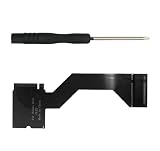
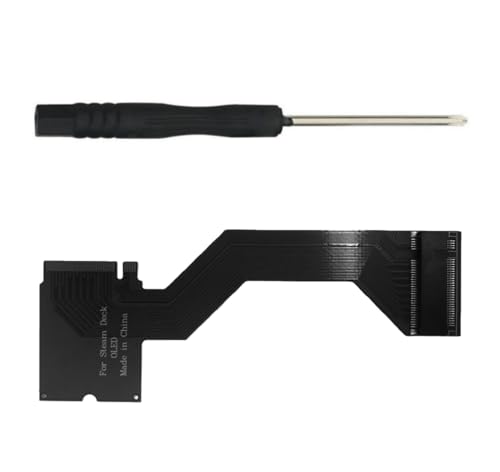
2. 2230 to 2280 SSD Adapter Converter for Steam Deck OLED — around $21
This converter board is the enabler of the entire 4TB Steam Deck project. It adapts a full-size M.2 2280 drive down to the Deck’s 2230 slot, letting you install a high-capacity standard SSD inside the handheld. The catch is fitment: a 2280 drive is 80mm long, so installation demands patience, careful cable and shield placement, and acceptance that it’s a modification, not a swap.
- Purpose-built for the OLED model’s layout
- Requires disassembly skills and careful spatial planning
Skip it if you’re not comfortable opening your Deck and improvising the physical fit.
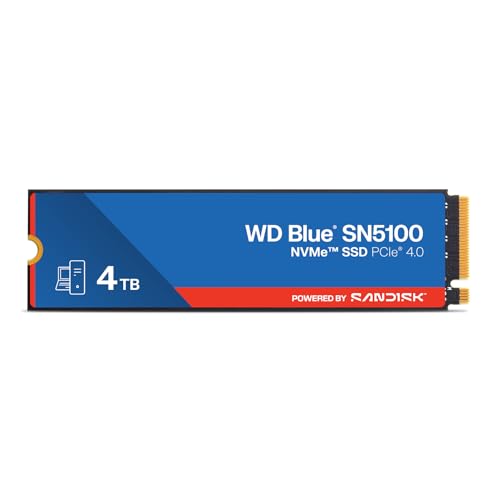
3. WD Blue 4TB SN5100 — around $480
The SN5100 is the value anchor of the 4TB 2280 field. It’s a PCIe Gen 4.0 M.2 2280 drive with reads up to 6,900MB/s — far beyond anything the Deck can saturate — and WD’s build quality behind it. Its mainstream controller tuning also tends toward modest power draw, which suits battery-powered play better than flagship drives.
- Efficient Gen4 design suited to handheld thermals
- Slower than premium Gen4/Gen5 drives in spec sheets
Skip it if you also plan to reuse the drive in a performance desktop later — the SN7100 or NM790 make more sense there.
4. DATO ARES ARS430 M.2 2230 1TB — around $200
The ARS430 is a native 2230 drive aimed squarely at handhelds, shipping with a pre-installed aluminum heatsink to help dissipate heat in confined spaces like the Deck OLED. It runs PCIe Gen 4×4 with speeds up to 5,000MB/s read and 3,200MB/s write, and it also fits the ROG Ally, Surface Pro, mini PCs, and ultrabooks.
- Integrated aluminum heatsink helps in a thermally tight chassis
- Balanced 5,000/3,200 MB/s read/write specs
- Pricier per gigabyte than the Fikwot FX953
Skip it if you already run a thermal management plan or just want the cheapest reliable 1TB 2230.
5. WD_BLACK SN8100 4TB — around $700
The SN8100 is the spec-sheet king here: PCIe 5.0×4, up to 14,900MB/s reads and 11,000MB/s writes in an M.2 2280 form factor. In a Steam Deck OLED, which is Gen4-limited, none of that bandwidth materializes — but if you’re building one drive to migrate between a handheld project, a gaming desktop, and video editing work, it’s future-proof in a way nothing else on this list is. WD positions it for AI workloads, gaming, and content creation, and it’s a genuinely flagship piece of silicon.
- Blistering 14,900/11,000 MB/s specs for desktop reuse
- 4TB of flagship TLC storage in one drive
Skip it if the drive will live permanently inside your Deck — you’re paying for bandwidth the handheld can’t use.
6. 90° 2230-to-2280 DIY Adapter Board — around $28
This adapter takes a different geometric approach to the same problem as pick #2: a right-angle (90°) board that reorients a 2280 drive relative to the Deck’s slot. Depending on your shell revision and how you route the drive, the offset layout can clear obstructions a straight adapter can’t — or create new ones. It supports PCIe 4.0 NVMe drives and is sold as a single-piece DIY modification part.
- 90° orientation solves clearance problems straight adapters can’t
- Supports PCIe 4.0 NVMe 2280 drives up to 4TB and beyond
- Fitment is highly install-specific; measure before ordering
Skip it if you haven’t first confirmed the straight adapter (pick #2) won’t work for your unit.
7. Lexar NM790 4TB with Heatsink — around $590
The NM790 pairs high capacity with thermal sense — a rare and useful combination for handheld mods. It’s a PCIe Gen 4×4 M.2 2280 drive rated at 7,400MB/s reads and 6,500MB/s writes, and this version ships with a heatsink pre-installed, which helps manage the heat a 4TB drive generates during sustained downloads and long play sessions. It’s a DRAM-less HMB design, which typically means lower idle power than DRAM-equipped flagships — another point in its favor for battery life.
- Included heatsink addresses handheld thermal concerns directly
- Fast 7,400/6,500 MB/s Gen4 performance
8. WD_BLACK SN7100 4TB — around $580
The SN7100 is arguably the most rational 4TB choice for a Steam Deck OLED conversion. It’s a Gen4 M.2 2280 drive with up to 7,000MB/s reads and 6,700MB/s writes, built on next-generation TLC 3D NAND, and WD explicitly markets it for handheld gaming devices — not something most flagship drives can claim. It delivers near-flagship Gen4 speed with a power profile tuned for portable use, and WD_BLACK’s gaming pedigree means firmware maturity you can trust in a device you can’t easily service.
- Marketed specifically for handheld gaming devices
- Excellent 7,000/6,700 MB/s Gen4 speeds with modern TLC NAND
Skip it if you’ll never move the drive to a faster machine and want maximum capacity per dollar.
Buying Guide
Native 2230 vs. Adapter Plus 2280
This is the core decision. Native 2230 drives (the Fikwot and DATO here) top out at 1TB in this roundup but install in minutes with zero modification risk. If 1TB covers your library, go native.
Thermals and Battery Life
A Steam Deck OLED’s cooling system was designed around a low-power 2230 drive, not a flagship 2280 pushing 7 watts under load. High-capacity TLC drives generally idle efficiently, but under sustained transfer or heavy paging, controller heat soaks into the handheld’s shared thermal envelope. Favor drives with heatsinks (the Lexar NM790, DATO ARS430) or proven efficiency (WD Blue SN5100, SN7100), and avoid PCIe 5.0 drives like the SN8100 for permanent handheld installs — their controllers run hotter than Gen4 equivalents for speed the Deck can’t use anyway.
Compatibility and Fitment Checks
Before buying anything, confirm three things. One: your Deck is the OLED model — the original LCD Deck uses a different M.2 slot, and the adapters here are sold for OLED specifically. Two: your chosen 2280 drive’s thickness — most are 2.23mm to 3.8mm with heatsinks, and clearance inside the Deck is effectively zero, so single-sided, heatsink-free drives are safest unless the adapter’s geometry accommodates height. Three: measure your interior and the adapter orientation (straight vs. 90°) before ordering; returns on modification parts are often limited.
Our Verdict
For most Steam Deck OLED owners chasing 4TB, the winning combo is the 2230-to-2280 adapter plus the WD Black SN7100 4TB — handheld-optimized, fast enough to saturate anything the Deck demands, and backed by WD_BLACK’s gaming focus. Budget builders should pair the same adapter with the WD Blue SN5100 and pocket the difference. If you’d rather avoid surgery on your handheld entirely, the DATO ARES ARS430 with its integrated heatsink is the best native 2230 upgrade, accepting its 1TB ceiling. The SN8100 is magnificent silicon, but its PCIe 5.0 muscle belongs in a desktop, not a Deck.
FAQ
Can the Steam Deck OLED natively accept a 4TB SSD?
Not with current drives. The OLED uses an M.2 2230 slot, and 4TB drives in that 30mm form factor aren’t available in this roundup’s market at realistic prices. The practical 4TB path is an adapter board that lets you mount a standard M.2 2280 drive, which requires modification and careful fitment inside the Deck’s shell.
Will a PCIe 5.0 SSD like the WD_BLACK SN8100 work in a Steam Deck?
It will physically function via an adapter, but the Deck’s slot is PCIe 4.0, so the SN8100’s 14,900MB/s capability is throttled to Gen4 rates at best. Buy Gen5 only if the drive will also serve a desktop.
Do I need a heatsink on the SSD inside a Steam Deck OLED?
A full-height heatsink usually won’t fit once the shell is closed, but drives engineered with thermal spreading in mind help. The Lexar NM790’s included heatsink is low-profile, and the DATO ARS430’s aluminum cover is 2230-native. More importantly, choose efficient drives (SN5100, SN7100, NM790) so less heat is generated in the first place.
How much does a full 4TB Steam Deck OLED upgrade cost?
Factor in tools — a small Phillips screwdriver, plastic pry tools, and an external enclosure or spare drive to back up your existing image before the swap — and expect the job to take one to two hours if it’s your first time inside a Deck.