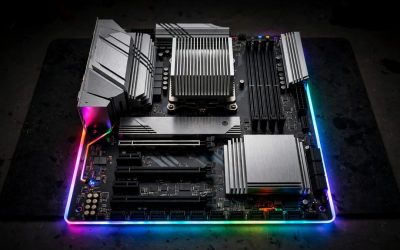
Our Short List of 3

- Best for: A white-themed AM5 gaming build with three M.2 slots and both wired and wireless networking.
- Socket: AM5, for AMD Ryzen 9000, 8000 and 7000 series processors
- Chipset: AMD B650, ATX form factor
- Memory: DDR5
- Power stages: 12 + 2

- Best for: A proven AM5 board for a Ryzen gaming PC with wired and wireless networking.
- Socket: AM5, for AMD Ryzen 9000, 8000 and 7000 series processors
- Chipset: AMD B650, ATX form factor
- Memory: DDR5
- Expansion: PCIe 4.0

- Best for: A Ryzen 9000 build that needs Wi-Fi 7, three M.2 slots and a PCIe 5.0 graphics slot.
- Socket: AM5, for AMD Ryzen 9000, 8000 and 7000 series processors
- Chipset: AMD B850, ATX form factor
- Memory: DDR5
- Power phase: 14+2+2
All 5 Picks at a Glance
| Product | Specs | Action |
|---|---|---|
| ASUS ROG Strix B650-A Gaming WiFi AMD B650 AM5 Ryzen Desktop 9000 8000 & 7000 ATX motherboard, 12 + 2 power stages, DDR5, 3x M.2 slot, PCIe 4.0, 2.5G LAN, WiFi 6E, USB 3.2 Gen 2×2 Type-C, Aura Sync |
| Check price on Amazon |
| MSI MAG B650 Tomahawk WiFi Gaming Motherboard (AMD Ryzen 9000/8000/7000 Series Processors, AM5, DDR5, PCIe 4.0, M.2, SATA 6Gb/s, USB 3.2 Gen 2, HDMI/DP, Wi-Fi 6E, Bluetooth 5.3, 2.5Gbps LAN, ATX) |
| Check price on Amazon |
| GIGABYTE B850 AORUS Elite WIFI7 AMD AM5 ATX Motherboard, Support AMD Ryzen 9000/8000/7000 Series, DDR5, 14+2+2 Power Phase, 3X M.2, PCIe 5.0, USB-C, WIFI7, 2.5GbE LAN, EZ-Latch, 5-Year Warranty |
| Check price on Amazon |
 ASUS TUF Gaming B860-PLUS WiFi B860 LGA 1851 ATX Motherboard, Intel Core Ultra Series 2 Ready, Advanced AI PC-Ready, 12+1+2+1 Stages, DDR5, PCIe 5.0, 3X M.2, Wi-Fi 7, 2.5Gb LAN, USB 20Gbps Type-C |
| Check price on Amazon |
 MSI PRO Z890-P WiFi ProSeries Motherboard (Supports Core Ultra Series 2 Intel Processors, LGA 1851, DDR5, PCIe 5.0, M.2, SATA, 5Gbps LAN, USB Type-C, Wi-Fi 7, Bluetooth 5.4, Thunderbolt 4, ATX) |
| Check price on Amazon |
A motherboard decides which CPU you can install, how much memory the system accepts, and how many fast drives fit before you start cutting corners. The socket comes first, because an AM5 board cannot take an Intel chip and an LGA 1851 board cannot take a Ryzen chip. After the socket, the chipset sets the ceiling: it decides whether the CPU can be overclocked, how many high-speed storage slots you get, and which USB and networking features are built in.
This guide is for builders choosing between AMD Ryzen and Intel Core Ultra systems, from a first gaming PC to a rebuild around a faster graphics card. Every board below is an ATX model with built-in Wi-Fi, and every pick comes from the name and specifications listed on its Amazon product page, so you can check the exact model, socket and feature list before ordering.
Our Top Picks
- ASUS ROG Strix B650-A Gaming WiFi AMD B650ATX 3x M.2 WiFi6E (Pack of 1)13.4 x 10.8 x 2.9 inches4.25 poundsCheck on Amazon
Top 3 picks at a glance
Quick Picks
As an Amazon Associate we earn from qualifying purchases.
| Product | Best for | Key spec from title |
|---|---|---|
| ASUS ROG Strix B650-A Gaming WiFi | A white-themed AM5 build with three M.2 slots | AM5, Ryzen 9000/8000/7000, DDR5, 3x M.2, WiFi 6E |
| MSI MAG B650 Tomahawk WiFi | A proven AM5 board for a Ryzen gaming PC with wired and wireless networking | AM5, Ryzen 9000/8000/7000, DDR5, PCIe 4.0, Wi-Fi 6E, Bluetooth 5.3 |
| GIGABYTE B850 AORUS Elite WIFI7 | A Ryzen 9000 build that needs Wi-Fi 7 and three M.2 slots | AM5, B850, DDR5, 14+2+2 power phase, 3x M.2, PCIe 5.0, WiFi 7 |
| ASUS TUF Gaming B860-PLUS WiFi | A Core Ultra build with durable power delivery and Wi-Fi 7 | LGA 1851, B860, DDR5, PCIe 5.0, 3x M.2, Wi-Fi 7, 2.5Gb LAN |
| MSI PRO Z890-P WiFi | A Core Ultra build that needs Z890 overclocking and Thunderbolt 4 | LGA 1851, Z890, DDR5, PCIe 5.0, Wi-Fi 7, Bluetooth 5.4, Thunderbolt 4 |
How to Choose
Start with the socket and chipset, not the brand
The socket is a hard limit, not a preference. AM5 fits Ryzen 7000, 8000 and 9000 series processors, while LGA 1851 fits Intel Core Ultra Series 2 processors and nothing older, so a board bought for the wrong family cannot be fixed with a BIOS update. The chipset then decides what the board can do with that CPU: B650 and B850 cover most Ryzen gaming builds, while on Intel, B860 suits locked Core Ultra chips and Z890 is the route when you want CPU overclocking. Pick the socket for the CPU you own or plan to buy, pick the chipset for the features you will switch on, and then compare brands and board layouts.
Match the memory type and slots to your kit
Every board in this guide uses DDR5, and that matters because DDR4 and DDR5 sticks are not interchangeable. Check the board’s memory support before you order RAM, and confirm the number of slots: four DDR5 slots give you room to start with two sticks and add two more later, while a two-slot board locks you into replacing the kit when you want more memory. Also check the maximum capacity and the rated memory speed listed for the board, since a kit rated above the board’s supported speed will run at a lower speed unless the board’s memory profile is enabled. If you already own a DDR5 kit, match its type, capacity and speed to the board first.
Count expansion and storage slots before you run out
A gaming board needs room for a graphics card, fast storage and the extras you will add later. Look for a PCIe 5.0 x16 slot for the graphics card, then count the M.2 slots: three or four slots let you keep a fast drive for Windows and games plus extra drives for a growing library, while a board with a single slot forces you to swap drives sooner. Check whether the M.2 slots have heatsinks, because a bare high-speed drive can slow down under sustained loads. Also note the SATA ports and the second PCIe slot, which matter if you plan to add a capture card, a sound card or extra USB expansion.
Check rear I/O and networking against your desk setup
The rear panel decides what you can plug in without reaching for adapters. Count the USB ports by type and speed, and look for a USB Type-C port on the rear and a front-panel Type-C header if your case has one. For networking, built-in Wi-Fi 6E or Wi-Fi 7 covers a wireless setup, while a 2.5Gb or 5Gb Ethernet port gives a wired connection more headroom than a standard gigabit port. Check the display outputs too: HDMI and DisplayPort on the board only matter if your CPU has integrated graphics, since a dedicated graphics card provides its own outputs. Match the audio jacks and the Wi-Fi antenna connectors to your speakers, headset and router placement.
The 5 Best Options
ASUS ROG Strix B650-A Gaming WiFi AMD B650 AM5 Ryzen Desktop 9000 8000 & 7000 ATX motherboard, 12 + 2 power stages, DDR5, 3x M.2 slot, PCIe 4.0, 2.5G LAN, WiFi 6E, USB 3.2 Gen 2×2 Type-C, Aura Sync
- Best for: A white-themed AM5 gaming build with three M.2 slots and both wired and wireless networking.
- Socket: AM5, for AMD Ryzen 9000, 8000 and 7000 series processors
- Chipset: AMD B650, ATX form factor
- Memory: DDR5
- Power stages: 12 + 2
A white-themed AM5 gaming build with three M.2 slots and both wired and wireless networking.
A BIOS update may be needed before a Ryzen 9000 or 8000 series CPU will start on an early board, so check the BIOS version and the board’s BIOS FlashBack support before installing the CPU.
This is the board for a Ryzen builder who wants a clean white and silver look without giving up the basics. The 12 + 2 power stages and three M.2 slots cover a mid-range to upper mid-range Ryzen system, and the board suits a first AM5 build or a rebuild where the case window shows the hardware. Wi-Fi 6E and a 2.5G LAN port cover both wireless and wired networking, while the USB 3.2 Gen 2×2 Type-C port handles fast external drives and modern peripherals.
Watch out for: A BIOS update may be needed before a Ryzen 9000 or 8000 series CPU will start on an early board, so check the BIOS version and the board’s BIOS FlashBack support before installing the CPU.
MSI MAG B650 Tomahawk WiFi Gaming Motherboard (AMD Ryzen 9000/8000/7000 Series Processors, AM5, DDR5, PCIe 4.0, M.2, SATA 6Gb/s, USB 3.2 Gen 2, HDMI/DP, Wi-Fi 6E, Bluetooth 5.3, 2.5Gbps LAN, ATX)
- Best for: A proven AM5 board for a Ryzen gaming PC with wired and wireless networking.
- Socket: AM5, for AMD Ryzen 9000, 8000 and 7000 series processors
- Chipset: AMD B650, ATX form factor
- Memory: DDR5
- Expansion: PCIe 4.0
A proven AM5 board for a Ryzen gaming PC with wired and wireless networking.
This board uses PCIe 4.0 rather than PCIe 5.0 for the graphics slot, so confirm that a PCIe 5.0 graphics card or drive is not part of your plan before choosing it.
The Tomahawk is the steady choice for a Ryzen gaming PC that needs to work on the first boot and stay out of the way afterward. Its AM5 socket covers Ryzen 7000, 8000 and 9000 series processors, and the combination of Wi-Fi 6E, Bluetooth 5.3 and a 2.5Gbps LAN port covers headsets, controllers and a wired connection in one board. The layout is straightforward, the rear panel carries HDMI and DisplayPort for systems using integrated graphics, and the board fits builders who would rather spend their attention on the graphics card and storage than on the motherboard itself.
Watch out for: This board uses PCIe 4.0 rather than PCIe 5.0 for the graphics slot, so confirm that a PCIe 5.0 graphics card or drive is not part of your plan before choosing it.
GIGABYTE B850 AORUS Elite WIFI7 AMD AM5 ATX Motherboard, Support AMD Ryzen 9000/8000/7000 Series, DDR5, 14+2+2 Power Phase, 3X M.2, PCIe 5.0, USB-C, WIFI7, 2.5GbE LAN, EZ-Latch, 5-Year Warranty
- Best for: A Ryzen 9000 build that needs Wi-Fi 7, three M.2 slots and a PCIe 5.0 graphics slot.
- Socket: AM5, for AMD Ryzen 9000, 8000 and 7000 series processors
- Chipset: AMD B850, ATX form factor
- Memory: DDR5
- Power phase: 14+2+2
A Ryzen 9000 build that needs Wi-Fi 7, three M.2 slots and a PCIe 5.0 graphics slot.
Gigabyte sells similar Aorus Elite boards in more than one revision, so confirm the exact model name and chipset on the listing before ordering, and check that the listing is the B850 version.
This Gigabyte board is the step up for a Ryzen 9000 build that needs newer connectivity. Wi-Fi 7 and a 14+2+2 power phase design sit alongside three M.2 slots and a PCIe 5.0 slot, so the board suits a system with a fast graphics card, a high-speed drive and a wireless network that will stay in place for years. The EZ-Latch design makes removing the graphics card and M.2 drives simpler, which helps when you upgrade storage or swap a card later. It is a sensible pick when the rest of the build already uses current-generation parts.
Watch out for: Gigabyte sells similar Aorus Elite boards in more than one revision, so confirm the exact model name and chipset on the listing before ordering, and check that the listing is the B850 version.
ASUS TUF Gaming B860-PLUS WiFi B860 LGA 1851 ATX Motherboard, Intel Core Ultra Series 2 Ready, Advanced AI PC-Ready, 12+1+2+1 Stages, DDR5, PCIe 5.0, 3X M.2, Wi-Fi 7, 2.5Gb LAN, USB 20Gbps Type-C
- Best for: A Core Ultra build with durable power delivery, Wi-Fi 7 and three M.2 slots.
- Socket: LGA 1851, for Intel Core Ultra Series 2 processors
- Chipset: Intel B860, ATX form factor
- Memory: DDR5
- Power stages: 12+1+2+1, 80A DrMOS
A Core Ultra build with durable power delivery, Wi-Fi 7 and three M.2 slots.
The B860 chipset does not support CPU overclocking, so if you plan to buy an unlocked Core Ultra K processor to overclock it, choose a Z890 board instead.
The TUF B860-Plus is the Intel board for a Core Ultra build where durability matters more than overclocking. Its 12+1+2+1 power stages use 80A DrMOS stages, and the board pairs that with three M.2 slots, a PCIe 5.0 slot and Wi-Fi 7, so a locked Core Ultra processor, a modern graphics card and a fast drive all have room. The rear USB 20Gbps Type-C port supports DisplayPort video output, and the front USB 10Gbps Type-C header suits a case with a front Type-C port. It fits a builder who wants a sturdy board and a clean, dark build.
Watch out for: The B860 chipset does not support CPU overclocking, so if you plan to buy an unlocked Core Ultra K processor to overclock it, choose a Z890 board instead.
MSI PRO Z890-P WiFi ProSeries Motherboard (Supports Core Ultra Series 2 Intel Processors, LGA 1851, DDR5, PCIe 5.0, M.2, SATA, 5Gbps LAN, USB Type-C, Wi-Fi 7, Bluetooth 5.4, Thunderbolt 4, ATX)
- Best for: A Core Ultra build that needs Z890 overclocking, Thunderbolt 4 and Wi-Fi 7.
- Socket: LGA 1851, for Intel Core Ultra Series 2 processors
- Chipset: Intel Z890, ATX form factor
- Memory: 4x DDR5, maximum memory capacity 256GB
- Memory support: DDR5 9200 to 6400 MT/s with overclocking
A Core Ultra build that needs Z890 overclocking, Thunderbolt 4 and Wi-Fi 7.
LGA 1851 takes Core Ultra Series 2 processors only, so a 12th, 13th or 14th generation Intel CPU will not fit this socket, and a DDR4 kit will not fit its DDR5 slots.
The PRO Z890-P WiFi is the Intel board for a builder who wants the full Z890 feature set without a gaming-branded design. It supports Core Ultra Series 2 processors on LGA 1851, and the Z890 chipset unlocks CPU overclocking for unlocked processors. Four DDR5 slots support up to 256GB of memory, and the board carries Wi-Fi 7, Bluetooth 5.4, a 5Gbps LAN port and a Thunderbolt 4 USB Type-C port. That combination suits a gaming PC that also handles video calls, large file transfers and a high-speed external drive.
Watch out for: LGA 1851 takes Core Ultra Series 2 processors only, so a 12th, 13th or 14th generation Intel CPU will not fit this socket, and a DDR4 kit will not fit its DDR5 slots.
Which One Fits Your Situation
Building a first AMD gaming PC
Pick the MSI MAG B650 Tomahawk WiFi. Its AM5 socket covers Ryzen 7000, 8000 and 9000 series processors, so you can start with a mid-range Ryzen chip and move to a faster one later without changing the board. Wi-Fi 6E, Bluetooth 5.3 and a 2.5Gbps LAN port cover networking in one step, and the straightforward layout keeps a first build simple.
Upgrading to a Ryzen 9000 system with current wireless
Pick the GIGABYTE B850 AORUS Elite WIFI7. Wi-Fi 7, a PCIe 5.0 slot and three M.2 slots match a Ryzen 9000 processor and a modern graphics card, while the 14+2+2 power phase design supports a higher-core-count chip. The EZ-Latch design also makes later storage and graphics card swaps much easier.
Building an Intel Core Ultra PC without overclocking
Pick the ASUS TUF Gaming B860-PLUS WiFi. It is built for Core Ultra Series 2 processors on LGA 1851, with durable 80A DrMOS power stages, three M.2 slots and Wi-Fi 7. The B860 chipset fits a locked processor, and the rear USB 20Gbps Type-C port covers fast external drives and modern peripherals.
Building an Intel PC for overclocking and fast external storage
Pick the MSI PRO Z890-P WiFi. The Z890 chipset unlocks CPU overclocking for unlocked Core Ultra processors, and the board adds a Thunderbolt 4 port, Wi-Fi 7 and a 5Gbps LAN port. Four DDR5 slots support up to 256GB of memory, which suits a gaming PC that also runs heavy multitasking.
Common Mistakes
- Buying a board for the wrong socket, then finding the CPU will not fit no matter which BIOS version is installed.
- Ordering DDR4 memory for a DDR5 board, or DDR5 memory for a DDR4 board, and only noticing the mismatch at installation.
- Choosing a board with a single M.2 slot, then running out of fast storage after the first large game library is installed.
- Ignoring the BIOS version, so a newer CPU will not start until the BIOS is updated with a supported processor.
- Picking a board for its looks while the rear panel lacks the USB Type-C port, Wi-Fi generation or Ethernet speed the desk setup needs.
Frequently Asked Questions
Can I use a Ryzen CPU on an Intel motherboard?
No. A Ryzen CPU fits an AMD socket such as AM5, while an Intel CPU fits an Intel socket such as LGA 1851 or LGA 1700. The sockets have different pin layouts and physical shapes, so the chip will not seat in the wrong board. Choose the CPU first, then buy a board with the matching socket and chipset.
Do I need a Z890 board for a Core Ultra CPU?
No, a Z890 board is only needed when you want CPU overclocking. A B860 board such as the ASUS TUF Gaming B860-PLUS WiFi supports Core Ultra Series 2 processors, DDR5 memory and PCIe 5.0, and it suits a locked processor. Choose Z890 when you own an unlocked K processor and plan to overclock it.
How many M.2 slots do I really need?
Two slots cover most gaming builds: one fast drive for Windows and games, and a second drive for extra storage. Three or four slots give you room to add drives later without removing anything, which helps when a game library grows. Check whether each slot has a heatsink, since a high-speed drive can slow down under sustained loads without one.
Will my board need a BIOS update for a newer CPU?
It can, especially when a board was made before the CPU was released. A B650 board may need a newer BIOS before a Ryzen 9000 series processor will start, and the same applies to newer Intel processors on an older board revision. Check the CPU support list on the maker’s site, note the minimum BIOS version, and confirm the board supports updating the BIOS without a CPU installed.
Related guides
More from Amazon
Programs that pair well with the guide above. Offers and eligibility are set by Amazon and may change.
A free business account with business pricing and bulk-buying tools for work, shop or home office.
Create a business accountFree shipping on eligible items, Prime Video and more. Eligible new members can start with a free trial.
Start a Prime free trialAudiobooks and podcasts to listen to on the go. Eligible new members can start with a free trial.
Try Audible freeAd-free music streaming. Eligible new subscribers can start with a free trial.
Try Music Unlimited freeAs an Amazon Associate we earn from qualifying purchases.