Our Short List of 3

- Capacity: 8TB
- Interface: SATA 6 Gb/s, 3.5-inch
- Recording: CMR
- Rated for NAS use up to 8 bays

- Capacity: 3TB
- Interface: SATA 6 Gb/s, 3.5-inch
- Recording: CMR
- Rated for NAS use up to 24 bays, 7,200 RPM

- Capacity: 6TB
- Interface: SATA 6 Gb/s, 3.5-inch
- Recording: CMR
- 7,200 RPM performance drive with a large cache
All 3 Picks at a Glance
| Product | Specs | Action |
|---|---|---|
| Seagate IronWolf 8TB (ST8000VNZ04) |
| Check price on Amazon |
| WD Red Pro 3TB (WD3001FFSX) |
| Check price on Amazon |
| WD Black 6TB (WD6003FZBX) |
| Check price on Amazon |
Finding the best hard drives to use for servers means looking past the drives sold for a single desktop and focusing on models built to spin all day, every day. A server drive lives in a rack or a NAS enclosure, often beside several other drives, and it is expected to handle constant read and write traffic, vibration from neighbouring bays, and rebuilds after a drive is swapped. The picks below are all conventional hard drives aimed at always-on use, with capacities and workloads matched to home servers, small business file servers, and media servers.
Server storage is also a place where the wrong drive creates quiet problems. A desktop drive dropped into a RAID array can drop out of the array under sustained load, and a drive with the wrong recording technology can slow to a crawl during a rebuild. This guide explains the specifications that matter, compares five drives that are made for server and NAS duty, and finishes with the questions buyers ask most often before they commit to a set of drives.
Our Top Picks
Top 3 picks at a glance
How to Choose
Workload rating and always-on design
Server drives carry a workload rating, usually expressed in terabytes written per year, that is far higher than a desktop drive. A NAS or server drive is also tuned for 24/7 operation, with firmware that handles error recovery in a way that suits RAID controllers. Before buying, check that the drive is listed for NAS or enterprise use rather than desktop use, and match the workload rating to how much data the server moves in a normal week.
CMR or SMR recording
Conventional magnetic recording, known as CMR, writes data in tracks that do not overlap, which keeps random writes and RAID rebuilds predictable. Shingled magnetic recording, known as SMR, overlaps tracks to fit more data on each platter, which can slow sustained writes and rebuilds considerably. For a server, CMR is the safer choice in almost every case, and every drive in this guide uses CMR recording.
Capacity and bay count
Capacity planning starts with how many bays the server has and how much room the array needs to grow. A four-bay NAS filled with 3TB drives holds far less usable space than the same enclosure filled with 8TB drives once parity is accounted for, and larger drives usually cost less per terabyte. Buy the capacity the server will need for the next two or three years rather than the capacity it needs today, because replacing a full set later costs more than buying larger drives now.
Vibration tolerance
Drives mounted side by side vibrate, and that vibration can slow neighbouring drives or cause read errors. Server and NAS drives include rotational vibration sensors and firmware that compensates for the movement of nearby drives. This matters most in enclosures with four or more bays, and it is one of the clearest differences between a server drive and a desktop drive of the same capacity.
Interface and form factor
Most server drives use a SATA interface in the 3.5-inch form factor, which fits standard NAS bays and rack trays. Some enterprise servers use SAS instead, and a SAS drive will not fit a SATA-only backplane without an adapter. Confirm the interface the server expects, the height of the bay, and whether the tray needs screws or a tool-less caddy before ordering.
Warranty and data recovery
Server drives usually carry longer warranties than desktop drives, and several include a data recovery service for a set period. A longer warranty is a useful signal about how the maker rates the drive for continuous use. Keep the purchase record and the serial numbers of every drive in the array, because a warranty claim and a recovery request both start with those details.
Top Picks
Seagate IronWolf Pro 8TB (ST8000NT001)
Key specifications:
- Capacity: 8TB
- Interface: SATA 6 Gb/s, 3.5-inch
- Recording: CMR
- Rated for NAS use up to 24 bays with rotational vibration sensors
Who it is for: Home and small business NAS enclosures and file servers that run around the clock and need a drive that handles multi-bay vibration and RAID rebuilds without dropping out.
Things to keep in mind: 8TB is a mid-range capacity for a growing media library, so a server that already holds several terabytes of video may need larger drives or more bays within a couple of years.
The IronWolf Pro line is Seagate’s NAS-focused range, and the 8TB model is a practical middle ground between the small capacities that fill up quickly and the very large drives that cost far more per unit. It carries a high annual workload rating, includes health monitoring that integrates with NAS operating systems, and is built for enclosures with many bays. For a first server build or a NAS upgrade, it is the most balanced pick in this guide.
Seagate IronWolf 8TB (ST8000VNZ04)
- Capacity: 8TB
- Interface: SATA 6 Gb/s, 3.5-inch
- Recording: CMR
- Rated for NAS use up to 8 bays
Key specifications:
Who it is for: Smaller NAS setups and home servers with up to eight bays, where the Pro line’s higher workload rating is not needed and a lower-cost NAS drive fits the budget better.
Things to keep in mind: The standard IronWolf carries a lower workload rating than the Pro model, so it suits a home server or light business file server better than a server that writes heavily all day.
The standard IronWolf 8TB shares the same capacity and CMR recording as its Pro sibling but is aimed at smaller enclosures and lighter workloads. It still includes rotational vibration sensors and NAS health monitoring, which keeps it well ahead of a desktop drive in a multi-bay box. Buyers who run a four-bay NAS for media, backups, and documents will find it a sensible and dependable choice.
WD Red Pro 3TB (WD3001FFSX)
- Capacity: 3TB
- Interface: SATA 6 Gb/s, 3.5-inch
- Recording: CMR
- Rated for NAS use up to 24 bays, 7,200 RPM
Key specifications:
Who it is for: Small RAID arrays and older servers where 3TB per drive is enough, and where the faster spindle speed of the Red Pro line helps with small-file access and database work.
Things to keep in mind: 3TB is a small capacity by current standards, so a growing library will need more bays or a later upgrade to larger drives, and the per-terabyte cost is higher than on 8TB models.
WD Red Pro is Western Digital’s NAS range for larger enclosures, and the 3TB model spins at 7,200 RPM, which gives it an edge in latency-sensitive work such as serving many small files. It is a good fit for a server that holds documents, virtual machine images, or a modest media collection rather than a large video archive. Confirm the exact model number when ordering, because the Red family includes several capacities and generations.
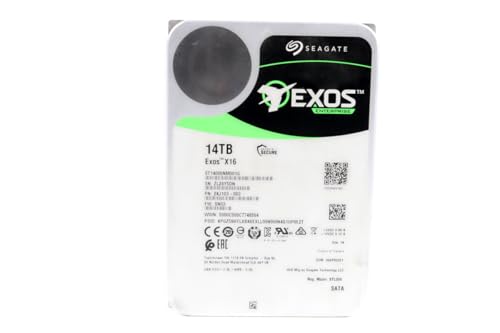
Seagate Exos X16 14TB (ST14000NM001G)
Key specifications:
- Capacity: 14TB
- Interface: SATA 6 Gb/s, 3.5-inch
- Recording: CMR
- Enterprise design for hyperscale and large RAID arrays
Who it is for: Large servers and media archives where a single drive needs to hold as much as possible, and where enterprise firmware and a high workload rating matter more than a low unit price.
Things to keep in mind: Many listings for this model are sold as renewed units, so confirm the condition, the seller, and the warranty on the listing before buying, and check the drive thoroughly when it arrives.
The Exos X16 is an enterprise drive built for data centres, and the 14TB model packs a very large archive into a single bay. Its workload rating and vibration tolerance are higher than NAS-focused drives, which makes it a strong choice for a server that stores a large media collection or backs up many machines. The capacity also means fewer drives are needed to reach a target array size, which simplifies cabling and power.
WD Black 6TB (WD6003FZBX)
- Capacity: 6TB
- Interface: SATA 6 Gb/s, 3.5-inch
- Recording: CMR
- 7,200 RPM performance drive with a large cache
Key specifications:
Who it is for: Servers that need fast access to a working set of files, such as a video editing server or a game server, where the drive’s higher spindle speed shortens load times.
Things to keep in mind: WD Black is a performance desktop line rather than a dedicated NAS line, so it is best used as a fast working drive or in a small array rather than as the backbone of a large multi-bay NAS.
WD Black drives are built for speed, and the 6TB model pairs a 7,200 RPM spindle with a large cache to keep sequential and random reads brisk. In a server it works well as the drive that holds active projects, a game library, or a frequently accessed media folder, while slower archive drives handle long-term storage. It is the performance pick in this guide rather than the pure capacity pick.
Comparison Table
| Product | Capacity / Size | Key Feature | Connection |
|---|---|---|---|
| Seagate IronWolf Pro 8TB | 8TB | NAS up to 24 bays | SATA 6 Gb/s |
| Seagate IronWolf 8TB | 8TB | NAS up to 8 bays | SATA 6 Gb/s |
| WD Red Pro 3TB | 3TB | 7,200 RPM NAS drive | SATA 6 Gb/s |
| Seagate Exos X16 14TB | 14TB | Enterprise, high workload | SATA 6 Gb/s |
| WD Black 6TB | 6TB | Performance 7,200 RPM | SATA 6 Gb/s |
Which One Is Right for You?
For most home servers and small business NAS boxes, the Seagate IronWolf Pro 8TB is the safest default: it is built for always-on multi-bay use, uses CMR recording, and holds enough for a growing library. The standard IronWolf 8TB is the better value when the enclosure has eight bays or fewer and the workload is light.
Choose the WD Red Pro 3TB when the server needs fast small-file access and the total library is modest, and choose the Exos X16 14TB when the goal is maximum capacity per bay in a large archive. The WD Black 6TB fits a server that needs a fast working drive for active projects rather than a pure archive drive.
Whatever the pick, buy drives of the same model and capacity for a RAID array, keep a spare on the shelf, and confirm the listing condition and warranty before ordering, especially for enterprise models where renewed units circulate.
Frequently Asked Questions
Can I use a desktop hard drive in a server?
A desktop drive will work in many servers, but it is not built for constant use, multi-bay vibration, or RAID error handling, and it can drop out of an array under sustained load. A NAS or enterprise drive is the safer choice for any server that runs around the clock.
What is the difference between CMR and SMR drives?
CMR writes data in tracks that do not overlap, which keeps writes and RAID rebuilds predictable. SMR overlaps tracks to increase density, which can slow sustained writes and rebuilds. For server use, CMR is the safer choice.
How much capacity does a home server need?
It depends on what the server stores. Documents and backups fit in a few terabytes, while a media library with high-definition video can pass 8TB quickly. Plan for two or three years of growth and remember that RAID parity consumes part of the raw capacity.
Should all drives in a RAID array be the same model?
Matching model and capacity keeps the array predictable and makes rebuilding straightforward. Mixing capacities wastes the extra space on larger drives, and mixing models can create uneven performance across the array.
Disclosure: As an Amazon Associate, we may earn from qualifying purchases.
Related guides
More from Amazon
Programs that pair well with the guide above. Offers and eligibility are set by Amazon and may change.
A free business account with business pricing and bulk-buying tools for work, shop or home office.
Create a business accountFree shipping on eligible items, Prime Video and more. Eligible new members can start with a free trial.
Start a Prime free trialAudiobooks and podcasts to listen to on the go. Eligible new members can start with a free trial.
Try Audible freeAd-free music streaming. Eligible new subscribers can start with a free trial.
Try Music Unlimited freeAs an Amazon Associate we earn from qualifying purchases.









