Our Short List of 3

- Capacity: 1TB
- Type: NVMe solid-state expansion card
- Interface: Xbox expansion slot
- Plays: Xbox Series X|S games directly
- Capacity: 4TB
- Type: NVMe solid-state expansion card
- Interface: Xbox expansion slot
- Plays: Xbox Series X|S games directly
- Capacity: 2TB
- Type: portable USB hard drive
- Interface: USB 3.2 Gen 1, bus-powered
- Extras: green LED bar, 3-year rescue services
All 5 Picks at a Glance
| Product | Specs | Action |
|---|---|---|
| Seagate Storage Expansion Card for Xbox Series X|S 1TB (STJR1000400) |
| Check price on Amazon |
| Seagate Storage Expansion Card for Xbox Series X|S 4TB (STJR4000400) |
| Check price on Amazon |
| Seagate Game Drive for Xbox 2TB (STKX2000400) |
| Check price on Amazon |
 Seagate Game Drive for Xbox 4TB (STKX4000402) |
| Check price on Amazon |
 WD_BLACK P10 Game Drive for Xbox 5TB (WDBA3A0050BBK-WESN) |
| Check price on Amazon |
The best high capacity Xbox hard drives solve the most common problem on a modern console: the internal drive fills up. Current games are large, and a console that holds only a handful of titles forces constant deleting and re-downloading. A high capacity external drive gives the library room to grow, and an official expansion card adds fast internal storage for current-generation games. This guide compares five high capacity options, from a 1TB expansion card to a 5TB portable hard drive, and explains which type of storage fits each kind of game.
The important distinction is between storage and play. Xbox Series X and Series S games must run from the internal drive or an official expansion card, while Xbox One games and older titles can run directly from a USB hard drive. A USB drive is still valuable for current-generation games, because it can store them and move them back to the internal drive far faster than downloading them again. The picks below cover both roles.
Our Top Picks
Top 3 picks at a glance
How to Choose
Expansion card or USB hard drive
An official expansion card plugs into the back of the console and behaves like internal storage, so current-generation games run directly from it. A USB hard drive is cheaper per terabyte and holds far more, but current-generation games must be moved to internal storage before they can be played. Choose an expansion card for games that are played often, and a USB drive for the archive and for Xbox One titles.
Capacity and the size of the library
High capacity means different things to different players. A player with a dozen large games needs at least 2TB of extra storage, and a collector who keeps every title installed will fill 4TB or 5TB over time. Count the installed games, add the size of the next few releases, and choose a capacity with room to grow rather than one that is full on arrival.
Speed and what it changes
Expansion cards use fast solid-state storage that matches the console’s internal drive, so load times stay short. USB hard drives are slower, which is fine for storing games and for playing Xbox One titles, but they are not a substitute for internal speed. Do not judge a USB drive by its sequential speed alone, because the console’s USB interface and the drive’s mechanics both limit real-world transfers.
Official licensing and compatibility
Drives made for Xbox are certified to work with the console’s storage system and come formatted or ready to format for games. A generic external drive will also work, but an Xbox-licensed drive removes the guesswork about compatibility and usually includes a longer warranty and a data recovery service. Confirm that the drive lists Xbox Series X, Series S, and Xbox One before ordering.
Portability and build
A portable drive is carried between rooms, to a friend’s console, or on a trip, so its housing matters. A rugged metal enclosure survives drops better than a plastic one, and a bus-powered drive needs no separate power adapter. Check the cable length and whether the drive includes a cable in the box, because a short cable limits where the drive can sit.
Warranty and data recovery
Game libraries represent hours of downloads, so a drive failure is costly in time even when the games can be re-downloaded. Xbox-licensed drives often include a multi-year warranty and a data recovery service, which is worth more than it first appears. Keep the purchase record and the serial number, and keep the console’s cloud saves enabled so a drive failure never costs a save file.
Top Picks
Seagate Storage Expansion Card for Xbox Series X|S 1TB (STJR1000400)
- Capacity: 1TB
- Type: NVMe solid-state expansion card
- Interface: Xbox expansion slot
- Plays: Xbox Series X|S games directly
Key specifications:
Who it is for: Players who want one extra terabyte of fast internal storage for current-generation games, with no cables and no transfer step before playing.
Things to keep in mind: 1TB fills quickly when games are large, so it suits a player who rotates a handful of titles rather than a collector who keeps everything installed.
The Seagate expansion card slides into the dedicated slot on the back of the console and behaves exactly like internal storage, using the same fast solid-state technology and the console’s velocity architecture. Current-generation games run directly from it with no transfer step, and load times match the internal drive. It is the fastest way to add storage to an Xbox Series X or Series S.
Seagate Storage Expansion Card for Xbox Series X|S 4TB (STJR4000400)
- Capacity: 4TB
- Type: NVMe solid-state expansion card
- Interface: Xbox expansion slot
- Plays: Xbox Series X|S games directly
Key specifications:
Who it is for: Players with a large library of current-generation games who want the biggest fast-storage upgrade available, so that many titles stay installed and ready to play.
Things to keep in mind: 4TB of fast expansion storage is the largest capacity in this guide and the most expensive per terabyte, so it suits a committed player rather than a casual one.
The 4TB Seagate expansion card is the same fast NVMe storage as the 1TB model with four times the capacity, which means a large library of current-generation games can stay installed at once. It plugs into the same slot, needs no cable or power adapter, and keeps load times identical to the internal drive. For a player who never wants to delete a game to make room, it is the most complete expansion option.
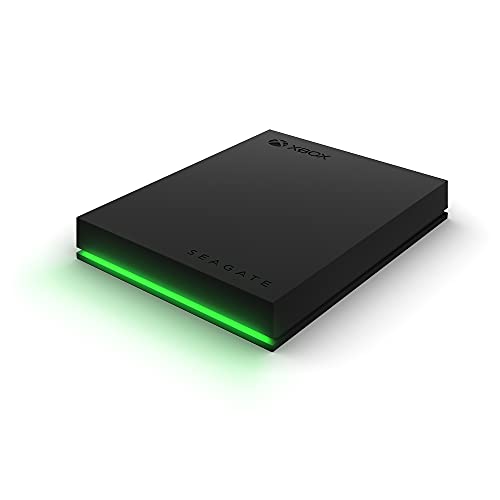
Seagate Game Drive for Xbox 2TB (STKX2000400)
- Capacity: 2TB
- Type: portable USB hard drive
- Interface: USB 3.2 Gen 1, bus-powered
- Extras: green LED bar, 3-year rescue services
Key specifications:
Who it is for: Players who need a portable archive for Xbox One games and a place to store Series X|S games between sessions, with an Xbox-certified drive that is ready to use.
Things to keep in mind: Current-generation games must be moved to internal storage or an expansion card before they can be played, so this drive is an archive and a player for older titles rather than a direct replacement for internal storage.
The Seagate Game Drive for Xbox is the official portable hard drive for the platform, with 2TB of space, a green LED bar that matches the console, and three years of rescue data recovery services. It plays Xbox One games directly and stores Series X|S games for fast transfer back to the console. It is the most practical high capacity USB drive for most Xbox players.
Seagate Game Drive for Xbox 4TB (STKX4000402)
- Capacity: 4TB
- Type: portable USB hard drive
- Interface: USB 3.2 Gen 1, bus-powered
- Extras: green LED bar, 3-year rescue services
Key specifications:
Who it is for: Collectors and households with several players who need the largest portable Xbox-certified archive, so that a whole library stays in one place.
Things to keep in mind: The 4TB model is thicker and heavier than the 2TB version, and one marketplace listing for this model showed no new stock at the time of research, so confirm the listing and the seller before ordering.
The 4TB Game Drive doubles the capacity of the 2TB model in the same Xbox-certified design, with the same green LED bar and three-year rescue services. It holds a very large library of Xbox One games and a deep archive of Series X|S titles ready to transfer. For a household where several people play and the library keeps growing, it is the largest portable option in this guide.
WD_BLACK P10 Game Drive for Xbox 5TB (WDBA3A0050BBK-WESN)
- Capacity: 5TB
- Type: portable USB hard drive
- Interface: USB 3.2 Gen 1, bus-powered
- Extras: rugged metal enclosure, 1-month Game Pass included
Key specifications:
Who it is for: Players who want the maximum portable capacity in this guide, in a rugged metal housing that survives being carried between rooms and consoles.
Things to keep in mind: Like other USB drives, it cannot play Series X|S games directly, so it is an archive and a player for Xbox One titles, and the included Game Pass period is a single month.
The WD_BLACK P10 Game Drive for Xbox offers 5TB in a rugged metal enclosure, which is the largest portable capacity in this guide. It is built for players who keep a large library installed and carry the drive between consoles, and it plays Xbox One games directly while archiving Series X|S titles. For maximum capacity in a portable drive, it is the pick.
Comparison Table
| Product | Capacity / Size | Key Feature | Connection |
|---|---|---|---|
| Seagate Expansion Card 1TB | 1TB | NVMe, plays Series X | S games |
| Seagate Expansion Card 4TB | 4TB | NVMe, plays Series X | S games |
| Seagate Game Drive 2TB | 2TB | USB archive, LED bar | USB 3.2 Gen 1 |
| Seagate Game Drive 4TB | 4TB | USB archive, LED bar | USB 3.2 Gen 1 |
| WD_BLACK P10 5TB | 5TB | USB archive, metal housing | USB 3.2 Gen 1 |
Which One Is Right for You?
For current-generation games that are played often, an expansion card is the right choice: the 1TB Seagate card suits a player who rotates a few titles, and the 4TB card suits a player who wants a large library ready at all times. Both run Series X|S games directly with no transfer step.
For the archive and for Xbox One games, a USB drive is the better value: the Seagate Game Drive 2TB is the practical default, the 4TB model suits a growing household library, and the WD_BLACK P10 5TB is the maximum-capacity portable option in a rugged housing.
Many players end up with both: an expansion card for the games in regular rotation and a USB drive for the archive. Whatever the combination, keep cloud saves enabled and confirm the listing before ordering, especially for the 4TB Game Drive, where one marketplace listing showed no new stock during research.
Frequently Asked Questions
Can I play Xbox Series X|S games from a USB hard drive?
No. Current-generation games must run from the internal drive or an official expansion card. A USB drive can store them and transfer them back to the console much faster than downloading them again, and it can play Xbox One games directly.
How much extra storage does an Xbox need?
It depends on the library. A player with a dozen large games needs at least 2TB of extra storage, and a collector who keeps everything installed will use 4TB or 5TB over time. Count the installed games and add room for the next few releases.
Is an expansion card faster than a USB hard drive?
Yes, by a wide margin. An expansion card uses the same fast solid-state storage as the internal drive, so load times match. A USB hard drive is slower, which is fine for storage and for Xbox One games but not a substitute for internal speed.
Do I need an Xbox-licensed drive?
A generic USB drive will work for storage, but an Xbox-licensed drive is certified for the console, comes ready to format for games, and usually includes a longer warranty and a data recovery service. For most buyers, the licensed drive removes the guesswork.
Disclosure: As an Amazon Associate, we may earn from qualifying purchases.
Related guides
More from Amazon
Programs that pair well with the guide above. Offers and eligibility are set by Amazon and may change.
A free business account with business pricing and bulk-buying tools for work, shop or home office.
Create a business accountFree shipping on eligible items, Prime Video and more. Eligible new members can start with a free trial.
Start a Prime free trialAudiobooks and podcasts to listen to on the go. Eligible new members can start with a free trial.
Try Audible freeAd-free music streaming. Eligible new subscribers can start with a free trial.
Try Music Unlimited freeAs an Amazon Associate we earn from qualifying purchases.









