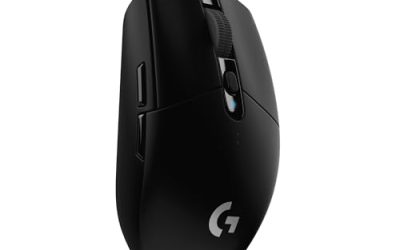
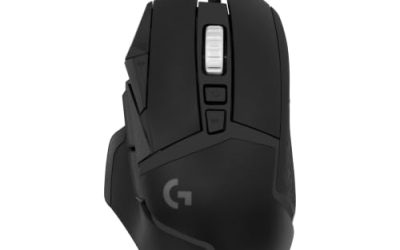
Short answer: The Razer DeathAdder Essential is the wired ergonomic gaming mouse to buy if you want a proven right-handed shape, a 6,400 DPI optical sensor and five programmable buttons without paying for extras. It is the lead pick here, ahead of the Logitech G502 HERO, Razer Basilisk V3 and SteelSeries Rival 5.


Picking a wired ergonomic mouse sounds simple until you line the options up side by side. Shapes that look alike on a product photo feel very different under a palm grip, button counts range from five to eleven, and sensor numbers climb far past the point where most players can tell them apart. The real decision is which combination of shell, sensor and buttons matches your hand and your games, and which extras you can honestly skip.
This guide is for right-handed players building or upgrading a gaming PC who want a corded mouse that stays comfortable through long sessions. Every product below was chosen from the names and specifications printed on its Amazon product page, starting with the DeathAdder Essential itself and continuing with three wired ergonomic alternatives in the same class.
Quick Picks
As an Amazon Associate we earn from qualifying purchases.
| Product | Best for | Key spec from title |
|---|---|---|
| Razer DeathAdder Essential | The classic ergonomic shape on a simple spec sheet | 6400 DPI Optical Sensor |
| Logitech G502 HERO | Players who want many buttons and tunable weight | Hero 25K Sensor, 25,600 DPI |
| Razer Basilisk V3 | A feature-rich shell with a tilt scroll wheel | 26K DPI Optical Sensor |
| SteelSeries Rival 5 | Multi-genre players who want nine buttons in a lighter shell | 18,000 CPI TrueMove Air Optical Sensor |
How to Choose
Shape and grip fit come first
A wired ergonomic shell only helps if it matches your hand size and the way you hold the mouse. Palm grip players rest their whole hand on the shell and usually prefer a taller hump with a wide right side, while fingertip players steer with their fingers and want a lower profile they can nudge precisely. Measure your hand from wrist to middle fingertip, compare it with the length printed on the product page, and check whether the shell is sculpted for right-handed use, because none of the mice in this guide suits a left-handed player.
Sensor range versus sensor quality
The DPI figure in a product title is a maximum, not a quality score, and nearly every player settles far below the ceiling of any mouse here. What matters more is that the sensor tracks consistently at the sensitivity you actually use, without smoothing or acceleration changing your aim between slow and fast movements. Optical sensors are the standard in this class, and each pick below names its sensor family on the Amazon page, so compare the named sensor and its stated range rather than chasing the largest number in the lineup.
Buttons and what you will map to them
Five buttons cover the essentials for shooters: two main clicks, a wheel click and two thumb buttons for melee, push-to-talk or a grenade key. Games with ability rotations, building edits or MMO skill bars reward the larger layouts further down this guide, where eleven programmable buttons and extra thumb controls appear. Count the actions you genuinely bind today, then add one or two spare inputs for growth. Buttons you never map only add weight and accidental presses, so the simplest layout that covers your games is usually the right one.
Cable behaviour and desk setup
Every mouse in this guide is wired, which removes batteries and charging from the routine but puts the cable in charge of how the mouse feels in motion. A stiff cable drags against the desk edge and can pull a light shell off line during wide swipes, while a flexible braided cable moves with far less resistance. Check the cable type named on the product page, leave slack in the run from your PC, and consider whether your desk depth gives the cord room to move before blaming a sensor for inconsistent tracking.
The 4 Best Options
Razer DeathAdder Essential
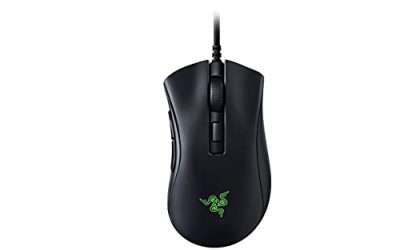
The DeathAdder Essential keeps the formula that made the DeathAdder shape a default recommendation for right-handed players: a sculpted ergonomic shell, rubber side grips and a control layout with nothing on it you will not use. Its 6,400 DPI optical sensor covers the sensitivity range most players actually set, the mechanical switches are rated for extended click life, and the two thumb buttons handle the extra binds a shooter loadout needs. For a first gaming mouse, or a dependable spare that matches a familiar shape, this is the straightforward choice in the group.
Specs
- Sensor: 6,400 DPI optical sensor
- Buttons: 5 programmable buttons
- Switches: mechanical switches rated for 10 million clicks
- Grip: rubber side grips with a ridged, rubberized scroll wheel
- Connectivity: wired, corded electric
- Colour: Classic Black
- Model number: RZ01-03850100-R3U1
- Dimensions: 5.01 x 2.86 x 1.69 inches
- Weight: 4.6 ounces
Best for: Right-handed palm and relaxed claw grip players who want the classic DeathAdder shape with a simple five-button layout.
Watch out for: The shell is large and right-handed only, so small hands and left-handed players should look at the other picks or a different shape entirely.
ASIN: B094PS5RZQ
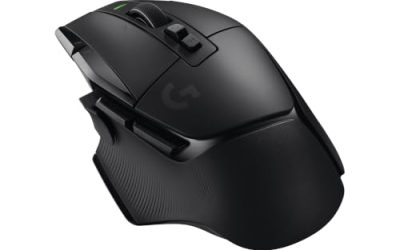
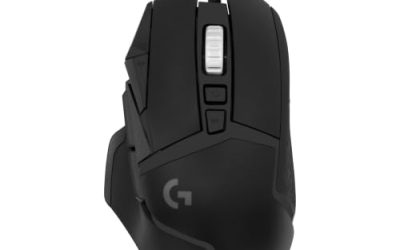
Logitech G502 HERO
The G502 HERO is the pick for players who treat the mouse as a control panel as much as a pointer. Eleven programmable buttons, including a sniper button beside the thumb, give MMO and MOBA players room for a full rotation without moving a hand off the shell. The HERO 25K sensor reaches 25,600 DPI, and the adjustable weight system lets you add up to five small weights to change the balance from front-heavy to centred. On-board memory stores your profiles, so your bindings travel with the mouse between computers.
Specs
- Sensor: HERO 25K sensor, up to 25,600 DPI
- Buttons: 11 programmable buttons
- Weight system: adjustable weights, five 3.6 g weights included
- Lighting: LIGHTSYNC RGB
- Memory: on-board memory for profiles
- Connectivity: wired, PC and Mac
- Model number: 910-005469
- Colour: Black
Best for: Players who map many abilities or macros and want to tune the mouse’s weight and balance to taste.
Watch out for: At its base weight it is already one of the heavier shells here, and the sculpted shape is right-handed only.
ASIN: B07GBZ4Q68
Razer Basilisk V3
The Basilisk V3 takes the ergonomic formula and adds the longest feature list in this guide. Its Focus+ optical sensor is rated to 26K DPI, eleven programmable buttons include a multi-function trigger on the side, and the HyperScroll tilt wheel switches between a tactile stepped mode and a free-spinning mode for fast document or inventory scrolling. Razer optical switches handle the main clicks, and Chroma RGB lighting runs along the shell and under the wheel. Players who want one mouse for shooters, strategy games and desktop work will find the fewest compromises here.
Specs
- Sensor: Focus+ 26K DPI optical sensor
- Buttons: 11 programmable buttons
- Scroll wheel: HyperScroll tilt wheel with tactile and free-spin modes
- Switches: Razer optical mouse switches
- Lighting: Chroma RGB
- Connectivity: wired
- Colour: Classic Black
- Model number: RZ01-04000100-R3U1
Best for: Players who want a tilt wheel, a side trigger and deep customisation in one ergonomic shell.
Watch out for: The extra features raise the weight and the learning curve, so confirm you will use the tilt wheel before paying for it.
ASIN: B09C13PZX7
SteelSeries Rival 5
The Rival 5 is built for players who move between genres and want a button for each of them. Nine programmable buttons include a five-button side panel with a thumb sniper button, and the TrueMove Air optical sensor is rated to 18,000 CPI with true one-to-one tracking. PrismSync RGB lighting runs in zones along the shell, and the design keeps the weight down for a mouse with this many inputs, which suits longer sessions and quicker flicks. If the DeathAdder Essential’s five buttons feel limiting but eleven feels like clutter, this is the middle ground.
Specs
- Sensor: TrueMove Air optical sensor, 18,000 CPI
- Buttons: 9 programmable buttons
- Lighting: PrismSync RGB lighting
- Connectivity: wired USB
- Model number: 62551
- Colour: Black
Best for: Multi-genre players who want a five-button side panel in a comparatively light ergonomic shell.
Watch out for: The side panel layout takes practice, and the sniper button sits where a resting thumb can press it by accident at first.
ASIN: B093LSMKL3
Which One Fits Your Situation
You are buying your first gaming mouse
Start with the Razer DeathAdder Essential. Its five buttons cover the binds a new player actually uses, the ergonomic shape suits the palm grip most people default to, and the 6,400 DPI sensor leaves plenty of room to experiment with sensitivity settings. A simple layout also makes troubleshooting easy, because there is less software configuration standing between you and the game.
You play MMOs or ability-heavy games
Choose between the Logitech G502 HERO and the Razer Basilisk V3, which both carry eleven programmable buttons. The G502 HERO adds tunable weights and on-board memory, suiting players who swap between computers. The Basilisk V3 counters with its HyperScroll tilt wheel and side trigger, which help in games where scrolling and one extra instant input matter as much as the button count.
You switch genres every week
The SteelSeries Rival 5 fits a mixed library best. Its nine buttons include a full side panel that can hold shooter binds one night and strategy hotkeys the next, while the TrueMove Air sensor’s 18,000 CPI range covers both careful aim and fast camera turns. The lighter shell also helps when a session runs long across several different games.
You want a spare or second-desk mouse
The DeathAdder Essential doubles as the sensible spare: it is wired, so it never needs charging before a session, and its familiar shape means a guest or a family member can use it without adjusting to an unusual layout. Keep the G502 HERO or Basilisk V3 on your main desk if you rely on their extra buttons, and let the Essential cover the second setup.
Common Mistakes
- Choosing a mouse by the largest DPI number in the title instead of the sensor’s consistency at the sensitivity you actually play on.
- Ignoring hand size and grip style, then blaming the shape when a large ergonomic shell feels clumsy in a fingertip grip.
- Buying eleven buttons for a game where you only ever bind two, and catching the extras by accident mid-match.
- Forgetting that every pick here is wired and right-handed, which matters for left-handed players and for desks with no clean cable run.
- Skipping the software step: programmable buttons and DPI stages only work once the maker’s app is installed and the profile is saved.
Frequently Asked Questions
Is the Razer DeathAdder Essential good for palm grip?
Yes, palm grip is the hold its shell was designed around. The tall hump fills the palm and the flared right side supports the ring and little fingers, so the whole hand rests on the mouse rather than hovering. Relaxed claw grip also works well because the main buttons are long enough to click from several finger positions. Fingertip players with small hands may find the shell longer than they need.
How many buttons does the DeathAdder Essential have?
It has five programmable buttons: left and right clicks, the scroll wheel click and two thumb buttons on the left side. Those two side buttons are the ones most players map first, usually to melee, push-to-talk or an item slot. Sensitivity can also be adjusted through the dedicated DPI control, which the buttons can be reprogrammed around in Razer’s software. If your games need more inputs than that, the G502 HERO and Basilisk V3 in this guide carry eleven each.
Does the DeathAdder Essential work without software?
The mouse works as a pointing device as soon as it is plugged in, with its default sensitivity stages available straight away. Installing Razer Synapse is what unlocks button remapping, macro assignment and saving custom DPI stages. Players who prefer a plug-and-play setup can use it indefinitely at the defaults. Anyone who wants the two thumb buttons doing something specific should plan on the one-time software setup.
Which of these mice is best for small hands?
None of the four is a small mouse, but the SteelSeries Rival 5 is the most manageable of the group because its shell keeps weight down and its side panel sits within easy thumb reach. The DeathAdder Essential and Basilisk V3 are full-size ergonomic shells aimed at medium and large hands. Small-handed players should compare the printed lengths on each product page against their current mouse before ordering. Grip style matters as much as size, since a fingertip hold tolerates a longer shell better than a palm hold.
Related guides
More from Amazon
Programs that pair well with the guide above. Offers and eligibility are set by Amazon and may change.
A free business account with business pricing and bulk-buying tools for work, shop or home office.
Create a business accountFree shipping on eligible items, Prime Video and more. Eligible new members can start with a free trial.
Start a Prime free trialAudiobooks and podcasts to listen to on the go. Eligible new members can start with a free trial.
Try Audible freeAd-free music streaming. Eligible new subscribers can start with a free trial.
Try Music Unlimited freeAs an Amazon Associate we earn from qualifying purchases.