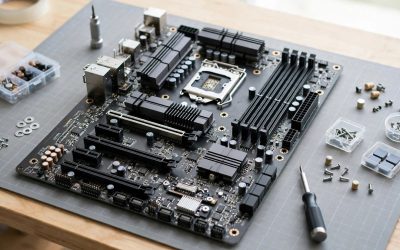
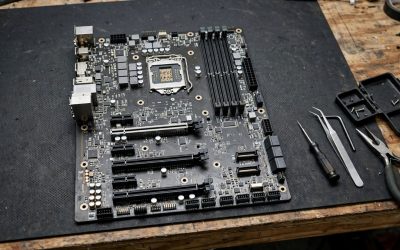
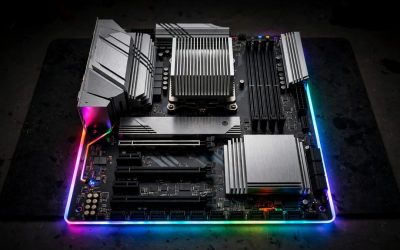
The best AM4 motherboard under $200 is a B550 board with a strong VRM, PCIe 4.0 for both the GPU and an NVMe drive, and at least four SATA ports. Boards like the MSI MAG B550 Tomahawk, Gigabyte B550 AORUS Elite V2, ASUS TUF Gaming B550-Plus, and ASRock B550 Steel Legend are the usual picks, while an X570 board is worth considering only if you need extra PCIe lanes or a second PCIe 4.0 M.2 slot.
AM4 remains a value platform in 2026 because Ryzen 5000 chips such as the Ryzen 5 5600 and Ryzen 7 5800X3D still deliver strong gaming performance. This guide compares the best boards by price and features, explains BIOS compatibility, and includes a VRM sizing calculation.
Our Top Picks
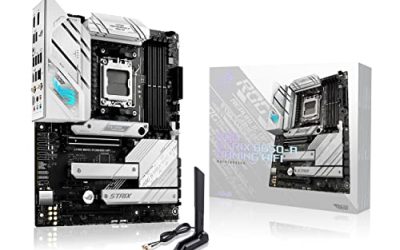
 ASUS TUF Gaming B550-PLUS WiFi II AMD AM4B550-Plus|M.2x2|D4|WiFi610.75 x 2.75 x 13.5 inches1.27 poundsCheck on Amazon


Top 3 picks at a glance
Quick comparison of the picks
| Pick | Best for | Key specs | Typical price range |
|---|---|---|---|
| MSI MAG B550 Tomahawk | Best overall | ATX, 12+2 phase VRM, 2.5G LAN, 2x M.2, PCIe 4.0 | $140–$180 |
| Gigabyte B550 AORUS Elite V2 | Best for features | ATX, 12+2 phase, 2.5G LAN, 2x M.2, 3 fan headers | $120–$160 |
| ASUS TUF Gaming B550-Plus WiFi II | Best with built-in Wi-Fi | ATX, 12+2 phase, Wi-Fi 6, 2.5G LAN, 2x M.2 | $140–$190 |
| ASRock B550M Steel Legend / Pro4 class | Best budget | mATX or ATX, 8–12 phase VRM, 1x–2x M.2 | $80–$130 |
| Spec class: X570 ATX board | Best for expansion | PCIe 4.0 chipset lanes, 3x M.2, extra SATA and USB | $150–$200 |
Best overall: MSI MAG B550 Tomahawk
The B550 Tomahawk has been a benchmark for AM4 value because of its heavy VRM heatsink, 2.5G Ethernet, and two M.2 slots with a PCIe 4.0 option. The VRM is strong enough to run a Ryzen 9 5950X without throttling, according to published reviews, which means it has plenty of headroom for a Ryzen 5 or 7.
The trade-off is that it lacks built-in Wi-Fi, so you will need a USB or PCIe adapter if you do not have a wired connection. Prices fluctuate as stock sells down, so check the current range.
Best for features: Gigabyte B550 AORUS Elite V2
This board gives a similar spec list at a lower price: a 12+2 phase digital VRM, 2.5G LAN, dual M.2, and a good selection of fan headers. The BIOS is clear and offers easy memory profile support through XMP.
The trade-offs are a more basic audio codec and slightly lighter VRM heatsinks than the Tomahawk. It suits builds with a Ryzen 5 5600 or Ryzen 7 5700X.
Best with Wi-Fi: ASUS TUF Gaming B550-Plus WiFi II
ASUS includes Wi-Fi 6 and Bluetooth, saving an adapter. The TUF line adds military-grade components, a solid heatsink design, and good BIOS support. The trade-off is price, which can approach $190 and compete with budget AM5 boards in some regions.
Best budget: ASRock B550 class
ASRock’s Steel Legend and Pro4 boards cut features such as a second M.2 slot or heavy heatsinks but keep PCIe 4.0 for the GPU. They suit a basic gaming PC with a Ryzen 5 5600 and a midrange graphics card. The mATX versions also fit smaller cases.
The trade-offs are weaker VRMs, which should not pair with a 105W Ryzen 9, and fewer USB ports.
When to pick X570 instead
X570 boards add chipset-supplied PCIe 4.0 lanes, which matters if you plan multiple NVMe drives or capture cards. They often have an active chipset fan, which can add noise. For a single GPU and one or two SSDs, B550 is enough and costs less.
Worked example: VRM sizing for your CPU
A Ryzen CPU’s package power tracking (PPT) limit determines how much power the VRM must supply. The Ryzen 5 5600 has a 65W TDP and a PPT of about 88W. The Ryzen 7 5800X3D has a 105W TDP and a PPT of about 142W. A Ryzen 9 5950X also has a 105W TDP with a PPT of 142W. Per AMD’s specifications, a 142W PPT at about 1.3V Vcore means a current of 142 / 1.3, which is about 109A.
| CPU | TDP | PPT | Approx. current at 1.3V | Minimum VRM class |
|---|---|---|---|---|
| Ryzen 5 5600 | 65W | 88W | ~68A | 6+ phase with heatsink |
| Ryzen 7 5700X | 65W | 88W | ~68A | 8+ phase with heatsink |
| Ryzen 7 5800X3D | 105W | 142W | ~109A | 10+ phase, large heatsink |
| Ryzen 9 5950X | 105W | 142W | ~109A | 12+ phase, large heatsink |
If each power stage is rated at 50A, a 12-phase VRM theoretically offers 600A, far above the 109A needed. Real limits depend on thermals, which is why a heatsink and airflow matter more than raw phase count. A budget board with 6 phases can handle a Ryzen 5 5600 but may run hot with a 105W part.
BIOS compatibility: the trap to avoid
Ryzen 5000 chips need a BIOS that supports them. Many older B550 boards shipped with BIOS versions that did not recognize the 5000 series. Check the board’s CPU support list, and look for a “Ryzen 5000 Ready” sticker or a BIOS Flashback button. Flashback lets you update the BIOS with a USB drive and no CPU installed. Per manufacturer support pages, most recent B550 production boards ship with a compatible BIOS.
How to choose: a decision matrix
| Your situation | Choose | Why |
|---|---|---|
| Ryzen 5 5600 and midrange GPU | ASRock or Gigabyte B550 | Enough VRM, lowest cost |
| Ryzen 7 5800X3D | MSI Tomahawk or ASUS TUF | Stronger VRM cooling |
| Wireless only | ASUS TUF WiFi II | Built-in Wi-Fi 6 |
| Small case | B550M mATX or ITX | Fits compact builds |
| Many NVMe drives | X570 ATX | More PCIe lanes |
What to check before you buy
- RAM type: AM4 supports DDR4 only, and 3200 to 3600 MT/s kits are the sweet spot.
- M.2 slots: Confirm how many are PCIe 4.0 and whether any share lanes with SATA ports.
- Form factor: ATX, mATX, or ITX must match your case.
- Rear I/O: Count USB ports, especially USB-C, for your accessories.
- Warranty and support: Check the manufacturer’s BIOS update history.
Pairing the board with memory and a GPU
AM4 CPUs perform best with DDR4-3600 CL16 memory, because the Infinity Fabric clock usually runs in sync at 1800 MHz. A 2 x 16 GB kit is the practical choice for gaming in 2026, and two sticks are better than four because they put less strain on the memory controller. Enable the XMP or DOCP profile in the BIOS after installation, since memory defaults to 2133 or 2666 MT/s otherwise.
For graphics, a PCIe 4.0 x16 slot matters most for cards with only an 8-lane interface. Some budget GPUs use x8 or x4 lanes, and in a PCIe 3.0 board they lose a measurable amount of performance. B550 gives the GPU slot PCIe 4.0 directly from the CPU, which avoids that penalty. Also check that the board’s top M.2 slot connects to the CPU rather than the chipset for the fastest NVMe drive speeds, typically up to about 7,000 MB/s on a PCIe 4.0 drive.
Top Picks for AM4 Motherboards for Ryzen 5000
AM4 remains a strong value platform, especially with Ryzen 5000 chips and DDR4 memory. These B550 and B450 boards cover micro-ATX and ATX sizes.
GIGABYTE B550M K AM4 Micro-ATX Motherboard
A compact micro-ATX board that supports Ryzen 5000, 4000 and 3000 series. It fits budget builds that do not need many extras.
As an Amazon Associate we earn from qualifying purchases at no extra cost to you.

MSI PRO B550M-P Motherboard, mATX
A straightforward micro-ATX board with support for Ryzen 5000 chips. It suits office or entry-level gaming builds.

GIGABYTE B550 Eagle WIFI6 AM4 ATX Motherboard
A full-size ATX board with built-in Wi-Fi 6, so you can skip a separate adapter. The larger size leaves room for more expansion cards.

ASUS TUF Gaming B550-PLUS WiFi II
A sturdier gaming-oriented board with Wi-Fi on the I/O panel. It is a good middle-range pick for a longer-lasting build.

ASRock B450M-HDV R4.0 AM4 Motherboard
An older B450 chipset board that supports Ryzen 2000 to 5000 series. Check that its BIOS is updated before installing a newer CPU.

Before buying, check that the board’s BIOS supports your exact Ryzen chip, and confirm the memory type and the number of M.2 slots. A board with decent power delivery and a few USB ports will serve an AM4 build well for years.
Frequently Asked Questions
Is AM4 still worth buying in 2026?
Yes, for budget builds. The platform supports inexpensive DDR4 and strong Ryzen 5000 CPUs. The trade-off is no upgrade path beyond Ryzen 5000, since newer chips use AM5.
B450, B550, or X570?
B550 is the best balance of price and features, with PCIe 4.0 for the GPU and NVMe. B450 lacks PCIe 4.0, and X570 adds more lanes at a higher price.
Can an AM4 board run a Ryzen 5000 CPU with an old BIOS?
Not always. Check the support list and use BIOS Flashback or a compatible older CPU to update before installing the 5000 chip.
Do I need Wi-Fi on the motherboard?
Only if you cannot use Ethernet. Many boards omit Wi-Fi, but a USB or PCIe adapter costs about $15 to $30.
How much VRM do I need for a Ryzen 7 5800X3D?
Aim for 10 or more phases with a decent heatsink. The 5800X3D draws up to about 142W at stock, and its cache-stacked design limits overclocking.
Related guides
More from Amazon
Programs that pair well with the guide above. Offers and eligibility are set by Amazon and may change.
A free business account with business pricing and bulk-buying tools for work, shop or home office.
Create a business accountFree shipping on eligible items, Prime Video and more. Eligible new members can start with a free trial.
Start a Prime free trialAudiobooks and podcasts to listen to on the go. Eligible new members can start with a free trial.
Try Audible freeAd-free music streaming. Eligible new subscribers can start with a free trial.
Try Music Unlimited freeAs an Amazon Associate we earn from qualifying purchases.