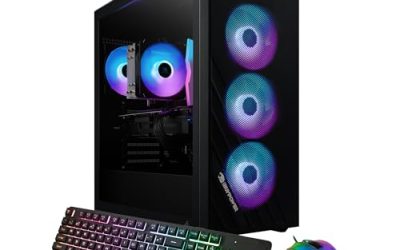
The best performance PC in 2026 for most gamers pairs a Ryzen 7 9800X3D with a GeForce RTX 5080, 32 GB of DDR5-6000 and a 2 TB PCIe 4.0 or 5.0 NVMe SSD. It handles 1440p at very high refresh rates and 4K at high settings. If you want zero compromises at 4K, step up to an RTX 5090. If you play at 1440p, an RTX 5070 Ti or Radeon RX 9070 XT gets you most of the way for far less.
“Performance” depends on your monitor. A PC that is overkill at 1080p can be the right size for 4K. The picks below are spec classes you can buy as a prebuilt or assemble yourself, followed by the numbers that decide which one fits you.
Quick comparison of the best performance PC configurations
| Pick | Best for | Key specs | Budget tier |
|---|---|---|---|
| Best overall | 1440p ultrawide and 4K at high settings | Ryzen 7 9800X3D, RTX 5080 (16 GB GDDR7, 360 W), 32 GB DDR5-6000, 850 W PSU | Premium |
| Best no-compromise 4K | 4K at 120 Hz+, heavy ray tracing, VR | Ryzen 7 9800X3D or 9950X3D, RTX 5090 (32 GB GDDR7, 575 W), 32–64 GB DDR5, 1000 W+ PSU | Top tier |
| Best value high-end | 1440p at 144 Hz+ | Ryzen 7 7800X3D or 9800X3D, RTX 5070 Ti (16 GB, 300 W) or RX 9070 XT (16 GB, 304 W), 750 W PSU | High-end |
| Best mid-range performance | 1440p at 100–144 Hz, 1080p esports | Ryzen 5 9600X, RTX 5070 (12 GB, 250 W) or RX 9070 (16 GB), 32 GB DDR5, 650–750 W PSU | Mid-range |
| Best for play plus creation | Gaming, video editing, 3D rendering | Ryzen 9 9950X3D or Core Ultra 9 285K, RTX 5080, 64 GB DDR5, 2–4 TB NVMe, 850 W PSU | Premium to top tier |
Best overall: Ryzen 7 9800X3D + RTX 5080
This pairing suits players who want a fast PC at 1440p high refresh or 4K without paying for flagship graphics. The 9800X3D uses AMD’s second-generation 3D V-Cache and is consistently at or near the top of published gaming CPU charts. The RTX 5080 has 16 GB of GDDR7 on a 256-bit bus. That is enough for 4K with ray tracing in current games, and it supports DLSS 4 multi frame generation.
Trade-off: 16 GB of VRAM is adequate today but is the first thing you may hit with heavy texture mods or path-traced games at 4K. The 8-core CPU also trails 16-core chips in rendering.
Best no-compromise 4K: RTX 5090 build
The RTX 5090 has 32 GB of GDDR7 on a 512-bit bus and a 575 W board power, per NVIDIA’s specifications. It is the only consumer card that treats 4K at high refresh with path tracing as a normal workload. It also helps with local AI work and large-texture VR. Pair it with a 9800X3D for pure gaming, or a 9950X3D if you also edit video.
Trade-off: It needs a 1000 W-class ATX 3.1 power supply with a proper 12V-2×6 cable, a large case with strong airflow, and a budget well above every other pick here. Gains over the RTX 5080 are largest at 4K. At 1440p, a slower CPU or a monitor refresh cap often wastes the extra power.
Best value high-end: RTX 5070 Ti or RX 9070 XT
If your monitor is 2560×1440, this tier is the sweet spot. Both cards have 16 GB of VRAM on a 256-bit bus and draw about 300 W. Published reviews generally put them in the same performance class. NVIDIA is usually ahead in ray tracing and upscaling support, while AMD often competes better on price per frame in rasterized games. Pair either with a Ryzen 7 7800X3D or 9800X3D.
Trade-off: Native 4K at maximum settings will need upscaling (DLSS or FSR 4) in demanding titles.
Best mid-range performance: Ryzen 5 9600X + RTX 5070 or RX 9070
This is the pick for 1440p at medium-to-high settings or competitive 1080p. The RTX 5070 has 12 GB of GDDR7 on a 192-bit bus at 250 W. The RX 9070 has 16 GB and draws about 220 W. A 6-core Ryzen 5 is enough for most games at this level, and it leaves budget for a good SSD and PSU.
Trade-off: 12 GB is the limiting factor on the RTX 5070 if you plan to keep the card for years. If VRAM headroom matters more than DLSS features, the RX 9070 is the safer choice.
Best for play plus creation: 9950X3D or Core Ultra 9 285K
If the PC earns money from video editing, compiling or rendering, spend on the CPU. The Ryzen 9 9950X3D has 16 cores and 3D V-Cache, so it games close to the 9800X3D while rendering much faster. The Core Ultra 9 285K (24 cores) is strong in multithreaded and some media workloads. Reviews generally show it behind the X3D chips in games. Pair either with 64 GB of DDR5 and an RTX 5080.
Trade-off: You pay extra for cores a pure gamer will not use.
Worked example: power supply budget
Do not size a PSU from the GPU alone. Add up the components, then allow headroom for transient spikes. For an RTX 5080 build:
- GPU (RTX 5080 board power): 360 W
- CPU (9800X3D, rated 120 W TDP; real gaming draw is often lower): about 120–160 W
- Motherboard, 32 GB RAM, SSD, fans, USB: about 75 W
- Estimated peak: 360 + 160 + 75 = 595 W
- With about 40% headroom for efficiency and spikes: roughly 830 W, so an 850 W unit
For an RTX 5090 build, the same method gives 575 + 160 + 75 = 810 W, or roughly 1,000–1,130 W with headroom. That is why NVIDIA’s recommended minimum is 1000 W. Always check the figure on the card maker’s spec page, since factory-overclocked models can draw more.
| GPU | Board power | Typical total system peak | Sensible PSU |
|---|---|---|---|
| RTX 5070 | 250 W | about 480 W | 650–750 W |
| RX 9070 XT / RTX 5070 Ti | about 300 W | about 535 W | 750 W |
| RTX 5080 | 360 W | about 595 W | 850 W |
| RTX 5090 | 575 W | about 810 W | 1000 W or more |
How to choose: match the PC to your pixels
Resolution sets how hard the GPU works. Pixel counts per frame: 1920×1080 is about 2.07 million, 2560×1440 is about 3.69 million, and 3840×2160 is about 8.29 million. Moving from 1440p to 4K therefore asks the GPU to draw 2.25 times as many pixels. At 4K and 144 Hz that is roughly 1.19 billion pixels per second, before any ray tracing cost. Upscaling and frame generation exist to close that gap, but they are not free, since they add latency and some image artifacts.
| Your monitor | Target | Best match |
|---|---|---|
| 1080p, 240 Hz+ (esports) | Highest frame rate, CPU-bound | Ryzen 5 9600X or 7800X3D with RTX 5070 / RX 9070 |
| 1440p, 144–180 Hz | High settings, native | 7800X3D or 9800X3D with RTX 5070 Ti / RX 9070 XT |
| 3440×1440 ultrawide | High settings, about 4.97 million pixels | 9800X3D with RTX 5080 |
| 4K, 60–120 Hz | High settings with upscaling | 9800X3D with RTX 5080 |
| 4K, 144 Hz+ or VR | Maximum settings, ray tracing | 9800X3D with RTX 5090 |
As a rough guide, published reviews of current AAA games show 1440p high settings landing in the range of about 100–200 fps on an RTX 5070 Ti-class card. 4K high settings on an RTX 5080 often falls near 60–110 fps before frame generation. Results vary widely with game, settings, CPU and driver patch, so check recent reviews of the games you play.
The rest of the build: where performance is quietly lost
- Memory: Use two matched DDR5 modules (2×16 GB) at DDR5-6000 CL30–36. This is the usual sweet spot for AMD’s current platform. A single stick halves memory bandwidth, and 64 GB only pays off for creation work.
- Enable the memory profile: DDR5 often runs at a slow default speed until you turn on EXPO or XMP in the BIOS. Check this on prebuilts too.
- Storage: A 2 TB PCIe 4.0 NVMe SSD is plenty. Faster PCIe 5.0 drives make little difference in game load times, and they run hotter.
- Power supply: Choose an ATX 3.1 unit with a native 12V-2×6 cable from a reputable brand. Avoid adapter-heavy setups for high-wattage GPUs.
- Cooling and case: A 240–360 mm AIO or a large dual-tower air cooler fits X3D chips well. Pick a case with a mesh front panel and enough clearance, since an RTX 5080 or 5090 card can be very large.
- Prebuilt checks: Look for a named PSU model, a standard motherboard (not a proprietary one) and an open upgrade path before paying for a “gaming” label.
Frequently Asked Questions
Is the RTX 5090 worth it for a performance PC?
Only if you play at 4K with high refresh rates, use path tracing, or run VR and AI workloads. At 1440p, the RTX 5080 or 5070 Ti delivers most of the playable experience for much less money. The RTX 5090 also needs a 1000 W-class PSU and a roomy case, which adds to the total cost.
Should I choose AMD or Intel for the CPU?
For gaming, AMD’s X3D chips such as the Ryzen 7 9800X3D lead most published CPU comparisons. For heavy multithreaded work, the Ryzen 9 9950X3D or Intel’s Core Ultra 9 285K make more sense. Intel boards can still be a good fit if you want specific platform features, but AMD is the default gaming choice.
How much RAM do I need for a high-performance gaming PC?
32 GB of DDR5 is the right amount for nearly all gaming in 2026. Go to 64 GB only if you also edit 4K video, run virtual machines or work with large 3D scenes. Speed and a stable memory profile matter more than raw capacity beyond 32 GB.
Is 16 GB of VRAM enough?
For 1440p and most 4K gaming with upscaling, yes. It becomes tight with heavy ray tracing, very high texture settings and some mods at 4K. If you want a card that stays comfortable for many years at 4K, the RTX 5090’s 32 GB is the safest choice. Otherwise 16 GB cards like the RTX 5080 and RX 9070 XT are well matched to their performance.
Is it better to buy a prebuilt or build my own?
Building usually gives you better component choices, particularly the PSU, cooling and RAM. A prebuilt can still make sense if the price is competitive and it uses standard parts with a clear warranty. Check the exact CPU, GPU, PSU model and RAM configuration before buying, and avoid listings that hide those details.
Do I need PCIe 5.0 for the best performance?
No. Current GPUs run well on PCIe 4.0 or 5.0 x16 slots, with little or no measurable difference in games. PCIe 5.0 SSDs add heat and cost without noticeably improving load times. Spend that money on the GPU or a better power supply instead.
Related guides
More from Amazon
Programs that pair well with the guide above. Offers and eligibility are set by Amazon and may change.
A free business account with business pricing and bulk-buying tools for work, shop or home office.
Create a business accountFree shipping on eligible items, Prime Video and more. Eligible new members can start with a free trial.
Start a Prime free trialAudiobooks and podcasts to listen to on the go. Eligible new members can start with a free trial.
Try Audible freeAd-free music streaming. Eligible new subscribers can start with a free trial.
Try Music Unlimited freeAs an Amazon Associate we earn from qualifying purchases.