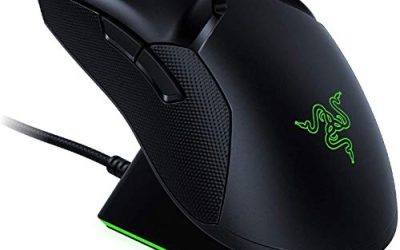
The best mid-range gaming mouse for most players in 2026 is a wireless model weighing 55-85 g with a sensor of 25,000 DPI or more, because every mouse in this class already has a sensor good enough for any game. Shape and weight are what decide whether you like it. The Razer DeathAdder V3 HyperSpeed is the safest all-round pick, the Logitech G305 Lightspeed is the value pick, and the rest of this guide maps your hand size, grip and games to the right model.
Note on the search term: “average gaming mouse” usually means a typical, mid-priced mouse that is not a bargain-bin model or a flagship. This guide treats it that way and describes budgets in words, not price figures.
Quick comparison of the picks
| Pick | Best for | Key specs (per manufacturer) | Price tier |
|---|---|---|---|
| Razer DeathAdder V3 HyperSpeed | Best overall, palm and relaxed claw grip | Ergonomic right-hand shape, about 55 g, 30K optical sensor, wireless | Mid-range |
| Logitech G305 Lightspeed | Best budget wireless | About 99 g with AA battery, HERO 12K sensor, up to about 250 hours | Budget |
| SteelSeries Aerox 3 Wireless | Best lightweight for FPS | Roughly 68 g, 18K sensor, 2.4 GHz and Bluetooth | Mid-range |
| Logitech G502 X (wired) | Best feature-rich all-rounder | About 89 g, HERO 25K sensor, 13 controls, hybrid optical-mechanical switches | Mid-range |
| Razer Basilisk V3 (wired) | Best for MMOs and macros | About 101 g, 26K sensor, 11 programmable controls, tiltable scroll wheel | Mid-range |
| Logitech G Pro X Superlight 2 | Best step-up if you can spend more | About 60 g, 32K sensor, wireless, symmetrical shape | Premium |
Best overall: Razer DeathAdder V3 HyperSpeed
The DeathAdder shape has been a reference ergonomic design for years. It is a good fit for medium to large right hands using a palm or relaxed claw grip. At roughly 55 g, per Razer’s spec sheet, it is far lighter than older mid-range mice, and its optical sensor and HyperSpeed wireless are competitive enough for ranked play. Trade-off: it is right-handed only, and the hump shape feels wrong to fingertip-grip users with small hands.
Best budget wireless: Logitech G305 Lightspeed
The G305 is the one to buy if you want a wireless mouse without a big spend. It runs on one AA battery, which Logitech rates at up to about 250 hours of continuous gaming. Its HERO 12K sensor is more than enough. Trade-off: it is heavy for a modern wireless mouse (about 99 g with the battery), and its small, symmetrical body suits small to medium hands better than large ones.
Best lightweight for FPS: SteelSeries Aerox 3 Wireless
If you play Valorant, Counter-Strike 2 or Apex Legends, the Aerox 3 Wireless offers a perforated shell at roughly 68 g with a low-profile ambidextrous shape. It suits claw and fingertip grips on small to medium hands. Trade-off: the thin shell and low hump give less palm support for big hands, and the holes let in dust and sweat over time.
Best feature-rich all-rounder: Logitech G502 X
The wired G502 X keeps the classic G502 layout: a thumb button cluster, a dual-mode scroll wheel and a dedicated DPI button. It is a good single mouse for FPS, strategy and RPG play. At about 89 g, it is not light, but the weight feels planted for players who use wrist-and-arm aim. Trade-off: the cable and weight make it a poor choice for fast, low-sensitivity flicking compared with the Aerox or DeathAdder. A wireless Lightspeed version exists and weighs about 102 g.
Best for MMOs and macros: Razer Basilisk V3
The Basilisk V3 is a wired, right-handed mouse with 11 programmable controls and a scroll wheel with adjustable resistance and a free-spin mode. That suits MMOs, MOBAs and productivity work where each button holds a spell, macro or shortcut. Trade-off: at about 101 g it is among the heaviest picks here, and it is not meant for fast shooters.
Best step-up: Logitech G Pro X Superlight 2
This is a premium mouse, not a mid-range one, but it is the benchmark to compare against. It weighs about 60 g with a symmetrical shape, and it is what many esports players use. If you are comparing it with the mid-range picks above, you are paying for lower weight, polish and consistent wireless performance, not for a sensor you will notice. Trade-off: there are no side-button extras, and the price is high relative to the others.
How to choose: the decision criteria that matter
1. Match mouse length to your hand length
Measure from the wrist crease to the tip of your middle finger. A common rule of thumb is that mouse length should be about 0.6 to 0.65 of hand length for claw and fingertip grips and about 0.65 to 0.7 for palm grip. For a 19 cm hand, that is about 114-124 mm for claw and 124-133 mm for palm. For a 17 cm hand, it is about 102-111 mm for claw and 111-119 mm for palm. Check the length on the manufacturer’s spec sheet before buying.
| Hand length | Grip | Target mouse length | Good fit from this list |
|---|---|---|---|
| Under 17 cm | Fingertip or claw | Under about 110 mm | Aerox 3 Wireless, G305 |
| 17-19 cm | Claw | About 105-122 mm | G305, Aerox 3, Superlight 2 |
| 17-19 cm | Palm | About 115-130 mm | DeathAdder V3 HyperSpeed, G502 X |
| Over 19 cm | Palm | About 125-135 mm | DeathAdder V3 HyperSpeed, Basilisk V3, G502 X |
2. Pick a weight by game type
- Fast shooters (Valorant, CS2): 55-70 g, since low mass helps quick stops and flicks.
- Battle royale and general FPS: 60-90 g.
- MMO, MOBA, strategy: weight matters less, so choose on button count instead.
3. Treat the sensor spec as a tie-breaker, not a goal
Every mouse in this guide advertises a sensor of 12,000 DPI or more, and nobody plays at those values. Most players use 400-1600 DPI. Here is a worked example for a Valorant player at 800 DPI. Valorant’s yaw is 0.07 degrees per count, so a full 360-degree turn at sensitivity 1.0 takes about 360 / 0.07 = 5,143 counts. At 800 DPI that is 6.43 inches, or about 16.3 cm. At an in-game sensitivity of 0.35, the same turn needs about 16.3 / 0.35 = 46.6 cm of mouse travel, and the eDPI is 800 x 0.35 = 280. This value is common among FPS players and fits on a normal mouse pad. If you would need much more room than your pad gives you, raise DPI or sensitivity, not the sensor class.
4. Estimate wireless battery life honestly
Manufacturers publish runtimes measured under specific conditions, so real use is lower with RGB, high polling rates or both. Take the G305’s rated 250 hours as a ceiling. At 3 hours of play a day, that is 250 / 3 = about 83 days. If heavier settings cut it by 40 percent, you still get about 150 hours, or 50 days. For a rechargeable model, the more useful question is whether you can keep playing while it charges on its cable.
5. Decide between wired and wireless
- Choose wireless if your desk is cluttered or you game on a couch. Modern 2.4 GHz connections are fast enough for competitive play.
- Choose wired if you prefer never to charge or change batteries, or if you want more buttons for the same money. The G502 X and Basilisk V3 offer that.
- Avoid Bluetooth-only for gaming. Use the 2.4 GHz dongle mode for play and keep Bluetooth for work or travel.
6. Quick situation-to-choice matrix
| Your situation | Choose | Reason |
|---|---|---|
| One mouse for everything, medium-large hand | DeathAdder V3 HyperSpeed | Ergonomic shape, light, wireless |
| Lowest cost for wireless | G305 Lightspeed | Rated about 250 hours on one AA |
| Small hand, fast aim | Aerox 3 Wireless | Roughly 68 g with a low profile |
| MMO or many binds | Basilisk V3 | 11 programmable controls |
| Wrist-and-arm aim, likes a heavier feel | G502 X | Planted weight, 13 controls |
| Left-handed | Aerox 3 Wireless or Superlight 2 | Symmetrical shells |
Frequently Asked Questions
What counts as a mid-range gaming mouse?
It is a mouse above the entry-level wired models and below flagship wireless ones. Typically it has a 12K-30K sensor, a weight of 55-100 g, and either a wired design with extra buttons or a decent wireless connection. The extra spend at the top buys weight, build and polish more than aiming performance.
Is a more expensive gaming mouse better for aim?
Not by much. Modern sensors from every major brand track accurately at normal DPI settings. Fit, weight and grip matter far more, which is why a mouse that matches your hand beats a premium one that does not.
What DPI should I use?
Most players set 400-1600 DPI, and 800 is the usual starting point. Adjust in-game sensitivity until a full 360-degree turn takes roughly 30-50 cm of travel, then tune from there. Higher DPI mainly makes the cursor feel fast on the desktop.
Is wireless good enough for competitive games?
Yes, if it uses a 2.4 GHz dongle, as the HyperSpeed and Lightspeed models do. Brand wireless protocols are designed for low latency, and many esports players use them. Bluetooth is the weaker option for gaming.
Should I get a lightweight honeycomb mouse?
Only if you like the feel and play fast shooters. Perforated shells cut weight but let in dust and can feel flimsy or less grippy, and they give less palm support. A solid-shell mouse around 60-80 g is a safer choice for general use.
How long should a mid-range gaming mouse last?
Switch wear is usually the first failure, often showing up as double clicks after a few years of heavy use. Optical or hybrid optical-mechanical switches, as on the G502 X, reduce that risk. Check the warranty length on the manufacturer’s page before you buy.
Related guides
More from Amazon
Programs that pair well with the guide above. Offers and eligibility are set by Amazon and may change.
A free business account with business pricing and bulk-buying tools for work, shop or home office.
Create a business accountFree shipping on eligible items, Prime Video and more. Eligible new members can start with a free trial.
Start a Prime free trialAudiobooks and podcasts to listen to on the go. Eligible new members can start with a free trial.
Try Audible freeAd-free music streaming. Eligible new subscribers can start with a free trial.
Try Music Unlimited freeAs an Amazon Associate we earn from qualifying purchases.