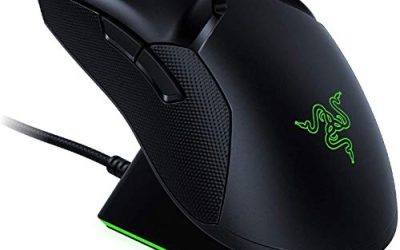
The best angular gaming mouse for most players in 2026 is the Logitech G502 X Plus: a faceted, sharp-edged shell with a large thumb rest and a wide button layout. If you want the angular look in a much lighter body, the Razer Viper V3 Pro is the pick, with its flat sides and creased silhouette. “Angular” is not an official spec, so this guide treats it as a shape class: flat planes, hard edges and a pronounced thumb ledge, rather than a smooth, pebble-shaped shell.
As an Amazon Associate we earn from qualifying purchases at no extra cost to you.


Top 3 picks at a glance
What “angular” means on a gaming mouse
Search results for this phrase mix three ideas, and they lead to different purchases:
- Faceted shell design: visible creases, sharp transitions and a stepped thumb rest. The G502 X family is the clearest example.
- Flat-sided shape: straight, near-vertical sidewalls that give your thumb and ring finger a firm edge to press against. This is common on lightweight esports mice.
- Angled sensor behaviour: “angle snapping” is a software smoothing feature that straightens your lines. Competitive players generally switch it off, and most current flagship sensors do not need it.
The rest of this guide focuses on the first two, since that is what shapes how a mouse feels in hand.
Quick comparison of the picks
| Pick | Best for | Key specs (per manufacturer) | Price range |
|---|---|---|---|
| Logitech G502 X Plus | Best overall angular shape | Wireless, about 106 g, 13 controls, Hero 25K sensor, LIGHTSYNC RGB | Premium |
| Logitech G502 X (wired) | Best budget angular shape | Wired, about 89 g, same faceted body, Hero 25K sensor | Mid-range |
| Razer Viper V3 Pro | Best lightweight, flat-sided | Wireless, about 54 g, up to 8000 Hz polling, Focus Pro 30K-class sensor | Premium |
| Razer DeathAdder V3 Pro | Best for palm grip with a sharp right edge | Wireless, about 63 g, ergonomic right-hand shape, Focus Pro 30K sensor | Premium |
| Razer Naga V2 Pro | Best for MMO and macro-heavy play | Wireless, about 117 g, swappable side plates up to 12 thumb buttons | Premium |
Weights and sensor figures come from each manufacturer’s spec sheet and can differ slightly by region and revision, so check the current product page before buying.
Best overall: Logitech G502 X Plus
The G502 X Plus keeps the signature G502 silhouette: a hard-edged body, a wide thumb shelf and a visible ridge line down the side. It adds wireless Lightspeed connectivity, RGB and hybrid optical-mechanical main switches. It suits palm and relaxed claw grips and medium-to-large hands, and it works well for shooters, ARPGs and general use.
Trade-off: at about 106 g it is heavy next to current esports mice. If you flick-aim in fast tactical shooters all day, you will feel the mass. It is also a right-handed shape.
Best budget: Logitech G502 X (wired)
The wired G502 X keeps the same faceted shell and button layout but drops wireless and RGB, which brings the weight down to about 89 g and the cost to the mid-range. It is the most direct way to get the angular shape without paying for features you may not use.
Trade-off: the cable. A good paracord-style cable and a mouse bungee reduce the drag, but a wired mouse will never feel as free as a wireless one.
Best lightweight: Razer Viper V3 Pro
The Viper V3 Pro is not as sculpted as the G502, but its flat sides and low, symmetrical body give the crisp, edged feel many people mean when they search for an angular mouse. At around 54 g with up to 8000 Hz polling, it is aimed squarely at competitive shooters. It works best for claw and fingertip grips on small-to-medium hands.
Trade-off: there is no real thumb rest, and palm-grip users with large hands may find it cramped. It also costs a premium.
Best for palm grip: Razer DeathAdder V3 Pro
The DeathAdder line is an ergonomic right-handed design with a raised back and a firm right-side edge. It is less faceted than the G502 but more angular than rounded mice such as the Logitech G Pro series. At about 63 g it is far lighter than the G502 X Plus.
Trade-off: it is strictly right-handed, and the hump sits fairly far back, so fingertip-grip users may find it long.
Best for MMO and macros: Razer Naga V2 Pro
If you want an angular body mainly for its button access, the Naga V2 Pro uses interchangeable side plates (2, 6 or 12 buttons per the manufacturer). The thumb cluster is where the angular geometry earns its keep: each button is easy to find by touch.
Trade-off: at about 117 g it is the heaviest pick here, and it is overkill for pure FPS play.
How to choose: decision criteria with numbers
1. Size the mouse to your hand
A common ergonomics rule of thumb is that mouse length should be roughly 58-64% of your hand length, measured from the wrist crease to the tip of your middle finger. Longer ratios suit palm grip and shorter ratios suit claw or fingertip grip.
Worked example: a hand length of 19 cm gives a range of about 11.0-12.2 cm (19 × 0.58 = 11.0; 19 × 0.64 = 12.2). A mouse around 127 mm long (like the Viper V3 Pro) sits just above that range, so it suits a claw grip that pulls the hand forward. A mouse around 131 mm (like the G502 X family) points to a hand of roughly 20.5 cm or larger for a comfortable palm grip. This is a guideline, not a rule, but it quickly rules out the worst mismatches.
2. Match weight to the games you play
- Under 65 g: best for fast flick aiming in tactical shooters.
- 65-90 g: a good balance for mixed play and long sessions.
- Over 100 g: acceptable for strategy, MMOs and ARPGs, where precision matters less than button count and comfort.
3. Check battery runtime math
Manufacturers quote runtime under specific settings, usually 1000 Hz and lighting off. Higher polling cuts that sharply. As a rough model, if a mouse claims 95 hours at 1000 Hz and polling drains power roughly in proportion to the report rate, 4000 Hz could drop that to around 24-35 hours, and 8000 Hz to well under 20. The exact curve depends on the sensor and firmware, so treat this as an estimate. Unless you can notice the difference, 1000 Hz saves charging time for no real loss.
4. Understand polling rate and latency
At 1000 Hz the mouse reports every 1 ms. At 4000 Hz that falls to 0.25 ms, and at 8000 Hz to 0.125 ms. The benefit shows up mainly on high-refresh monitors (240 Hz and above) and with fast flicks. It also loads the CPU more, which matters on older systems.
5. Leave angle snapping off
Angle snapping (also called prediction or line straightening) adds processing that makes cursor movement less true to your hand. In Logitech G HUB or Razer Synapse, leave it off for games. It can help in drawing tasks, but that is a separate use case.
Decision matrix: which angular mouse fits you
| Your situation | Choose | Why |
|---|---|---|
| Large hand, palm grip, mixed games | Logitech G502 X Plus | Big thumb rest and 131 mm class length |
| Same shape, tight budget | Logitech G502 X (wired) | Cheaper, lighter, no battery |
| Hand under about 18 cm, claw grip, FPS | Razer Viper V3 Pro | About 54 g, 127 mm class length |
| Medium hand, palm grip, want a firm right edge | Razer DeathAdder V3 Pro | Ergonomic hump with moderate weight |
| MMO, MOBA or macro-heavy play | Razer Naga V2 Pro | Up to 12 thumb buttons |
| Left-handed | A symmetrical flat-sided mouse | The G502 and DeathAdder shapes are right-handed |
Common mistakes to avoid
- Buying by looks alone. Sharp edges can dig into the pad of your thumb or ring finger if the shape does not fit your grip.
- Ignoring the cable on wired models. A stiff cable adds drag that you may mistake for sensor problems.
- Chasing DPI numbers. Anything above about 3200 DPI is rarely used in practice. Most players run 400-1600 DPI and tune in-game sensitivity.
- Skipping the return window. Shape comfort only shows over several hours, so buy where returns are straightforward.
Frequently Asked Questions
What is an angular gaming mouse?
It is an informal term for a mouse with a sharp, faceted or flat-sided shell instead of a smooth, rounded one. There is no official spec for it. The Logitech G502 X series is the best-known example.
Are angular mice better for gaming than rounded ones?
Not inherently. Angular shells give firmer edges for your thumb and fingers, which some players find more secure, while rounded shells suit others better. Fit, weight and grip style matter far more than the surface styling.
Is angle snapping good for gaming?
Generally no. It smooths your cursor path and can make aiming feel less accurate, so most competitive players turn it off. Modern flagship sensors track cleanly without it.
Which angular mouse is best for small hands?
Look for a flat-sided mouse around 120-127 mm long and under about 65 g, such as the Razer Viper V3 Pro. The G502 X family is a large mouse and tends to suit medium-to-large hands better.
Do I need a wireless angular mouse?
No. Current wireless mice from Logitech and Razer have latency on par with wired ones, but the wired G502 X delivers the same shape for less money and with less weight. Choose wireless mainly for cable-free movement and a cleaner desk.
What DPI and polling rate should I use?
Start at 800 DPI and 1000 Hz. Move to 4000 or 8000 Hz only if you have a high-refresh monitor and a capable CPU, and accept the shorter battery life that comes with it.
Related guides
More from Amazon
Programs that pair well with the guide above. Offers and eligibility are set by Amazon and may change.
A free business account with business pricing and bulk-buying tools for work, shop or home office.
Create a business accountFree shipping on eligible items, Prime Video and more. Eligible new members can start with a free trial.
Start a Prime free trialAudiobooks and podcasts to listen to on the go. Eligible new members can start with a free trial.
Try Audible freeAd-free music streaming. Eligible new subscribers can start with a free trial.
Try Music Unlimited freeAs an Amazon Associate we earn from qualifying purchases.