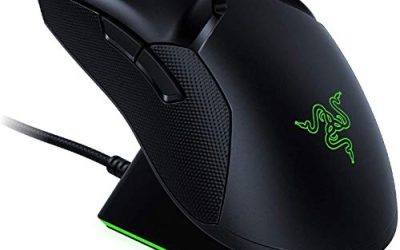
The MacBook Pro is a powerful machine, but its trackpad was never built for fast aiming, and a mouse that works well on Windows can turn into a chore on macOS when its software has no Mac version. The real decision is not about the fastest sensor on paper; it is about finding a gaming mouse that pairs cleanly with a MacBook Pro, keeps its settings without a Windows-only app, and still feels right in your hand during long sessions.
This guide is for MacBook Pro owners who game on Apple silicon, whether that means native Mac titles, cloud streaming, or Windows games through a compatibility layer. Every mouse below is a gaming mouse that works with macOS, chosen from names and specifications on its Amazon product page, and each one is still selling on Amazon US. The five cover ultralight esports shapes, a button-heavy ergonomic pick, and two software-friendly options from Logitech and SteelSeries.
Top 3 picks at a glance


Quick Picks
As an Amazon Associate we earn from qualifying purchases
| Product | Best for | Key spec from title |
|---|---|---|
| Razer Viper V4 Pro | Fast shooters on a MacBook Pro | Focus Pro 50K sensor, 49 g |
| Razer Basilisk V3 Pro 35K | Work and play on one mouse | 35,000 DPI, 13 customizable controls |
| Logitech G PRO X2 SUPERSTRIKE | Quiet clicks with flagship speed | Haptic triggers, 44,000 DPI |
| SteelSeries Aerox 5 Wireless | Dongle-free Bluetooth gaming | 74 g, 9 buttons, 180-hour battery |
| Corsair M75 AIR Wireless | A light mouse with Mac software | 60 g, 26,000 DPI, Bluetooth |
How to Choose
How the mouse connects to a MacBook Pro
A MacBook Pro has USB-C ports and no USB-A port, so the connection type decides how much extra gear you need. Bluetooth mice pair directly with no dongle at all, which keeps your bag light and leaves every port free. A 2.4 GHz wireless receiver usually comes on a USB-A stick, so you need a USB-C adapter or a hub to use it. A wired mouse with a USB-C cable plugs straight in and never needs charging. Before you buy, check which connection the mouse uses and whether the receiver or cable in the box matches the ports on your MacBook Pro.
Whether the software runs on macOS
A gaming mouse is only as configurable as its software, and on a MacBook Pro that software has to exist for macOS. Logitech G Hub, SteelSeries GG and Corsair iCUE all have Mac versions, so you can remap buttons, set DPI steps and tune lighting from your laptop. Razer offers a Synapse release for Apple silicon Macs that covers recent models. Onboard memory matters just as much: a mouse that stores profiles on the device keeps your settings even when the app is closed. If the software is Windows-only, extra buttons keep their factory defaults on macOS.
Weight, shape and grip
Weight changes how a mouse feels after an hour of play, and shape decides whether your hand relaxes or cramps. Ultralight mice under 65 grams suit fast flick aiming and small hands, while a larger ergonomic shape supports a palm grip during long sessions. A symmetrical shape works for claw and fingertip grips, and a right-handed thumb rest helps players who rest their whole hand on the mouse. Hand size matters more than brand here: a mouse that is too small forces a cramped grip, and one that is too large makes precise clicks harder. Match the shape to your grip first, then worry about the sensor.
Sensor, polling rate and battery
The sensor and polling rate set the ceiling for tracking, but for most players the differences between modern gaming sensors are small. A sensor up to 26,000 DPI or higher covers every sensible sensitivity, and a 1,000 Hz polling rate already reports movement every millisecond. Higher polling rates up to 8,000 Hz shave latency further on fast machines, at the cost of battery life. Battery life itself is quoted per connection type, with Bluetooth usually lasting longer than 2.4 GHz wireless. Check the battery figure for the connection you will actually use, and favour USB-C charging so one cable serves the mouse and the laptop.
The 5 Best Options
Razer Viper V4 Pro

The Viper V4 Pro is the lightest mouse in this guide and the fastest-feeling one for shooters on a MacBook Pro. Its symmetrical shape suits claw and fingertip grips, and at 49 grams it changes direction with very little effort, which matters in fast aim duels. The listing describes the mouse as made for PC and Mac, and it connects over HyperSpeed wireless, Bluetooth or a USB-C cable, so it fits a MacBook Pro without an adapter. Razer Synapse for Mac covers recent models on Apple silicon, and onboard memory keeps your settings when the app is closed.
Specs
- Focus Pro 50K Optical Sensor Gen-3, up to 50,000 DPI
- 8,000 Hz HyperPolling wireless polling rate
- 49 g weight
- Up to 180 hours of battery life at 1,000 Hz polling
- Gen-4 Optical Switches
- HyperSpeed Wireless, Bluetooth and USB-C wired connections
- USB-C charging
Best for: Competitive shooters on a MacBook Pro where every gram counts.
Watch out for: Synapse for Mac is an early release that needs macOS 15 or later on Apple silicon, so check your macOS version first. The Black model is a separate listing from the White model, so confirm you are looking at the right colour before ordering.
Razer Basilisk V3 Pro 35K
The Basilisk V3 Pro 35K is the pick for players who want one mouse for work and games on a MacBook Pro. Its ergonomic right-handed shape fills the palm, and thirteen customizable controls put shortcuts, skills and media keys within thumb reach. The HyperScroll Tilt Wheel switches between smooth free-spin scrolling for long documents and notched steps for weapon selection. It connects over HyperSpeed wireless, Bluetooth or USB-C, so it pairs with a MacBook Pro in three ways, and the battery lasts up to 140 hours on wireless.
Specs
- Focus Pro 35K Optical Sensor Gen-2, up to 35,000 DPI
- 13 customizable controls
- Configurable HyperScroll Tilt Wheel
- Up to 140 hours of battery life
- Razer Chroma RGB lighting
- Optical Switches Gen-3
- HyperSpeed Wireless, Bluetooth and USB-C wired connections
- 112 g weight
Best for: MacBook Pro owners who want one ergonomic mouse for games, editing and everyday work.
Watch out for: At 112 grams it is the heaviest mouse in this guide, so fingertip-grip players may find it slow. Full button remapping needs Razer Synapse, and the Phantom White finish shows marks more easily than the black version.
Logitech G PRO X2 SUPERSTRIKE
The G PRO X2 SUPERSTRIKE is the most unusual mouse here, and the best choice if you play late at night near other people. Instead of mechanical switches, it uses haptic triggers that produce a click you feel rather than hear, so there is no loud snap on every shot. The HERO 2 sensor reaches 44,000 DPI and the LIGHTSPEED connection polls at 8,000 Hz, which keeps it firmly in flagship territory for speed. Logitech G Hub runs natively on macOS, so every setting is configurable from your MacBook Pro, and the mouse weighs just 61 grams.
Specs
- HERO 2 sensor, up to 44,000 DPI
- Haptic triggers with no mechanical microswitch
- LIGHTSPEED wireless with 8,000 Hz polling rate
- 61 g weight
- Up to 60 hours of battery life per the Amazon listing
- Logitech G Hub software for macOS
- USB-C charging
Best for: Late-night play on a MacBook Pro where quiet clicks matter as much as speed.
Watch out for: Haptic triggers feel different from a normal click, so the mouse may take a few sessions to get used to. The Amazon listing quotes 60 hours of battery life while Logitech marketing quotes a higher figure, so plan around the listing number.
SteelSeries Aerox 5 Wireless

The Aerox 5 Wireless is the easiest mouse in this guide to use with a MacBook Pro on the move. It connects over Bluetooth 5.0 with no dongle at all, which is handy when every USB-C port is already in use, and it also offers a 2.4 GHz wireless mode for lower latency at a desk. Nine programmable buttons give you room for macros and shortcuts without adding much bulk, and the perforated shell keeps the weight down to 74 grams. SteelSeries GG has a native macOS app, so remapping and DPI steps are all set from the MacBook Pro itself.
Specs
- TrueMove Air sensor, up to 18,000 CPI
- 9 programmable buttons
- Up to 180 hours of battery life
- 74 g weight
- Bluetooth 5.0 and 2.4 GHz wireless connections
- IP54 water and dust resistance
- SteelSeries GG software for macOS
Best for: MacBook Pro owners who want a dongle-free Bluetooth mouse with real gaming buttons.
Watch out for: Remapping the nine side buttons needs SteelSeries GG on macOS, since the defaults may not match your game. The perforated shell lets dust in more easily than a solid shell, so keep it clean if you carry it in a bag.
Corsair M75 AIR Wireless

The M75 AIR Wireless is a light, simple mouse that still gives you proper Mac software. At 60 grams it is one of the lightest options in this guide, and its symmetrical shape works for claw and fingertip grips in either hand. The MARKSMAN sensor reaches 26,000 DPI, which covers every sensible sensitivity, and the mouse connects over Slipstream wireless or Bluetooth. Corsair iCUE has a macOS version, so you can remap buttons and adjust DPI from your MacBook Pro instead of borrowing a Windows PC.
Specs
- MARKSMAN optical sensor, up to 26,000 DPI
- 60 g weight
- Slipstream Wireless and Bluetooth connections
- 1,000 Hz polling rate
- Corsair iCUE software for macOS
- Symmetrical shape for left or right hand
Best for: MacBook Pro gamers who want a light, ambidextrous mouse with Mac-native software.
Watch out for: Bluetooth mode runs at a lower polling rate than Slipstream wireless, so use the receiver for competitive play. The mouse has fewer extra buttons than the others in this guide, so MMO players who need a thumb grid should look elsewhere.
Which One Fits Your Situation
You play fast shooters on the go
Pick the Razer Viper V4 Pro. At 49 grams with an 8,000 Hz polling rate it is the quickest mouse in this guide, and its USB-C receiver and Bluetooth mean it works with a MacBook Pro straight out of the box. The symmetrical shape suits claw and fingertip grips, which are common among shooter players who travel with their laptop.
You want one mouse for work and games
Pick the Razer Basilisk V3 Pro 35K. Its ergonomic shape is comfortable through a full workday, the thirteen controls cover shortcuts and game skills alike, and the HyperScroll wheel handles long documents as well as weapon switching. Three connection types mean it fits any desk setup your MacBook Pro sits on.
You hate carrying dongles and adapters
Pick the SteelSeries Aerox 5 Wireless. Bluetooth 5.0 pairs directly with a MacBook Pro and leaves every USB-C port free for charging and displays. With nine buttons, 180 hours of battery life and a native macOS app, it loses nothing to the dongle-based mice in this guide, and it travels lighter than any of them.
You play late at night near other people
Pick the Logitech G PRO X2 SUPERSTRIKE. Its haptic triggers remove the mechanical click sound entirely while keeping flagship speed, and G Hub runs natively on macOS so you can set it up without a Windows machine. At 61 grams it is light enough for fast play once you adjust to the different click feel.
Common Mistakes
- Buying a gaming mouse whose configuration software has no Mac version, then finding the extra buttons cannot be remapped on macOS.
- Assuming a 2.4 GHz receiver plugs straight into a MacBook Pro, when most receivers are USB-A and need an adapter or hub.
- Choosing a mouse by its maximum DPI number alone, when shape, weight and software support matter far more in daily use.
- Ignoring onboard memory, so your DPI stages and button assignments reset every time the software is closed.
- Picking a heavy, palm-shaped mouse for a laptop bag, then carrying it everywhere when a lighter shape would have been easier.
Frequently Asked Questions
Can any gaming mouse work with a MacBook Pro?
Most gaming mice work as basic pointing devices on a MacBook Pro, because macOS recognises standard mouse buttons without extra drivers. The difference is in the extras: remapping buttons, setting DPI steps and tuning lighting need software that runs on macOS, or onboard memory that stores settings on the mouse. Check both before you buy.
Do I need the maker’s software on macOS?
You need it only if you want to change the defaults. A mouse with onboard memory can be configured once on any machine and then keeps its profiles on a MacBook Pro. Without onboard memory or Mac software, extra buttons keep their factory assignments, which may not match your game or workflow.
Is Bluetooth fast enough for gaming on a MacBook Pro?
Bluetooth is fast enough for casual and story-driven games, and modern Bluetooth mice feel responsive in everyday play. For competitive shooters, a 2.4 GHz wireless connection or a wired USB-C connection gives lower latency and a higher polling rate. Use Bluetooth on the move and switch to the receiver when you sit down to compete.
What should I check before buying a wireless gaming mouse for a MacBook Pro?
Check three things: whether the receiver is USB-C or needs an adapter, whether the configuration software has a macOS version, and whether the mouse stores profiles in onboard memory. Also check the battery life for the connection you will use, since Bluetooth and 2.4 GHz wireless figures are usually different.
Related guides
More from Amazon
Programs that pair well with the guide above. Offers and eligibility are set by Amazon and may change.
A free business account with business pricing and bulk-buying tools for work, shop or home office.
Create a business accountFree shipping on eligible items, Prime Video and more. Eligible new members can start with a free trial.
Start a Prime free trialAudiobooks and podcasts to listen to on the go. Eligible new members can start with a free trial.
Try Audible freeAd-free music streaming. Eligible new subscribers can start with a free trial.
Try Music Unlimited freeAs an Amazon Associate we earn from qualifying purchases.