Disclosure: As an Amazon Associate, this site may earn from qualifying purchases made through links on this page.
The switch under the main click buttons decides how a gaming mouse feels in your hand, and the best mechanical gaming mouse is the one whose switches match the way you play. Mechanical switches use a physical metal contact, which gives a crisp, tactile click and a familiar feel. Optical switches use a beam of light to register the click, which removes the metal contact and the double-click faults that can follow when contacts wear. Hybrid switches combine an optical beam with a mechanical feel, aiming for the speed of optical and the click of mechanical in the same button. This guide compares four gaming mice that are still sold on Amazon US, and each pick states its switch type plainly so you can compare mechanical, optical and hybrid designs side by side. All four cover wired and wireless play, and all four come from brands with long histories in gaming hardware.
Our Top Picks
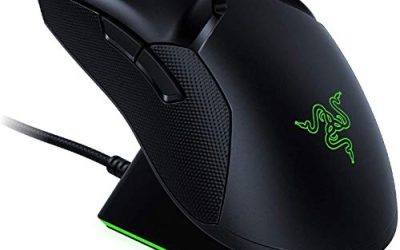
 Razer DeathAdder V3 Pro Wireless Gaming Mouse1000 Hz5.01 x 2.65 x 1.69 inches0.1 poundsCheck on Amazon
 Razer Basilisk V3 Pro Customizable RGB Wireless GamingMouse5.12 x 2.96 x 1.67 inches0.24 poundsCheck on Amazon
Top 3 picks at a glance
At a Glance
| Product | Switch type | Connection | Best for |
|---|---|---|---|
| Logitech G502 X | LIGHTFORCE hybrid optical-mechanical | Wired USB | A classic shape with hybrid switches |
| Razer DeathAdder V3 Pro | Gen-3 optical | Wireless | Lightweight esports play |
| Razer Basilisk V3 Pro | Gen-3 optical | Wireless | Many buttons and a tilt wheel |
| Glorious Model O 2 Wireless | Glorious mechanical, 80M clicks | Wireless | Mechanical clicks in a light shell |
How to Choose for Mechanical Switch Gaming Mice
Begin with the switch type, because it shapes both the click feel and the long-term reliability of the mouse. A mechanical switch gives a distinct tactile snap and a familiar click sound, which many players prefer for the feedback it gives during fast clicking. An optical switch gives a lighter, faster click with no metal contact to wear, which suits players who have faced double-clicking on older mechanical mice. A hybrid switch keeps a mechanical feel while an optical beam handles the signal, which suits players who want the crisp click of mechanical with the speed of optical. Check the listing for the switch name and the rated click lifecycle, since those two details tell you more about durability than any other line in the listing.
Next, match the shape and weight to your grip. A palm grip suits a larger, taller shell, while a claw grip suits a shorter shell with a raised hump, and a fingertip grip suits a low, light shell. Weight matters more than most buyers expect: a light mouse moves faster across the pad and tires the wrist less during long sessions, while a heavier mouse feels steadier for deliberate aiming. Sensor quality matters too, and every pick in this guide uses a high-end sensor, so the choice comes down to shape and switches rather than tracking.
Button count and software round out the decision. Look for at least two side buttons for common in-game actions, and more if you play games with many abilities. Software that lets you remap buttons, adjust sensitivity and set up profiles is worth having, and a mouse that stores profiles on board keeps your settings when you move between computers. Finally, check the listing for the exact connection modes and battery life on wireless models, since a mouse that runs for days on one charge suits a different routine than one that needs a cable every night.
The Picks
1. Logitech G502 X
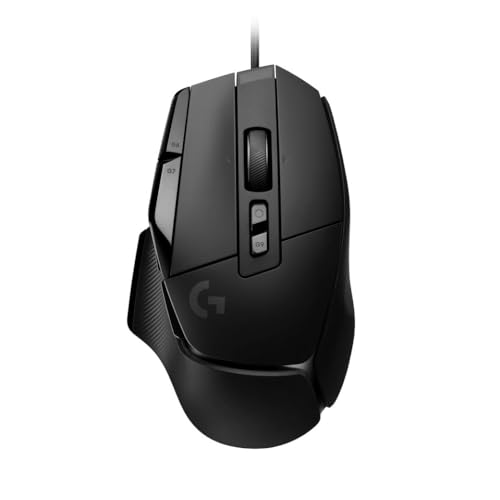
The G502 X is the wired pick in this guide, and it carries the most famous shape in gaming mice into the hybrid switch era. Its LIGHTFORCE switches combine an optical beam with a mechanical feel, so the primary buttons click with the crisp snap that mechanical fans expect while the optical signal keeps the response fast and removes the metal contact that can wear into double-click faults. The HERO 25K sensor tracks cleanly across the full sensitivity range, and the familiar G502 shape suits a palm grip with its thumb rest and contoured side. Thirteen programmable controls cover a wide set of in-game actions, and the scroll wheel tilts left and right for extra inputs.
The wired connection keeps the setup simple and removes battery life from the routine entirely, which suits a fixed desk where the mouse never leaves the pad. Logitech G HUB software handles button remapping, sensitivity steps and profile storage, and the mouse keeps its settings on board when you move between computers. The shape is on the larger side, so players with small hands should check the dimensions in the listing before buying. The G502 X also comes in wireless versions under different model numbers, so confirm that the listing you open is the wired version if a cable is what you want. For a player who wants a proven shape, hybrid switches and a wired connection, the G502 X is the most complete package in this guide.
2. Razer DeathAdder V3 Pro
The DeathAdder V3 Pro is the lightweight esports pick in this guide, and its Gen-3 optical switches are the reason it belongs here. Razer rates the Gen-3 optical switches for 90 million clicks with 0.2 ms actuation and no debounce delay, which means the click registers fast and the switch has no metal contact to wear into a double-click fault. The Focus Pro 30K optical sensor tracks up to 30,000 DPI, and the shell weighs 63 grams, which makes fast, wide flicks easier and keeps the wrist fresher during long sessions. HyperSpeed wireless keeps the connection responsive, and the battery runs for up to 90 hours, so a single charge covers a full week of evening play for most players.
The shape is the classic DeathAdder ergonomic curve, built for a right-handed palm grip and refined over many generations, with five programmable buttons that cover the essentials without crowding the shell. Razer Synapse software handles remapping, sensitivity and lighting, and the mouse stores profiles on board. The V3 Pro keeps the design focused: no extra side buttons, no tilt wheel, just a light shell, a strong sensor and fast optical switches. Check the listing for the exact battery life per connection mode and for the included cable and grip tape details. For a competitive player who wants the low-weight shell, the quickest switches and a proven ergonomic shape, the DeathAdder V3 Pro is the pick to beat. The cable in the box charges the mouse over USB-C and lets you play wired while the battery tops up.
3. Razer Basilisk V3 Pro
The Basilisk V3 Pro is the button-rich pick in this guide, and it pairs the same Gen-3 optical switches as the DeathAdder V3 Pro with a shell built for players who map many actions to the mouse. The Gen-3 optical switches are rated for 90 million clicks with 0.2 ms actuation and no debounce delay, so the main buttons stay fast and consistent over years of heavy use. Eleven programmable buttons include a HyperScroll tilt wheel that spins freely for fast scrolling or clicks into notched steps for precise movement, plus a multi-function paddle under the thumb. The Focus Pro 30K optical sensor tracks up to 30,000 DPI, and Chroma RGB lighting runs across 13 zones with a full underglow.
The wireless connection runs over HyperSpeed, Bluetooth or a wired USB cable, and the battery life is long, so check the listing for the exact hours per connection mode before buying. The ergonomic right-handed shape suits a palm grip, and the thumb rest gives the hand a place to sit during long sessions. Razer Synapse software handles remapping, sensitivity steps and lighting profiles, and the mouse stores settings on board. The Basilisk V3 Pro is heavier than the DeathAdder V3 Pro, which suits players who prefer a steadier feel for deliberate aiming. For a player who wants optical switches, many programmable buttons and a tilt wheel in one wireless mouse, the Basilisk V3 Pro covers more ground than any other pick here.
4. Glorious Model O 2 Wireless

The Glorious Model O 2 Wireless is the true mechanical pick in this guide, and it is the mouse for players who want a classic mechanical click in a modern lightweight shell. Its Glorious mechanical switches are rated for 80 million clicks, and the split-button design keeps the click feel crisp no matter where your finger lands on the button. The BAMF 2.0 sensor tracks up to 26,000 DPI, and the shell weighs 68 grams, which puts it close to the low-weight mice in this guide while keeping a symmetrical shape that suits claw and fingertip grips. Six buttons cover the essentials, and PTFE feet keep the glide smooth across the pad.
The wireless connection runs over 2.4 GHz or Bluetooth, and the battery life is long, so check the listing for the exact hours per connection mode. The ambidextrous shape suits either hand, though the side buttons sit on the left side for right-handed use. Glorious CORE software handles remapping, sensitivity and lighting, and the RGB lighting runs along the sides of the shell. The Model O 2 Wireless costs less than the flagship Razer picks here while keeping a strong sensor and a genuine mechanical switch, which makes it the value choice in this guide. For a player who wants a mechanical click, a light shell and a fair asking amount, the Model O 2 Wireless is hard to beat. The solid shell keeps dust out of the body and wipes clean with a dry cloth.
Comparison Table
| Feature | G502 X | DeathAdder V3 Pro | Basilisk V3 Pro | Model O 2 Wireless |
|---|---|---|---|---|
| Switch type | LIGHTFORCE hybrid | Gen-3 optical | Gen-3 optical | Glorious mechanical |
| Click lifecycle | Check the listing | 90M clicks | 90M clicks | 80M clicks |
| Sensor | HERO 25K | Focus Pro 30K | Focus Pro 30K | BAMF 2.0, 26K DPI |
| Weight | Check the listing | 63 g | Check the listing | 68 g |
| Connection | Wired USB | Wireless | Wireless, Bluetooth, wired | 2.4 GHz, Bluetooth |
Which One Fits Your Situation
If you want a proven shape with hybrid switches and a wired connection, choose the Logitech G502 X, since its LIGHTFORCE switches give a mechanical click with optical speed. If you want the low-weight shell and the quickest switches for competitive play, choose the Razer DeathAdder V3 Pro, since its 63-gram shell and Gen-3 optical switches suit fast, wide flicks. If you want optical switches with many buttons and a tilt wheel, choose the Razer Basilisk V3 Pro, since its eleven programmable controls cover more in-game actions than any other pick here. If you want a true mechanical click in a light wireless shell, choose the Glorious Model O 2 Wireless, since its mechanical switches and 68-gram shell give the classic click feel without the flagship weight on your wrist. Check the listing for current availability on the exact model you choose, since each mouse here comes in several colors and connection versions.
FAQ
What is the difference between a mechanical switch and an optical switch?
A mechanical switch uses a physical metal contact to register a click, which gives a tactile snap and a familiar feel. An optical switch uses a beam of light to register the click, which removes the metal contact and the double-click faults that can follow when contacts wear. A hybrid switch combines an optical beam with a mechanical feel.
Do optical switches last longer than mechanical switches?
Optical switches often carry a higher click lifecycle figure because they have no metal contact to wear, and the Gen-3 optical switches in this guide are rated for 90 million clicks. Mechanical switches are still durable, and the Glorious mechanical switches here are rated for 80 million clicks, so either type lasts for years of heavy use.
Can I use a wireless gaming mouse for competitive play?
Yes, the wireless mice in this guide use a dedicated 2.4 GHz connection with low latency, and competitive players use them in ranked matches. A wired mouse removes the question entirely, which is why the G502 X suits players who want the simplest possible connection.
Does a lighter mouse really help in games?
A lighter mouse moves faster across the pad and tires the wrist less during long sessions, which helps with fast flicks and long ranked sessions. A heavier mouse feels steadier for deliberate aiming, so the best weight depends on your grip and the games you play.
How do I know which switch type suits me?
If you like a crisp, tactile click and a familiar feel, a mechanical or hybrid switch suits you. If you have faced double-clicking on an older mouse, or you want the quickest possible actuation, an optical switch suits you. If you can, try each type in a store before buying, since click feel is personal.
Final Take
The best mechanical gaming mouse depends on which switch feel you want under your fingers. The Logitech G502 X gives a hybrid switch in a proven shape with a wired connection. The Razer DeathAdder V3 Pro gives Gen-3 optical switches in the low-weight shell here. The Razer Basilisk V3 Pro gives the same optical switches with more buttons and a tilt wheel. The Glorious Model O 2 Wireless gives a true mechanical click in a light, ambidextrous shell. Pick the switch type that matches your hand and your games, confirm the exact model in the listing, and let the click feel decide.
Related guides
More from Amazon
Programs that pair well with the guide above. Offers and eligibility are set by Amazon and may change.
A free business account with business pricing and bulk-buying tools for work, shop or home office.
Create a business accountFree shipping on eligible items, Prime Video and more. Eligible new members can start with a free trial.
Start a Prime free trialAudiobooks and podcasts to listen to on the go. Eligible new members can start with a free trial.
Try Audible freeAd-free music streaming. Eligible new subscribers can start with a free trial.
Try Music Unlimited freeAs an Amazon Associate we earn from qualifying purchases.