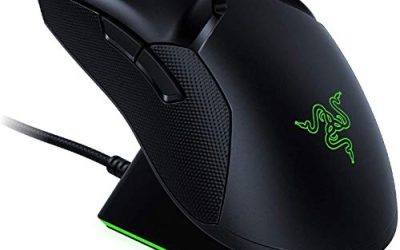
The best gaming mouse for action games is the Logitech G Pro X Superlight 2 for most players: it weighs about 60 g, is wireless with no noticeable lag, and suits fast shooters and fast-paced melee games alike. If you play action RPGs or hack-and-slash games with lots of abilities, a button-heavy mouse like the Logitech G502 X Plus or Razer Naga V2 Pro is the better buy. On a budget, the Logitech G305 Lightspeed gives you reliable wireless play for roughly $40–$60.
“Action” covers very different mouse demands. A tactical shooter rewards low weight and a clean sensor. A Diablo-style ARPG rewards extra buttons and comfort over long sessions. This guide matches the mouse to the kind of action game you play, then shows the numbers that matter: weight, sensitivity maths, polling rate and grip fit.
Quick comparison of the five picks
| Pick | Best for | Key specs (per manufacturer) | Price range |
|---|---|---|---|
| Logitech G Pro X Superlight 2 | Best overall | ~60 g, wireless, HERO 2 sensor (up to 44,000 DPI), 5 buttons | Usually $130–$160 |
| Razer Viper V3 Pro | Fastest flicks / lightest | ~54 g, wireless, Focus Pro 35K sensor, 8,000 Hz capable with its dongle | Usually $150–$170 |
| Logitech G502 X Plus | Action RPG and mixed genres | ~106 g, wireless, HERO 25K sensor, 13 controls, RGB | Usually $130–$160 |
| Razer Naga V2 Pro | Many-ability action RPG / MMO | ~134 g, wireless, swappable side plates (2, 6 or 12 buttons), Focus Pro 30K | Usually $150–$180 |
| Logitech G305 Lightspeed | Best budget | ~99 g with AA battery, HERO 12K sensor, 6 buttons, long battery life | Usually $35–$60 |
Weights and specs come from each manufacturer’s spec sheet. Street prices move with sales, so treat the ranges as general guidance.
Best overall: Logitech G Pro X Superlight 2
This is the safe pick for anyone who plays more than one action genre. The shape is low and symmetrical, which works for palm, claw and fingertip grips on medium-sized hands. At about 60 g it is easy to stop and redirect in shooters, yet it has enough shell to feel stable in third-person action games where you drag the mouse through long camera sweeps.
Trade-off: it has only five buttons. If your game wants a dozen bound abilities, you will run out of inputs and end up leaning on the keyboard.
Best for flick-heavy shooters: Razer Viper V3 Pro
The Viper V3 Pro is among the lightest wireless mice from a major brand, at roughly 54 g. It is symmetrical, suits claw and fingertip grips, and supports 8,000 Hz polling with Razer’s dongle. That higher polling rate only helps if your PC can hold high, stable frame rates, since the extra reports use more CPU time.
Trade-off: it is a premium-priced mouse with the same small button count as other ultralights, and its low, slim shell can feel cramped in a large hand.
Best for action RPGs: Logitech G502 X Plus
The G502 X Plus is a thumb-rest, right-handed shape with a programmable scroll wheel and extra buttons within thumb reach. In ARPGs and hack-and-slash games you can map potions, dodge and skill slots to the mouse and keep your left hand near movement keys. At about 106 g it is not a flick specialist, but the weight is not a problem for slower, deliberate aiming.
Trade-off: the right-handed sculpted shape suits palm grips best. It is also heavy if you also play fast shooters.
Best for many abilities: Razer Naga V2 Pro
The Naga V2 Pro comes with three swappable side plates, so you can run a 2-, 6- or 12-button layout. This suits MMO-style action combat and ARPGs with large skill bars. Choose the 12-button plate for heavy rotations and the 2-button plate for shooters.
Trade-off: at about 134 g it is the heaviest pick here. Treat it as a specialist mouse for button-heavy games, not as an all-rounder.
Best budget: Logitech G305 Lightspeed
The G305 uses Logitech’s Lightspeed wireless link and a HERO 12K sensor, which is more than enough for any action game. A single AA battery powers it for a very long time according to Logitech’s spec sheet, and it has a comfortable, compact shape for small to medium hands. If you want a first proper gaming mouse, it avoids the main budget pitfall of laggy or inconsistent sensors.
Trade-off: it is heavier than modern ultralights, with a basic scroll wheel and limited customisation.
How to choose: decision criteria with numbers
1. Match the mouse to the action genre
| If you mostly play… | Prioritise | Weight target | Buttons needed | Pick |
|---|---|---|---|---|
| Tactical / competitive shooters | Low weight, sensor precision | Under 65 g | 5 | Superlight 2 or Viper V3 Pro |
| Third-person action (soulslikes, character action) | Comfort, reliable side buttons | 60–100 g | 5–7 | Superlight 2 or G305 |
| ARPG / hack-and-slash | Thumb buttons, comfort | 90–130 g | 8–13 | G502 X Plus |
| MMO-style action combat | Number-pad-style thumb grid | Weight less important | 12+ | Naga V2 Pro |
| Mixed library, tight budget | Value and battery life | Any | 5–6 | G305 |
2. Fit the mouse to your hand
A common rule of thumb is that a mouse around 60–70% of your hand length (wrist crease to middle fingertip) suits palm grip, and a slightly shorter mouse suits claw. For a 19 cm hand, that is roughly 11.4–13.3 cm of mouse length. Always compare against the manufacturer’s listed length and width. Shape matters more than any sensor spec, because a mouse that cramps your hand will hurt your aim.
3. Understand DPI with a worked example
Marketing DPI numbers like 25,000 or 44,000 are irrelevant for real play. What matters is how far you move the mouse to turn your view, which you can calculate. In Counter-Strike 2 and Source-engine games, the yaw value is 0.022 degrees per count at sensitivity 1.0.
- Counts for a full 360° turn at sens 1.0: 360 ÷ 0.022 ≈ 16,364 counts.
- At 800 DPI: 16,364 ÷ 800 ≈ 20.5 inches, or about 52 cm.
- At sens 0.5 and 800 DPI, the distance doubles to about 104 cm per 360°.
- At 1,600 DPI and sens 0.25 you get the same 104 cm, so DPI and in-game sensitivity can be traded off without changing feel.
Most shooter players land between roughly 25 and 50 cm per 360° on a large mouse pad. ARPG and third-person action players often prefer faster, smaller movements, since the cursor or camera is not tied to precise aim. Pick a DPI between 800 and 1,600, then adjust in-game sensitivity until the cm/360 feels right. Games use different yaw values, so recalculate when you switch titles.
4. Polling rate: when 8,000 Hz matters
Polling rate sets how often the mouse reports its position. At 1,000 Hz that is one report per millisecond. At 8,000 Hz it is one report every 0.125 ms. A 240 Hz monitor refreshes every 4.17 ms, so 1,000 Hz already gives about four reports per frame. Higher rates can make cursor movement look smoother on very fast displays, but they put more load on the CPU and can reduce frame rates in demanding games. For most players, 1,000 Hz or 2,000 Hz is a sensible default.
5. Wireless or wired
Modern wireless links from Logitech and Razer are effectively indistinguishable from wired in play, and the major brands’ wireless mice weigh less than many wired ones because there is no cable drag. Wired still wins on price, with no battery to charge. If you pick wireless, check that the dongle can sit close to the mouse, using a short extension cable or a USB port on the front of the PC, since signal quality drops behind a case or monitor.
6. Switches, feet and the mouse pad
Optical switches, used in several current Logitech and Razer models, avoid the double-click failures that older mechanical switches can develop. PTFE feet and a consistent mouse pad surface matter as much as the sensor. A heavier mouse needs a smoother, lower-friction pad, while a light mouse is easier to control on a slower surface.
Frequently Asked Questions
What DPI should I use for action games?
Between 800 and 1,600 DPI suits most players. Pick one of those, then tune in-game sensitivity until your 360° turn distance feels comfortable, rather than raising DPI for its own sake.
Is a lightweight mouse better for action games?
For shooters and any game with fast flicks, yes, mice under about 65 g make fast direction changes easier and tire your wrist less. For ARPGs and slower action games, weight is less important than comfort and the number of buttons.
Do I need a mouse with side buttons for action RPGs?
Not strictly, but they help. Mapping potions, dodges or skills to thumb buttons keeps your fingers on the movement keys. If your game has more than five or six bound abilities, a mouse like the G502 X Plus or Naga V2 Pro is worth the extra weight.
Is 8,000 Hz polling worth paying for?
Usually not. It can make motion look smoother on very fast monitors, but it uses more CPU and the benefit is small if your frame rate is not very high. Treat it as a bonus, not a reason to buy.
Is the Logitech G305 good enough for competitive play?
Yes, its HERO sensor and Lightspeed wireless are reliable for ranked play. The main disadvantages are its weight of about 99 g with a battery and its basic build, not its tracking.
How long does a gaming mouse last?
Many gaming mice last several years, with switch wear and rechargeable batteries being the usual failure points. Look for a warranty of at least two years, per the manufacturer’s terms, and keep the mouse’s feet clean to preserve glide.
Related guides
More from Amazon
Programs that pair well with the guide above. Offers and eligibility are set by Amazon and may change.
A free business account with business pricing and bulk-buying tools for work, shop or home office.
Create a business accountFree shipping on eligible items, Prime Video and more. Eligible new members can start with a free trial.
Start a Prime free trialAudiobooks and podcasts to listen to on the go. Eligible new members can start with a free trial.
Try Audible freeAd-free music streaming. Eligible new subscribers can start with a free trial.
Try Music Unlimited freeAs an Amazon Associate we earn from qualifying purchases.