Our Short List of 3

- Connection: Wired USB (USB Type A)
- Sensor: Razer Focus+ 26K optical
- Buttons: 11 programmable
- Scroll wheel: HyperScroll with tilt (left/right) inputs and dual scroll modes

- Connection: Wired USB
- Sensor: Logitech HERO, 200–25,600 DPI
- Buttons: 11 programmable
- Scroll wheel: Dual-mode (ratcheted and free-spin)

- Connection: Wired USB
- Sensor: Optical, 6,400 DPI
- Buttons: 5
- Switches: Mechanical
All 3 Picks at a Glance
| Product | Specs | Action |
|---|---|---|
| 1. Razer Basilisk V3 |
| Check price on Amazon |
| 2. Logitech G502 HERO |
| Check price on Amazon |
| 4. Razer DeathAdder Essential |
| Check price on Amazon |
Wireless mice have closed the latency gap in recent years, but a wired USB gaming mouse still offers something no battery-powered model can match: a direct, uninterrupted connection that never needs charging, never drops to sleep, and never asks you to think about a receiver. Plug it in and it works, on any machine, every time. For competitive players who want consistent input, desk-bound gamers who never move their setup, and anyone tired of a mouse dying mid-match, the best USB gaming mouse is still the simplest and most dependable tool for the job. The four picks below were selected from the specifications published on their Amazon product listings, so every sensor, weight, and button count stated here comes straight from the manufacturer’s own listing rather than from detailed research.
As an Amazon Associate, we earn from qualifying purchases.
Top 3 picks at a glance
Quick answer
If you want one wired USB mouse that does almost everything well, the Razer Basilisk V3 is the standout: a Focus+ 26K sensor, 11 programmable buttons, a tilting HyperScroll wheel, and a sculpted thumb rest in a right-handed shape that suits long sessions. If you prefer a heavier mouse you can tune to your hand, the Logitech G502 HERO pairs its 25K sensor with an adjustable weight system and dual-mode scroll wheel. Players who want the lightest possible wired mouse should look at the SteelSeries Rival 3, which weighs just 77 g and keeps its sensor honest with a true 1 ms polling response. And if you want a simple, proven shape with mechanical switches and nothing you do not need, the Razer DeathAdder Essential covers the fundamentals cleanly.
Key takeaways
- Every pick in this guide is a true wired USB mouse: no batteries, no receivers, no charging cables to manage, and no wireless interference to worry about.
- Sensor numbers are not the whole story. All four mice track far beyond what any player can use, so shape, weight, and button layout matter more than headline DPI.
- Weight is the biggest feel difference here: the Rival 3 is 77 g, the Basilisk V3 is around 101 g, and the G502 HERO is 121 g before you add its tuning weights.
- Button count splits the list in two: the Basilisk V3 and G502 HERO offer 11 buttons for MMO, MOBA, and productivity shortcuts, while the Rival 3 and DeathAdder Essential keep things lean for FPS play.
The picks
1. Razer Basilisk V3
- Connection: Wired USB (USB Type A)
- Sensor: Razer Focus+ 26K optical
- Buttons: 11 programmable
- Scroll wheel: HyperScroll with tilt (left/right) inputs and dual scroll modes
The Basilisk V3 is the most fully featured wired mouse on this list, built around Razer’s Focus+ 26K optical sensor and a right-handed ergonomic shell with a pronounced thumb rest. That thumb rest is the detail players notice first: it gives your thumb a shelf to sit on instead of dragging against the mouse pad, which makes the mouse feel planted during fast flicks and relaxed during long strategy sessions. Razer’s listing confirms the connection is wired USB Type A, so it plugs into any standard port with no dongle or pairing step.
The feature that separates the Basilisk V3 from most rivals is its HyperScroll tilt wheel, which clicks left and right as well as scrolling, and can switch between a tactile, notched roll and a free-spinning mode for flying through long pages or weapon lists. Combined with 11 programmable buttons, including a multi-function trigger near the thumb, it is the pick for players who bind a lot of actions to the mouse or split their time between games and desktop work. At roughly 101 g it sits in the middle of this group on weight: light enough for FPS play, substantial enough to feel controlled in slower games.
See the Razer Basilisk V3 on Amazon
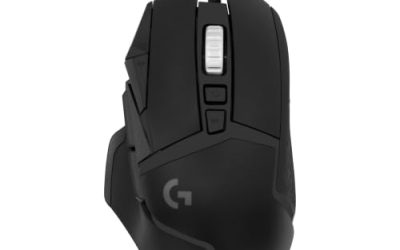
2. Logitech G502 HERO
- Connection: Wired USB
- Sensor: Logitech HERO, 200–25,600 DPI
- Buttons: 11 programmable
- Scroll wheel: Dual-mode (ratcheted and free-spin)
The G502 HERO is built around Logitech’s HERO sensor, rated from 200 to 25,600 DPI, and a design philosophy of adjustment: if a part of the mouse’s feel can be tuned, Logitech lets you tune it. The headline example is the weight system. The mouse weighs 121 g out of the box, and the listing’s published design includes tunable weights, so you can add mass in small steps until the glide and stopping feel match your preference. Players who grew up on heavier mice, or who play at low sensitivity and want inertia in their swipes, tend to prefer this approach.
Its dual-mode scroll wheel is the other signature feature, switching between a precise ratcheted roll and a free-spinning mode at the press of a button, which is genuinely useful both for weapon switching and for scrolling long documents or spreadsheets between matches. With 11 programmable buttons arranged around a sniper-style DPI shift button by the thumb, the G502 HERO suits players who want one wired mouse for shooters, MMOs, and everyday work. It is the heaviest pick here, so fingertip-grip players with small hands should read the “Who should skip” section before choosing it.
See the Logitech G502 HERO on Amazon
3. SteelSeries Rival 3
The Rival 3 is the lightweight of this group at just 77 g, and that single number defines who it is for. A lighter mouse takes less effort to start and stop, which reduces fatigue over long sessions and makes small, repeated aim corrections easier to control. SteelSeries pairs that low weight with its TrueMove Core sensor, rated at 8,500 CPI, and a published 1000 Hz polling rate with 1 ms response, which means the wired connection reports the mouse’s position a thousand times per second with no wireless link in between.
SteelSeries keeps the rest of the design deliberately simple: 6 buttons in a symmetrical layout that works for claw and fingertip grips, and a shape that does not force your hand into one posture. It lacks the extra thumb buttons, tilt wheels, and weight systems of the two picks above it, and that is the point. If your games are Counter-Strike, Valorant, or Apex Legends and your priorities are a light shell, a dependable sensor, and a cable, the Rival 3 is the most focused tool on this list.
Specs
- Connection: Wired USB
- Sensor: SteelSeries TrueMove Core, 8,500 CPI
- Polling rate: 1000 Hz / 1 ms response
- Buttons: 6
- Shape: Symmetrical, suited to claw and fingertip grips
- Weight: 77 g
See the SteelSeries Rival 3 on Amazon
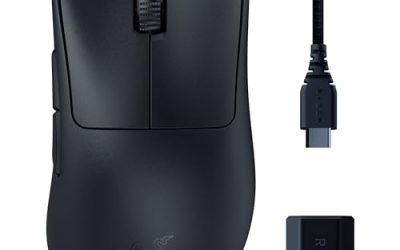
4. Razer DeathAdder Essential
- Connection: Wired USB
- Sensor: Optical, 6,400 DPI
- Buttons: 5
- Switches: Mechanical
The DeathAdder Essential strips the wired gaming mouse down to its essentials and executes them well. Its optical sensor is rated at 6,400 DPI, which is lower on paper than the other picks here, but still far beyond the sensitivity settings real players use in games; in practice you will never come close to its ceiling. What matters more is the shape. The DeathAdder’s right-handed ergonomic form is one of the most copied in gaming, with a gentle hump that fills the palm and flared primary buttons that cradle your fingers.
Razer fits mechanical switches under those primary buttons, which give a crisp, defined click feel, and keeps the button layout to 5, covering the two main clicks, the wheel click, and two thumb buttons for melee, push-to-talk, or a DPI shift. There is no weight tuning, no tilt wheel, and no extra clutter. For a player who wants a wired USB mouse with a proven shape and mechanical switches, and who would rather spend their attention on the game than on configuration software, the DeathAdder Essential is the straightforward choice.
See the Razer DeathAdder Essential on Amazon
How to choose
Start with grip and hand fit, because a wired mouse’s cable means you will use it at the same desk, in the same posture, for years. Palm-grip players who rest their whole hand on the mouse generally suit the fuller ergonomic shapes of the Basilisk V3, G502 HERO, and DeathAdder Essential. Claw and fingertip players, who steer with their fingers and prefer a mouse that moves the instant they do, usually get on better with the Rival 3’s lighter, symmetrical shell.
Next, decide how much weight you actually want. Weight is not a quality ranking; it is a preference. Lighter mice like the 77 g Rival 3 reduce the effort of constant small movements and are kinder over long FPS sessions. Heavier mice like the 121 g G502 HERO feel more planted, and its tunable weight system exists precisely because players disagree about the ideal number. If you have never thought about mouse weight, the Basilisk V3’s roughly 101 g middle ground is a safe place to start.
Then count the buttons your games really use. Shooters need very few: two thumb buttons are plenty for most players, which is why the Rival 3 and DeathAdder Essential stay lean. MMO, MOBA, and simulation players, and anyone who likes macros for work, will use the 11 buttons on the Basilisk V3 or G502 HERO. Extra buttons you never press are not a benefit, so buy for your actual games, not for the biggest number.
Finally, treat sensor specifications with some perspective. Every sensor in this guide, from the DeathAdder Essential’s 6,400 DPI unit to the Basilisk V3’s Focus+ 26K, tracks accurately at any sane in-game sensitivity, and the Rival 3’s published 1000 Hz / 1 ms polling is the standard wired response across the category. Once a mouse is wired, sensor differences are the last thing you will notice. Shape, weight, buttons, and the feel of the scroll wheel are what you live with every day, so choose on those.
One practical note on cables: a wired mouse’s cord can drag on the desk edge or bunch up against a monitor stand. A few centimetres of slack arranged in a gentle loop, or an inexpensive mouse bungee, removes nearly all of that drag and makes a wired mouse feel close to wireless in motion while keeping its zero-latency, no-battery advantages.
Who should skip
Skip wired USB entirely if your setup is a living-room PC, a laptop you move between rooms, or a desk where a cable genuinely gets in the way; a modern wireless mouse serves those situations better. Skip the G502 HERO if you have small hands or use a fingertip grip, since its 121 g starting weight and large shell are built for palm grips and players who like mass. Skip the Basilisk V3 if you are left-handed, because its ergonomic shape and thumb rest are right-hand only, and the same applies to the right-handed DeathAdder Essential. Skip the Rival 3 and DeathAdder Essential if you play MMOs or rely on mouse macros, because their 6- and 5-button layouts will run out of room quickly; the 11-button picks exist for you. And skip the DeathAdder Essential if adjustable weights or a free-spinning scroll wheel matter to you, since it deliberately leaves both out.
FAQ
Is a wired USB gaming mouse still better than wireless?
For latency and reliability at a fixed desk, yes in the ways that count: a wired connection has no battery to die, no receiver to lose, and no wireless link that can be affected by interference. The Rival 3’s published 1000 Hz / 1 ms polling shows the standard a wired mouse delivers by default. Wireless has real convenience advantages away from a desk, but at a desk the cable costs you nothing in performance.
Does a higher DPI sensor make me aim better?
No. DPI is a sensitivity ceiling, not an accuracy score. Most competitive players use effective sensitivities far below even the DeathAdder Essential’s 6,400 DPI maximum. All four sensors here are more than capable; your grip, the mouse’s weight, and your in-game settings will affect your aim far more than the difference between 8,500 CPI and 26K.
Will these mice work on a laptop or a console?
All four connect through standard USB, and the Basilisk V3’s listing specifies USB Type A, so they plug into laptops and desktops directly; a USB-C-only laptop will need a simple adapter or hub. Console support depends on the console and the individual game rather than the mouse, so check your game’s input settings before assuming mouse control is available.
How do I stop the cable from dragging?
Leave a loose loop of cable on the desk so the mouse never pulls against a taut cord, route the cable so it does not catch on the desk edge, and consider a mouse bungee, which holds the cord up off the surface. With the cable managed, a wired mouse’s movement feels nearly as free as a wireless one.
Final verdict
The best USB gaming mouse is the one whose shape and weight disappear under your hand. For most players, that is the Razer Basilisk V3: its Focus+ 26K sensor, 11 buttons, tilting HyperScroll wheel, and thumb rest make it the most versatile wired pick here. Choose the Logitech G502 HERO if you want to tune your mouse’s weight and value a dual-mode scroll wheel, the SteelSeries Rival 3 if a 77 g shell and a clean 1 ms wired response are your priorities, and the Razer DeathAdder Essential if you want a proven ergonomic shape with mechanical switches and nothing extra. Whichever you pick, you get the wired promise in full: plug it in once, and it simply works, every session, with no battery anxiety attached.
Product and ASIN Reference
| Product | ASIN |
|---|---|
| Razer Basilisk V3 | B09C13PZX7 |
| Logitech G502 HERO | B07GBZ4Q68 |
| SteelSeries Rival 3 | B08176SM7C |
| Razer DeathAdder Essential | B094PS5RZQ |
Related guides
More from Amazon
Programs that pair well with the guide above. Offers and eligibility are set by Amazon and may change.
A free business account with business pricing and bulk-buying tools for work, shop or home office.
Create a business accountFree shipping on eligible items, Prime Video and more. Eligible new members can start with a free trial.
Start a Prime free trialAudiobooks and podcasts to listen to on the go. Eligible new members can start with a free trial.
Try Audible freeAd-free music streaming. Eligible new subscribers can start with a free trial.
Try Music Unlimited freeAs an Amazon Associate we earn from qualifying purchases.