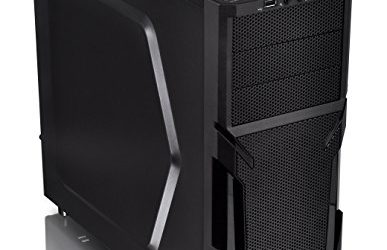
The best PC case for a high-power gaming build is one that fits a 300-360 mm graphics card, accepts a 1000 W-class power supply and moves at least 150 CFM of air through the chassis. Mesh-front airflow cases such as the Fractal Design North, Corsair 4000D Airflow, Lian Li Lancool 216 and Fractal Design Torrent do this well, while the Lian Li O11 Dynamic EVO suits showpiece builds with radiators. The right pick depends mainly on GPU length, radiator plans and how much noise you will tolerate.
The phrase “power case” usually means a case built to house powerful parts: a flagship GPU that draws 450-600 W, a high-wattage PSU and a CPU cooler or radiator that can shed all that heat. This guide works out the numbers first, then maps them to cases.
Quick comparison of the top picks
| Pick | Best for | Key specs (per manufacturer) | Typical price range |
|---|---|---|---|
| Fractal Design Torrent | Maximum airflow, big GPUs | Two 180 mm front fans, up to about 423 mm GPU, ATX, 420 mm radiator support | Usually $190-$230 |
| Lian Li O11 Dynamic EVO | Dual-chamber show builds, radiators | Up to 3 x 360 mm radiators, around 422 mm GPU, glass front and side | Usually $150-$190 |
| Fractal Design North | Best looking quiet mesh case | Wood and mesh front, around 355 mm GPU in the standard layout, ATX | Usually $140-$180 |
| Lian Li Lancool 216 | Best value airflow | Two 160 mm front fans, around 392 mm GPU, ATX, 360 mm radiator support | Usually $90-$120 |
| Corsair 4000D Airflow | Budget-friendly all-rounder | Mesh front, up to 360 mm GPU, ATX, 360 mm front radiator support | Usually $80-$110 |
Step one: work out your power and heat budget
Every watt a PC draws ends up as heat in the room, so the power budget is also your cooling budget. Take a high-end example using manufacturer total board power figures: a flagship GPU class card at roughly 450-575 W, a high-end CPU at 120-250 W under gaming or rendering load, and about 80-100 W for motherboard, memory, drives and fans.
- Typical high-end gaming load: 575 W GPU + 140 W CPU + 90 W other = roughly 805 W peak.
- PSU sizing rule: add 20-25 percent headroom for transient spikes: 805 x 1.25 = about 1000 W. That is why 1000 W units are the standard recommendation for flagship cards.
- Midrange build: 285 W GPU + 105 W CPU + 80 W other = 470 W, so a 750 W PSU is comfortable.
Now convert heat into airflow. A common engineering approximation is CFM = 3.16 x watts / temperature rise in degrees Fahrenheit. If you want the air leaving your case no more than 15 F (about 8 C) hotter than the air entering it at 700 W of sustained heat, you need 3.16 x 700 / 15 = about 147 CFM of actual through-flow.
A single 120 mm fan typically moves 50-70 CFM in free air and noticeably less against a dust filter and mesh, so three good intake fans plus one or two exhaust fans are the practical minimum for a 700 W load. A 180 mm fan, like those in the Torrent, moves comparable air at lower RPM, which is why it is quieter at the same load.
Step two: check GPU length, thickness and the 12V-2×6 cable
Flagship cards run 300-360 mm in length and three to four slots thick. Always compare the manufacturer’s listed GPU clearance to the card’s listed length, and leave 10-15 mm spare for the power cable bend. The 12V-2×6 connector should not be bent sharply within about 35 mm of the plug, so a case with at least 40-45 mm of space between the card’s edge and the side panel is safer. Glass side panels on narrow cases can force a tight bend.
| Component | Typical dimension | Case spec to check |
|---|---|---|
| Flagship GPU | 300-360 mm long, 3-4 slots | Max GPU length, slot count |
| Midrange GPU | 240-310 mm long, 2-3 slots | Max GPU length |
| Tower air cooler | 150-170 mm tall | Max CPU cooler height |
| 360 mm AIO | about 397 mm radiator length | Top or front radiator support, tube clearance |
| 1000 W ATX PSU | 150-180 mm deep | PSU length with cable space |
Best airflow overall: Fractal Design Torrent
The Torrent pushes air from large front fans directly over the GPU and out through rear and top fans. It is the case to choose if your GPU runs hot and you want lower fan RPM. The main trade-off is size and price: it is a big, heavy case that needs a roomy desk, and its open front allows more noise to escape than a solid-panel design.
Best for liquid cooling and showpiece builds: Lian Li O11 Dynamic EVO
The dual-chamber layout isolates the PSU and cables from the main compartment and mounts radiators on the side, top and bottom. It handles extreme builds with multiple radiators. Its main trade-off is that tempered glass on the front restricts intake unless you use bottom and side fans; airflow is good with a proper fan setup but not as simple as a mesh-front case.
Best looking quiet mesh case: Fractal Design North
The North combines a mesh front with a timber-style trim, so it looks at home on a desk in a living room. Airflow is better than its appearance suggests, and noise is moderate. The trade-off is GPU length: the stock layout handles around 355 mm cards, and the largest flagship cards need the fans removed or a different case.
Best value: Lian Li Lancool 216
Two big 160 mm front fans and a rear fan come in the box, the layout is simple and the clearances handle the majority of current cards. For a mid-to-high-end build on a budget it is the most efficient spend. The trade-off is a plainer build quality and a less impressive side panel than the premium options.
Best budget all-rounder: Corsair 4000D Airflow
This case has shaped the budget market for years. It supports ATX motherboards, 360 mm front radiators and decent cable management. Pairing it with a 750-850 W PSU and a midrange GPU is ideal. The trade-off is limited GPU length for the biggest cards and only two included fans.
Decision matrix: which case for which situation
| Your situation | Choose | Why |
|---|---|---|
| Flagship GPU above 350 mm, 1000 W PSU | Torrent or O11 Dynamic EVO | Longest GPU clearance, large PSU space |
| Midrange GPU, best price | Lancool 216 or 4000D Airflow | Cheap, good fans, enough room |
| Quiet office-friendly build | Fractal Design North | Dampened look, moderate fan noise |
| Custom loop or 360 mm side radiator | O11 Dynamic EVO | Multiple radiator mounts |
Fan layout that works in any of these cases
- Put three intake fans at the front or bottom so cool air reaches the GPU first.
- Put one fan at the rear and one or two at the top as exhaust, giving slightly more intake than exhaust for positive pressure that reduces dust.
- Set a fan curve that holds fans at 40-50 percent below 60 C and ramps above that, so the case stays quiet in light use.
- Clean dust filters monthly; a clogged filter can cut airflow by a quarter or more.
Frequently Asked Questions
How much airflow does a gaming PC case need?
Use the CFM formula: 3.16 x watts / allowed temperature rise in F. For 700 W of heat and a 15 F rise you need roughly 147 CFM, which means about three quality 120 mm fans moving air in and one or two moving it out.
Do I need a case with a bigger PSU shroud?
The shroud mainly hides cables and the PSU; it does not affect power delivery. Check that the case’s maximum PSU length fits your unit with 30-40 mm spare for cables, especially for 1000 W modular models.
Is a mesh front better than glass?
For temperatures, yes. Mesh fronts let fans pull air directly from outside, while a glass front depends on side gaps. Glass looks cleaner and blocks more noise, so it suits lower-power builds.
Will a 4-slot GPU fit in a normal mid-tower?
Usually, but the extra thickness can block lower PCIe slots and press against the side panel. Check the case manufacturer’s maximum GPU thickness, and keep at least 40 mm of side clearance for the power cable.
Is a bigger case always cooler?
Not automatically. Internal volume helps, but fan placement, intake area and filter quality matter more. A well-designed mid-tower with three good intake fans often beats a larger case with restricted airflow.
Related guides
More from Amazon
Programs that pair well with the guide above. Offers and eligibility are set by Amazon and may change.
A free business account with business pricing and bulk-buying tools for work, shop or home office.
Create a business accountFree shipping on eligible items, Prime Video and more. Eligible new members can start with a free trial.
Start a Prime free trialAudiobooks and podcasts to listen to on the go. Eligible new members can start with a free trial.
Try Audible freeAd-free music streaming. Eligible new subscribers can start with a free trial.
Try Music Unlimited freeAs an Amazon Associate we earn from qualifying purchases.