The best monitors for Xbox Series X are the ones with an HDMI 2.1 port, because that is what lets the console send 4K at 120 Hz with variable refresh rate. This guide works through that checklist first, then ranks seven monitors, from a budget 4K 120Hz screen to an OLED, by what the listing actually confirms.
Quick answer: the LG 27G810A is the best monitor for Xbox Series X for most players because it lists HDMI 2.1, 4K, 180Hz and a dual mode that drops to 360Hz at full HD. The CRUA 27-inch 4K 120Hz is the budget pick, and the LG 27GX704A OLED is the picture-quality pick at 1440p.
All monitors come from the current catalog in our product store. When a spec such as the HDMI version, panel brightness or stand adjustment is not on the listing, we say so, and you should confirm it with the maker before you buy.
Our Top Picks

Top 3 picks at a glance
Xbox Series X Monitors at a Glance
The table shows resolution, refresh rate and whether the listing names HDMI 2.1. A monitor with HDMI 2.1 not listed may still work at lower settings, but confirm before you rely on 4K 120Hz.
| Monitor | Size and resolution | Refresh rate | HDMI 2.1 on listing | Panel |
|---|---|---|---|---|
| LG 27G810A-B | 27-inch, 4K | 180Hz (360Hz at FHD) | Yes | IPS |
| Acer Nitro VG270K V4 | 27-inch, 4K | 160Hz (320Hz DFR) | Yes, two ports | IPS |
| CRUA 27 inch 4K 120Hz | 27-inch, 4K | 120Hz | Yes | IPS |
| ASUS TUF Gaming VG27UQ1A | 27-inch, 4K | 160Hz | Not listed | Not listed |
| Hikers G27H1Q | 27-inch, 1440p, curved | 170Hz | Yes, two ports | Fast VA |
| LG 27GX704A-B | 27-inch, 1440p OLED | 240Hz | Yes | OLED |
| Samsung Odyssey G7 G75F | 37-inch, 4K, curved | 165Hz | Not listed | Not listed |
What Your Xbox Series X Needs From a Monitor
The Xbox Series X can output 4K at up to 120 Hz and 1440p at up to 120 Hz, with variable refresh rate and auto low latency mode. To use 4K 120Hz you need an HDMI 2.1 port on the monitor and a cable that supports the full 48 Gbps bandwidth. Monitors with only HDMI 2.0 are limited to 4K at 60 Hz, which wastes the console’s best mode.
HDMI 2.1 explained
HDMI 2.1 is the version that allows 4K at 120 Hz. A monitor can have several HDMI ports with different versions, so read the spec carefully. A DisplayPort input is useless for the console, since the Series X only outputs HDMI. Use the cable that came with the console, or a certified Ultra High Speed HDMI cable, for the best results.
VRR, ALLM and why they matter
Variable refresh rate smooths out frame drops by matching the monitor’s refresh to the console’s frame rate. FreeSync Premium is the common label on Xbox-friendly monitors. Auto low latency mode switches the display to its game mode automatically. Both are standard on modern gaming monitors, so look for them on the listing.
4K 120Hz or 1440p 120Hz?
The Series X can render many games in 4K at 60 Hz or in a performance mode at 120 Hz with a lower internal resolution. A 1440p monitor is easier for the console to drive at 120 Hz, and 1440p on a 27-inch screen looks sharp. A 4K monitor is better if you also play at 60 Hz in quality modes or watch movies. Both are valid, and the right choice depends on how you play.
Monitor or TV for Xbox Series X?
A monitor suits a desk, where you sit about an arm’s length away. Pixel density is higher, input lag is usually lower and you can share the screen with a PC. A TV suits a living room where you sit two to three meters back and want a larger picture. A 27-inch monitor is a good choice for one player at a desk, and a TV is better for couch co-op. If you do both, a monitor with two HDMI 2.1 ports, like the Acer pick, covers a console and a PC.
What to do if 120Hz is missing from the Xbox menu
- Connect the console to the monitor’s HDMI 2.1 port, not an older HDMI 2.0 port.
- Swap in a certified Ultra High Speed HDMI cable.
- Enable 120Hz or Game mode in the monitor’s on-screen menu, since some monitors keep it off by default.
- On the Xbox, go to Settings, General, TV and display options, and choose the 4K or 1440p setting with a 120Hz refresh.
- Update the monitor firmware if the maker offers it, if the maker offers it, since makers sometimes release connection fixes.
Input lag and game mode
Input lag is the delay between a button press and the response on screen. Gaming monitors are generally very low in this respect, and auto low latency mode switches off extra processing. If a monitor has a game mode, turn it on. Avoid heavy image enhancement features, which add delay.
The 7 Best Monitors for Xbox Series X
1. LG 27G810A-B: Best Overall Monitor for Xbox Series X
As an Amazon Associate we earn from qualifying purchases at no extra cost to you.

The LG 27G810A-B is a 27-inch UltraGear 4K IPS gaming monitor with a dual mode that runs at 4K 180Hz or full HD 360Hz. The listing shows a 1ms response time, NVIDIA G-Sync, AMD FreeSync Premium, VESA DisplayHDR 400 and an HDMI 2.1 port. It is the most flexible monitor on this list.
The dual mode is what makes this monitor interesting. For the Xbox Series X, the 4K mode at 120Hz is the main draw, and the IPS panel gives wide viewing angles and good color. If you also have a PC, you can switch to full HD at a very high refresh rate for competitive shooters. DisplayHDR 400 is a starter level of HDR, so expect a modest HDR boost rather than a dramatic one.
Key specs listed:
- Size: 27-inch, 4K UHD IPS
- Refresh: 180Hz at 4K, 360Hz at FHD
- Response: 1ms
- Sync: G-Sync, FreeSync Premium
- HDR: VESA DisplayHDR 400
- Ports: HDMI 2.1
Best for: players who want one monitor for Xbox and a PC.
Skip if: you want the lowest tier or a bright HDR experience.
Pros
- Dual mode for 4K and full HD
- HDMI 2.1 on the listing
- IPS color and viewing angles
- G-Sync and FreeSync support
Cons
- DisplayHDR 400 is entry level
- Higher tier than the budget picks
- Stand details are not listed
2. Acer Nitro VG270K V4: Best 4K With Two HDMI 2.1 Ports

The Acer Nitro VG270K V4 is a 27-inch 4K IPS gaming monitor with a 160Hz refresh rate and a dynamic frame rate mode that reaches 320Hz at a lower resolution. The listing shows a 0.5ms response time, AMD FreeSync Premium, two HDMI 2.1 ports, a DisplayPort input, built-in speakers, VESA mounting and flicker-free technology.
Two HDMI 2.1 ports are the key advantage, because you can connect an Xbox Series X and a PS5 at the same time without swapping cables. The 4K IPS panel gives sharp text and good colors, and the 160Hz refresh rate gives headroom for PC use. Built-in speakers are a convenient extra for casual play. It is a strong middle-tier pick for a console player with more than one system.
Key specs listed:
- Size: 27-inch, 4K IPS
- Refresh: 160Hz, DFR 320Hz
- Response: 0.5ms
- Sync: FreeSync Premium
- Ports: 2 x HDMI 2.1, DisplayPort
- Extras: speakers, VESA mount
Best for: players with more than one console who want 4K.
Skip if: you want G-Sync branding or deep HDR performance.
Pros
- Two HDMI 2.1 ports
- Fast 0.5ms response
- Built-in speakers
- VESA mountable
Cons
- HDR level is not listed
- Speakers are basic
- Mid tier
3. CRUA 27 Inch 4K 120Hz: Best Budget 4K Monitor

The CRUA 27-inch 4K 120Hz gaming monitor is an IPS panel with built-in speakers, 120 percent sRGB color, FreeSync, an HDMI 2.1 port and a DisplayPort 1.4 input. The listing shows a 178 degree wide view, a tilt-adjustable stand and a 75x75mm wall mount pattern. It is aimed at gamers, workers and streamers who want 4K without paying for a premium brand.
This monitor matches the Xbox Series X’s 4K 120Hz ceiling exactly, which means you are not paying for refresh rate that the console cannot use. The IPS panel and 120 percent sRGB give vivid colors, and the built-in speakers let you play without a separate sound system. It is a lesser-known brand, so check the warranty terms and support options. The stand is tilt-only, so a VESA arm is a worthwhile upgrade.
Key specs listed:
- Size: 27-inch, 4K IPS
- Refresh: 120Hz
- Color: 120 percent sRGB
- Sync: FreeSync
- Ports: HDMI 2.1, DisplayPort 1.4
- Stand: tilt only
Best for: budget buyers who want 4K 120Hz for the console.
Skip if: you want a well-known brand with strong support or height adjustment.
Pros
- Lowest tier of the 4K picks
- HDMI 2.1
- IPS color
- Built-in speakers
Cons
- Tilt-only stand
- Lesser-known brand
- No G-Sync
4. ASUS TUF Gaming VG27UQ1A: Best Brand-Name 4K Pick

The ASUS TUF Gaming VG27UQ1A is a 27-inch 4K gaming monitor with a 160Hz refresh rate and G-SYNC compatibility. The listing shows ELMB Sync, 1ms response, 95 percent DCI-P3 color coverage, FreeSync Premium and DisplayWidget Center software, and it names PS5 and Xbox as target consoles.
ASUS’s TUF line is a trusted choice for gamers who want a recognizable brand and reliable support. ELMB Sync reduces motion blur while VRR is active, which is unusual among 4K panels. The listing does not state the HDMI version, so confirm that the port is HDMI 2.1 on the maker page before you rely on 4K 120Hz. If it checks out, this is a very solid pick.
Key specs listed:
- Size: 27-inch, 4K
- Refresh: 160Hz
- Response: 1ms
- Color: 95 percent DCI-P3
- Sync: G-SYNC compatible, FreeSync Premium
- HDMI version: not listed
Best for: players who want a trusted brand and wide color for a 4K console setup.
Skip if: you cannot confirm HDMI 2.1 on the maker page.
Pros
- Wide 95 percent DCI-P3 color
- ELMB Sync for motion clarity
- Trusted brand
- G-SYNC compatible
Cons
- HDMI version not listed
- Mid-to-upper tier
- Panel type not listed
5. Hikers G27H1Q: Best 1440p Pick With Two HDMI 2.1 Ports

The Hikers 27-inch curved gaming monitor is a 2K 1440p screen with a 170Hz refresh rate, with 144Hz as a lower option. The listing shows two HDMI 2.1 ports, one DisplayPort 1.4, a fast VA panel with a 4000:1 contrast ratio, an AI crosshair feature and one HDMI 2.1 cable in the box.
1440p is a sweet spot for the Xbox Series X because the console can drive 120 Hz at that resolution with less strain than 4K. The fast VA panel gives deep blacks and strong contrast, which helps in dark games, while the curved shape makes the screen feel wider. A cable in the box saves you from buying one separately. VA panels have narrower viewing angles than IPS, so this is best for a single player in front of the screen.
Key specs listed:
- Size: 27-inch, 1440p, curved
- Refresh: 170Hz
- Panel: fast VA, 4000:1 contrast
- Ports: 2 x HDMI 2.1, DisplayPort 1.4
- In the box: one HDMI 2.1 cable
Best for: budget-minded players who prefer 1440p and a curved screen.
Skip if: you want an IPS panel, or you sit off-axis.
Pros
- Two HDMI 2.1 ports
- Strong VA contrast
- Cable included
- Budget tier
Cons
- Narrower viewing angles than IPS
- Lesser-known brand
- HDR details not listed
6. LG 27GX704A-B OLED: Best Picture Quality at 1440p
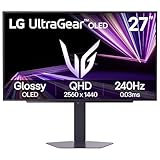
The LG 27GX704A-B is a 27-inch UltraGear QHD OLED gaming monitor with a 240Hz refresh rate and 0.03ms response. The listing shows NVIDIA G-Sync compatibility, AMD FreeSync Premium Pro, VESA DisplayHDR TrueBlack 400, an HDMI 2.1 port and a DisplayPort input. OLED gives perfect black levels and very fast pixel response.
If picture quality matters, OLED is the biggest jump you can make. Each pixel switches off completely, so dark scenes look deeper and HDR highlights pop. The 1440p resolution suits the Xbox Series X’s 120Hz mode, and the 0.03ms response keeps fast action crisp. OLED panels cost more and can be prone to burn-in with static images, so vary what you display and use the built-in protection options.
Key specs listed:
- Size: 27-inch, 1440p OLED
- Refresh: 240Hz
- Response: 0.03ms
- HDR: DisplayHDR TrueBlack 400
- Sync: G-Sync compatible, FreeSync Premium Pro
- Ports: HDMI 2.1, DisplayPort
Best for: players who want the best contrast and motion clarity.
Skip if: you leave static images on screen for hours or want the lowest tier.
Pros
- Perfect blacks
- Extremely fast response
- HDMI 2.1
- FreeSync Premium Pro
Cons
- Premium tier
- Burn-in risk with static images
- Resolution is 1440p, not 4K
7. Samsung Odyssey G7 G75F 37 Inch: Best Large 4K Screen

The Samsung 37-inch Odyssey G7 G75F is a curved 4K UHD gaming monitor with a 165Hz refresh rate and a 1ms response time. The listing shows VESA DisplayHDR 600 and AMD FreeSync Premium Pro. It is a very large display compared with the 27-inch picks.
At 37 inches, this is a screen you can sit back from and use almost like a small television. DisplayHDR 600 offers a stronger HDR experience than the entry-level DisplayHDR 400 tier. The listing does not state the HDMI version, so check that the port supports 4K 120Hz before you buy. It sits at a premium tier and needs a deep desk.
Key specs listed:
- Size: 37-inch, 4K UHD, curved
- Refresh: 165Hz
- Response: 1ms
- HDR: VESA DisplayHDR 600
- Sync: FreeSync Premium Pro
- HDMI version: not listed
Best for: players who want a very large curved 4K screen.
Skip if: you have a small desk or limited budget.
Pros
- Large immersive size
- DisplayHDR 600
- Fast refresh rate
- FreeSync Premium Pro
Cons
- Needs a deep desk
- HDMI version not listed
- Premium tier
Also Consider
Gawfolk 4K Curved 32 Inch
A 32-inch curved 4K 120Hz VA monitor with a 1ms response, G-Sync and FreeSync support, speakers and a 100×100 VESA mount. A fair pick if you want a larger screen at a lower tier.
AOC Q27G41ZE
A 27-inch QHD IPS monitor with a 240Hz native refresh rate, 260Hz overclock and G-SYNC compatibility. The listing does not say HDMI 2.1, so check the ports before pairing it with a console.
Acer Nitro 27 QHD 180Hz
A 27-inch QHD IPS monitor at 180Hz with two HDMI ports and FreeSync. It suits a budget 1440p setup, but confirm the HDMI version for 120Hz console output.
How We Chose These Xbox Series X Monitors
This guide is research-based. We did not use the monitors ourselves. We compared the listings in our product store and the manufacturers’ specification pages, starting with the HDMI 2.1 requirement for 4K 120Hz and then looking at panel type, refresh rate, response time and extras. We skipped renewed or unavailable units, kept a maximum of two monitors per brand and included both 4K and 1440p options.
When the listing did not state the HDMI version, brightness or stand adjustment, we flagged it as not listed. Confirm those points on the maker page before you buy.
Xbox Series X Monitor Buying Guide
Resolution and size
A 27-inch 4K monitor gives sharp detail at a typical desk distance, and a 27-inch 1440p screen is also clear while being easier on the console in 120Hz mode. Choose 32 inches or larger only if you sit farther back. For 4K at 27 inches, the pixel density is high enough that you will not see individual pixels.
Refresh rate
The Series X tops out at 120 Hz. A monitor with 144, 160 or 180Hz is fine, but the extra speed only helps if you also use a PC. Do not pay extra for 240Hz if the screen is only for the Xbox.
Panel type
IPS panels give the best color and viewing angles. VA panels give deeper contrast but narrower angles. OLED panels give perfect blacks and the fastest response, but cost more and need care to avoid burn-in.
HDR
DisplayHDR 400 is a modest improvement, DisplayHDR 600 is a clear step up, and OLED TrueBlack 400 delivers strong contrast even at lower brightness. If HDR matters to you, look for 600 or an OLED screen.
Ports and cables
Check for HDMI 2.1 and use a cable that is certified for 48 Gbps. A weak cable is the most common cause of a missing 120Hz option. If the setting does not appear in the Xbox video settings, try another cable and port first.
Speakers and stands
Built-in speakers are convenient but basic. A height-adjustable stand improves comfort, and a VESA mount lets you add an arm. Most picks here have VESA mounting, so you can upgrade the stand later.
Xbox settings to check
Open Settings, then General, then TV and display options, and set the resolution and refresh rate. Turn on variable refresh rate under Video modes and allow 4K and 120Hz if the monitor supports it. Run the display calibration tool to adjust HDR if you use it.
Frequently Asked Questions
What is the best monitor for Xbox Series X?
The LG 27G810A is the best overall pick. It lists a 27-inch 4K IPS panel, HDMI 2.1, 180Hz refresh and a dual mode that reaches 360Hz at full HD.
Does the Xbox Series X need HDMI 2.1?
Only for 4K at 120Hz. A monitor with HDMI 2.0 still works, but it is limited to 4K at 60Hz, so HDMI 2.1 is worth having if you want the console’s top mode.
Is a 1440p monitor good for Xbox Series X?
Yes. The console can output 1440p at up to 120Hz, and a 27-inch 1440p screen looks sharp while being easier to drive than 4K. It is a good choice for performance modes.
Can I use a G-Sync monitor with an Xbox?
Yes, if it is G-Sync compatible and supports variable refresh rate over HDMI. Xbox uses VRR rather than G-Sync directly, so FreeSync and G-Sync Compatible monitors both work.
What refresh rate do I need for Xbox Series X?
120Hz is the console’s maximum, so any monitor at 120Hz or higher covers it. Faster screens only help if you also use a PC.
Is OLED safe for console gaming?
Yes, with some care. OLED gives excellent contrast, but static HUD elements can cause burn-in over time. Use screen savers and pixel-shift options, and vary what you play.
Do I need a special HDMI cable?
Yes. For 4K at 120Hz, use a certified Ultra High Speed HDMI cable rated for 48 Gbps. The cable that ships with the Xbox Series X works well.
Which One Should You Buy?
Choose the LG 27G810A for the best all-round 4K monitor that also suits a PC. Choose the Acer Nitro VG270K V4 if you have two consoles and want two HDMI 2.1 ports. Choose the CRUA 4K 120Hz for the lowest tier of 4K, and the ASUS TUF VG27UQ1A if you want a trusted brand and have confirmed its HDMI version. Choose the Hikers G27H1Q for a budget 1440p curved screen, the LG 27GX704A for OLED picture quality and the Samsung Odyssey G7 for a large 4K display.
Check HDMI 2.1 first, then pick the resolution and panel that fit your room and budget.
Sources
- Xbox official support pages on display and refresh rate settings
- HDMI Licensing Administrator HDMI 2.1 overview
- LG, Acer, ASUS and Samsung monitor specification pages
- Store product listings in the gamingpchardware.com catalog
Last updated: November 2026
Related guides
More from Amazon
Programs that pair well with the guide above. Offers and eligibility are set by Amazon and may change.
A free business account with business pricing and bulk-buying tools for work, shop or home office.
Create a business accountFree shipping on eligible items, Prime Video and more. Eligible new members can start with a free trial.
Start a Prime free trialAudiobooks and podcasts to listen to on the go. Eligible new members can start with a free trial.
Try Audible freeAd-free music streaming. Eligible new subscribers can start with a free trial.
Try Music Unlimited freeAs an Amazon Associate we earn from qualifying purchases.


