Our Short List of 3

- Size: 27 inches
- Panel: IPS
- Resolution: 3840 x 2160 (4K)
- Refresh rate: 144Hz

- Size: 27 inches
- Panel: Nano IPS
- Resolution: 2560 x 1440 (QHD)
- Refresh rate: 165Hz, 180Hz overclock

- Size: 27 inches
- Panel: IPS
- Resolution: 2560 x 1440 (QHD)
- Refresh rate: 170Hz
All 4 Picks at a Glance
| Product | Specs | Action |
|---|---|---|
| 1. Sony INZONE M9 — Best Overall 4K Monitor for PS5 |
| Check price on Amazon |
| 2. LG UltraGear 27GP850-B — Best 1440p All-Rounder |
| Check price on Amazon |
| 3. Gigabyte M27Q — Best 1440p Monitor With KVM |
| Check price on Amazon |
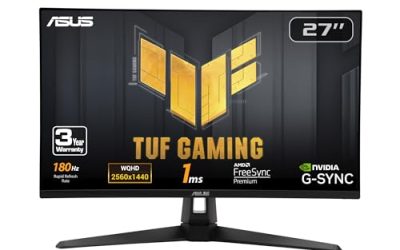
 4. ASUS TUF Gaming VG27AQ — Best Feature-Packed 1440p Pick |
| Check price on Amazon |
The best monitors to use with PS5 are the ones that match what the console can actually output, and that is a narrower list than most roundups admit. The PlayStation 5 tops out at 4K resolution and 120 frames per second, and it only reaches those numbers together when the monitor has an HDMI 2.1 port with enough bandwidth. A monitor can be excellent for PC gaming and still be a poor match for a PS5, because the console has no DisplayPort output and cannot use the high refresh rates that PC players take for granted over that connection.
That is why this guide focuses on console reality rather than spec-sheet maximums. Every pick below connects to a PS5 over HDMI, supports the refresh rates the console offers, and handles variable refresh rate so frame-rate dips do not turn into visible tearing. We cover one true 4K 120Hz option for players who want the full PS5 experience, plus three strong 1440p monitors for players who would rather spend less and still get smooth 120Hz play.
Our Top Picks
- LG 27GP850-B Ultragear Gaming Monitor 27-Inch QHD14.4"x24.2"x2"11.5 x 24.2 x 22.7 inches13.9 poundsCheck on Amazon
- ASUS TUF Gaming VG27AQ 27 Inch QHD 165Hz27” 2K WQHD IPS19.96 x 24.41 x 8.31 inches12.8 poundsCheck on Amazon
Top 3 picks at a glance
How to Choose a Monitor for PS5
Resolution: 4K or 1440p
A 4K monitor shows the console at its sharpest, and it is the only way to see native 4K games as the developers intended. A 1440p monitor is the value sweet spot: the PS5 supports 1440p output directly, the image is noticeably sharper than 1080p on a 27-inch screen, and 1440p panels with high refresh rates cost far less than 4K 120Hz panels.
HDMI 2.1 for 4K 120Hz
This is the single most important spec for a PS5 monitor. The PS5 needs HDMI 2.1 bandwidth to deliver 4K at 120Hz. A monitor with only HDMI 2.0 can still do 4K at 60Hz or 1440p at 120Hz, which covers most games, but it cannot do 4K and 120Hz at the same time. If you buy a 4K monitor for your PS5, check that at least one HDMI port is version 2.1 and that it supports the full 48 Gbps bandwidth, because some monitors label a port HDMI 2.1 while limiting its speed. For 1440p monitors, HDMI 2.0 is enough for 120Hz play, so do not pay extra for HDMI 2.1 unless you plan to move up to 4K later.
Refresh rate: 120Hz is the PS5 ceiling
The PS5 supports up to 120Hz, and a growing list of games offer a 120Hz performance mode. A 120Hz, 144Hz, or 165Hz monitor all handle this equally well on console, because the console never sends more than 120 frames per second. Higher refresh rates still matter if you also connect a PC, but for a PS5-only setup there is no benefit in chasing 240Hz. What matters more is that the monitor accepts a 120Hz signal over HDMI at your chosen resolution, which is not guaranteed on every high-refresh display, so confirm it in the specifications before buying.
Variable refresh rate and low input lag
The PS5 supports variable refresh rate over HDMI, and it makes a real difference in games whose frame rates fluctuate. With VRR enabled, the monitor adjusts its refresh rate to match the console frame by frame, which removes screen tearing and smooths out stutters without adding input delay. Look for HDMI Forum VRR support specifically, since that is the standard the PS5 uses. Input lag matters just as much: a good gaming monitor responds in a few milliseconds, while a TV or office monitor can add enough delay to make aiming feel sluggish. All four picks below are gaming monitors with low input lag, which is one reason they beat a cheap TV for competitive play.
HDR and panel type
HDR on the PS5 looks best on a monitor with real local dimming and solid peak brightness. A DisplayHDR 600 rating or better is a useful minimum to look for, while DisplayHDR 400 is entry level and mostly adds tone mapping rather than dramatic highlights. IPS panels are the safest all-round choice: wide viewing angles, accurate colors, and fast response times. VA panels offer deeper blacks and stronger contrast, which suits dark horror and cinematic games, but they can smear in fast motion. OLED is the premium option for contrast and response time, but true OLED gaming monitors remain expensive and raise burn-in questions for players who leave static HUD elements on screen for long sessions.
Size and extra features
For a desk setup, 27 inches is the sweet spot for both 1440p and 4K, because it keeps pixel density high without forcing you to sit far back. A 32-inch screen suits 4K better and works well if your desk is deep enough. Built-in speakers are handy for casual sessions, but they rarely sound good, so plan on a headset or separate speakers for serious play. A height-adjustable stand matters more than it sounds, since the correct eye level reduces neck strain over long sessions, and a USB hub is useful if you also plug in a keyboard, a headset dongle, or a charging cable.
Top Picks
1. Sony INZONE M9 — Best Overall 4K Monitor for PS5
- Size: 27 inches
- Panel: IPS
- Resolution: 3840 x 2160 (4K)
- Refresh rate: 144Hz
The Sony INZONE M9 is the most natural match for a PS5, because Sony built it with its own console in mind. Its 27-inch 4K IPS panel runs at 144Hz, and its two HDMI 2.1 ports deliver 4K at 120Hz from the PS5 with variable refresh rate supported. Full array local dimming with DisplayHDR 600 gives HDR games real highlights and deeper blacks than a typical edge-lit monitor, and the panel covers over 95 percent of the DCI-P3 color gamut, so colorful games look rich without oversaturation.
What sets the M9 apart is how it works with the console itself. It supports Auto HDR Tone Mapping, which lets the PS5 recognize the monitor and adjust its HDR output automatically, and an Auto Genre Picture Mode that switches the display settings when you move between games and movies. The 1ms gray-to-gray response time keeps fast motion clean, and the tripod-style stand leaves room underneath for a headset or a controller. Connectivity is generous: two HDMI 2.1 ports, one DisplayPort 1.4, USB-C with DisplayPort alternate mode, and a built-in KVM switch.
The trade-offs are the cost and the stand, which adjusts for height and tilt but not swivel, and the white finish, which will not suit every setup. Still, if you want the full 4K 120Hz PS5 experience with HDR that actually looks like HDR, the M9 is the pick that makes the fewest compromises.
2. LG UltraGear 27GP850-B — Best 1440p All-Rounder
- Size: 27 inches
- Panel: Nano IPS
- Resolution: 2560 x 1440 (QHD)
- Refresh rate: 165Hz, 180Hz overclock
The LG UltraGear 27GP850-B is the best value pick for most PS5 players. Its 27-inch Nano IPS panel runs at 2560 x 1440 with a 165Hz refresh rate that overclocks to 180Hz, and its 1ms gray-to-gray response keeps fast motion sharp in shooters and racing games. The PS5 outputs 1440p at 120Hz to this monitor without any fuss, and the wide 98 percent DCI-P3 color coverage makes games look vivid while staying accurate enough for photo and video work on the side.
Nano IPS is the key technology here. It delivers the fast response and wide viewing angles of IPS with richer color than a standard IPS panel, and DisplayHDR 400 certification adds entry-level HDR tone mapping. FreeSync Premium and G-SYNC Compatible certification cover adaptive sync, and the stand adjusts for height, tilt, pivot, and swivel, so dialing in a comfortable position is easy. Two HDMI 2.0 ports and one DisplayPort 1.4 cover a PS5 and a PC at the same time, and a USB hub sits on the back for accessories.
The main limitation is the HDMI 2.0 connection, which caps the PS5 at 1440p 120Hz or 4K 60Hz, but that is a fair trade at this level, since the monitor is not a 4K display anyway. If you want a sharp, fast, color-rich monitor for your PS5 without paying for a 4K HDMI 2.1 panel, this is the one to buy.
3. Gigabyte M27Q — Best 1440p Monitor With KVM
- Size: 27 inches
- Panel: IPS
- Resolution: 2560 x 1440 (QHD)
- Refresh rate: 170Hz
The Gigabyte M27Q stands out for players who share a desk between a PS5 and a PC. Its 27-inch IPS panel delivers 2560 x 1440 at 170Hz with a 0.5ms MPRT response time, and the built-in KVM switch lets one keyboard and mouse control two connected machines, switching between the PS5 and a PC at the press of a button. That is a genuinely useful feature in a mixed setup, and few monitors in this class offer it.
Image quality is strong for the class. The panel covers 92 percent of the DCI-P3 gamut, HDR Ready support adds tone mapping for HDR content, and FreeSync Premium keeps the frame rate and refresh rate in sync so tearing stays out of the picture. The PS5 runs 1440p at 120Hz over HDMI without issue, and the 170Hz headroom is there if you connect a PC that can push more frames. The stand adjusts for height and tilt, and the monitor includes USB-C alongside its HDMI and DisplayPort inputs.
The M27Q gives up a little color coverage to the LG pick above, and its HDR is basic rather than dramatic, but its combination of speed, KVM convenience, and USB-C connectivity makes it the best choice for a desk that does double duty. If your PS5 shares space with a work or gaming PC, this monitor earns its place.
4. ASUS TUF Gaming VG27AQ — Best Feature-Packed 1440p Pick
- Size: 27 inches
- Panel: IPS
- Resolution: 2560 x 1440 (QHD)
- Refresh rate: 165Hz
The ASUS TUF Gaming VG27AQ is the feature pick of this list. Its 27-inch IPS panel runs at 2560 x 1440 and 165Hz with a 1ms MPRT response time, and its Extreme Low Motion Blur Sync can run alongside variable refresh to cut motion blur without giving up tear-free play, which is a combination many monitors force you to choose between. HDR10 support adds tone mapping for HDR games and movies, and built-in speakers cover casual audio without a headset.
Adaptive-Sync and G-SYNC Compatible certification cover variable refresh on the PS5 over HDMI, and the monitor accepts a 120Hz signal from the console at 1440p, which is what matters for smooth play. The stand adjusts for height, tilt, swivel, and pivot, the panel mounts to a VESA arm, and the TUF build quality has a solid reputation for surviving daily use. Two HDMI 2.0 ports and a DisplayPort 1.2 input round out the connectivity.
The VG27AQ is an older design than the other picks, and its HDMI 2.0 ports mean it cannot do 4K 120Hz, but as a 1440p monitor it is not giving anything up. For players who want blur reduction, speakers, and full ergonomics in one package, it covers the most ground.
Comparison Table
| Monitor | Resolution | Refresh Rate | HDMI Version | HDR | Best For |
|---|---|---|---|---|---|
| Sony INZONE M9 | 4K (3840 x 2160) | 144Hz | 2.1 | DisplayHDR 600 | Full 4K 120Hz PS5 experience |
| LG UltraGear 27GP850-B | 1440p (2560 x 1440) | 165Hz | 2.0 | DisplayHDR 400 | Best all-round value |
| Gigabyte M27Q | 1440p (2560 x 1440) | 170Hz | 2.0 | HDR Ready | Shared PS5 and PC desk with KVM |
| ASUS TUF Gaming VG27AQ | 1440p (2560 x 1440) | 165Hz | 2.0 | HDR10 | Blur reduction and built-in speakers |
Setting Up Your PS5 With a New Monitor
Getting the picture right takes a few minutes in the PS5 settings, and it is worth doing properly. Connect the console with the HDMI cable that came in the box, since it is rated for the full bandwidth the PS5 needs, and plug it into the monitor HDMI port that supports the highest version. In the PS5 settings, open Screen and Video, then Video Output, and confirm the resolution, refresh rate, and HDR settings the console detects. Enable 120Hz output and VRR if your monitor supports them, and run the HDR calibration tool so the console learns the brightness limits of your display.
If the console reports 4K but not 120Hz, check that you are using the HDMI 2.1 port and not a secondary HDMI 2.0 port, and confirm the monitor input is set to enhanced or high-bandwidth mode in its own menu, since some monitors ship with that setting off by default. If 1440p output is missing, update the PS5 system software, since 1440p support arrived in a later update and older firmware will not offer it. For audio, a headset plugged into the DualSense controller is the simplest route, while the monitor headphone jack works if you prefer wired audio without draining the controller battery.
FAQ
Do I need a 4K monitor for PS5?
No. The PS5 looks great on a 1440p monitor, and 1440p at 120Hz covers the performance modes of most games. A 4K monitor is worth it if you play cinematic single-player games and want the sharpest image, or if you sit close to a large screen, but a good 1440p monitor is the better value for most players.
Can the PS5 do 120Hz on a 1440p monitor?
Yes. The PS5 supports 1440p output at 120Hz over HDMI, and many games offer a 120Hz performance mode. You need a monitor that accepts a 120Hz signal over HDMI at 1440p, which all four picks in this guide do. Enable 120Hz output in the PS5 video settings and check that your game has a performance mode turned on.
Is HDMI 2.1 required for PS5?
Only for 4K at 120Hz. For 1440p at 120Hz or 4K at 60Hz, HDMI 2.0 has enough bandwidth. If you buy a 4K monitor and want the full 120Hz experience, HDMI 2.1 is essential, and you should confirm the port supports full 48 Gbps bandwidth rather than a reduced-speed implementation.
Does VRR work on PS5 monitors?
Yes, the PS5 supports variable refresh rate over HDMI on compatible displays, and it works with both HDMI Forum VRR and HDMI 2.1 VRR implementations. Turn it on in the PS5 video settings. VRR smooths out frame-rate dips and removes tearing, and it is most noticeable in games with unlocked frame rates.
Should I buy a monitor or a TV for PS5?
A monitor suits a desk setup and competitive play: lower input lag, higher refresh rates, and a sharper image at close range. A TV suits a living room and cinematic games, with a bigger screen and usually better built-in speakers. If you sit at a desk, buy a monitor. If you play from a couch, a TV is the better fit.
Conclusion
The best monitors to use with PS5 start with an honest match between the monitor and the console. If you want everything the PS5 can do, the Sony INZONE M9 delivers 4K at 120Hz over HDMI 2.1 with HDR that holds up in dark scenes, and its console-aware features remove setup guesswork. If you would rather spend less, the LG UltraGear 27GP850-B is the best all-rounder, with a fast Nano IPS panel and rich color at 1440p. The Gigabyte M27Q is the pick for a shared PS5 and PC desk thanks to its KVM switch, and the ASUS TUF Gaming VG27AQ covers blur reduction, speakers, and ergonomics in one package.
Whichever you choose, check three things before you buy: an HDMI port that supports your target resolution and refresh rate together, VRR support over HDMI, and low input lag. Get those right, and any of these four monitors will make your PS5 look and feel better than it does on a random display. Start with the resolution that fits your budget, confirm the HDMI version, and let the rest of the features follow.
Disclosure: As an Amazon Associate, we earn from qualifying purchases.
Related guides
More from Amazon
Programs that pair well with the guide above. Offers and eligibility are set by Amazon and may change.
A free business account with business pricing and bulk-buying tools for work, shop or home office.
Create a business accountFree shipping on eligible items, Prime Video and more. Eligible new members can start with a free trial.
Start a Prime free trialAudiobooks and podcasts to listen to on the go. Eligible new members can start with a free trial.
Try Audible freeAd-free music streaming. Eligible new subscribers can start with a free trial.
Try Music Unlimited freeAs an Amazon Associate we earn from qualifying purchases.