Our Short List of 3

- Best for: Everyday work, media, and second-screen setups on a small desk.
- Screen size: 20 inches
- Resolution: 1600 x 900
- Refresh rate: up to 75Hz
- Response time: 5 ms
- Best for: Reading, documents, and shared viewing where text sharpness matters most.
- Screen size: 20 inches (19.5 inches viewable)
- Resolution: 1920 x 1080
- Panel type: SuperClear MVA
- Contrast ratio: 3,000:1
- Best for: Basic office work, shop counters, and tight desks that need a small second screen.
- Screen size: 19.5 inches
- Resolution: 1366 x 768
- Refresh rate: 60Hz
- Response time: 5 ms
All 3 Picks at a Glance
| Product | Specs | Action |
|---|---|---|
| Sceptre E205W-16003R |
| Check price on Amazon |
| ViewSonic VA2055SM |
| Check price on Amazon |
| Acer K202HQL Abi |
| Check price on Amazon |
A 20-inch monitor is the right call when desk space is tight and a laptop screen feels cramped. It holds a full document, a spreadsheet, or a video call window at a comfortable size, yet it leaves room for a notebook, a lamp, or a second small screen beside it. Dorm rooms, kitchen counters, checkout counters, and crowded home offices all suit this size, and the compact footprint also makes it easy to move between rooms. Because most 20-inch monitors use simple stands and standard mounts, setup stays quick and the screen stays out of the way.
This guide compares three 20-inch class monitors that are still listed on Amazon, covering a 75Hz Sceptre with built-in speakers, a 1080p ViewSonic with a wide-angle panel, and a compact Acer for basic work. Each pick is measured by resolution, ports, speakers, and mounting, so you can match the screen to your desk and your daily tasks.
Our Top Picks
Top 3 picks at a glance
Quick Picks
As an Amazon Associate we earn from qualifying purchases
| Product | Best for | Key spec from title |
|---|---|---|
| Sceptre E205W-16003R | Everyday work and media | 20-inch 1600×900 75Hz with built-in speakers |
| ViewSonic VA2055SM | Sharp text and wide viewing angles | 20-inch 1080p MVA panel with dual speakers |
| Acer K202HQL Abi | Basic tasks on a tight desk | 19.5-inch HD 1366×768 with HDMI and VGA |
How to Choose
Resolution and text sharpness
Resolution decides how crisp text and images look on a 20-inch screen, and the gap between the common options is easy to see. A 1366×768 panel shows documents and web pages clearly enough for basic work, but text edges look softer and less fits on screen at once. A 1600×900 panel adds a useful step up in sharpness and workspace, which suits long documents and spreadsheets. A 1920×1080 panel is the sharpest of the three, with fine text and room for two windows side by side. If you read for hours each day, choose the highest resolution your budget allows.
Ports and cables
Ports decide whether the monitor connects to your computer without extra adapters, so check the back of your PC before you buy. HDMI is the most common modern connection and carries both picture and sound on one cable. VGA still appears on older desktops, office machines, and checkout hardware, while DVI sits between the two on older graphics cards. Some monitors in this size class include a VGA cable in the box, and a few include a DVI cable as well. Match at least one port on the monitor to a port on your computer, and keep a spare cable handy if your setup changes often.
Speakers and sound
Built-in speakers save desk space and keep wiring simple, but they are small and thin-sounding on nearly every 20-inch monitor. They work well for video calls, notification sounds, and casual video, where clarity matters more than depth. They fall short for music, movies, and games, where even a basic pair of external speakers or headphones sounds fuller. If you watch video often, plan on headphones or a small speaker set beside the screen. When you compare picks, treat built-in speakers as a convenience for calls rather than a reason to choose one monitor over another.
Mounting and desk fit
A 20-inch monitor measures about 18 inches wide with its stand, so measure your desk before you order and leave room for a keyboard and mouse. Most models in this class use tilt-only stands that adjust a few degrees forward and back, with no height adjustment, which makes the viewing angle harder to tune on a tall desk. A VESA mount solves that, letting you hang the screen on an arm or a wall bracket and free the desk surface underneath. Check whether the mount pattern is 75 x 75 mm or 100 x 100 mm, and confirm the monitor lists VESA compatibility before you buy an arm.
The 3 Best Options
Sceptre E205W-16003R
- Best for: Everyday work, media, and second-screen setups on a small desk.
- Screen size: 20 inches
- Resolution: 1600 x 900
- Refresh rate: up to 75Hz
- Response time: 5 ms
Everyday work, media, and second-screen setups on a small desk.
Resolution is 1600×900 rather than full 1080p, and the stand tilts only.
The Sceptre E205W-16003R is the most rounded 20-inch monitor in this group, pairing a 1600×900 panel with a 75Hz refresh rate that keeps scrolling and casual video a little smoother than a standard 60Hz screen. Two HDMI ports plus a VGA port cover modern laptops and older desktops alike, and built-in speakers handle calls and short clips without extra hardware on the desk. The slim frame and light 4.43-pound body suit small desks, dorm rooms, and second-screen setups, while the 250 cd/m2 brightness keeps the picture readable in a lit room.
ViewSonic VA2055SM
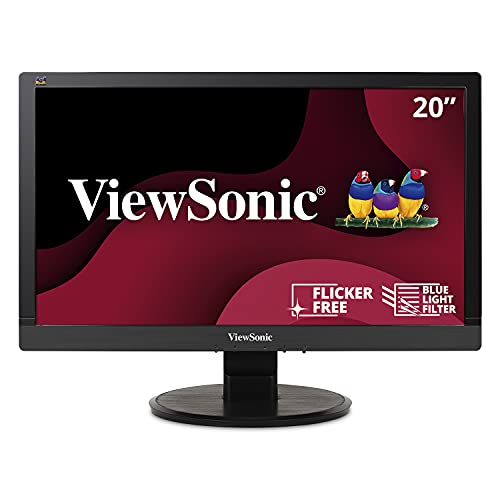
- Best for: Reading, documents, and shared viewing where text sharpness matters most.
- Screen size: 20 inches (19.5 inches viewable)
- Resolution: 1920 x 1080
- Panel type: SuperClear MVA
- Contrast ratio: 3,000:1
Reading, documents, and shared viewing where text sharpness matters most.
No HDMI port, so connect through DVI or VGA, and the 25 ms response time is slow for fast-paced games.
The ViewSonic VA2055SM is the only pick here with a full 1920×1080 panel, and that shows in crisp text, clean window edges, and room for two documents side by side. Its SuperClear MVA panel holds color and contrast steady at wide angles, so the picture stays readable when you glance at it from the side or share it with someone sitting nearby. Dual 2W speakers cover calls and short video, and the box includes both a VGA cable and a DVI cable. The 20-inch frame with a 19.5-inch viewable area fits the same tight desks as the other picks while giving you the sharpest image of the three.
Acer K202HQL Abi
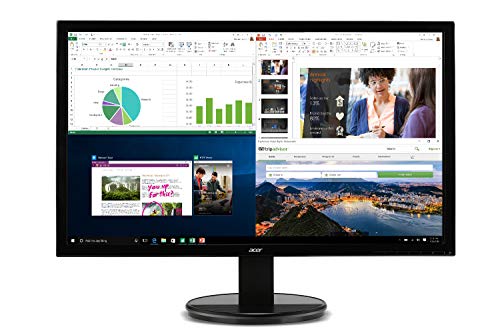
- Best for: Basic office work, shop counters, and tight desks that need a small second screen.
- Screen size: 19.5 inches
- Resolution: 1366 x 768
- Refresh rate: 60Hz
- Response time: 5 ms
Basic office work, shop counters, and tight desks that need a small second screen.
Lowest resolution of the three at 1366×768, and the 19.5-inch viewable panel sits in the 20-inch class rather than measuring a full 20 inches.
The Acer K202HQL Abi is the simplest monitor here, built for basic tasks where a compact screen and a low footprint matter more than resolution. Its 19.5-inch HD panel shows documents, email, and web pages clearly, and its 5 ms response keeps everyday motion smooth. One HDMI port and one VGA port cover most laptops and desktops, a VGA cable comes in the box, and the 100 x 100 mm VESA pattern lets you mount it on an arm or a wall bracket when desk space runs out. The tilt range of minus 5 to 25 degrees helps you angle the screen on a low desk or a counter.
Which One Fits Your Situation
Second screen for a laptop
A second screen gives a laptop room for email, chat, or a reference document beside the main window, and any of these three works. The ViewSonic suits long reading sessions because its 1080p panel keeps small text crisp, while the Sceptre suits mixed use because its two HDMI ports make switching between machines simple. Pick the Acer when the second screen only needs to show a dashboard or a queue.
Small desk or dorm room
A 20-inch monitor leaves space for a keyboard, a notebook, and a drink on a narrow desk, and all three picks measure about 18 inches wide. The Sceptre is the lightest of the three, which helps when the desk moves or the room gets rearranged. If the desk has no depth for a stand, the Acer and its VESA mount pair well with a cheap arm that lifts the screen off the surface.
Basic office work and documents
Documents, spreadsheets, and email need sharp text and a stable image more than they need speed or color depth. The ViewSonic leads here with its 1080p MVA panel and wide viewing angles, which keep text readable across a full workday. The Sceptre is a solid middle ground with its 1600×900 panel and 75Hz refresh, while the Acer covers light workloads where the screen mainly shows one window at a time.
Watching video and video calls
Video calls need a clear picture and working sound, and all three picks cover that with built-in speakers and a webcam-friendly size. The Sceptre fits best because its two HDMI ports connect a laptop and a streaming stick without swapping cables, and its 75Hz panel keeps motion smooth. The ViewSonic adds sharper video, while the Acer suits a spare room or a kitchen counter where a basic screen is enough.
Common Mistakes
- Buying a 20-inch monitor without checking the ports on your computer, then finding you need an adapter for HDMI, DVI, or VGA.
- Expecting full 1080p sharpness from a 1600×900 or 1366×768 panel, and being unhappy with soft text after setup.
- Counting on built-in speakers for music or movies, when even basic external speakers or headphones sound much fuller.
- Forgetting to measure the desk, then finding the 18-inch-wide screen leaves no room for a keyboard and mouse.
- Assuming every small monitor mounts on an arm, when some models in this size class lack VESA mounting holes.
Frequently Asked Questions
Is a 20-inch monitor big enough for office work?
Yes, a 20-inch monitor is big enough for most office work, because it shows a full document or spreadsheet at a readable size without crowding a small desk. It suits email, word processing, video calls, and web browsing, and it works well as a second screen beside a laptop. If you often compare two large documents side by side, a larger screen gives more room.
What resolution should a 20-inch monitor have?
A 1920×1080 panel gives the sharpest text on a 20-inch screen and suits long reading sessions and fine detail. A 1600×900 panel is a solid middle ground that still looks crisp for documents and video. A 1366×768 panel is usable for basic tasks, but text looks softer and less fits on screen, so choose it only when funds are tight or the screen shows simple content.
Do 20-inch monitors have HDMI?
Most current 20-inch monitors include at least one HDMI port, and some include two, which covers modern laptops, desktops, and streaming sticks. Older models may rely on VGA or DVI instead, so check the port list before you buy. If your computer only has a newer USB-C port, you will need an adapter or a dock, since none of the picks in this guide include USB-C video input.
Can I mount a 20-inch monitor on a monitor arm?
Many 20-inch monitors support VESA mounting, but not all do, so confirm the mount pattern before you buy an arm. The Acer in this guide uses a 100 x 100 mm pattern, while other models may use 75 x 75 mm or none at all. A matching arm frees desk space and sets height and angle precisely, which helps where a tilt-only stand cannot reach a comfortable viewing position.
Related guides
More from Amazon
Programs that pair well with the guide above. Offers and eligibility are set by Amazon and may change.
A free business account with business pricing and bulk-buying tools for work, shop or home office.
Create a business accountFree shipping on eligible items, Prime Video and more. Eligible new members can start with a free trial.
Start a Prime free trialAudiobooks and podcasts to listen to on the go. Eligible new members can start with a free trial.
Try Audible freeAd-free music streaming. Eligible new subscribers can start with a free trial.
Try Music Unlimited freeAs an Amazon Associate we earn from qualifying purchases.