Our Short List of 3

- Best for: Mac users who want a quiet, tiny main computer for work and creative apps.
- Apple M4 chip with 10-core CPU and 10-core GPU
- 16GB unified memory
- 256GB SSD storage
- Gigabit Ethernet

- Best for: Home office workers who want dual 4K displays and smooth everyday Windows performance.
- Intel 12th Gen Alder Lake N100 processor, 4 cores and 4 threads, up to 3.4GHz
- 16GB DDR4 RAM
- 500GB M.2 SSD
- Dual HDMI display output supporting 4K at 60Hz
- Best for: Small offices that need a compact Windows box with strong wired networking and plenty of USB ports.
- Intel Core i3-10110U processor
- 8GB DDR4 RAM
- 256GB SSD
- 4K dual display output
All 3 Picks at a Glance
| Product | Specs | Action |
|---|---|---|
| Apple Mac mini M4 |
| Check price on Amazon |
| Beelink Mini S12 Pro |
| Check price on Amazon |
| GMKtec NucBox G3 Pro |
| Check price on Amazon |
Choosing a mini desktop is a decision about desk space and daily comfort, not raw horsepower. A full tower hides under a desk and gathers dust, while a mini desktop sits beside a monitor, behind it on a VESA mount, or on a shelf, and still runs office apps, browsers, and media without complaint. The trade is simple: a smaller box means fewer upgrade slots and less cooling headroom, so the chip, memory, and ports inside matter far more than the size outside. A wrong pick leaves a desk cluttered or a machine struggling with daily multitasking.
This guide is for home office workers who want a tidy desk, for media center builders who need quiet 4K playback, and for small business owners setting up compact workstations. Each pick below comes from its Amazon listing title and listed specifications, with the memory, storage, processor, and display outputs the listing itself states. Ports, memory size, and storage size are covered too, so each pick matches its desk.
Our Top Picks
Top 3 picks at a glance
Quick Picks
As an Amazon Associate we earn from qualifying purchases
| Product | Best for | Key spec from title |
|---|---|---|
| Apple Mac mini M4 | A silent main computer for Mac users | M4 chip, 10-core CPU and 10-core GPU, 16GB unified memory, 256GB SSD |
| Beelink Mini S12 Pro | Everyday office work on a small budget footprint | Intel N100 up to 3.4GHz, 16GB DDR4 RAM, 500GB SSD |
| GMKtec NucBox G3 Pro | A compact Windows workstation with wired networking | Intel Core i3-10110U, 8GB DDR4 RAM, 256GB SSD |
How to Choose
Match the processor to the daily workload
A mini desktop processor sets the ceiling for everything else, so begin with the work the machine will actually do. An Intel N100 handles browsing, documents, video calls, and media playback with ease, while a Core i3 adds headroom for heavier multitasking and larger spreadsheets. Apple silicon in the Mac mini suits creative apps and long sessions of mixed work. Count the apps that stay open at once: a dozen browser tabs plus a video call plus a spreadsheet is a heavier load than one task at a time, and a chip with more threads keeps that mix smooth. A little extra headroom today also keeps the machine useful when new apps arrive next year.
Get enough memory and storage from day one
Memory and storage decide how a mini desktop feels after six months, and many small boxes make upgrades awkward or impossible. Sixteen gigabytes of memory keeps a browser, office suite, and chat app open together without constant reloading, while eight gigabytes fits lighter routines but fills up fast with many tabs. A 256GB solid state drive holds the system software and core apps, yet photo libraries and game installs outgrow it quickly, so a 500GB drive or a second slot is worth having. Check whether the memory is soldered or socketed before buying, since a soldered board locks the choice in forever. A second storage slot gives later room for photos and documents without opening the case often.
Count the ports and displays before the desk is set
Ports are the quiet weak point on a mini desktop, because a tiny chassis leaves no room for add-in cards. Two HDMI outputs or a mix of HDMI and DisplayPort lets one box drive two monitors, which matters for office work and trading screens. Front USB ports save reaching behind the box for a flash drive, while a USB-C port with display output adds a third screen option on some models. Wired Ethernet keeps video calls stable in a busy household, and a VESA mount in the box lets the whole computer disappear behind a monitor. A quick port count on the listing avoids buying hubs and adapters after the box arrives.
Watch where small boxes cut corners
Low cost mini desktops save money in places that only show up later, so read the listing with care. Some ship with a single memory stick that halves memory bandwidth, others use a slower SATA drive in the second slot, and a few bundle a short power cable that limits where the box can sit. Cooling is another corner: a single small fan can grow loud under sustained load, and a passively cooled box can throttle during long video exports. Confirm system software is included, since a barebones unit arrives with no system software and needs a license and install. Reading the full listing twice beats returning a box that misses a basic feature.
The 3 Best Options
Apple Mac mini M4
- Best for: Mac users who want a quiet, tiny main computer for work and creative apps.
- Apple M4 chip with 10-core CPU and 10-core GPU
- 16GB unified memory
- 256GB SSD storage
- Gigabit Ethernet
Mac users who want a quiet, tiny main computer for work and creative apps.
Memory and storage are not user upgradable, so choose the configuration with care before ordering.
The Mac mini M4 turns a five inch square into a genuine main computer, and it suits anyone already living in the Apple ecosystem. Its M4 chip runs office work, photo editing, and browser heavy days without the fan noise that larger desktops produce, and the tiny footprint leaves a desk clear for a keyboard, a notebook, and a coffee mug. Three Thunderbolt 4 ports on the back plus two USB-C ports on the front give it more modern connectivity than most boxes its size, and Gigabit Ethernet keeps wired networking simple. Setup takes minutes, and the small square fits on a shelf beside books and speakers.
Watch out for: Memory and storage are not user upgradable, so choose the configuration with care before ordering.
Beelink Mini S12 Pro
- Best for: Home office workers who want dual 4K displays and smooth everyday Windows performance.
- Intel 12th Gen Alder Lake N100 processor, 4 cores and 4 threads, up to 3.4GHz
- 16GB DDR4 RAM
- 500GB M.2 SSD
- Dual HDMI display output supporting 4K at 60Hz
Home office workers who want dual 4K displays and smooth everyday Windows performance.
The N100 is built for everyday tasks, so heavy video editing and demanding games will feel slow.
The Beelink Mini S12 Pro is the practical pick for a home office that needs a capable Windows machine without a tower under the desk. Its Intel N100 processor covers documents, spreadsheets, video meetings, and streaming without fuss, and the sixteen gigabytes of memory keep a busy browser from stalling. Dual HDMI outputs drive two 4K displays, which makes it a strong fit for a dual monitor workstation, and the compact case tucks behind a monitor or sits flat on a shelf out of the way. It also works well as a spare computer in a guest room or a study corner.
Watch out for: The N100 is built for everyday tasks, so heavy video editing and demanding games will feel slow.
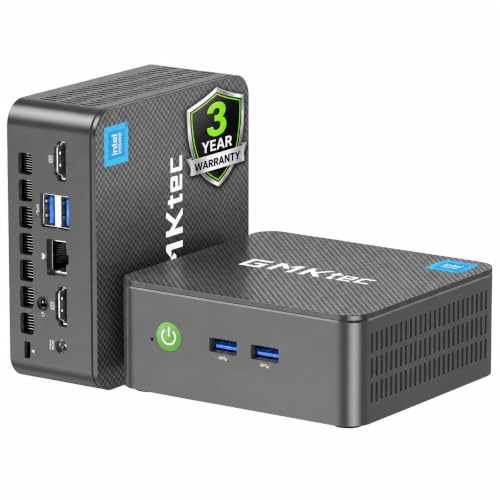
GMKtec NucBox G3 Pro
- Best for: Small offices that need a compact Windows box with strong wired networking and plenty of USB ports.
- Intel Core i3-10110U processor
- 8GB DDR4 RAM
- 256GB SSD
- 4K dual display output
Small offices that need a compact Windows box with strong wired networking and plenty of USB ports.
Eight gigabytes of memory limits heavy multitasking, so close unused apps or plan a memory upgrade.
The GMKtec NucBox G3 Pro fits a small business desk or a home workstation where a wired connection and familiar Windows software matter most. Its Core i3 processor handles office suites, browsers, and video calls with room to spare, and the Intel 2.5 gigabit Ethernet port gives wired networking a clear edge over wireless in a crowded office. Four USB 3.2 ports cover a keyboard, mouse, printer, and external drive at once, and the included VESA mount hides the whole machine behind a monitor for a clean setup. The compact case also keeps cables short and the workspace tidy day after day.
Watch out for: Eight gigabytes of memory limits heavy multitasking, so close unused apps or plan a memory upgrade.
Which One Fits Your Situation
You want a tiny main computer for Apple apps
Pick the Apple Mac mini M4. Its M4 chip and unified memory handle office work, photo apps, and browser heavy days in a box that barely takes up desk space, and the Thunderbolt ports connect fast external drives and modern displays. The sealed design means the configuration chosen at purchase is the one kept for years, so this pick rewards buyers who know their memory and storage needs up front. Front USB-C ports make quick connections easy every day.
You need two monitors for office work
Pick the Beelink Mini S12 Pro. Dual HDMI outputs run two 4K displays from a box smaller than a paperback, and sixteen gigabytes of memory keeps a spreadsheet, a browser full of tabs, and a video call open together. It is the most straightforward choice for a home office where the desk is small but the workload spans two screens. Cable setup stays simple with two identical HDMI outputs on the back.
You run a small office with wired networking
Pick the GMKtec NucBox G3 Pro. Its 2.5 gigabit Ethernet port and four USB 3.2 ports suit a desk with a printer, an external drive, and a wired network drop, and the VESA mount keeps the machine out of sight behind a monitor. Windows software compatibility is broad, so existing office apps install without surprises. Staff can swap in a spare unit quickly if one machine needs service.
You want the quietest box for a living room media center
Pick the Beelink Mini S12 Pro for a media center, or the Mac mini M4 if the household already uses Apple apps. The Beelink drives a 4K television over HDMI and sips little electricity during long playback sessions, while the Mac mini stays silent and handles streaming plus light creative work. Either one hides behind a television or on a shelf without the hum of a tower. Both options stay out of sight and run quietly during films and shows.
Common Mistakes
- Buying a mini desktop with eight gigabytes of memory for a workflow that keeps twenty browser tabs open all day.
- Forgetting to check display outputs, then finding the box cannot drive a second monitor.
- Choosing a barebones unit and only later learning it ships without any system software.
- Ignoring storage size, then filling a 256GB drive with photos and apps within months.
- Placing a mini desktop in a closed cabinet where heat builds up and the fan runs constantly.
Frequently Asked Questions
Is a mini desktop fast enough for office work?
Yes, for most office work a modern mini desktop is fast enough. A current N100, Core i3, or M4 chip runs browsers, office suites, video calls, and email at the same time without trouble. The limits appear with heavy video editing, large data work, or demanding games, where a larger desktop with a discrete graphics card fits better. A solid state drive and enough memory matter just as much.
Can a mini desktop drive two monitors?
Many can, but it depends on the outputs on the specific model. The Beelink Mini S12 Pro and the GMKtec NucBox G3 Pro both list dual display support in their Amazon titles, and the Mac mini M4 supports multiple displays through Thunderbolt and HDMI. Check the listing for HDMI, DisplayPort, and USB-C display support before ordering cables. Adapters can add outputs, but native ports always run more reliably.
Can I upgrade memory and storage later?
It varies by model, so check the listing and the manual before buying. Some mini desktops have socketed memory and a second storage slot, which makes upgrades simple. Others, such as the Mac mini M4, solder memory and storage to the board, so the configuration chosen at purchase stays fixed for the life of the machine. The manual usually lists upgrade steps and the parts each slot accepts.
Does a mini desktop need a separate monitor and keyboard?
Yes, a mini desktop is only the computer itself, with no screen, keyboard, or mouse in the box. That is part of the appeal: an existing monitor, keyboard, and mouse connect directly, and a VESA mount can attach the box to the back of a monitor. Budget for a display and input devices when setting up a first workstation. Check the box contents, since some bundles add them.
Related guides
More from Amazon
Programs that pair well with the guide above. Offers and eligibility are set by Amazon and may change.
A free business account with business pricing and bulk-buying tools for work, shop or home office.
Create a business accountFree shipping on eligible items, Prime Video and more. Eligible new members can start with a free trial.
Start a Prime free trialAudiobooks and podcasts to listen to on the go. Eligible new members can start with a free trial.
Try Audible freeAd-free music streaming. Eligible new subscribers can start with a free trial.
Try Music Unlimited freeAs an Amazon Associate we earn from qualifying purchases.