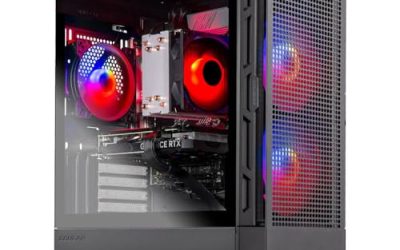
The best gaming PC maker depends on what you value most. Alienware, HP OMEN and Lenovo Legion suit buyers who want big-company support and frequent sales. iBUYPOWER and CyberPowerPC suit buyers who want the most GPU for the money. Corsair and NZXT suit buyers who want standard, upgrade-friendly parts, and boutiques like Falcon Northwest and Maingear suit buyers who will pay extra for hand-built quality and white-glove service. Pick the maker type first, then the model, because the maker decides your warranty, your upgrade path and how much of your money goes to the GPU.
As an Amazon Associate we earn from qualifying purchases at no extra cost to you.


Our Top Picks

Top 3 picks at a glance
Quick comparison of the best gaming PC makers
| Maker | Best for | Key traits | Typical price range |
|---|---|---|---|
| iBUYPOWER / CyberPowerPC | Best value per dollar | System integrators using off-the-shelf parts, wide GPU choice, frequent promotions | Usually $700–$3,500 |
| Alienware (Dell) | Support and premium design | Aurora and Area-51 lines, large service network, some custom chassis and cooling | Usually $1,500–$5,000+ |
| HP OMEN / Lenovo Legion | Mainstream buyers who wait for sales | Large retail presence, frequent discounts, some proprietary parts in lower tiers | Usually $900–$3,500 |
| MSI / ASUS ROG | Buyers who want matched components from a parts maker | Own motherboards, GPUs, cases and coolers, so tuning is consistent | Usually $900–$4,000 |
| Corsair / NZXT | Upgradeable, clean builds | Standard ATX parts, brand-name PSU, cooler and case, tidy cable work | Usually $1,500–$5,000+ |
| Falcon Northwest / Maingear / Digital Storm | Premium hand-built systems | Custom configuration, burn-in testing, direct builder support, longer service relationships | Usually $2,500–$8,000+ |
Best for value: iBUYPOWER and CyberPowerPC
These integrators build around retail parts and let you pick a specific CPU, GPU, RAM and SSD. Their pricing is usually the most aggressive for a given GPU tier. They suit first-time prebuilt buyers who want a mainstream GPU without paying a brand premium.
Trade-off: component quality varies by configuration. Check the PSU brand and wattage, the RAM configuration and the motherboard model on every listing. Support is adequate, but you are often dealing with individual part warranties on top of the system warranty.
Best for support and premium design: Alienware
Alienware is the safest big-brand choice if you want a recognizable service network and a designed chassis. The Aurora line is the mainstream tier and the Area-51 line is the high-end tier, aimed at flagship GPUs. It suits buyers who want one company to call and care more about experience than raw price efficiency.
Trade-off: you pay a premium, and some designs limit upgrades through chassis, cooling or power supply choices. Confirm the PSU wattage and available expansion space before assuming you can drop in a bigger GPU later.
Best for sales-driven mainstream buying: HP OMEN and Lenovo Legion
HP and Lenovo sell through direct storefronts and big retailers, and discounting is common. Shoppers who can wait for a promotion often get a well-balanced RTX 5060 Ti or RTX 5070 class system at a fair price. Lenovo’s Legion Tower line and HP’s OMEN desktops cover entry through high-end tiers.
Trade-off: lower-tier models more often use proprietary front panel connectors, smaller PSUs or limited cooling. List prices can look inflated until a sale lands, so compare the sale price rather than the crossed-out one.
Best for matched components: MSI and ASUS ROG
MSI and ASUS make motherboards, graphics cards and cases themselves, so the BIOS, GPU and cooling are often tuned together. This suits buyers who like a known motherboard and GPU brand. MSI also sells many mid-range models through retail channels, which makes comparison easy.
Trade-off: configurations are fixed rather than custom, and you may get a house-brand PSU or cooler. Read the full spec sheet instead of relying on the GPU name in the title.
Best for upgradeable, clean builds: Corsair and NZXT
Corsair builds with its own PSUs, coolers, memory and cases. NZXT sells its Player series with NZXT parts and a clean assembly style. Both lean on standard ATX-style layouts, so replacing a GPU, adding storage or swapping a cooler later is straightforward. They suit buyers who plan to keep the case and PSU through two GPU generations.
Trade-off: these systems usually cost more than an equivalent integrator build. You are paying for part quality, cable management and a cleaner look rather than extra frames.
Best premium boutique: Falcon Northwest, Maingear and Digital Storm
Boutiques configure each system to order and typically do extended stress testing before shipping. Falcon Northwest’s Tiki and Talon are well-known examples of compact and mid-tower custom builds. They suit buyers with flagship budgets, quiet-operation goals, or a need for a builder who handles repairs directly.
Trade-off: price. A boutique system can cost well above the sum of its parts, and the extra spending only pays off if you will use the service and customization.
Match your situation to a maker type
| Your situation | Choose | Why |
|---|---|---|
| Strict budget, want the best GPU tier you can afford | iBUYPOWER or CyberPowerPC | Lowest premium over parts cost, flexible configurations |
| Want one phone number for problems | Alienware, HP or Lenovo | Large service networks and on-site or depot options, depending on plan |
| Plan to upgrade the GPU in 2–3 years | Corsair, NZXT or a custom integrator build | Standard PSU and case dimensions, higher PSU headroom |
| Want a compact, quiet or showpiece PC | Boutique or Alienware | Custom cooling, tuning and finish |
| Hate waiting and want a store-bought price | HP, Lenovo or MSI | Frequent retail and direct promotions |
How to check any maker’s price: a worked example
Add up the parts before you trust the price. This illustrative RTX 5070 Ti class build uses typical market prices, not a specific listing:
- GPU (RTX 5070 Ti): about $750
- CPU (8-core gaming chip): about $300
- Motherboard: about $150
- 32 GB DDR5: about $100
- 2 TB NVMe SSD: about $120
- 850 W PSU: about $110
- Case: about $90
- CPU cooler: about $60
The total is about $1,680. If a maker quotes $2,000, the premium is $320, or about 19%. As a rule of thumb, under 15% is excellent, 15–25% is normal for a major brand with warranty and support, and above 30% needs a clear reason such as custom tuning, burn-in testing or exceptional service. Recheck the math if a listing hides the motherboard or PSU model, because those are the parts that get cut to hit a price.
Check the power supply before you check the brand
Add the GPU’s rated board power, the CPU’s peak power and roughly 75 W for fans, drives and the motherboard. For an RTX 5070 Ti at 300 W, a CPU peaking near 160 W and 75 W for everything else, the budget is about 535 W. NVIDIA’s published recommendation for that card is a 750 W PSU, which leaves headroom for transient spikes. For reference, NVIDIA recommends about 650 W for an RTX 5070, 750 W for an RTX 5070 Ti, 850 W for an RTX 5080 and 1000 W for an RTX 5090, per its published specifications.
If a maker pairs a high-end GPU with a PSU below those figures, treat that as a reason to walk away or to demand a higher-wattage option.
Warranty and support checklist
- Length and type: look for at least one year, with two or three years on better plans. Check whether service is on-site, depot or you-ship.
- Shipping cost for repairs: some makers cover both directions and others cover only one.
- Upgrade policy: confirm that opening the case or swapping a GPU does not void the warranty.
- Return window: 14 to 30 days is common. Ask about restocking fees.
- Parts disclosure: the listing should name the motherboard, PSU brand and wattage, RAM speed and layout, and SSD model.
- Memory layout: two sticks (dual channel) is the minimum for gaming. A single stick can cost performance on many systems.
Red flags across makers
- A listing that says “gaming PSU” with no brand or wattage.
- A 16 GB single-stick configuration on a mid-range or higher system.
- A very small SSD, such as 500 GB, on a system sold for modern AAA games.
- A high-end GPU in a case with minimal ventilation and a single rear fan.
- Proprietary motherboard or PSU shapes, which limit future upgrades.
Frequently Asked Questions
Which gaming PC maker is best overall?
No single maker wins for everyone. iBUYPOWER and CyberPowerPC usually give the most hardware per dollar. Alienware, HP and Lenovo offer larger support networks, and Corsair and NZXT give the cleanest upgrade path. Choose based on whether price, support or upgradeability matters most to you.
Are boutique builders like Falcon Northwest worth the money?
They are worth it if you value custom configuration, extensive testing and direct builder support. If you only want frame rates for the money, an integrator or a major brand on sale will deliver more per dollar. Boutiques make the most sense at the high end, where service and tuning matter more.
Is a prebuilt from a big brand a bad deal compared with building yourself?
Not necessarily. A premium of about 15–25% over parts cost is common, and it covers assembly, testing, Windows and a warranty. During sales, some prebuilts price near or even below the cost of buying parts separately, particularly with the GPU, which is usually the hardest part to find at a fair price.
Do I need to worry about proprietary parts?
Yes, if you plan to upgrade. Proprietary motherboards, front panel connectors or power supplies can limit future GPU, cooler and case swaps. Look at the maker’s published spec sheet or ask support whether the motherboard and PSU use standard sizes and connectors.
How much PSU wattage should a prebuilt include?
Match the GPU manufacturer’s recommended minimum, then add headroom if you plan to upgrade. A mid-range RTX 5060 Ti system is typically fine on 600 W, but an RTX 5070 Ti or RTX 5080 system should be at 750 W or 850 W, respectively. The PSU should be from a recognizable brand, not a generic unit.
Should I buy direct from the maker or from a retailer?
Buying direct often gives more configuration options and clearer warranty terms, while retailers can offer faster shipping and easier returns. Compare the return window and who handles warranty claims in each case, because the exact terms vary by seller and region.
Related guides
More from Amazon
Programs that pair well with the guide above. Offers and eligibility are set by Amazon and may change.
A free business account with business pricing and bulk-buying tools for work, shop or home office.
Create a business accountFree shipping on eligible items, Prime Video and more. Eligible new members can start with a free trial.
Start a Prime free trialAudiobooks and podcasts to listen to on the go. Eligible new members can start with a free trial.
Try Audible freeAd-free music streaming. Eligible new subscribers can start with a free trial.
Try Music Unlimited freeAs an Amazon Associate we earn from qualifying purchases.