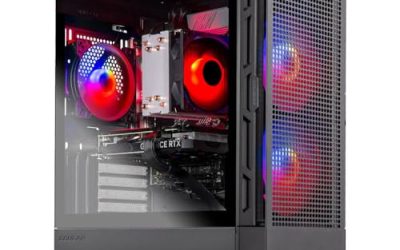
For most buyers in 2026, the best prebuilt PC company is one that uses standard, upgradeable parts, names every component, and backs the build with a clear warranty. NZXT, Corsair, and CyberPowerPC/iBUYPOWER cover most needs, with Maingear and Falcon Northwest at the premium end. Big OEMs such as Alienware, HP Omen, and Lenovo Legion suit buyers who want retail availability and fast support. The right company depends on your budget, how much you plan to upgrade, and how much of a markup you will accept for assembly and support.
Quick comparison of the best prebuilt PC companies
Price ranges are general market ranges for gaming-oriented desktops. Specific configurations, sales, and GPU pricing change often, so confirm the parts list before buying.
| Company | Best for | Typical strengths | Typical gaming price range |
|---|---|---|---|
| NZXT | Best overall for clean, standard-part builds | ATX-style parts, own cases and coolers, simple ordering | $1,200–$3,500 |
| Corsair | Best for matched, upgrade-friendly parts | Corsair PSU, RAM, cooling, and cases in one build | $1,800–$5,000+ |
| CyberPowerPC / iBUYPOWER | Best value | Wide range of GPU and CPU configurations, frequent sales | $800–$3,000 |
| Alienware (Dell) | Best for design and OEM support | Distinct chassis, retail and phone support, frequent promotions | $1,200–$4,500 |
| HP Omen / Lenovo Legion | Best for retail availability and bundles | Widely stocked, often discounted, solid mainstream configs | $900–$3,000 |
| Maingear / Falcon Northwest / Digital Storm | Best premium, custom-built | Hand-tuned builds, careful cable work, personalized support | $2,500–$8,000+ |
Best overall: NZXT
NZXT fits the “just give me a clean, normal PC” buyer. The company is known for building around its own cases and cooling with mostly standard parts, so future GPU, RAM, and storage upgrades are straightforward. Ordering is simple, with preset tiers rather than endless option menus.
Trade-off: you pay a brand premium over value sellers, and the cheapest tiers may pair a strong GPU with a modest motherboard and PSU. Read the parts list rather than the tier name.
Best for upgradeability and matched parts: Corsair
Corsair makes its own PSUs, memory, coolers, cases, and fans, so its prebuilts typically use its own branded components throughout. That reduces the “mystery PSU” risk, and the parts are easy to replace later.
Trade-off: prices usually skew higher than similarly spec’d value builders, and the lineup leans toward mid-to-high-end configurations rather than entry-level.
Best value: CyberPowerPC and iBUYPOWER
These two sell the widest range of CPU and GPU combinations at the lowest prices, and sales are frequent. If your goal is the most frames per dollar, this is where the pricing pressure is.
Trade-off: quality varies between configurations. On budget tiers, check the PSU brand and wattage, the motherboard chipset, RAM speed and whether it runs in dual channel, and whether the SSD is a named model. Value sellers sometimes list vague parts such as “650W certified PSU” without naming the manufacturer.
Best for support and design: Alienware
Alienware, Dell’s gaming brand, is the pick if you value a distinctive chassis and the support structure of a large manufacturer. Promotions are frequent, so the real price is often lower than list.
Trade-off: some chassis use proprietary or semi-proprietary parts (power supply form factors, motherboards, or cooling layouts), which can complicate upgrades. Check which parts are standard before you buy.
Best for retail availability: HP Omen and Lenovo Legion
Both companies sell widely, bundle monitors and peripherals, and often discount heavily. They suit buyers who want a ready-to-go system with a large company behind it, and who will not do much upgrading.
Trade-off: component choices are sometimes less transparent at lower tiers, and cases and PSUs may not follow standard sizing. Confirm the PSU wattage and slot layout if you want to add a bigger GPU later.
Best premium and custom: Maingear, Falcon Northwest, Digital Storm
These boutique builders focus on careful assembly, cable management, burn-in or validation, and personalized support. They are the choice if you want a compact high-end system, a tuned build, or a company that handles problems personally.
Trade-off: you pay substantially more than the parts cost, and lead times can be longer. The benefit is support and build quality, not extra performance.
How to choose: the markup test
A prebuilt is worth it when the premium over the parts cost buys you assembly, a warranty, and support you would actually use. Here is a worked example with illustrative part prices (not a quote from any seller):
| Part | Illustrative street price |
|---|---|
| Mid-range 6–8 core CPU | $300 |
| RTX 5070-class or Radeon RX 9070-class GPU | $600 |
| B650/B850-class motherboard | $150 |
| 32GB DDR5 kit | $100 |
| 2TB NVMe SSD | $120 |
| 750W 80+ Gold PSU | $90 |
| Case with fans | $80 |
| Air cooler or 240mm AIO | $50 |
| Total parts | $1,490 |
If a seller offers that spec for $1,700, the premium is $210, or about 14% over parts. For a first-time buyer who values a warranty and a working system on day one, that is reasonable. At $2,100 the premium is about 41%, and you should expect something extra, such as premium parts, a boutique warranty, or custom work. At or below $1,500, you are getting a deal, so look closely for corner-cutting in the PSU, RAM, or SSD.
Check the power supply with simple math
The PSU is where weak prebuilts cut corners. Use this method: take the GPU’s total board power plus CPU peak power plus roughly 75W for the board, drives, RAM, and fans, then add headroom for transient spikes.
Example: a Ryzen 7 9800X3D-class CPU (about 120W rated TDP, with peaks higher) plus a GeForce RTX 5070 Ti (300W total graphics power per NVIDIA’s spec) plus 75W for the rest is about 495W. NVIDIA’s own recommended PSU for that GPU is 750W, which leaves about 50% headroom and keeps the PSU in its efficient range. If a prebuilt pairs these parts with a 550W unit, walk away.
| GPU class | Rated board power | Manufacturer-recommended PSU |
|---|---|---|
| GeForce RTX 5070 | 250W | 650W |
| GeForce RTX 5070 Ti | 300W | 750W |
| Radeon RX 9070 XT | 304W | 750W |
| GeForce RTX 5080 | 360W | 850W |
| GeForce RTX 5090 | 575W | 1000W |
Figures are from NVIDIA and AMD published specifications; board partner models may differ slightly.
Decision matrix: match your situation to a company
| Your situation | Best fit | Why |
|---|---|---|
| First PC, $1,000–$1,500, want it working immediately | CyberPowerPC, iBUYPOWER, HP Omen, Lenovo Legion | Lowest prices and frequent sales; just verify the PSU and RAM |
| Plan to upgrade the GPU in 2–3 years | NZXT, Corsair | Standard parts, known PSU quality, easy swaps |
| Want phone or in-home support from a large company | Alienware, HP, Lenovo | Large support networks and nationwide service options |
| High-end 4K build at $3,000+ | Corsair, Maingear, Falcon Northwest, Digital Storm | Better cooling validation and premium component selection |
| Streaming plus gaming plus video editing | Boutique builders or workstation-oriented sellers | Custom RAM, storage, and cooling configurations |
| Small footprint priority | Check each brand’s compact lines | Compact cases limit GPU length and cooling, so check specs |
What to check before you buy any prebuilt
- Full parts list: the exact PSU brand and wattage, motherboard model, RAM speed and kit count, and SSD model.
- Memory configuration: two sticks (dual channel), not a single stick, for better gaming performance.
- Warranty terms: length, whether it covers parts and labor, and whether opening the case to upgrade voids it.
- Return policy: restocking fees and the window, in case of a dead-on-arrival system.
- Cooling: the CPU cooler type, plus front intake fans in the case.
- Standard sizing: an ATX or SFX PSU, and a regular motherboard form factor, if upgrades matter.
- Bloatware: some OEM systems arrive with preinstalled trial software; plan a clean-up.
Frequently Asked Questions
Which prebuilt PC company is the most reliable?
No company is reliable across every configuration, so judge the specific build. Companies that use named, standard parts and offer clear warranties, such as NZXT, Corsair, and the boutique builders, tend to produce fewer surprises. Reliability also depends on the PSU, memory, and cooling in the exact model you choose.
Is a prebuilt cheaper than building your own?
Sometimes. During sales, large sellers can match or undercut parts-list prices, especially for GPU-heavy configurations. Typically, a premium of up to about 15% over parts cost is fair for assembly, a warranty, and support; much higher premiums should come with something tangible.
Are boutique builders like Maingear and Falcon Northwest worth the price?
They are worth it if you value hand-built quality, tuned and validated systems, and personal support, and you do not mind paying well above parts cost. They do not make games run faster than the same parts in a cheaper build. If you want the most frames for the money, a value builder is a better fit.
Do prebuilt PCs void the warranty if I upgrade them?
It depends on the company. Many allow standard upgrades such as adding storage or RAM, but some void coverage if you open the case or replace certain parts. Read the warranty terms before purchase, and ask support directly if you plan to swap the GPU or PSU.
What should I avoid in a cheap prebuilt?
Avoid unnamed or undersized power supplies, single-stick RAM, tiny or slow SSDs, and proprietary parts that cannot be replaced. Compare the PSU wattage against your GPU’s recommended wattage, and make sure the listing names every component.
Should I buy from a big OEM or a smaller builder?
Choose a big OEM for availability, promotions, and broad support, and a smaller builder for transparency, standard parts, and personal service. If you plan to upgrade, the openness of the parts list matters more than the company’s size.
Related guides
More from Amazon
Programs that pair well with the guide above. Offers and eligibility are set by Amazon and may change.
A free business account with business pricing and bulk-buying tools for work, shop or home office.
Create a business accountFree shipping on eligible items, Prime Video and more. Eligible new members can start with a free trial.
Start a Prime free trialAudiobooks and podcasts to listen to on the go. Eligible new members can start with a free trial.
Try Audible freeAd-free music streaming. Eligible new subscribers can start with a free trial.
Try Music Unlimited freeAs an Amazon Associate we earn from qualifying purchases.