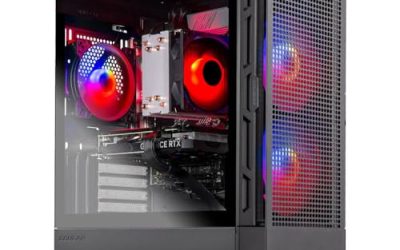
The best site to buy a gaming PC depends on how you buy. Micro Center is the strongest pick if you live near a store and want a bundle or a prebuilt with standard parts. Newegg and Best Buy suit shoppers who want wide selection and easy returns, and NZXT, Corsair, Maingear, Falcon Northwest and Digital Storm suit buyers who want cleaner builds and direct support. Whichever you pick, judge the exact parts list and warranty terms, not the brand name.
This guide treats “best gaming PC sites” as “where should I buy a gaming PC online in 2026,” and it ranks site types by the criteria that affect your money: part transparency, return terms, upgrade-friendliness and price premium.
Quick comparison of the best places to buy a gaming PC
| Pick | Best for | What to expect | Typical price range (complete PC) |
|---|---|---|---|
| Micro Center | Best overall value (US, near a store) | In-store builds and prebuilts, CPU/motherboard/RAM bundles, standard parts | Usually $900–$3,000+ |
| Newegg | Best selection | Marketplace plus house-brand and partner prebuilts, plus every component | Usually $800–$4,000+ |
| Best Buy | Best for easy returns and financing | Big-brand prebuilts, in-store pickup, store protection plans | Usually $900–$3,500 |
| NZXT | Best for clean, upgrade-friendly builds | Configurable Player-series PCs, standard ATX layouts, monthly payment options | Usually $1,000–$3,500 |
| Corsair | Best for a single-brand parts stack | Prebuilts with Corsair PSU, cooler, RAM and case | Usually $1,500–$5,000 |
| CyberPowerPC / iBuyPower / Skytech | Best budget configurators | Many GPU/CPU combos, variable component quality, frequent promotions | Usually $700–$3,000 |
| Maingear / Falcon Northwest / Digital Storm | Best premium boutique | Hand-built, cable management, stress testing, dedicated support | Usually $2,000–$6,000+ |
| PCSpecialist / Scan / Overclockers UK | Best for UK buyers | Configurable builds and component retail in the UK market | Usually £800–£3,000+ |
Best overall: Micro Center
Micro Center works well because many of its prebuilts use standard ATX parts and its stores also sell components, so upgrades and troubleshooting are straightforward. Its in-store CPU and motherboard bundles are well known for undercutting the same parts bought separately. It also lets you inspect the actual box and ask about the build before paying.
Trade-off: it only helps if you are near a physical location, and stock and bundle deals vary by store. Always read the parts list rather than assuming the house-brand case or PSU is premium.
Best for selection: Newegg
Newegg covers every price band, from entry-level prebuilts to high-end systems, and you can price-check individual components against the complete machine. Its filters let you search by GPU model, RAM capacity and storage type, which makes comparison fast.
Trade-off: the marketplace mixes first-party and third-party sellers. Check who is shipping the item and who handles the warranty, and read the return terms for that specific listing.
Best for returns and financing: Best Buy
Best Buy is the low-friction option for buyers who value a physical return counter, local pickup and familiar financing. It stocks mainstream gaming desktops from large OEMs and is useful if you want a machine today.
Trade-off: configurations are fixed, so you rarely get to choose RAM, SSD or PSU, and some OEM models use proprietary parts that limit upgrades.
Best for clean builds: NZXT
NZXT lets you configure a Player-series PC around a chosen GPU tier, and its builds use a standard layout that stays upgradeable. Monthly payment options are a draw if you don’t want a single large charge.
Trade-off: you pay a premium over a self-build, and options are narrower than a big marketplace. Compare the final parts list against what the same GPU, CPU, RAM and SSD would cost separately.
Best single-brand stack: Corsair
Corsair builds its prebuilts largely from its own cases, power supplies, coolers and memory, which means fewer unknown brands in the parts list and one company handling most of the support.
Trade-off: prices skew high, and the CPU and GPU are the same ones you’d get elsewhere for less. You are paying mostly for the stack and the support.
Best budget configurators: CyberPowerPC, iBuyPower and Skytech
These sellers offer a huge range of GPU and CPU combinations, and promotions are frequent. They are the usual route to a gaming PC with a current mid-range GPU at an entry-level price.
Trade-off: component quality varies, and savings often come from the power supply, motherboard, cooler or RAM speed. Never buy these on the GPU name alone.
Best premium boutique: Maingear, Falcon Northwest and Digital Storm
These builders focus on hand assembly, tidy cabling, pre-shipment burn-in and responsive support. They suit buyers of high-end systems who want the machine to arrive finished and don’t want to troubleshoot.
Trade-off: price. Premiums over equivalent parts can be large, so this is worth it only if you value the service and polish.
Decision matrix: match your situation to a site
| Your situation | Best choice | Why |
|---|---|---|
| Near a Micro Center, want max value | Micro Center | Bundles plus standard parts |
| Want to compare many GPU/CPU combos | Newegg or a configurator (CyberPowerPC, iBuyPower, Skytech) | Broad filters and configs |
| Need it this week with simple returns | Best Buy | Local pickup and in-person returns |
| Want to upgrade the PC for years | NZXT or Micro Center | Standard form factors |
| Spending $3,000+ and want no hassle | Maingear, Falcon Northwest, Digital Storm | Hand build and support |
| UK buyer | PCSpecialist, Scan, Overclockers UK | Local pricing, VAT and returns |
How to choose: the numbers that matter
1. Do a premium check before you pay
Add up the parts yourself. Here is a hypothetical example, not a real quote. A prebuilt with an RTX 5070-class GPU, a mid-range 8-core CPU, 32GB DDR5, a 2TB NVMe SSD, a 750W PSU and a mid-tower case is listed at $1,650.
- GPU: about $550
- CPU: about $300
- Motherboard: about $170
- 32GB DDR5: about $150–$250, since memory prices have been volatile
- 2TB NVMe SSD: about $120–$180
- PSU: about $90
- Case and cooler: about $150
- Windows license: about $0–$140 depending on whether it is included
That totals roughly $1,530–$1,800 depending on the memory, SSD and license assumptions. If the prebuilt is within about 10% of the parts total, the assembly, warranty and testing are cheap to buy. If it sits 25% or more above, you are paying for branding or a lighting package.
2. Check the power supply against the GPU
Per Nvidia’s spec sheets, total board power is about 145W for the RTX 5060, 180W for the 5060 Ti, 250W for the 5070, 300W for the 5070 Ti, 360W for the 5080 and 575W for the 5090. Its recommended system PSU ratings are 650W for the 5070, 750W for the 5070 Ti, 850W for the 5080 and 1000W for the 5090.
Worked example for an RTX 5070 system: GPU 250W + CPU around 160W under heavy load + about 100W for the board, RAM, drives and fans comes to about 510W. A 30% headroom margin gives about 660W, so a 650W unit is borderline and a quality 750W unit is the safer choice. A prebuilt listing a generic 600W unit with this GPU should raise concern.
3. Read the parts list for these red flags
- Single stick of RAM: a single module runs in single-channel mode, which can cost frames in CPU-limited games. Look for two matched modules.
- 16GB total memory on a new mid-range or higher build. 32GB is the safer 2026 target.
- “Generic” or unnamed PSU, or no wattage and efficiency rating.
- Proprietary motherboard or PSU in a branded case, which limits upgrades.
- Unspecified SSD, or a SATA or QLC drive when you expected a fast NVMe.
- Vague GPU naming, such as “RTX graphics,” without the exact model and VRAM.
4. Match the GPU tier to your monitor
| Target | GPU class | VRAM to look for | Expected experience (varies by game, settings and CPU) |
|---|---|---|---|
| 1080p, 144Hz+ | RTX 5060 / RX 9060 XT class | 8GB minimum, 16GB preferred on the XT | High settings in most games, often 80–140 fps |
| 1440p, high refresh | RTX 5070 / RX 9070 class | 12–16GB | High to ultra, often 70–120 fps in demanding titles |
| 4K, 60+ fps | RTX 5070 Ti / 5080 / RX 9070 XT class | 16GB | Often 50–90 fps with upscaling in heavy games |
These are approximate ranges based on what published reviews typically show. Actual results change with game, resolution, CPU, driver and patch.
5. Read the policies before the specs
- Return window and restocking fees for built-to-order systems, which are often stricter than for off-the-shelf items.
- Who handles warranty repairs: the seller, the part makers, or both.
- Whether the warranty is voided by opening the case to upgrade RAM or storage.
- Shipping insurance and how damaged-in-transit claims are handled.
Confirm all of these on the seller’s current policy page, since terms change.
Frequently Asked Questions
Is it cheaper to build a gaming PC or buy a prebuilt?
Building is usually cheaper by the assembly premium, but promotions and bundles can erase the gap. Compare the prebuilt price against the total of its listed parts, and if it is within roughly 10%, the convenience and warranty are often worth it.
Which gaming PC site has the best customer support?
Boutique builders such as Maingear, Falcon Northwest and Digital Storm market direct support as a core feature, and NZXT and Corsair offer brand-level support. Support quality changes over time, so check recent policy pages and the warranty terms rather than relying on reputation alone.
Are cheap prebuilts from budget sites any good?
They can be good value if the parts list is transparent. The usual compromises are the power supply, motherboard, cooler and RAM, so choose a configuration where you can see the exact brands and wattage, and avoid listings that hide them.
Should I buy a gaming PC with 16GB or 32GB of RAM?
32GB is the safer choice for a new mid-range or better system, especially if you multitask or stream. 16GB still runs many games, but it leaves little headroom, and make sure either amount is installed as two matched modules.
Is a gaming laptop or a desktop better when buying online?
For the same money, a desktop usually gives faster performance, better cooling and easier upgrades. Choose a laptop only when you need portability, and note that laptop GPUs with the same name as desktop ones are generally slower, per the manufacturers’ own spec sheets.
When is the best time to buy a gaming PC?
Major sale events and new GPU launches tend to bring discounts on previous-generation systems. Don’t wait indefinitely though: if your current PC is holding you back, buy when a configuration meets your resolution and refresh-rate targets at a price within about 10% of the parts total.
Related guides
More from Amazon
Programs that pair well with the guide above. Offers and eligibility are set by Amazon and may change.
A free business account with business pricing and bulk-buying tools for work, shop or home office.
Create a business accountFree shipping on eligible items, Prime Video and more. Eligible new members can start with a free trial.
Start a Prime free trialAudiobooks and podcasts to listen to on the go. Eligible new members can start with a free trial.
Try Audible freeAd-free music streaming. Eligible new subscribers can start with a free trial.
Try Music Unlimited freeAs an Amazon Associate we earn from qualifying purchases.